
Hello guys!
I've just bought a new PC(part-based assembly), together with Windows 7 Professional.
I received it yesterday - the guys did a decent job and even installed the windows for me, so I got it ready-to-use. I've noticed there are some programs installed - Microsoft Security Essentials, Google Chrome and all the necessary components - NVIDIA stuff, etc...
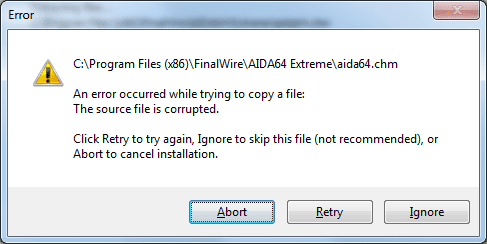
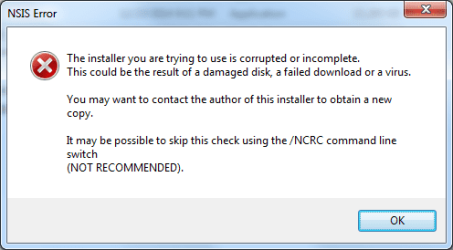
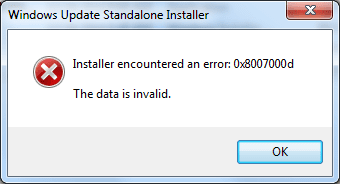
I just renamed my user account and set a password and decided to start installing my software. I started with Aida64 Extreme, latest trial version from their website as I wanted to observe my specs and Dev C++ afterwards. For my great surprise, both installs fail in their own way. With AIDA, I could accept the license agreement and it failed upon the start of the installation process. With DevCpp, it doesn't even open any window, just the NSIS error. In another forum I found the link for the latest version of Windows Installer - 4.5 and downloaded it for 64-bit. It fails too. Please check the attached images for the exact error messages.
I've tried the Sfc /scannow tool and it reports everything is OK after it reaches 100%.
I've tried granting maximum permissions to the Program Files(and x86 one) to see if it has to do with permissions but Windows says I don't have the permissions to do it(my account is Administrator). UAC is set to the lowest level until this is fixed.
Microsoft Fix It tool (portable version) for installing/uninstalling software doesn't run at all. I double click it but nothing shows up.
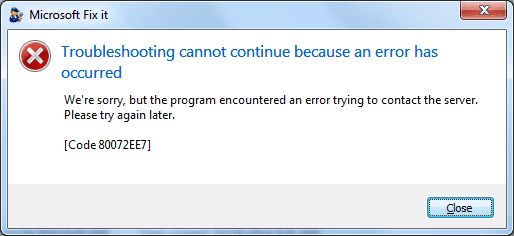
Edit: My mistake - the Fixit It (Run Now) version doesn't show up. I then noticed the portable version, downloaded it and it reports an error too(last screenshot).
All these issues are experienced in Safe Mode too.
If it matters, I have both SSD and normal hard drive.
SSD: KINGSTON V300 240 GB 2.5 '' SATA3
HDD: SEAGATE 1000 GB SATA III, 7200 rpm, 64 MB
Windows7 is installed on the SSD for the sake of performance.
All the programs I want to install have been transferred via a flash drive to the PC, if it matters.
What I haven't tried so far:
Check Disc - I have read it may have the effect of marking bad sectors on a SSD - no moving parts, no sectors, so I refrain from running it.
Windows Repair - my PC has no CD/DVD drive(they forgot to put one?). I believe Windows has been installed by using the Microsoft tool for CD/DVD to flash drive. I have the disc in my hands but I need to make a USB drive in order to run the repair, at least this is what I think. Another option is that they used a temporary CD/DVD while installing.
I am looking for some ideas what can be failing all the installs. There can't be any virus because I haven't even connected to the Internet from that PC. It is a blank install. Unfortunately, I can't ask the company guys until Friday because 24th and 25th are holidays. It is very interesting how I got the NVIDIA drivers, Microsoft Security Essentials installed but can't install anything.
Thank you very much in advance.
EDIT: Problem solved.
For some reason, the flash drive I saved the files to is corrupted. And the corrupted files, copied to the SSD of the new PC are still corrupted and can't install from them. Using another external HDD, I was able to install and do everything as expected. For now the problem is solved.
Tricky one.
I've just bought a new PC(part-based assembly), together with Windows 7 Professional.
I received it yesterday - the guys did a decent job and even installed the windows for me, so I got it ready-to-use. I've noticed there are some programs installed - Microsoft Security Essentials, Google Chrome and all the necessary components - NVIDIA stuff, etc...
I just renamed my user account and set a password and decided to start installing my software. I started with Aida64 Extreme, latest trial version from their website as I wanted to observe my specs and Dev C++ afterwards. For my great surprise, both installs fail in their own way. With AIDA, I could accept the license agreement and it failed upon the start of the installation process. With DevCpp, it doesn't even open any window, just the NSIS error. In another forum I found the link for the latest version of Windows Installer - 4.5 and downloaded it for 64-bit. It fails too. Please check the attached images for the exact error messages.
I've tried the Sfc /scannow tool and it reports everything is OK after it reaches 100%.
I've tried granting maximum permissions to the Program Files(and x86 one) to see if it has to do with permissions but Windows says I don't have the permissions to do it(my account is Administrator). UAC is set to the lowest level until this is fixed.
Microsoft Fix It tool (portable version) for installing/uninstalling software doesn't run at all. I double click it but nothing shows up.
Edit: My mistake - the Fixit It (Run Now) version doesn't show up. I then noticed the portable version, downloaded it and it reports an error too(last screenshot).
All these issues are experienced in Safe Mode too.
If it matters, I have both SSD and normal hard drive.
SSD: KINGSTON V300 240 GB 2.5 '' SATA3
HDD: SEAGATE 1000 GB SATA III, 7200 rpm, 64 MB
Windows7 is installed on the SSD for the sake of performance.
All the programs I want to install have been transferred via a flash drive to the PC, if it matters.
What I haven't tried so far:
Check Disc - I have read it may have the effect of marking bad sectors on a SSD - no moving parts, no sectors, so I refrain from running it.
Windows Repair - my PC has no CD/DVD drive(they forgot to put one?). I believe Windows has been installed by using the Microsoft tool for CD/DVD to flash drive. I have the disc in my hands but I need to make a USB drive in order to run the repair, at least this is what I think. Another option is that they used a temporary CD/DVD while installing.
I am looking for some ideas what can be failing all the installs. There can't be any virus because I haven't even connected to the Internet from that PC. It is a blank install. Unfortunately, I can't ask the company guys until Friday because 24th and 25th are holidays. It is very interesting how I got the NVIDIA drivers, Microsoft Security Essentials installed but can't install anything.
Thank you very much in advance.
EDIT: Problem solved.
For some reason, the flash drive I saved the files to is corrupted. And the corrupted files, copied to the SSD of the new PC are still corrupted and can't install from them. Using another external HDD, I was able to install and do everything as expected. For now the problem is solved.
Tricky one.
Attachments
Last edited:
My Computer
At a glance
Windows 7 Professional x64
- Computer type
- PC/Desktop
- OS
- Windows 7 Professional x64


