
Solved Can't install Catalyst Control Center

mas886

New member
Local time
2:06 PM
Messages
3
I can't install Cataltst control center, i downloaded two versions the latest beta, and the latest stable version and happen the same on the both, I start the program as admin, it extracts the program, i choose "express" installation, (the same happen with custom install), then starts detecting hardware correctly and when it should start installing the program stalls at this stage:
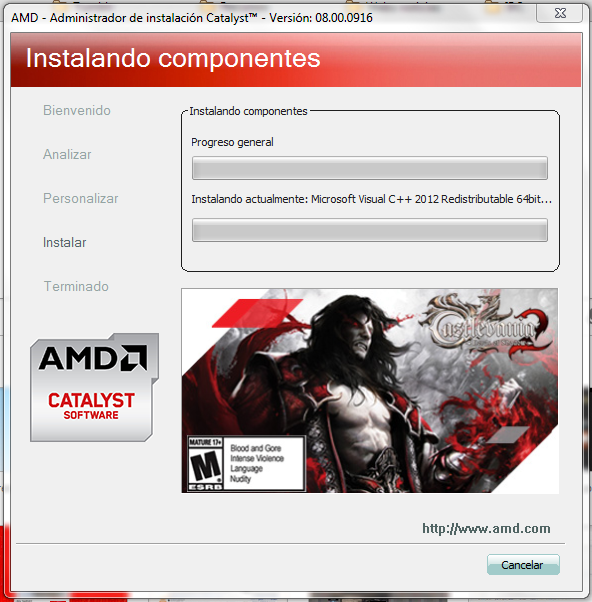
aioeTU7.png


And i can't do anything, if someone can help me, it would be awesome.
 

My Computer

Computer type
PC/Desktop
Computer Manufacturer/Model Number
custom
OS
Windows 7 home premium 64Bits
Graphics Card(s)
AMD Radeon HD 7770

My Computer

Computer type
PC/Desktop
Computer Manufacturer/Model Number
Bluethunder II
OS
Windows 7 x64 Ultimate and numerous virtual machines
CPU
AMD FX-8350 Vishera 32nm Technology @ 4.2 GHz default
Motherboard
ASUSTeK COMPUTER INC. SABERTOOTH 990FX R2.0 (Socket 942)
Memory
G Skill 32.0GB Dual-Channel DDR3 @ 1204MHz (11-13-13-31)
Graphics Card(s)
EVGA GeForce GTX 960 4GB Super SC ACX 2.0+ with Back Plate
Sound Card
Creative X-Fi Titanium HD Audiophile PCIe
Monitor(s) Displays
LG L227WTG x 3
Screen Resolution
1680 x 1050 16:10
Hard Drives
238GB Samsung850 PRO SATA Disk Device (SSD)
1863GB Seagate ST2000DM 001-1CH164 (SATA)
1397GB Seagate ST1500DL 003-9VT16L(SATA)
466GB Western Digital WDC WD50 03AZEX-00K1GA0 (SATA) x 2
932GB Seagate ST310005 28AS SATA Disk Device (SATA)
PSU
Enermax Revolution87+ 1000 Watts Gold Certified Power Supply
Case
Rocketfish Full Tower
Cooling
Cooler Master Hyper 212 EVO Push Pull 120mm Fans
Keyboard
Logitech K740
Mouse
Logitech G100S Laser LED + Logitech Gamepad F310
Internet Speed
500 mbs down and 30mbs up
Antivirus
Malwarebytes Pro & Avast and MSE on certain Virtual Machines
Browser
Firefox (Main) Chrome, Internet Explorer (Back Up)
Other Info
Logitech X 230 2.1 Stereo System and 5.1 Yamaha RX V2090
B&W DM6 Monitor Speakers + Center and Surround Speakers
Using Mouse Without Borders (Google it)
Hi mas886 and welcome to Seven forums. A common issue is not having dot net installed. Is your system up to date with patches and updates?
Download Microsoft .NET Framework 4 (Standalone Installer) from Official Microsoft Download Center

Link to dot net download

Thanks, but yes I have .Net framework in the latest version installed, and it's strange because i wasn't having that problem, some months ago I installed the same version I was trying to install today (I changed to an oldest driver) and the first time it worked correctly, but not now. :-/
 

My Computer

Computer type
PC/Desktop
Computer Manufacturer/Model Number
custom
OS
Windows 7 home premium 64Bits
Graphics Card(s)
AMD Radeon HD 7770
Sometimes that one just takes a few mins to install
 

My Computer

Computer type
Laptop
Computer Manufacturer/Model Number
Packard Bell
OS
Windows 7 Home Premium 64Bit
CPU
AMD A6-3420M 1.5GHZ OC - 2.0GHZ
Memory
4GB DDR3 1600MHZ
Graphics Card(s)
AMD RADEON 6520G+AMD RADEON HD7470M 1GB DDR3
Screen Resolution
1366x768
Hard Drives
500GB SATA
Internet Speed
18Mb Unlimited
Antivirus
AVAST!
Browser
MOZILLA FIREFOX
I know but when I writed this (I restarted the PC 2 times) it was lasting over 30 minutes without doing this, now I opened it and the precess started very fast and now it's installed with any problem. :huh:
 

My Computer

Computer type
PC/Desktop
Computer Manufacturer/Model Number
custom
OS
Windows 7 home premium 64Bits
Graphics Card(s)
AMD Radeon HD 7770
Back
Top