
Solved Can't install Firefox

kenC

New member
Pro User
Local time
5:31 AM
Messages
184
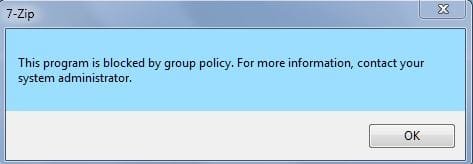
I decided to give Firefox another try but can't get it to install. I get a window about Group Policy regarding 7Zip. I've tried a new account also as administrator. I've tried deleting my old Mozilla program file folder and starting from fresh but nothing works. Any ideas ?
 

Attachments
  • Capture.JPG
    Capture.JPG
    15.6 KB · Views: 43

My Computer

Computer Manufacturer/Model Number
Acer 7738G
OS
Windows 7 Home Premium X64 SP1
CPU
Intel Core2 duo T6600
Memory
4gb
Graphics Card(s)
Nvidia GeForce GT 1gb
Hard Drives
2 X 500 gb
Hi:

Are you sure you're not infected?
When you say that you've "tried another account as Administrator", are you referring to a Windows user account?

Also, where are you getting the Fx installer?
The only official source is Mozilla.org >>HERE<< (the list of fully localized installers is >>here<<)

Thanks,
 

My Computer

Computer type
PC/Desktop
Computer Manufacturer/Model Number
Dell Studio XPS 8500
OS
OEM Windows 7 Ult (x64) SP1
CPU
Intel Core-i7 3770 @ 3.4 GHz
Motherboard
"Dell" branded
Memory
16 GB DDR3 SDRAM @ 1333 MHz
Graphics Card(s)
NVidia GeForce GT620 1 GB
Sound Card
THX TruStudio PC
Monitor(s) Displays
Dell U2410 Full HD
Hard Drives
2.0 TB SATA2 @ 7200 RPM
PSU
350W
Keyboard
MS 4000 Ergon - Wired
Mouse
Logitech Anywhere MX
Internet Speed
Cable HSI w/Turbo (router)
Antivirus
KIS-MBAM Premium-MBAE Premium
Browser
Fx (current version); IE
Other Info
And a Win7/64 Pro laptop; And a Win10/64 Pro desktop.
Yep, sure I'm not infected - everything else is fine. By another account, I meant another Windows user account. I also meant I've tried running the installer as admin. Googling 7zip, it seems it is part of the installer. I actually prefer Waterfox but I'm having the same problem with that. Yes, I'm sure they're the official installers
I tried getting into Group Policy but it was a bit over my head.
 

My Computer

Computer Manufacturer/Model Number
Acer 7738G
OS
Windows 7 Home Premium X64 SP1
CPU
Intel Core2 duo T6600
Memory
4gb
Graphics Card(s)
Nvidia GeForce GT 1gb
Hard Drives
2 X 500 gb
There is nothing having to do with 7Zip in the Firefox installer.

I suggest deleting whatever setup file you may have and starting again, with a fresh download from the link I provided.

Also: those sorts of "Group Policy Restriction" messages can be indicative of malware. Just saying.

Cheers,
 

My Computer

Computer type
PC/Desktop
Computer Manufacturer/Model Number
Dell Studio XPS 8500
OS
OEM Windows 7 Ult (x64) SP1
CPU
Intel Core-i7 3770 @ 3.4 GHz
Motherboard
"Dell" branded
Memory
16 GB DDR3 SDRAM @ 1333 MHz
Graphics Card(s)
NVidia GeForce GT620 1 GB
Sound Card
THX TruStudio PC
Monitor(s) Displays
Dell U2410 Full HD
Hard Drives
2.0 TB SATA2 @ 7200 RPM
PSU
350W
Keyboard
MS 4000 Ergon - Wired
Mouse
Logitech Anywhere MX
Internet Speed
Cable HSI w/Turbo (router)
Antivirus
KIS-MBAM Premium-MBAE Premium
Browser
Fx (current version); IE
Other Info
And a Win7/64 Pro laptop; And a Win10/64 Pro desktop.
Yes, I'm aware of malware. I've scanned the d/loaded files with Malwarebytes - Super Anti-spyware and Avast - I've also tried earlier versions of FF and Waterfox in case there was anything wrong with the latest versions.
 

My Computer

Computer Manufacturer/Model Number
Acer 7738G
OS
Windows 7 Home Premium X64 SP1
CPU
Intel Core2 duo T6600
Memory
4gb
Graphics Card(s)
Nvidia GeForce GT 1gb
Hard Drives
2 X 500 gb
Hmm, well that's sure odd.

I am no Mozilla Script Kiddie, and I am just a longtime home user of Firefox.
But I do lurk a lot at forums.mozillazine.org and I have never heard of the problem you describe, with a 7Zip error and a "Group Policy Error" during installation on an uninfected system.

Normally, running the Firefox installer from HERE under a Windows Admin account is uneventful - the process is quite straightforward, as shown here.

If you are getting the same error messages with other browsers and with other versions of Firefox, then that would suggest that the problem is likely on your system, not with the installer files themselves??

I will defer to other, more expert forum members to further assist you.
Sorry I could not help.

Cheers,
 

My Computer

Computer type
PC/Desktop
Computer Manufacturer/Model Number
Dell Studio XPS 8500
OS
OEM Windows 7 Ult (x64) SP1
CPU
Intel Core-i7 3770 @ 3.4 GHz
Motherboard
"Dell" branded
Memory
16 GB DDR3 SDRAM @ 1333 MHz
Graphics Card(s)
NVidia GeForce GT620 1 GB
Sound Card
THX TruStudio PC
Monitor(s) Displays
Dell U2410 Full HD
Hard Drives
2.0 TB SATA2 @ 7200 RPM
PSU
350W
Keyboard
MS 4000 Ergon - Wired
Mouse
Logitech Anywhere MX
Internet Speed
Cable HSI w/Turbo (router)
Antivirus
KIS-MBAM Premium-MBAE Premium
Browser
Fx (current version); IE
Other Info
And a Win7/64 Pro laptop; And a Win10/64 Pro desktop.
Well, thank you for trying - that's what makes this site so great, people giving their time to help others.
I think you're correct and the fault lies with something on my system - maybe some program I installed has changed some setting that FF needs. I'll keep exploring:) Thanks again.
 

My Computer

Computer Manufacturer/Model Number
Acer 7738G
OS
Windows 7 Home Premium X64 SP1
CPU
Intel Core2 duo T6600
Memory
4gb
Graphics Card(s)
Nvidia GeForce GT 1gb
Hard Drives
2 X 500 gb
Hi:

If it were my system, I'd probably head over to one of the excellent, free, reputable computer disinfection forums for help with a look at the system for malware or damaged settings.
It can't hurt and will only cost you a bit of your time.

Alternatively, you might try posting over at the very active, very expert user community at forums.mozillazine.org
I have lurked there daily for many years and just don't recall seeing the problem you report.
Unless there's something obvious that I missed -- certainly possible -- I suspect they may recommend a check for malware on the system, as well.

Sorry I could not help.

Please do post back and let us know how it works out, so that we can all learn.


Good luck!
 

My Computer

Computer type
PC/Desktop
Computer Manufacturer/Model Number
Dell Studio XPS 8500
OS
OEM Windows 7 Ult (x64) SP1
CPU
Intel Core-i7 3770 @ 3.4 GHz
Motherboard
"Dell" branded
Memory
16 GB DDR3 SDRAM @ 1333 MHz
Graphics Card(s)
NVidia GeForce GT620 1 GB
Sound Card
THX TruStudio PC
Monitor(s) Displays
Dell U2410 Full HD
Hard Drives
2.0 TB SATA2 @ 7200 RPM
PSU
350W
Keyboard
MS 4000 Ergon - Wired
Mouse
Logitech Anywhere MX
Internet Speed
Cable HSI w/Turbo (router)
Antivirus
KIS-MBAM Premium-MBAE Premium
Browser
Fx (current version); IE
Other Info
And a Win7/64 Pro laptop; And a Win10/64 Pro desktop.
I've now solved this problem and have FF and Waterfox back on my laptop. It's just after 2am so I won't go into any detail right now - just wanted to say problem solved :) Will post details later today.
 

My Computer

Computer Manufacturer/Model Number
Acer 7738G
OS
Windows 7 Home Premium X64 SP1
CPU
Intel Core2 duo T6600
Memory
4gb
Graphics Card(s)
Nvidia GeForce GT 1gb
Hard Drives
2 X 500 gb
I promised to come back here and explain how I solved the problem I had at the top of the thread.
So, I googled the message from the attachment and found lots of people had the same problem installing programs etc. There was also a short video explaining how to solve it. I read all the comments under the video and it seems it worked for most so decided to give it a go. I replayed the video and copied down all the steps and then shut down after making a restore point. I restarted in Safe Mode and opened 'regedit'
I then followed all the steps and when done I clicked on the FF exe I'd been trying to open and it installed easily. I then did the same with the Waterfox one and success with that too.

Here's a link to the video: https://www.youtube.com/watch?v=0jhB91LL8hA

If anyone with the same problem comes across this thread - here's the steps to take from the video.
Make a restore point before attempting.

Safe Mode - Regedit - Machine - Software - Policies - Microsoft - Windows - safer - Codeidentifiers - 0 - paths
.......and delete Paths

The first 30 secs of the video shows the problem - the middle bit how to solve it and then shows how the problem has been solved.
 

My Computer

Computer Manufacturer/Model Number
Acer 7738G
OS
Windows 7 Home Premium X64 SP1
CPU
Intel Core2 duo T6600
Memory
4gb
Graphics Card(s)
Nvidia GeForce GT 1gb
Hard Drives
2 X 500 gb
Hi:

Thanks for posting back with the details of how you resolved the issue.

At the risk of flagellating the proverbial deceased equine, the nagging question remains for me: how did those software policies get changed in the first place?
I would still worry about hidden malware on the system.
Rootkits, in particular, can hide very well and require the use of specialized tools for detection and complete removal.

But, it's up to you, of course.
I'm glad you were able to fix the problem.

Cheers,
 

My Computer

Computer type
PC/Desktop
Computer Manufacturer/Model Number
Dell Studio XPS 8500
OS
OEM Windows 7 Ult (x64) SP1
CPU
Intel Core-i7 3770 @ 3.4 GHz
Motherboard
"Dell" branded
Memory
16 GB DDR3 SDRAM @ 1333 MHz
Graphics Card(s)
NVidia GeForce GT620 1 GB
Sound Card
THX TruStudio PC
Monitor(s) Displays
Dell U2410 Full HD
Hard Drives
2.0 TB SATA2 @ 7200 RPM
PSU
350W
Keyboard
MS 4000 Ergon - Wired
Mouse
Logitech Anywhere MX
Internet Speed
Cable HSI w/Turbo (router)
Antivirus
KIS-MBAM Premium-MBAE Premium
Browser
Fx (current version); IE
Other Info
And a Win7/64 Pro laptop; And a Win10/64 Pro desktop.
Yes, it bothers me to too. After reading the comments under the video I did a full scan with Avast, malwarebytes and super antispyware all of which found nothing apart from a couple of Pups which I deleted. I'll give it some more thought tonight. Thanks for your concern.
 

My Computer

Computer Manufacturer/Model Number
Acer 7738G
OS
Windows 7 Home Premium X64 SP1
CPU
Intel Core2 duo T6600
Memory
4gb
Graphics Card(s)
Nvidia GeForce GT 1gb
Hard Drives
2 X 500 gb

My Computer

Computer type
Laptop
Computer Manufacturer/Model Number
Employer provided Dell Latitude
OS
W7 Pro SP1 64bit
CPU
i7
Memory
8GB
Graphics Card(s)
Intel HD Graphics
Hard Drives
crappy SSD
Antivirus
Employer mandated Symantec Endpoint Protection
Browser
Pale Moon 64bit, IE11 64bit & Chrome 64bit
@kenC, I agree with MoxieMomma: you should hunt down the reason for those policy changes. They did not just happen out of thin air.

Yep.


@MoxieMomma, the Firefox installer uses 7zSD (comfirmed via Process Monitor). Lots of installers use that tool. ([Tutorial] Making A 7-Zip Switchless Installer - SVCPACK Addons - WinCert.net Forums)
Who knew??!?!:D
I guess I wasn't aware of the coding "under-the-hood".
Thanks for that important and helpful info.

..... dead horse :-)
Pretty tacky of us, given the excitement about a possible new Triple Crown winner!:D

Cheers!
 

My Computer

Computer type
PC/Desktop
Computer Manufacturer/Model Number
Dell Studio XPS 8500
OS
OEM Windows 7 Ult (x64) SP1
CPU
Intel Core-i7 3770 @ 3.4 GHz
Motherboard
"Dell" branded
Memory
16 GB DDR3 SDRAM @ 1333 MHz
Graphics Card(s)
NVidia GeForce GT620 1 GB
Sound Card
THX TruStudio PC
Monitor(s) Displays
Dell U2410 Full HD
Hard Drives
2.0 TB SATA2 @ 7200 RPM
PSU
350W
Keyboard
MS 4000 Ergon - Wired
Mouse
Logitech Anywhere MX
Internet Speed
Cable HSI w/Turbo (router)
Antivirus
KIS-MBAM Premium-MBAE Premium
Browser
Fx (current version); IE
Other Info
And a Win7/64 Pro laptop; And a Win10/64 Pro desktop.
BTW when I deleted the FF program folder to start over with it, I've since noticed that I have a Firefox old data folder on my desktop. Any idea how to merge it. I guess it contains my settings.
 

My Computer

Computer Manufacturer/Model Number
Acer 7738G
OS
Windows 7 Home Premium X64 SP1
CPU
Intel Core2 duo T6600
Memory
4gb
Graphics Card(s)
Nvidia GeForce GT 1gb
Hard Drives
2 X 500 gb

My Computer

Computer type
Laptop
Computer Manufacturer/Model Number
Employer provided Dell Latitude
OS
W7 Pro SP1 64bit
CPU
i7
Memory
8GB
Graphics Card(s)
Intel HD Graphics
Hard Drives
crappy SSD
Antivirus
Employer mandated Symantec Endpoint Protection
Browser
Pale Moon 64bit, IE11 64bit & Chrome 64bit
Back
Top