
Hey,
I've recently performed a clean install of Windows 7 64-bit whilst running off the motherboard's internal graphics. After installing all of the drivers from the Gigabyte website, I installed Norton 360 and got all of the important updates from Windows Update. I then turned off my PC and physically installed another memory kit (I was running 4GB, I'm now running 8GB) and my Sapphire HD7870 Ghz Edition 2GB GDDR5 PCI-E graphics card. I plugged my monitor cable into this card.
When it came to installing the driver utility from the Sapphire website, the installer would finish but say there were warnings. The summary said that the AMD Install Manager and HDMI Audio Driver had installed. No errors were mentioned. However, I wasn't prompted to restart my PC like I have been in the past. Under Display Adapter in Device Manager, the GPU is listed as "Standard VGA Graphics Adapter" whereas I'm sure that normally it's alot more specific than that.
I tried uninstalling the utility using the same install, rebooting and then re-installing but it made no difference. I then repeated this after disabling the onboard graphics in the BIOS, but still there was no change. I then made sure to run the uninstall option from the install.
I then used AMD's driver auto-detect utility and downloaded another Catalyst Control Centre install. This time it was version 13.9 over Sapphire's 13.4. During this new installation process this error message appeared:
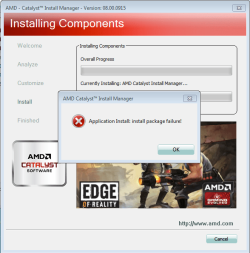
The summary of the failed installation says this:

This time just the audio driver was installed.
I've tried a range of things to solve this problem.
I've reseated the graphics card and the power cables going to it. I've also turned the PC on with the case open and both of the fans on the card run, as do all of the other fans in the case.
I used RevoUninstaller to remove the Intel HD Graphics for the onboard graphics, rebooted then tried to run the installer again. I still got the same error as before.
I then googled the error message and found this page which seemed similar to my problem: AMD Catalyst Drivers Not Installing: "Application Install: install package failure!" [Solved] - Radeon - Graphics & Displays
I followed the solution below, except that my graphics card was already installed:
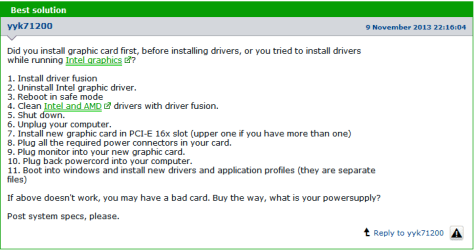
Note: I took "Clean" the drivers to mean delete them. I hope I was right!
I still got the same errors from before. I then repeated the procedure but enabled the onboard graphics and physically removed the discreet video card. Still no joy!
I also uninstalled the card from Device Manager and ran the install, but, again, it made no difference.
I've also swapped the graphics card for an identical one, thinking that maybe it was faulty, but there was no change.
I googled the problem again and checked the MsiIinstaller settings in services.msc. It was initially set to "Stop" but I restarted it and tried to run the driver installer again. I then tried the Microsoft Fixits for both hardware not being detected or working and problems installing programs but they made no difference.
These cards worked fine before this new install, so I'm thinking that it's a software problem.
Please help!
I've recently performed a clean install of Windows 7 64-bit whilst running off the motherboard's internal graphics. After installing all of the drivers from the Gigabyte website, I installed Norton 360 and got all of the important updates from Windows Update. I then turned off my PC and physically installed another memory kit (I was running 4GB, I'm now running 8GB) and my Sapphire HD7870 Ghz Edition 2GB GDDR5 PCI-E graphics card. I plugged my monitor cable into this card.
When it came to installing the driver utility from the Sapphire website, the installer would finish but say there were warnings. The summary said that the AMD Install Manager and HDMI Audio Driver had installed. No errors were mentioned. However, I wasn't prompted to restart my PC like I have been in the past. Under Display Adapter in Device Manager, the GPU is listed as "Standard VGA Graphics Adapter" whereas I'm sure that normally it's alot more specific than that.
I tried uninstalling the utility using the same install, rebooting and then re-installing but it made no difference. I then repeated this after disabling the onboard graphics in the BIOS, but still there was no change. I then made sure to run the uninstall option from the install.
I then used AMD's driver auto-detect utility and downloaded another Catalyst Control Centre install. This time it was version 13.9 over Sapphire's 13.4. During this new installation process this error message appeared:
The summary of the failed installation says this:
This time just the audio driver was installed.
I've tried a range of things to solve this problem.
I've reseated the graphics card and the power cables going to it. I've also turned the PC on with the case open and both of the fans on the card run, as do all of the other fans in the case.
I used RevoUninstaller to remove the Intel HD Graphics for the onboard graphics, rebooted then tried to run the installer again. I still got the same error as before.
I then googled the error message and found this page which seemed similar to my problem: AMD Catalyst Drivers Not Installing: "Application Install: install package failure!" [Solved] - Radeon - Graphics & Displays
I followed the solution below, except that my graphics card was already installed:
Note: I took "Clean" the drivers to mean delete them. I hope I was right!
I still got the same errors from before. I then repeated the procedure but enabled the onboard graphics and physically removed the discreet video card. Still no joy!
I also uninstalled the card from Device Manager and ran the install, but, again, it made no difference.
I've also swapped the graphics card for an identical one, thinking that maybe it was faulty, but there was no change.
I googled the problem again and checked the MsiIinstaller settings in services.msc. It was initially set to "Stop" but I restarted it and tried to run the driver installer again. I then tried the Microsoft Fixits for both hardware not being detected or working and problems installing programs but they made no difference.
These cards worked fine before this new install, so I'm thinking that it's a software problem.
Please help!
My Computer
- Computer type
- PC/Desktop
- Computer Manufacturer/Model Number
- N/A - Self Built
- OS
- Windows 7 Home Premium 64-bit
- CPU
- Intel Quad Core i5-3570K CPU 3.40GHz 6Mb L3 Cache
- Motherboard
- Gigabyte GA-Z77-D3H (rev 1.1)
- Memory
- Crucial Ballistix 8GB (4GB x2) DDR3
- Graphics Card(s)
- Sapphire Radeon HD 7870 GHz Edition - 2 GB GDDR5
- Sound Card
- Onboard motherboard
- Monitor(s) Displays
- ViewSonic VX2336S
- Screen Resolution
- 1920 x 1080
- Hard Drives
- 1.5 Tb Seagate Barracuda ST31500341AS 3.5" SATA II
- PSU
- Corsair Professional Series AX750 750W Modular PSU - 80plus
- Case
- Corsair Vengeance Series C70
- Cooling
- Standard Case Fans
- Keyboard
- ThermalTake TT eSports Meka Mech Keyboard KB-MEK007UK
- Mouse
- Logitech G400 Optical Gaming Mouse
- Antivirus
- Microsoft Security Essentials
- Browser
- Firefox 22.0
- Other Info
- My cat's name is Mittens


