Solved Can't install Intel Rapid Storage Technology

hatemf23

New member
Local time
4:40 PM
Messages
71
I have a EX58-UD3R motherboard and I decided to install the latest drivers instead of the installation CD, but when I get to Intel Rapid Storage Technology I get "This computer does not meet the minimum requirements to install this software" which is a very vague message. I tried to look into the installation CD for something similar but found nothing, so Im not sure what's causing this..
 

My Computer

Computer type
PC/Desktop
Computer Manufacturer/Model Number
Custom build
OS
Windows 7 Professional, 64bit
CPU
i7 920 @ 2.66
Motherboard
EX58-UD3R
Memory
6 GB DDR3
Graphics Card(s)
GALAX GTX 960
Monitor(s) Displays
ASUS MK221H 22" widescreen
PSU
Antec 650W Earthwatts
Case
Thermaltake Element T
Cooling
Zalman CNPS9900 LED
Mouse
Logitech M205 Wireless
Internet Speed
2 mb/s
Antivirus
Avast! Antivirus
hmm, 150 views, no one knows?
 

My Computer

Computer type
PC/Desktop
Computer Manufacturer/Model Number
Custom build
OS
Windows 7 Professional, 64bit
CPU
i7 920 @ 2.66
Motherboard
EX58-UD3R
Memory
6 GB DDR3
Graphics Card(s)
GALAX GTX 960
Monitor(s) Displays
ASUS MK221H 22" widescreen
PSU
Antec 650W Earthwatts
Case
Thermaltake Element T
Cooling
Zalman CNPS9900 LED
Mouse
Logitech M205 Wireless
Internet Speed
2 mb/s
Antivirus
Avast! Antivirus
Where did you get those latest drivers?

Were you trying to fix a problem or just updating to have the latest?

I see drivers from 2011 here from Gigabyte,

GIGABYTE - Motherboard - Socket 1366 - GA-EX58-UD3R (rev. 1.7)

If you are just wondering about the message, it's not really that vague, there are minimum requirements to install it and your computer does not meet them.

There are usually some indications of what is the minimum requirement to use something where you download from.

It could be an OS version, an architecture requirement (x86 or x64) or a prerequisite to be installed first.

So, where did you download from?
 

My Computer

Computer type
PC/Desktop
Computer Manufacturer/Model Number
Self Built
OS
Win 10 Pro x64
CPU
Intel I5-2500K @3.3GHz
Motherboard
Asrock P67 Extreme4
Memory
16GB G.Skill Ripjaws X (4x4GB)
Graphics Card(s)
EVGA GeForce 750 Ti SC 2GB
Sound Card
ASUS Xonar DG 5.1 Channels 24-bit 96KHz PCI Interface Sound
Monitor(s) Displays
auria eq2367
Screen Resolution
1920 x 1080
Hard Drives
250GB Samsung 850 EVO SSD
1TB WD Blue
1TB Hitachi
PSU
SeaSonic X 650W 80 Plus Gold
Case
Corsair Obsidian 750D
Cooling
Corsair H60, Three 140mm case fans
Keyboard
Logitech Wireless Keyboard K520
Mouse
Logitech Wireless Mouse M310
Internet Speed
Wave Broadband ~ 100 dn 5 up
Antivirus
Windows Defender, Malwarebytes Premium
Browser
Edge, IE11, Chrome
Other Info
Laptop specs: HP g7-1365dx /
CPU: AMD A6-3420M APU with Radeon(tm) HD Graphics /
RAM: Crucial 8Gb (2x4Gb) /
SSD: Crucial M4-CT128M4SSD2 ATA Device/ FW 000F /
GFX: AMD Radeon HD 6520G /
OS: Windows 10 Pro x64
Is your system set to AHCI or RAID?
 

My Computer

Computer type
PC/Desktop
Computer Manufacturer/Model Number
Custom Built
OS
Windows 10 Pro x64, Windows 8.1 Pro x64, Windows 7 Ultimate x64 SP1,
CPU
INTEL i9-7920X LGA 2066
Motherboard
Gigabyte X299-WU8 F3
Memory
64 GB (4 X 16 GB) G-Skill V Series DDR4 3200 Quad Channel
Graphics Card(s)
EVGA GTX 1060 SC 3 GB
Sound Card
Realtek Onboard ALC1220
Monitor(s) Displays
2 x Samsung S27E310
Screen Resolution
1920x1080
Hard Drives
Samsung 2 x 970 EVO Plus 500 GB NVMe
1 x 6TB WD 6003FZBX SATA
1 x 6TB WD 60EFRX SATA
12 x 3TB WD 30EFRX SATA
PSU
Seasonic X-1050
Case
Thermaltake Armor+
Cooling
Corsair H80i V2 Liquid AOI Cooler
Keyboard
Logitech G510s
Mouse
Logitech MX Master 2S
Internet Speed
200 Mb/s
Antivirus
ESET NOD32 13.1
Browser
EDGE (Dev, Canary, Beta), Chrome
Other Info
ASUS RT-AC68U router
Malwarebytes 4.0.4
Where did you get those latest drivers?

Were you trying to fix a problem or just updating to have the latest?

I see drivers from 2011 here from Gigabyte,

GIGABYTE - Motherboard - Socket 1366 - GA-EX58-UD3R (rev. 1.7)

If you are just wondering about the message, it's not really that vague, there are minimum requirements to install it and your computer does not meet them.

There are usually some indications of what is the minimum requirement to use something where you download from.

It could be an OS version, an architecture requirement (x86 or x64) or a prerequisite to be installed first.

So, where did you download from?
I downloaded them from the link you posted, rev 1.6, the reason is its a new windows install, I wanted to setup the newest driver instead of the one from 2009... Windows is 7 64bit prof. service pack 1 fully updated (except the optionals)

Is your system set to AHCI or RAID?
I have no idea.. if its in the BIOS where should I look?
 

My Computer

Computer type
PC/Desktop
Computer Manufacturer/Model Number
Custom build
OS
Windows 7 Professional, 64bit
CPU
i7 920 @ 2.66
Motherboard
EX58-UD3R
Memory
6 GB DDR3
Graphics Card(s)
GALAX GTX 960
Monitor(s) Displays
ASUS MK221H 22" widescreen
PSU
Antec 650W Earthwatts
Case
Thermaltake Element T
Cooling
Zalman CNPS9900 LED
Mouse
Logitech M205 Wireless
Internet Speed
2 mb/s
Antivirus
Avast! Antivirus
Did you install the chipset driver yet?
 

My Computer

Computer type
PC/Desktop
Computer Manufacturer/Model Number
Self Built
OS
Win 10 Pro x64
CPU
Intel I5-2500K @3.3GHz
Motherboard
Asrock P67 Extreme4
Memory
16GB G.Skill Ripjaws X (4x4GB)
Graphics Card(s)
EVGA GeForce 750 Ti SC 2GB
Sound Card
ASUS Xonar DG 5.1 Channels 24-bit 96KHz PCI Interface Sound
Monitor(s) Displays
auria eq2367
Screen Resolution
1920 x 1080
Hard Drives
250GB Samsung 850 EVO SSD
1TB WD Blue
1TB Hitachi
PSU
SeaSonic X 650W 80 Plus Gold
Case
Corsair Obsidian 750D
Cooling
Corsair H60, Three 140mm case fans
Keyboard
Logitech Wireless Keyboard K520
Mouse
Logitech Wireless Mouse M310
Internet Speed
Wave Broadband ~ 100 dn 5 up
Antivirus
Windows Defender, Malwarebytes Premium
Browser
Edge, IE11, Chrome
Other Info
Laptop specs: HP g7-1365dx /
CPU: AMD A6-3420M APU with Radeon(tm) HD Graphics /
RAM: Crucial 8Gb (2x4Gb) /
SSD: Crucial M4-CT128M4SSD2 ATA Device/ FW 000F /
GFX: AMD Radeon HD 6520G /
OS: Windows 10 Pro x64
yes, everything else is installed.
 

My Computer

Computer type
PC/Desktop
Computer Manufacturer/Model Number
Custom build
OS
Windows 7 Professional, 64bit
CPU
i7 920 @ 2.66
Motherboard
EX58-UD3R
Memory
6 GB DDR3
Graphics Card(s)
GALAX GTX 960
Monitor(s) Displays
ASUS MK221H 22" widescreen
PSU
Antec 650W Earthwatts
Case
Thermaltake Element T
Cooling
Zalman CNPS9900 LED
Mouse
Logitech M205 Wireless
Internet Speed
2 mb/s
Antivirus
Avast! Antivirus

My Computer

Computer type
PC/Desktop
Computer Manufacturer/Model Number
Self Built
OS
Win 10 Pro x64
CPU
Intel I5-2500K @3.3GHz
Motherboard
Asrock P67 Extreme4
Memory
16GB G.Skill Ripjaws X (4x4GB)
Graphics Card(s)
EVGA GeForce 750 Ti SC 2GB
Sound Card
ASUS Xonar DG 5.1 Channels 24-bit 96KHz PCI Interface Sound
Monitor(s) Displays
auria eq2367
Screen Resolution
1920 x 1080
Hard Drives
250GB Samsung 850 EVO SSD
1TB WD Blue
1TB Hitachi
PSU
SeaSonic X 650W 80 Plus Gold
Case
Corsair Obsidian 750D
Cooling
Corsair H60, Three 140mm case fans
Keyboard
Logitech Wireless Keyboard K520
Mouse
Logitech Wireless Mouse M310
Internet Speed
Wave Broadband ~ 100 dn 5 up
Antivirus
Windows Defender, Malwarebytes Premium
Browser
Edge, IE11, Chrome
Other Info
Laptop specs: HP g7-1365dx /
CPU: AMD A6-3420M APU with Radeon(tm) HD Graphics /
RAM: Crucial 8Gb (2x4Gb) /
SSD: Crucial M4-CT128M4SSD2 ATA Device/ FW 000F /
GFX: AMD Radeon HD 6520G /
OS: Windows 10 Pro x64
done.
 

Attachments

My Computer

Computer type
PC/Desktop
Computer Manufacturer/Model Number
Custom build
OS
Windows 7 Professional, 64bit
CPU
i7 920 @ 2.66
Motherboard
EX58-UD3R
Memory
6 GB DDR3
Graphics Card(s)
GALAX GTX 960
Monitor(s) Displays
ASUS MK221H 22" widescreen
PSU
Antec 650W Earthwatts
Case
Thermaltake Element T
Cooling
Zalman CNPS9900 LED
Mouse
Logitech M205 Wireless
Internet Speed
2 mb/s
Antivirus
Avast! Antivirus
It looks like you are using this one instead,

Code:
Name	GIGABYTE GBB36X Controller
Manufacturer	JMicron Technology Corp.
Status	OK
PNP Device ID	PCI\VEN_197B&DEV_2363&SUBSYS_B0001458&REV_02\4&238ED369&0&00E1
I/O Port	0x0000DF00-0x0000DF07
I/O Port	0x0000DE00-0x0000DE03
I/O Port	0x0000DD00-0x0000DD07
I/O Port	0x0000DC00-0x0000DC03
I/O Port	0x0000DB00-0x0000DB0F
Memory Address	0xFBDFE000-0xFBDFFFFF
IRQ Channel	IRQ 17
Driver	c:\windows\system32\drivers\jraid.sys (1.17.43.5, 95.84 KB (98,144 bytes), 9/30/2015 10:27 AM)

I also don't see any of your ports using an AHCI driver,

Code:
Name	ATA Channel 0
Manufacturer	(Standard IDE ATA/ATAPI controllers)
Status	OK
PNP Device ID	PCIIDE\IDECHANNEL\4&1A1C9FDC&0&0
Driver	c:\windows\system32\drivers\atapi.sys (6.1.7600.16385, 23.56 KB (24,128 bytes), 7/14/2009 1:19 AM)
Name	ATA Channel 1
Manufacturer	(Standard IDE ATA/ATAPI controllers)
Status	OK
PNP Device ID	PCIIDE\IDECHANNEL\4&1A1C9FDC&0&1
Driver	c:\windows\system32\drivers\atapi.sys (6.1.7600.16385, 23.56 KB (24,128 bytes), 7/14/2009 1:19 AM)
Name	Intel(R) ICH10 Family 4 port Serial ATA Storage Controller 1 - 3A20
Manufacturer	Intel
Status	OK
PNP Device ID	PCI\VEN_8086&DEV_3A20&SUBSYS_B0021458&REV_00\3&13C0B0C5&0&FA
I/O Port	0x0000F900-0x0000F90F
I/O Port	0x0000F800-0x0000F80F
Driver	c:\windows\system32\drivers\pciide.sys (6.1.7600.16385, 12.06 KB (12,352 bytes), 7/14/2009 1:19 AM)

Name	ATA Channel 0
Manufacturer	(Standard IDE ATA/ATAPI controllers)
Status	OK
PNP Device ID	PCIIDE\IDECHANNEL\4&388620A7&0&0
I/O Port	0x000001F0-0x000001F7
I/O Port	0x000003F6-0x000003F6
IRQ Channel	IRQ 14
Driver	c:\windows\system32\drivers\atapi.sys (6.1.7600.16385, 23.56 KB (24,128 bytes), 7/14/2009 1:19 AM)
Name	ATA Channel 1
Manufacturer	(Standard IDE ATA/ATAPI controllers)
Status	OK
PNP Device ID	PCIIDE\IDECHANNEL\4&388620A7&0&1
I/O Port	0x00000170-0x00000177
I/O Port	0x00000376-0x00000376
IRQ Channel	IRQ 15
Driver	c:\windows\system32\drivers\atapi.sys (6.1.7600.16385, 23.56 KB (24,128 bytes), 7/14/2009 1:19 AM)
Name	Intel(R) ICH10 Family 2 port Serial ATA Storage Controller 2 - 3A26
Manufacturer	Intel
Status	OK
PNP Device ID	PCI\VEN_8086&DEV_3A26&SUBSYS_B0021458&REV_00\3&13C0B0C5&0&FD
I/O Port	0x0000F600-0x0000F607
I/O Port	0x0000F500-0x0000F503
I/O Port	0x0000F400-0x0000F407
I/O Port	0x0000F300-0x0000F303
I/O Port	0x0000F200-0x0000F20F
I/O Port	0x0000F100-0x0000F10F
IRQ Channel	IRQ 19
Driver	c:\windows\system32\drivers\pciide.sys (6.1.7600.16385, 12.06 KB (12,352 bytes), 7/14/2009 1:19 AM)

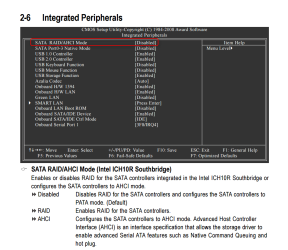
I think pbcopter was on the right track.

In the BIOS look for this setting,

2015-09-30_10h38_00.png

Does yours say RAID?

Here's your manual too,

View attachment 372641

That pic is from page 51.
 

My Computer

Computer type
PC/Desktop
Computer Manufacturer/Model Number
Self Built
OS
Win 10 Pro x64
CPU
Intel I5-2500K @3.3GHz
Motherboard
Asrock P67 Extreme4
Memory
16GB G.Skill Ripjaws X (4x4GB)
Graphics Card(s)
EVGA GeForce 750 Ti SC 2GB
Sound Card
ASUS Xonar DG 5.1 Channels 24-bit 96KHz PCI Interface Sound
Monitor(s) Displays
auria eq2367
Screen Resolution
1920 x 1080
Hard Drives
250GB Samsung 850 EVO SSD
1TB WD Blue
1TB Hitachi
PSU
SeaSonic X 650W 80 Plus Gold
Case
Corsair Obsidian 750D
Cooling
Corsair H60, Three 140mm case fans
Keyboard
Logitech Wireless Keyboard K520
Mouse
Logitech Wireless Mouse M310
Internet Speed
Wave Broadband ~ 100 dn 5 up
Antivirus
Windows Defender, Malwarebytes Premium
Browser
Edge, IE11, Chrome
Other Info
Laptop specs: HP g7-1365dx /
CPU: AMD A6-3420M APU with Radeon(tm) HD Graphics /
RAM: Crucial 8Gb (2x4Gb) /
SSD: Crucial M4-CT128M4SSD2 ATA Device/ FW 000F /
GFX: AMD Radeon HD 6520G /
OS: Windows 10 Pro x64
Ok, so which one should I set it to? right now its disabled.
 

My Computer

Computer type
PC/Desktop
Computer Manufacturer/Model Number
Custom build
OS
Windows 7 Professional, 64bit
CPU
i7 920 @ 2.66
Motherboard
EX58-UD3R
Memory
6 GB DDR3
Graphics Card(s)
GALAX GTX 960
Monitor(s) Displays
ASUS MK221H 22" widescreen
PSU
Antec 650W Earthwatts
Case
Thermaltake Element T
Cooling
Zalman CNPS9900 LED
Mouse
Logitech M205 Wireless
Internet Speed
2 mb/s
Antivirus
Avast! Antivirus
OK, that explains why you can't install those drivers, you're in IDE mode.

There is a work around but normally you would set it to AHCI before installation.

Since you are not running an SSD it might not even be worth changing the setting.

Here is our tutorial for changing the setting after installation, read it carefully,

http://www.sevenforums.com/tutorials/61869-ahci-enable-windows-7-vista.html
 

My Computer

Computer type
PC/Desktop
Computer Manufacturer/Model Number
Self Built
OS
Win 10 Pro x64
CPU
Intel I5-2500K @3.3GHz
Motherboard
Asrock P67 Extreme4
Memory
16GB G.Skill Ripjaws X (4x4GB)
Graphics Card(s)
EVGA GeForce 750 Ti SC 2GB
Sound Card
ASUS Xonar DG 5.1 Channels 24-bit 96KHz PCI Interface Sound
Monitor(s) Displays
auria eq2367
Screen Resolution
1920 x 1080
Hard Drives
250GB Samsung 850 EVO SSD
1TB WD Blue
1TB Hitachi
PSU
SeaSonic X 650W 80 Plus Gold
Case
Corsair Obsidian 750D
Cooling
Corsair H60, Three 140mm case fans
Keyboard
Logitech Wireless Keyboard K520
Mouse
Logitech Wireless Mouse M310
Internet Speed
Wave Broadband ~ 100 dn 5 up
Antivirus
Windows Defender, Malwarebytes Premium
Browser
Edge, IE11, Chrome
Other Info
Laptop specs: HP g7-1365dx /
CPU: AMD A6-3420M APU with Radeon(tm) HD Graphics /
RAM: Crucial 8Gb (2x4Gb) /
SSD: Crucial M4-CT128M4SSD2 ATA Device/ FW 000F /
GFX: AMD Radeon HD 6520G /
OS: Windows 10 Pro x64
OK, that explains why you can't install those drivers, you're in IDE mode.

There is a work around but normally you would set it to AHCI before installation.

Since you are not running an SSD it might not even be worth changing the setting.

Here is our tutorial for changing the setting after installation, read it carefully,

http://www.sevenforums.com/tutorials/61869-ahci-enable-windows-7-vista.html
Ok I tried googling a bit but I still dont know if this is worth doing or not, I know what RAID is but never heard of AHCI before, is it a better way of operating SATA drivers? whats the difference between it and whatever Windows was using before?
 

My Computer

Computer type
PC/Desktop
Computer Manufacturer/Model Number
Custom build
OS
Windows 7 Professional, 64bit
CPU
i7 920 @ 2.66
Motherboard
EX58-UD3R
Memory
6 GB DDR3
Graphics Card(s)
GALAX GTX 960
Monitor(s) Displays
ASUS MK221H 22" widescreen
PSU
Antec 650W Earthwatts
Case
Thermaltake Element T
Cooling
Zalman CNPS9900 LED
Mouse
Logitech M205 Wireless
Internet Speed
2 mb/s
Antivirus
Avast! Antivirus
I'm far from an expert on the subject so I can't give you much info other than I know it enables hot swapping of drives and is needed for SSD's to use the TRIM feature.

I don't think you'd notice any real world difference but I'll leave that to others to give more detail.

I wouldn't mess with it, if you do another install you might want to remember that before hand.
 

My Computer

Computer type
PC/Desktop
Computer Manufacturer/Model Number
Self Built
OS
Win 10 Pro x64
CPU
Intel I5-2500K @3.3GHz
Motherboard
Asrock P67 Extreme4
Memory
16GB G.Skill Ripjaws X (4x4GB)
Graphics Card(s)
EVGA GeForce 750 Ti SC 2GB
Sound Card
ASUS Xonar DG 5.1 Channels 24-bit 96KHz PCI Interface Sound
Monitor(s) Displays
auria eq2367
Screen Resolution
1920 x 1080
Hard Drives
250GB Samsung 850 EVO SSD
1TB WD Blue
1TB Hitachi
PSU
SeaSonic X 650W 80 Plus Gold
Case
Corsair Obsidian 750D
Cooling
Corsair H60, Three 140mm case fans
Keyboard
Logitech Wireless Keyboard K520
Mouse
Logitech Wireless Mouse M310
Internet Speed
Wave Broadband ~ 100 dn 5 up
Antivirus
Windows Defender, Malwarebytes Premium
Browser
Edge, IE11, Chrome
Other Info
Laptop specs: HP g7-1365dx /
CPU: AMD A6-3420M APU with Radeon(tm) HD Graphics /
RAM: Crucial 8Gb (2x4Gb) /
SSD: Crucial M4-CT128M4SSD2 ATA Device/ FW 000F /
GFX: AMD Radeon HD 6520G /
OS: Windows 10 Pro x64
Strange, it seems that all it takes is a switch to AHCI in the BIOS..
 

My Computer

Computer type
PC/Desktop
Computer Manufacturer/Model Number
Custom build
OS
Windows 7 Professional, 64bit
CPU
i7 920 @ 2.66
Motherboard
EX58-UD3R
Memory
6 GB DDR3
Graphics Card(s)
GALAX GTX 960
Monitor(s) Displays
ASUS MK221H 22" widescreen
PSU
Antec 650W Earthwatts
Case
Thermaltake Element T
Cooling
Zalman CNPS9900 LED
Mouse
Logitech M205 Wireless
Internet Speed
2 mb/s
Antivirus
Avast! Antivirus

My Computer

Computer type
PC/Desktop
Computer Manufacturer/Model Number
Self Built
OS
Win 10 Pro x64
CPU
Intel I5-2500K @3.3GHz
Motherboard
Asrock P67 Extreme4
Memory
16GB G.Skill Ripjaws X (4x4GB)
Graphics Card(s)
EVGA GeForce 750 Ti SC 2GB
Sound Card
ASUS Xonar DG 5.1 Channels 24-bit 96KHz PCI Interface Sound
Monitor(s) Displays
auria eq2367
Screen Resolution
1920 x 1080
Hard Drives
250GB Samsung 850 EVO SSD
1TB WD Blue
1TB Hitachi
PSU
SeaSonic X 650W 80 Plus Gold
Case
Corsair Obsidian 750D
Cooling
Corsair H60, Three 140mm case fans
Keyboard
Logitech Wireless Keyboard K520
Mouse
Logitech Wireless Mouse M310
Internet Speed
Wave Broadband ~ 100 dn 5 up
Antivirus
Windows Defender, Malwarebytes Premium
Browser
Edge, IE11, Chrome
Other Info
Laptop specs: HP g7-1365dx /
CPU: AMD A6-3420M APU with Radeon(tm) HD Graphics /
RAM: Crucial 8Gb (2x4Gb) /
SSD: Crucial M4-CT128M4SSD2 ATA Device/ FW 000F /
GFX: AMD Radeon HD 6520G /
OS: Windows 10 Pro x64
Ok, thanks for your help. Im tempted to do it since my PC isnt exactly new and is getting slower and slower so even a moderate speed improvement would be nice.
 

My Computer

Computer type
PC/Desktop
Computer Manufacturer/Model Number
Custom build
OS
Windows 7 Professional, 64bit
CPU
i7 920 @ 2.66
Motherboard
EX58-UD3R
Memory
6 GB DDR3
Graphics Card(s)
GALAX GTX 960
Monitor(s) Displays
ASUS MK221H 22" widescreen
PSU
Antec 650W Earthwatts
Case
Thermaltake Element T
Cooling
Zalman CNPS9900 LED
Mouse
Logitech M205 Wireless
Internet Speed
2 mb/s
Antivirus
Avast! Antivirus
Back
Top