Can't install .Net Framework 3.5 in Windows 7 64bit Ultimate

jack2014

New member
Local time
4:06 AM
Messages
5
I have installed a software that requires .net framework 3.5 and for some reason i just can't install the .net framework 3.5 ! I have done some reading in the forum , did some scans , enable some things and still a no "Go" for me!

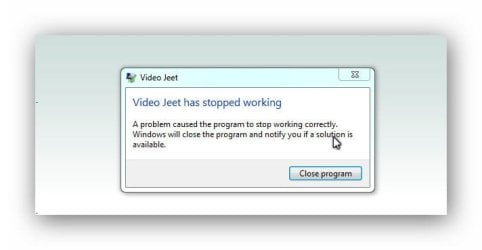
I have attached the log error from appcrashview , with the info why that software
that keeps crushing on me.

Will appreciate if anyone can help!
Thank you,
Regards.
 

Attachments

My Computer My Computer

At a glance

7 64bit ultimate
Computer type
PC/Desktop
Computer Manufacturer/Model Number
syx costum
OS
7 64bit ultimate
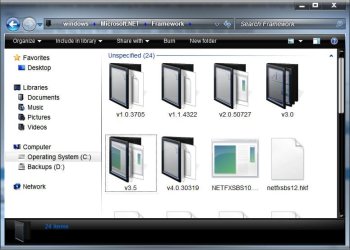
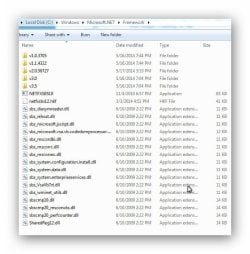
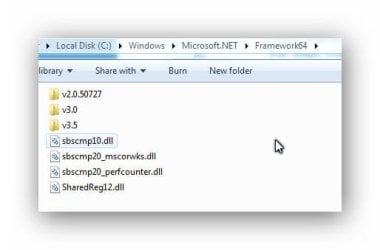
You say you can't install .Net 3.5? It should be installed by default. First let's determine if you actually already have 3.5. An easy method is to navigate to C:\windows\Microsoft.NET\Framework . You will have a folder for each version installed

.net.jpg

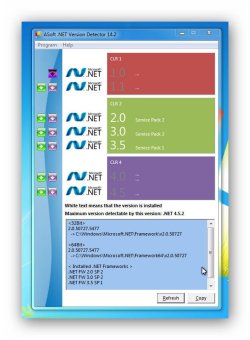
Or a simple utility like .NET Version Detector

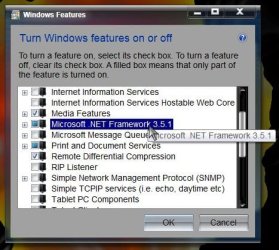
Also confirm it is enabled in Turn windows features on or off

Start> In search box type Turn windows features on or off> Enter> Scroll down to Microsoft .NET Framework> It will likely show 3.5.1 as mine does (even though I have V4 installed, 3.5 comes WITH Windows 7)> Make sure it is highlighted

Features.jpg

Assuming you do actually already have it, then we're trying to determine why this program is asking for it? Why you think that's the issue, etc. We'd need to know what software is causing the issue, screenshots of any errors, and how you determined .net 3.5 is the issue.

http://www.sevenforums.com/tutorials/9733-screenshots-files-upload-post-seven-forums.html

A Guy
 

My Computer My Computer

At a glance

Windows 10 Home x64INTEL Core i5-750 Quad-Core 3.37GHzHyperX Fury Black Series 8GB (2 x 4GB) 1866MhzEVGA GeForce GTX 750 Superclocked 1GB 128-Bit...
Computer type
PC/Desktop
OS
Windows 10 Home x64
CPU
INTEL Core i5-750 Quad-Core 3.37GHz
Motherboard
ASUS P7P55D
Memory
HyperX Fury Black Series 8GB (2 x 4GB) 1866Mhz
Graphics Card(s)
EVGA GeForce GTX 750 Superclocked 1GB 128-Bit GDDR5
Monitor(s) Displays
LG 32MA68HY 32" IPS
Screen Resolution
1920 x 1080
Hard Drives
Samsung 840 Evo 120GB, SEAGATE 500GB Barracuda® 7200.12, SATA 3 Gb/s, 7200 RPM, 16MB cache
PSU
ANTEC TruePower New TP-550, 80 PLUS, 550W
Case
ANTEC Three Hundred Illusion
Cooling
COOLER MASTER Hyper 212 Plus, 4 x 120mm 1 x 140mm Noctua's
Internet Speed
85 + Mbps
Antivirus
Avast
Browser
Vivaldi
Hi A Guy,

And thank you for helping!

Here are he screens from all the info requested and the error log file from the application error crash that i
have copy from appcrashview.

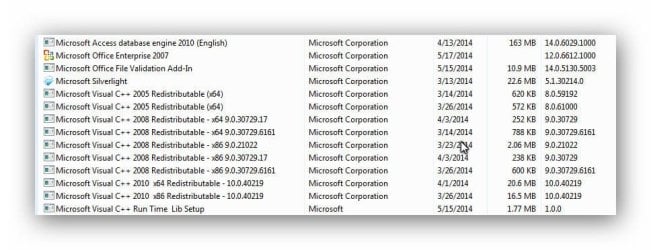
The software is called videojeet (videojeet dot com) and who built the software said that i need .net framework 3.5 for it to work, so i am not sure if the software is not working because maybe the 3.5 version is not enabled or maybe other error, in control panel/ un-install programs i see no .net frame 3.5 , usually it suppose to show up there if it was enable it.

Please see the attached picture and software error log maybe you see some that maybe not right or missing from my system.

Running Windows 7 64 bit Ultimate.

Thank you,
 

Attachments

  • pic5.jpg
    pic5.jpg
    19.4 KB · Views: 5
  • pic4.jpg
    pic4.jpg
    45.4 KB · Views: 42
  • pic3.jpg
    pic3.jpg
    60.4 KB · Views: 3
  • pic2.jpg
    pic2.jpg
    65.7 KB · Views: 6
  • pic1.jpg
    pic1.jpg
    15.3 KB · Views: 44
  • pic6.jpg
    pic6.jpg
    65.6 KB · Views: 5
  • appcrashview.zip
    appcrashview.zip
    3.2 KB · Views: 17

My Computer My Computer

At a glance

7 64bit ultimate
Computer type
PC/Desktop
Computer Manufacturer/Model Number
syx costum
OS
7 64bit ultimate
OK, you do have .NET 3.5.1, it doesn't show in programs usually. Versions after it would show. So there is another problem causing the software to crash. There doesn't seem to be much info online about the program, just offers on discounts. There are no help links on that site, just buy now?

Has the program worked at all since install? Does it work then crash randomly? I would check the Event logs after a crash, see if you can get a clue what exactly is happening, the error is rather generic.

http://www.sevenforums.com/tutorials/226084-event-viewer-open-use-windows-7-a.html

Start> In search box type Event Viewer> Enter> When the Event viewer opens expand Custom Views, and click on Administrative events

318269d1400395472t-windows-7-enterprise-x-64-strange-behavior-event.jpg


Find the timestamp from trying to open the program, or attempt to open it and create a new event

You are the administrator of this PC? You might try right clicking the application and choosing Run as administrator as well. You could try a Clean Start and see if there is a conflict

http://www.sevenforums.com/tutorial...ation-conflicts-performing-clean-startup.html

If you have another user on the PC, you might see if it works there, or enable the hidden Admin user and try it there (disable it again after testing)

http://www.sevenforums.com/tutorials/507-built-administrator-account-enable-disable.html

A Guy
 

My Computer My Computer

At a glance

Windows 10 Home x64INTEL Core i5-750 Quad-Core 3.37GHzHyperX Fury Black Series 8GB (2 x 4GB) 1866MhzEVGA GeForce GTX 750 Superclocked 1GB 128-Bit...
Computer type
PC/Desktop
OS
Windows 10 Home x64
CPU
INTEL Core i5-750 Quad-Core 3.37GHz
Motherboard
ASUS P7P55D
Memory
HyperX Fury Black Series 8GB (2 x 4GB) 1866Mhz
Graphics Card(s)
EVGA GeForce GTX 750 Superclocked 1GB 128-Bit GDDR5
Monitor(s) Displays
LG 32MA68HY 32" IPS
Screen Resolution
1920 x 1080
Hard Drives
Samsung 840 Evo 120GB, SEAGATE 500GB Barracuda® 7200.12, SATA 3 Gb/s, 7200 RPM, 16MB cache
PSU
ANTEC TruePower New TP-550, 80 PLUS, 550W
Case
ANTEC Three Hundred Illusion
Cooling
COOLER MASTER Hyper 212 Plus, 4 x 120mm 1 x 140mm Noctua's
Internet Speed
85 + Mbps
Antivirus
Avast
Browser
Vivaldi
Hi A Guy,

That program is just to auto search youtube videos based on the keywords,and then auto post into a
blog , like wordpress or blogger .
But i notice if i open the program/software everything is okay, i get the error just if i click "post now" i guess
the build of the software has an internal error , you can see the video here:
https://www.youtube.com/watch?v=ZBOJJT9YsII&feature=youtu.be
I have contacted the software guy to see ,why is doing that and why needs .net 3.5 framework.

As for the "Event Viewer" see attached .txt that i have extracted from the logs.

And regarding the "Admin", while back when i was starting the pc/desktop , it was going directly into windows desktop,but then i start getting this (see pic123), but now it goes directly to windows descktop at startup, as i follow that "Built in Administrator Account - Enable or Disable".

Thanks,
 

Attachments

My Computer My Computer

At a glance

7 64bit ultimate
Computer type
PC/Desktop
Computer Manufacturer/Model Number
syx costum
OS
7 64bit ultimate
Enabling the admin account was just to test if the software worked there. Disable it again after testing. I'm afraid that event log isn't much use to me, not going to slog through every error on your PC ;) You need to find just the error that is created when your program does not work. I think since this is an uncommon software, you might be better served asking the creators, if possible. I was just hoping the error for that particular event might shed some clues. A Guy
 

My Computer My Computer

At a glance

Windows 10 Home x64INTEL Core i5-750 Quad-Core 3.37GHzHyperX Fury Black Series 8GB (2 x 4GB) 1866MhzEVGA GeForce GTX 750 Superclocked 1GB 128-Bit...
Computer type
PC/Desktop
OS
Windows 10 Home x64
CPU
INTEL Core i5-750 Quad-Core 3.37GHz
Motherboard
ASUS P7P55D
Memory
HyperX Fury Black Series 8GB (2 x 4GB) 1866Mhz
Graphics Card(s)
EVGA GeForce GTX 750 Superclocked 1GB 128-Bit GDDR5
Monitor(s) Displays
LG 32MA68HY 32" IPS
Screen Resolution
1920 x 1080
Hard Drives
Samsung 840 Evo 120GB, SEAGATE 500GB Barracuda® 7200.12, SATA 3 Gb/s, 7200 RPM, 16MB cache
PSU
ANTEC TruePower New TP-550, 80 PLUS, 550W
Case
ANTEC Three Hundred Illusion
Cooling
COOLER MASTER Hyper 212 Plus, 4 x 120mm 1 x 140mm Noctua's
Internet Speed
85 + Mbps
Antivirus
Avast
Browser
Vivaldi
You can try 4 or 4.5, they should automatically update your .net to 3.5 in the process of updating
 

My Computer My Computer

At a glance

Windows 7 Home Premium x64
Computer type
Laptop
Computer Manufacturer/Model Number
Compaq ( I want intel :[ )
OS
Windows 7 Home Premium x64
Antivirus
Avast
Browser
Firefox <3
Other Info
if you want a few paid programs for free pm me!
He has 3.5.1, I don't think .NET has anything to do with this problem. A Guy
 

My Computer My Computer

At a glance

Windows 10 Home x64INTEL Core i5-750 Quad-Core 3.37GHzHyperX Fury Black Series 8GB (2 x 4GB) 1866MhzEVGA GeForce GTX 750 Superclocked 1GB 128-Bit...
Computer type
PC/Desktop
OS
Windows 10 Home x64
CPU
INTEL Core i5-750 Quad-Core 3.37GHz
Motherboard
ASUS P7P55D
Memory
HyperX Fury Black Series 8GB (2 x 4GB) 1866Mhz
Graphics Card(s)
EVGA GeForce GTX 750 Superclocked 1GB 128-Bit GDDR5
Monitor(s) Displays
LG 32MA68HY 32" IPS
Screen Resolution
1920 x 1080
Hard Drives
Samsung 840 Evo 120GB, SEAGATE 500GB Barracuda® 7200.12, SATA 3 Gb/s, 7200 RPM, 16MB cache
PSU
ANTEC TruePower New TP-550, 80 PLUS, 550W
Case
ANTEC Three Hundred Illusion
Cooling
COOLER MASTER Hyper 212 Plus, 4 x 120mm 1 x 140mm Noctua's
Internet Speed
85 + Mbps
Antivirus
Avast
Browser
Vivaldi
Back
Top