Solved Can't install network printer

icefront

New member
Local time
10:13 AM
Messages
2
This is a stupid problem, installing Canon ip1600...
I want to install a printer from an another computer, running XP, I have 7. When installing, windows doesn't find the driver, so it connects to windows update. There is also no driver so I'm prompted for an .inf file...
Ok, I download the driver from Canon, but they provide an exe, I'm unpacking it but unfortunately there's an another exe in the pack. This installs the driver, I say ok, win should find it.
I try again to connect to printer, but win still doesn't find the driver, always wants to download from update.
Why? There is a driver in the system, why win still wants to install again??????

I installed manually the printer, but it is mapped to some local lpt or com port, I'm unable to change to a network location, there is no such option.
 

My Computer

Computer Manufacturer/Model Number
Custom built
OS
Windows 7 64 bit
CPU
i7
Motherboard
Gigabyte
Memory
8G
Graphics Card(s)
Nvidia
Icefront, welcome to the windows 7 forums.
When you executed the .exe in the download from Canon, It could have created the .inf file in another directory.
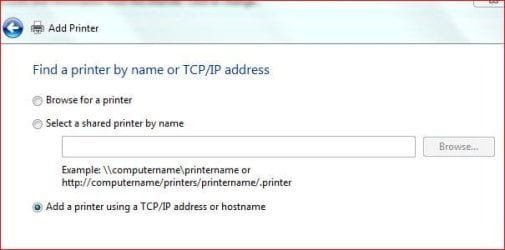
Also, If you know the IP for the printer, you can create a new tcp/ip port by looking at the screen and selecting
add simple tcp/ip port at this prompt.


Rich
 

Attachments

  • addprinter-ip.JPG
    addprinter-ip.JPG
    31.7 KB · Views: 27

My Computer

Computer type
Laptop
Computer Manufacturer/Model Number
Toshiba Laptop Qosimo X870
OS
Windows 7 Pro x64 SP1
CPU
Intel Core I7
Motherboard
Toshiba Qosmio
Memory
16 Gigs
Graphics Card(s)
NVIDIA GeForce GTX 670M
Monitor(s) Displays
17.7" laptop
Screen Resolution
1600 x 900
Hard Drives
256 Gig SanDisk SSD for C
256 Gig Intel SSD for D
Internet Speed
50/25 FIOS
Antivirus
Vipre (all you can eat for 10 machines)
Browser
IE and FF
Other Info
I have dos 6.22, wfwg 3.11, win98, 2000 and xp VHD's available for testing. MS's Virtual PC works great.
Icefront, welcome to the windows 7 forums.
Thank you!

Sadly, there's no .inf file in the whole directory structure, there are only dll's. It's a kind of built-in install thing - as canon does with cameras and other stuff...

Okay, finally it worked, i found a hidden path...
Here is how. If somebody in the future will have this problem, here are the steps to follow:

Intro: you want to install a network printer. The other computer has different OS or different OS version, so the driver isn't compatible with yours. The manufacturer provides a proprietary install kit which installs the driver on the system, without checking physically the presence of the printer

  1. Install the printer driver with the provided/downloaded pack.
  2. Go to network and try to find the PC with the printer. You should see the printer. Example: Buddy's PC, Canon123 printer
  3. Go to Control Panel -> Printers and click "Add printer". Choose "Local printer" (!). DON'T choose "Local port", choose instead "Create new port". Click next and you should see a dialog popping up, asking for a text. Write here \\buddy\Canon123. Be careful:
    1. two backslashes (as written in the other window's address bar when you checked Buddy's computer)
    2. exact printer name (as seen when you checked Buddy's computer's printer)
    3. no backslash at the end
  4. Click the OK's and Next's, the printer should work correctly afterwards.
 

My Computer

Computer Manufacturer/Model Number
Custom built
OS
Windows 7 64 bit
CPU
i7
Motherboard
Gigabyte
Memory
8G
Graphics Card(s)
Nvidia
Icefront, great reply and good info.

Rich
 

My Computer

Computer type
Laptop
Computer Manufacturer/Model Number
Toshiba Laptop Qosimo X870
OS
Windows 7 Pro x64 SP1
CPU
Intel Core I7
Motherboard
Toshiba Qosmio
Memory
16 Gigs
Graphics Card(s)
NVIDIA GeForce GTX 670M
Monitor(s) Displays
17.7" laptop
Screen Resolution
1600 x 900
Hard Drives
256 Gig SanDisk SSD for C
256 Gig Intel SSD for D
Internet Speed
50/25 FIOS
Antivirus
Vipre (all you can eat for 10 machines)
Browser
IE and FF
Other Info
I have dos 6.22, wfwg 3.11, win98, 2000 and xp VHD's available for testing. MS's Virtual PC works great.
Back
Top