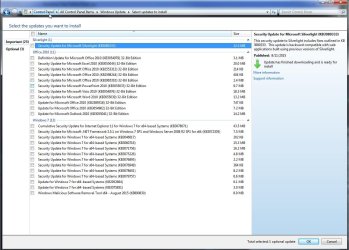
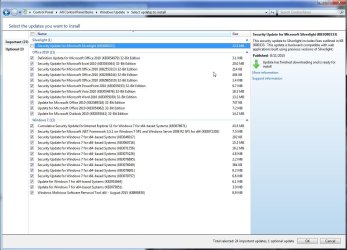
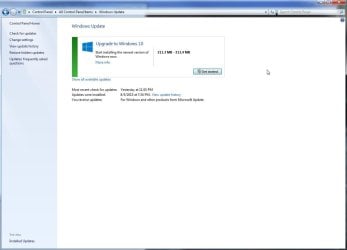
I'm not ready yet to upgrade to Windows 10 on my main computer (still waiting for some of the initial problems to be resolved) but in the mean time my anti-virus is complaining that "Windows isn't up to date" but when I go to Windows Updates it offers me the option to Upgrade to Windows 10 and below that it says "Show all available updates"; if I click on that I see a list of about 25 updates and when I check off all of them the only options on that screen are Ok and Cancel; if I click Ok I'm back to the previous screen and there doesn't appear to be any way to install the updates that I just checked off.
Btw, I have the automatic update options set to "Download updates but let me choose whether to install them", I set that mainly because I hated having Windows install and reboot when I wasn't looking and messing up whatever I happened to be working on. Any ideas how to install these selected updates?
- Norm
My Computer
At a glance
Windows 7I7-96012 GBZotac GTX 980 AMP! Extreme Edition
Computer type
PC/Desktop
Computer Manufacturer/Model Number
Self Built
OS
Windows 7
CPU
I7-960
Motherboard
Asus P6X58D Premium
Memory
12 GB
Graphics Card(s)
Zotac GTX 980 AMP! Extreme Edition
Sound Card
Built In
Monitor(s) Displays
Asus WQHD
Screen Resolution
2560x1440
Hard Drives
Western Digital 1TB Black - C: drive
Seagate 4TB ST4000DX - Data Drive
Western Digital 4TB Black - Data Drive
No, they are not (see attached screen shot Updates.jpg) and I'm not unchecking anything, I'm checking off 25 important updates (see screen shot checked.jpg) and 3 optional updates and then when I click "Ok" I'm back at the Windows Update screen with no way to install the updates that I just checked off (see AfterOkClick.jpg screen shot). When I'm back on the Windows Update screen the only clickable options are those on the left border "Control Panel Home", "Check for updates", "Change settings", "View update history", "Restore hidden updates" and "Updates: frequently asked questions" and then on the main window the "Get started" button and "Show all available updates" (where I just came from) there just doesn't seem to be a button or anyway to install those updates that I just checked off.
- Norm
Attachments
Updates.jpg
129.5 KB
· Views: 3
Checked.jpg
132.1 KB
· Views: 1
AfterOkClick.jpg
45.9 KB
· Views: 3
My Computer
At a glance
Windows 7I7-96012 GBZotac GTX 980 AMP! Extreme Edition
Computer type
PC/Desktop
Computer Manufacturer/Model Number
Self Built
OS
Windows 7
CPU
I7-960
Motherboard
Asus P6X58D Premium
Memory
12 GB
Graphics Card(s)
Zotac GTX 980 AMP! Extreme Edition
Sound Card
Built In
Monitor(s) Displays
Asus WQHD
Screen Resolution
2560x1440
Hard Drives
Western Digital 1TB Black - C: drive
Seagate 4TB ST4000DX - Data Drive
Western Digital 4TB Black - Data Drive
Odd - I've not seen that problem before
However, the MB total there is about right for the updates, and not for the Windows 10 installer. I've not done many upgrades from Windows 7 so I can't claim to be any kind of an expert on it.
I'll ask for some assistance.
My Computer
At a glance
Win 7 x64 Home Premium (and x86 VirtualBox VM...i3 370M/i7 6500U8GB - finally :)/8GBit's an i3, dude!/dual Intel&nVidia
Computer type
Laptop
Computer Manufacturer/Model Number
Asus K52F or Lenovo B51-80
OS
Win 7 x64 Home Premium (and x86 VirtualBox VM)/Win10
CPU
i3 370M/i7 6500U
Motherboard
Asus/Lenovo
Memory
8GB - finally :)/8GB
Graphics Card(s)
it's an i3, dude!/dual Intel&nVidia
Sound Card
onboard
Monitor(s) Displays
15.6" built-in
Screen Resolution
1366x768/1920x1080
Hard Drives
750GB Seagate internal
Sundry external drives attached to other computers on the local network
1TB SSD on the Lenovo
PSU
n/a
Internet Speed
as much as I can get - usually on a dongle/phone, so <1MB/s
Hi,
Do you still show the win-10 logo on the taskbar ?
Unfortunately your update settings have already downloaded win-10 so it's just waiting to install
Which might be hampering with any other updates from installing until 10 does install.
Traditionally if you want to wait you'd change the update setting to Check for updates but let me choose when to download and install.
Then you have more choices to wait,
10 as an update was delivered as Important not optional or recommended.
If you know exactly when the 10 update came to you use system restore to an earlier time before 10 did download.
Then switch your update settings as quick as possible to what I state above.
My Computer
At a glance
Win-7-Pro64bit 7-H-Prem-64biti7-5930K 2nd i9-9940x both water blocked VRM'...Trident-z 3200C14 2nd Trident-z 3600C16EVGA 1080ti ftw3 2nd Titan Xp both water blocked
Computer type
PC/Desktop
Computer Manufacturer/Model Number
Custom assembled by me :}
OS
Win-7-Pro64bit 7-H-Prem-64bit
CPU
i7-5930K 2nd i9-9940x both water blocked VRM's too
2nd ASUS X299 Apex/Intel i9-9940x with Custom water loop/7H-Prem-x64/Corsair 450D case/Ram Trident-z 3600C16 4x8gb / Samsung970Evo plus 500gb SSD/Dual ssd EZ swap evo/PSU EVGA SuperNova 1200w-P2 80+Platinum/GPU Titan Xp /8-ML-140 on push-pull on 2-280GTX rads
Win-7-Pro64bit 7-H-Prem-64biti7-5930K 2nd i9-9940x both water blocked VRM'...Trident-z 3200C14 2nd Trident-z 3600C16EVGA 1080ti ftw3 2nd Titan Xp both water blocked
Computer type
PC/Desktop
Computer Manufacturer/Model Number
Custom assembled by me :}
OS
Win-7-Pro64bit 7-H-Prem-64bit
CPU
i7-5930K 2nd i9-9940x both water blocked VRM's too
2nd ASUS X299 Apex/Intel i9-9940x with Custom water loop/7H-Prem-x64/Corsair 450D case/Ram Trident-z 3600C16 4x8gb / Samsung970Evo plus 500gb SSD/Dual ssd EZ swap evo/PSU EVGA SuperNova 1200w-P2 80+Platinum/GPU Titan Xp /8-ML-140 on push-pull on 2-280GTX rads
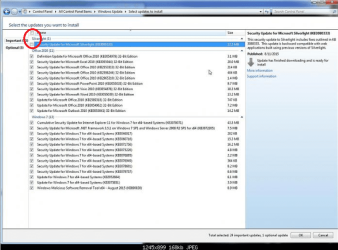
I do have the Windows 10 logo in the system tray but not on the taskbar. I kept fiddling around for a while and no matter how many times nor what number of updates I had checked (I tried check all) the main Windows Update window only showed "Get Started" to install Windows 10 instead of "Install Updates" as it should. Finally in exasperation I clicked "Check for updates" on the left border and after taking about 10 minutes to check it came back with a couple extra optional updates "nVidia - Graphics Adaper WDDM1.1 etc etc" and "Upgrade to Windows 10 Pro" (which I didn't have before) and once I unchecked the upgrade to Windows 10 and clicked "Ok" (I was returned to the main Windows update screen) the "Get Started" button now changed to "Install Updates" (see screen shot).
I mean this was the most bizarre thing, that until I got the Windows 10 optional update listed and unchecked there was no way to install the updates that I'd selected.
Btw since the first time after I installed the OS (I built this computer myself) that Windows installed updates and rebooted when I wasn't looking (loosing hours worth of unsaved work) I've had this computer set to "Download updates but let me choose whether to install them".
Thanks everyone for your help and input!
- Norm
Attachments
AfterWin10UnCheck.jpg
34.6 KB
· Views: 0
My Computer
At a glance
Windows 7I7-96012 GBZotac GTX 980 AMP! Extreme Edition
Computer type
PC/Desktop
Computer Manufacturer/Model Number
Self Built
OS
Windows 7
CPU
I7-960
Motherboard
Asus P6X58D Premium
Memory
12 GB
Graphics Card(s)
Zotac GTX 980 AMP! Extreme Edition
Sound Card
Built In
Monitor(s) Displays
Asus WQHD
Screen Resolution
2560x1440
Hard Drives
Western Digital 1TB Black - C: drive
Seagate 4TB ST4000DX - Data Drive
Western Digital 4TB Black - Data Drive
Also, I think you are missing what it's doing. If you press the 'Get Started' Button, it will start the upgrade, but when it changes to Install Updates' it is just installing the usual Updates.
Also, I think you are missing what it's doing. If you press the 'Get Started' Button, it will start the upgrade, but when it changes to Install Updates' it is just installing the usual Updates.
I really don't understand what you mean by "I think you are missing what it's doing"? When I posted about this problem this is exactly the sequence of events:
1). My anti-virus warned me that Windows was "out of date" so I went to Windows updates as I have always had updates set to "download updates but let me choose whether to install them".
2). I clicked "show all available updates" and none of those were checked off (please see the screenshot I provided) and I checked off everything except the silverlight update as I don't believe I have silverlight installed and didn't want it installed.
3). I clicked the "Ok" button and was returned to the main Windows update window, however instead of having an "Install updates button" (as can be seen in my final screen shot) all I was given was the "Get started" button to install Windows 10.
4). No matter how many times I went back and forth between the two screens and no matter if all updates were checked or just one the "Get started" button never changed to install updates.
What is there not to understand? The only option I was given would have been to install or start the process to install Windows 10 which is not what I wanted at the moment; all I wanted was to install the selected Windows 7 updates. It wasn't until I clicked on "Check for updates" to go and check for any additional updates that a couple more updates appeared in "Optional updates" one of which was "Upgrade to Windows 10 Pro" (which I gather from what I've read is somehow different from the tray icon that says "Get Windows 10") and once I unchecked that and clicked "Ok" the "Get Started" button finally changed to "Install updates" which it should have done in the first place. I can really only conclude that this was a short tern glitch or issue between Windows update and the Windows 10 upgrade notification.
- Norm
My Computer
At a glance
Windows 7I7-96012 GBZotac GTX 980 AMP! Extreme Edition
Computer type
PC/Desktop
Computer Manufacturer/Model Number
Self Built
OS
Windows 7
CPU
I7-960
Motherboard
Asus P6X58D Premium
Memory
12 GB
Graphics Card(s)
Zotac GTX 980 AMP! Extreme Edition
Sound Card
Built In
Monitor(s) Displays
Asus WQHD
Screen Resolution
2560x1440
Hard Drives
Western Digital 1TB Black - C: drive
Seagate 4TB ST4000DX - Data Drive
Western Digital 4TB Black - Data Drive
Maybe I misunderstood what you were saying. I installed 10 on 4 of my computers, but not on my Wife's. She is not sure so wants to wait. I have the same notice you have in Windows Update, Get Started. But, when I go and just check the updates I want, it changes to install updates. It then only installs the updates I checked. That's all I meant. I meant no offense. After all, they haven't been real up front about the process. The information is there, you just have to hunt for it.
You could just get rid of the GWX icon and upgrade process and do it manually with the Media Creation Tool whenever you want to. Windows 10 ISO Download - Windows 10 Forums
Mine will tell me there are available updates, Jack.
Norm,
Please fill out your System Specs
Information
Your System Specs will help us to help you, and doing it in this manner will make them available to all helpers in every post and keep us from hunting for them. We ask that you fill them out in as much detail as possible including Desktop or Laptop, Model number if it is an OEM computer and all components with the Manufacturer and Model number if possible.
If you will go to your last post and click the 'System Specs' in the bottom left of the post, you will find a link to update your system specs. Please fill those out in as much detail as possible, making sure to click save at the bottom of the page. If you would like to know what we would like, you can click 'My System Specs' at the bottom left of this post to see mine. If you do not know what your components are, this will help you accomplish this task. http://www.sevenforums.com/tutorials/180324-system-info-see-your-system-specs.html
I really did not know Anti Virus programs did such a thing.
I use MSE and it might do the same but I never let it get behind so maybe that is the reason I have never seen such a warning.
My Computer
At a glance
Windows 10 Pro. 64/ version 1709 Windows 7 Pr...Intel i7-6800K @ 4.3Corsair Platinum 16 gig @2400EVGA GTX 1070 OC
Computer type
PC/Desktop
Computer Manufacturer/Model Number
Home made Desktop
OS
Windows 10 Pro. 64/ version 1709 Windows 7 Pro/64
CPU
Intel i7-6800K @ 4.3
Motherboard
ASUS X-99 Deluxe II
Memory
Corsair Platinum 16 gig @2400
Graphics Card(s)
EVGA GTX 1070 OC
Monitor(s) Displays
Asus 27" LED LCD/VE278Q
Screen Resolution
1920-1080 or 1280-720 HDMI
Hard Drives
INTEL SSD 730-240 Gb Sata 3.0/
PSU
EVGA Platium 1200W
Case
Phanteks Luxe Tempered Glass 8 fans/ one radiator
Cooling
XSPC/ Water Cooled CPU
Keyboard
Das 4 Professional
Mouse
Logitech M705/MX Anywhere 2-S
Internet Speed
100 mbits
Antivirus
Microsoft Security Essentials/ Malwarebytes Premium 3.0/ SAS
Browser
I.E. 11 default/Firefox/ ISP Time Warner Cable/Spectrum
Other Info
LG BluRay Burner/
Sound system-KLipsch-THX/
Icy Dock ssd Hot Swap bays.