DISM ++ can't install updates after Repair Install

Hi Steampunk7,

Btw, I managed to install critical updates, in small packages of 5-6 updates at the time. There's 59 other updates which can't be installed. What puzzles me is the fact that DISM successfully downloaded and installed some of those 59 updates, but after rebooting I got this annoying message seen zillion times by now: Failure configuring Windows updates. Reverting changes. Do not turn off your computer. It always stuck at 15%.

Doesn't sound good!

For the sake of the time that is being spent on this and you not having a working OS, what I would personally do is the following.

Download the ISO again, burn it to a DVD or USB, detach any other drives, start the installation, perform the repair install, update the LIVE OS using DISM++ [run a couple of times], make a system image, and then do your customisation!

I hope this helps!
 

My Computer My Computer

At a glance

Win 7 HP SP1 64-bit Vista HB SP2 32-bit Linux...Intel(R) Pentium(R) CPU P6200 @ 2.13GHz4.00 GBIntel(R) Graphics Media Accelerator HD
Computer type
Laptop
Computer Manufacturer/Model Number
Fujitsu LIFEBOOK
OS
Win 7 HP SP1 64-bit Vista HB SP2 32-bit Linux Mint 18.3
CPU
Intel(R) Pentium(R) CPU P6200 @ 2.13GHz
Motherboard
FUJITSU FJNBB06
Memory
4.00 GB
Graphics Card(s)
Intel(R) Graphics Media Accelerator HD
Sound Card
[1] Realtek High Definition Audio [2] Intel(R) Display Audio
Screen Resolution
1366 x 768 x 32 bits (4294967296 colors) @ 59 Hz
Hard Drives
TOSHIBA MK5076GSX
Antivirus
AVG FREE
SIW2 asked you to mount the image for a particular reason, to see if you were able to install the updates into the mounted image [trouble-shooting]!


You mean to burn Repair install ISO image to DVD? And then start again RI from the dvd?


What M$ stuff exactly in particular [or just those you have stated], and how did you delete it?

Could you have inadvertently deleted any system files for example?


I know what you mean, it's logical question..but no. I haven't deleted anything from system disc files, Program files, particularly not reg files...anything like that. I uninstalled some programs which I needed for the RI (like Key Finder) via Add or install feature.

As for the rest I went Control panel> Gadgets and uninstalled them, leaving only Clock and Calendar. (And that was AFTER I encountered issues.)
 

My Computer My Computer

At a glance

Windows 7 Ultimate x64Intel(R) Xeon(R) CPU E3-1231 v3 @ 3.40GHz16 GBAMD Radeon (TM) R9 390 Series
Computer type
PC/Desktop
OS
Windows 7 Ultimate x64
CPU
Intel(R) Xeon(R) CPU E3-1231 v3 @ 3.40GHz
Motherboard
ASUSTeK COMPUTER INC. Z97-A Rev 1.xx
Memory
16 GB
Graphics Card(s)
AMD Radeon (TM) R9 390 Series
Sound Card
(1) AMD High Definition Audio Device (2) Realtek High Defi
Hi Steampunk7,

You mean to burn Repair install ISO image to DVD? And then start again RI from the dvd?

Yes.

Trying to run the repair install from the partition is for whatever reasons maybe NOT working properly and causing an issue when it comes to updating. Just a thought!

You will need your Product Key for the version of Windows that you are repair-installing.

After you have created a Win 7 SP1 installation disk, insert it into the DVD drive. When AutoPlay appears, click Run setup.exe. The process is the same as if you were doing a clean install, with the exception of when you get to the Which type of installation do you want screen, you MUST click Upgrade.

IMPORTANT: Although a repair installation leaves ALL your User Accounts, Folders, Files, Documents, Pictures, Music, Videos, Data Files, Icons, and any installed programs intact, it is still strongly advised that you backup ALL your essential files [excluding installed programs of course because these have registry entries and other data including product keys etc] to an external HDD or USB BEFORE you start in case of any unforeseen problems.

Have you got a C:\Windows.old folder?

I know what you mean, it's logical question..but no. I haven't deleted anything from system disc files, Program files, particularly not reg files...anything like that. I uninstalled some programs which I needed for the RI (like Key Finder) via Add or install feature.

As for the rest I went Control panel> Gadgets and uninstalled them, leaving only Clock and Calendar. (And that was AFTER I encountered issues.)

:thumbsup:

I hope this helps!
 

My Computer My Computer

At a glance

Win 7 HP SP1 64-bit Vista HB SP2 32-bit Linux...Intel(R) Pentium(R) CPU P6200 @ 2.13GHz4.00 GBIntel(R) Graphics Media Accelerator HD
Computer type
Laptop
Computer Manufacturer/Model Number
Fujitsu LIFEBOOK
OS
Win 7 HP SP1 64-bit Vista HB SP2 32-bit Linux Mint 18.3
CPU
Intel(R) Pentium(R) CPU P6200 @ 2.13GHz
Motherboard
FUJITSU FJNBB06
Memory
4.00 GB
Graphics Card(s)
Intel(R) Graphics Media Accelerator HD
Sound Card
[1] Realtek High Definition Audio [2] Intel(R) Display Audio
Screen Resolution
1366 x 768 x 32 bits (4294967296 colors) @ 59 Hz
Hard Drives
TOSHIBA MK5076GSX
Antivirus
AVG FREE
You already have the installation files on a partition. Mount the wim into any empty folder. Install the updates into the mounted wim image. Save the updated image. Unmount the image.

Check if you are able to do that. If so, you can use the updated wim for clean/repair install.

I don't see why it makes any difference whether you run the installation ( setup.exe) from another partition or from external media e.g. dvd/usb - but you can try it and find out.
 

My Computers My Computers

  • At a glance

    7 X64i5 84002x8gb 3200mhz
    Computer type
    PC/Desktop
    OS
    7 X64
    CPU
    i5 8400
    Motherboard
    gigabyte b365m ds3h
    Memory
    2x8gb 3200mhz
    Hard Drives
    various
    PSU
    pure power 11 400w cm
    Case
    Coolermaster
    Cooling
    cryorig m9i
  • At a glance

    7x64g54008gb ddr4 2400
    Computer type
    PC/Desktop
    OS
    7x64
    CPU
    g5400
    Motherboard
    ga b365m ds3h
    Memory
    8gb ddr4 2400
    PSU
    xfx pro 450w
Hi SIW2,

I don't see why it makes any difference whether you run the installation ( setup.exe) from another partition or from external media e.g. dvd/usb - but you can try it and find out.

The only reason I mentioned this was in case any of the extracted files on the partition could possibly be corrupted due to a bad download etc!

Downloading another ISO and burning it to a DVD/USB is just another option to hopefully get him up and running again as quickly as possible!
 

My Computer My Computer

At a glance

Win 7 HP SP1 64-bit Vista HB SP2 32-bit Linux...Intel(R) Pentium(R) CPU P6200 @ 2.13GHz4.00 GBIntel(R) Graphics Media Accelerator HD
Computer type
Laptop
Computer Manufacturer/Model Number
Fujitsu LIFEBOOK
OS
Win 7 HP SP1 64-bit Vista HB SP2 32-bit Linux Mint 18.3
CPU
Intel(R) Pentium(R) CPU P6200 @ 2.13GHz
Motherboard
FUJITSU FJNBB06
Memory
4.00 GB
Graphics Card(s)
Intel(R) Graphics Media Accelerator HD
Sound Card
[1] Realtek High Definition Audio [2] Intel(R) Display Audio
Screen Resolution
1366 x 768 x 32 bits (4294967296 colors) @ 59 Hz
Hard Drives
TOSHIBA MK5076GSX
Antivirus
AVG FREE
Hi Steampunk7,
Have you got a C:\Windows.old folder?


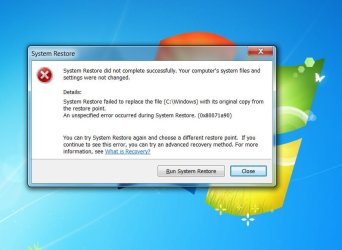
No, I haven't. Besides, I am not able to perform a system restore for some reason. It couldn't be virus, since I haven't visited any suspicious sites.
 

Attachments

  • 7.jpg
    7.jpg
    67.7 KB · Views: 0

My Computer My Computer

At a glance

Windows 7 Ultimate x64Intel(R) Xeon(R) CPU E3-1231 v3 @ 3.40GHz16 GBAMD Radeon (TM) R9 390 Series
Computer type
PC/Desktop
OS
Windows 7 Ultimate x64
CPU
Intel(R) Xeon(R) CPU E3-1231 v3 @ 3.40GHz
Motherboard
ASUSTeK COMPUTER INC. Z97-A Rev 1.xx
Memory
16 GB
Graphics Card(s)
AMD Radeon (TM) R9 390 Series
Sound Card
(1) AMD High Definition Audio Device (2) Realtek High Defi
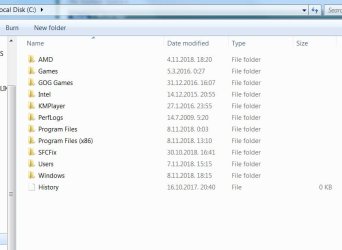
This is my C: disk.
 

Attachments

  • 8.jpg
    8.jpg
    51.1 KB · Views: 0

My Computer My Computer

At a glance

Windows 7 Ultimate x64Intel(R) Xeon(R) CPU E3-1231 v3 @ 3.40GHz16 GBAMD Radeon (TM) R9 390 Series
Computer type
PC/Desktop
OS
Windows 7 Ultimate x64
CPU
Intel(R) Xeon(R) CPU E3-1231 v3 @ 3.40GHz
Motherboard
ASUSTeK COMPUTER INC. Z97-A Rev 1.xx
Memory
16 GB
Graphics Card(s)
AMD Radeon (TM) R9 390 Series
Sound Card
(1) AMD High Definition Audio Device (2) Realtek High Defi
Hi Steampunk7,

Have you got a C:\Windows.old folder?
No, I haven't.

I only asked because during a successful repair install, a C:\Windows.old backup folder gets created which is a FULL copy of the current version.

Besides, I am not able to perform a system restore for some reason. It couldn't be virus, since I haven't visited any suspicious sites.

That is why I didn't suggest it! I doubt if a System Restore would have helped anyway!
 
Last edited:

My Computer My Computer

At a glance

Win 7 HP SP1 64-bit Vista HB SP2 32-bit Linux...Intel(R) Pentium(R) CPU P6200 @ 2.13GHz4.00 GBIntel(R) Graphics Media Accelerator HD
Computer type
Laptop
Computer Manufacturer/Model Number
Fujitsu LIFEBOOK
OS
Win 7 HP SP1 64-bit Vista HB SP2 32-bit Linux Mint 18.3
CPU
Intel(R) Pentium(R) CPU P6200 @ 2.13GHz
Motherboard
FUJITSU FJNBB06
Memory
4.00 GB
Graphics Card(s)
Intel(R) Graphics Media Accelerator HD
Sound Card
[1] Realtek High Definition Audio [2] Intel(R) Display Audio
Screen Resolution
1366 x 768 x 32 bits (4294967296 colors) @ 59 Hz
Hard Drives
TOSHIBA MK5076GSX
Antivirus
AVG FREE
Paul, so it means that there is no hope of fixing Windows (it works ok now, after installing critical updates) without performing Repair Install again, right ? This time from DVD.
You talked about running installation disk earlier. You mean my Win 7 (64) installation disk, or this ISO image ?
 

My Computer My Computer

At a glance

Windows 7 Ultimate x64Intel(R) Xeon(R) CPU E3-1231 v3 @ 3.40GHz16 GBAMD Radeon (TM) R9 390 Series
Computer type
PC/Desktop
OS
Windows 7 Ultimate x64
CPU
Intel(R) Xeon(R) CPU E3-1231 v3 @ 3.40GHz
Motherboard
ASUSTeK COMPUTER INC. Z97-A Rev 1.xx
Memory
16 GB
Graphics Card(s)
AMD Radeon (TM) R9 390 Series
Sound Card
(1) AMD High Definition Audio Device (2) Realtek High Defi
If you mean the latter, then I'll d/l that file again, burn the ISO image on DVD and run the Repair Install from that DVD disc, right?
 

My Computer My Computer

At a glance

Windows 7 Ultimate x64Intel(R) Xeon(R) CPU E3-1231 v3 @ 3.40GHz16 GBAMD Radeon (TM) R9 390 Series
Computer type
PC/Desktop
OS
Windows 7 Ultimate x64
CPU
Intel(R) Xeon(R) CPU E3-1231 v3 @ 3.40GHz
Motherboard
ASUSTeK COMPUTER INC. Z97-A Rev 1.xx
Memory
16 GB
Graphics Card(s)
AMD Radeon (TM) R9 390 Series
Sound Card
(1) AMD High Definition Audio Device (2) Realtek High Defi
Hi Steampunk7,

You already have the installation files on a partition. Mount the wim into any empty folder. Install the updates into the mounted wim image. Save the updated image. Unmount the image.

Check if you are able to do that. If so, you can use the updated wim for clean/repair install.

Were you able to mount the .wim and do the updates as SIW2 advised above?

You talked about running installation disk earlier. You mean my Win 7 (64) installation disk?

Yes.

I didn't realise you already had an installation disk!!!

Why didn't you run the repair install directly from the installation disk instead of running it from a seperate partition?

You will need your Product Key for the version of Windows that you are repair-installing.

Insert your Win 7 SP1 installation disk into the DVD drive. When AutoPlay appears, click Run setup.exe. The process is the same as if you were doing a clean install, with the exception of when you get to the Which type of installation do you want screen, you MUST click Upgrade.

When the installation is complete, update the LIVE OS using DISM++ [run it a couple of times], then make a system image [see below], and finally do your customisation!

Create A System Image

Once you have your OS updated and running the way you like it, create a system image. This way, if things go wrong in the future, you will be able to restore your OS back to the exact same state that it is now in a very short time. This is because you will NOT have to install ALL the updates again, not to mention the amount of time needed to download and install them, and the numerous restarts required. There are two imaging programs which are very popular among members here, the first is AOMEI Backupper Standard [FREE], and the second is Macrium Reflect [FREE].

IMPORTANT: Although a repair installation leaves ALL your User Accounts, Folders, Files, Documents, Pictures, Music, Videos, Data Files, Icons, and any installed programs intact, it is still strongly advised that you backup ALL your essential files [excluding installed programs of course because these have registry entries and other data including product keys etc] to an external HDD or USB BEFORE you start in case of any unforeseen problems.

I hope this helps!
 
Last edited:

My Computer My Computer

At a glance

Win 7 HP SP1 64-bit Vista HB SP2 32-bit Linux...Intel(R) Pentium(R) CPU P6200 @ 2.13GHz4.00 GBIntel(R) Graphics Media Accelerator HD
Computer type
Laptop
Computer Manufacturer/Model Number
Fujitsu LIFEBOOK
OS
Win 7 HP SP1 64-bit Vista HB SP2 32-bit Linux Mint 18.3
CPU
Intel(R) Pentium(R) CPU P6200 @ 2.13GHz
Motherboard
FUJITSU FJNBB06
Memory
4.00 GB
Graphics Card(s)
Intel(R) Graphics Media Accelerator HD
Sound Card
[1] Realtek High Definition Audio [2] Intel(R) Display Audio
Screen Resolution
1366 x 768 x 32 bits (4294967296 colors) @ 59 Hz
Hard Drives
TOSHIBA MK5076GSX
Antivirus
AVG FREE
Your CBS.log has several entries regarding SLEEP state

I believe DISM++ will fail if you allow the computer to SLEEP!

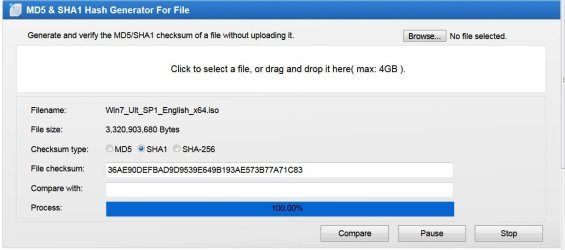
Did you check your Win7x64 Ultimate image for validity with SHA1: 36ae90defbad9d9539e649b193ae573b77a71c83 from WZT website?

On Line MD5 & SHA1 Hash Generator For File

Did you try using Windows Update?

Here's the prerequisite for convenience rollup
KB3020369
and convenience rollup
KB3125574
 

My Computer My Computer

At a glance

Win 10 x64, Linux Lite, Win 7 x64, BlackArch,...
Computer type
PC/Desktop
Computer Manufacturer/Model Number
HP Desktop & Compaq Laptop
OS
Win 10 x64, Linux Lite, Win 7 x64, BlackArch, & Kali
Hard Drives
Samsung 850 Pro 256Gb,
Hitachi HDD 1Tb,
Crucial MX SSD 250Gb
Segate 3Tb USB 3.0 Ext. Backup HDD
Internet Speed
150Mbps dn, 20Mbps up
Antivirus
Avast Free, Malwarebytes Anti-Exploit & Anti-Ransomware
Browser
Firefox, Chrome, Opera, & VPN
Hi Snick,

I believe DISM++ will fail if you allow the computer to SLEEP!

That's an interesting point.

I haven't come across anyone on this forum to my knowledge that has had a DISM++ updates failure due to the computer entering sleep mode. I certainly haven't had it happen to me. It does obviously depend though on the length of time before sleep mode cuts in!
 

My Computer My Computer

At a glance

Win 7 HP SP1 64-bit Vista HB SP2 32-bit Linux...Intel(R) Pentium(R) CPU P6200 @ 2.13GHz4.00 GBIntel(R) Graphics Media Accelerator HD
Computer type
Laptop
Computer Manufacturer/Model Number
Fujitsu LIFEBOOK
OS
Win 7 HP SP1 64-bit Vista HB SP2 32-bit Linux Mint 18.3
CPU
Intel(R) Pentium(R) CPU P6200 @ 2.13GHz
Motherboard
FUJITSU FJNBB06
Memory
4.00 GB
Graphics Card(s)
Intel(R) Graphics Media Accelerator HD
Sound Card
[1] Realtek High Definition Audio [2] Intel(R) Display Audio
Screen Resolution
1366 x 768 x 32 bits (4294967296 colors) @ 59 Hz
Hard Drives
TOSHIBA MK5076GSX
Antivirus
AVG FREE
One member here (ME) it has happened to, that's why I posted info.
 
Last edited:

My Computer My Computer

At a glance

Win 10 x64, Linux Lite, Win 7 x64, BlackArch,...
Computer type
PC/Desktop
Computer Manufacturer/Model Number
HP Desktop & Compaq Laptop
OS
Win 10 x64, Linux Lite, Win 7 x64, BlackArch, & Kali
Hard Drives
Samsung 850 Pro 256Gb,
Hitachi HDD 1Tb,
Crucial MX SSD 250Gb
Segate 3Tb USB 3.0 Ext. Backup HDD
Internet Speed
150Mbps dn, 20Mbps up
Antivirus
Avast Free, Malwarebytes Anti-Exploit & Anti-Ransomware
Browser
Firefox, Chrome, Opera, & VPN
Hi Snick,

One member here it has happened to, that's why I posted info.

How long was your sleep mode set to out of interest?

Thank you for pointing this out, I will add it to my procedure notes.
 

My Computer My Computer

At a glance

Win 7 HP SP1 64-bit Vista HB SP2 32-bit Linux...Intel(R) Pentium(R) CPU P6200 @ 2.13GHz4.00 GBIntel(R) Graphics Media Accelerator HD
Computer type
Laptop
Computer Manufacturer/Model Number
Fujitsu LIFEBOOK
OS
Win 7 HP SP1 64-bit Vista HB SP2 32-bit Linux Mint 18.3
CPU
Intel(R) Pentium(R) CPU P6200 @ 2.13GHz
Motherboard
FUJITSU FJNBB06
Memory
4.00 GB
Graphics Card(s)
Intel(R) Graphics Media Accelerator HD
Sound Card
[1] Realtek High Definition Audio [2] Intel(R) Display Audio
Screen Resolution
1366 x 768 x 32 bits (4294967296 colors) @ 59 Hz
Hard Drives
TOSHIBA MK5076GSX
Antivirus
AVG FREE
Run DISM++ overnight, forgot to change power options. pressed arrow key to wake computer, DISM++ was frozen. Closed program, rebooted, updates were not installed.

BTW: It appears as though DISM++ hordes RAM as WinUpdate does. I have 4gb and trying to install all the updates at once causes out of memory error, DISM++ updates fail.

I noticed that steampunk7's first post on this thread shows some updates installed,
and saying DISM++ updates fail. It appears that some didn't install, most likely because prerequisites didn't get installed prior.
 

My Computer My Computer

At a glance

Win 10 x64, Linux Lite, Win 7 x64, BlackArch,...
Computer type
PC/Desktop
Computer Manufacturer/Model Number
HP Desktop & Compaq Laptop
OS
Win 10 x64, Linux Lite, Win 7 x64, BlackArch, & Kali
Hard Drives
Samsung 850 Pro 256Gb,
Hitachi HDD 1Tb,
Crucial MX SSD 250Gb
Segate 3Tb USB 3.0 Ext. Backup HDD
Internet Speed
150Mbps dn, 20Mbps up
Antivirus
Avast Free, Malwarebytes Anti-Exploit & Anti-Ransomware
Browser
Firefox, Chrome, Opera, & VPN
Weird. I have used it several times on old machine with only 4gb ram. No issues. I probably didn't try installing all at once though. Typically I put in the recommended, then reboot and scan again
 

My Computers My Computers

  • At a glance

    7 X64i5 84002x8gb 3200mhz
    Computer type
    PC/Desktop
    OS
    7 X64
    CPU
    i5 8400
    Motherboard
    gigabyte b365m ds3h
    Memory
    2x8gb 3200mhz
    Hard Drives
    various
    PSU
    pure power 11 400w cm
    Case
    Coolermaster
    Cooling
    cryorig m9i
  • At a glance

    7x64g54008gb ddr4 2400
    Computer type
    PC/Desktop
    OS
    7x64
    CPU
    g5400
    Motherboard
    ga b365m ds3h
    Memory
    8gb ddr4 2400
    PSU
    xfx pro 450w
Thanks Snick,

Run DISM++ overnight, forgot to change power options. pressed arrow key to wake computer, DISM++ was frozen. Closed program, rebooted, updates were not installed.
I have added a note to my procedure :thumbsup:.
 

My Computer My Computer

At a glance

Win 7 HP SP1 64-bit Vista HB SP2 32-bit Linux...Intel(R) Pentium(R) CPU P6200 @ 2.13GHz4.00 GBIntel(R) Graphics Media Accelerator HD
Computer type
Laptop
Computer Manufacturer/Model Number
Fujitsu LIFEBOOK
OS
Win 7 HP SP1 64-bit Vista HB SP2 32-bit Linux Mint 18.3
CPU
Intel(R) Pentium(R) CPU P6200 @ 2.13GHz
Motherboard
FUJITSU FJNBB06
Memory
4.00 GB
Graphics Card(s)
Intel(R) Graphics Media Accelerator HD
Sound Card
[1] Realtek High Definition Audio [2] Intel(R) Display Audio
Screen Resolution
1366 x 768 x 32 bits (4294967296 colors) @ 59 Hz
Hard Drives
TOSHIBA MK5076GSX
Antivirus
AVG FREE
Your CBS.log has several entries regarding SLEEP state

I believe DISM++ will fail if you allow the computer to SLEEP!


I have 16GB of RAM and I don't have to wait all night for 170 updates. About 90 minutes. But, my sleep mode is on 30 min and that's a good point. Maybe that was the problem.

BUT, over the last three days I am trying to upload updates in smaller packages. What puzzles me is that even when DISM successfully download and install those, the problem occurs upon restarting PC. In 4 out of 5 cases I get Failure configuring Windows updates error.

System Restore also can not restore my PC to a previous time, though it can create Restore points.
 

My Computer My Computer

At a glance

Windows 7 Ultimate x64Intel(R) Xeon(R) CPU E3-1231 v3 @ 3.40GHz16 GBAMD Radeon (TM) R9 390 Series
Computer type
PC/Desktop
OS
Windows 7 Ultimate x64
CPU
Intel(R) Xeon(R) CPU E3-1231 v3 @ 3.40GHz
Motherboard
ASUSTeK COMPUTER INC. Z97-A Rev 1.xx
Memory
16 GB
Graphics Card(s)
AMD Radeon (TM) R9 390 Series
Sound Card
(1) AMD High Definition Audio Device (2) Realtek High Defi

Attachments

  • b.jpg
    b.jpg
    68.9 KB · Views: 0

My Computer My Computer

At a glance

Windows 7 Ultimate x64Intel(R) Xeon(R) CPU E3-1231 v3 @ 3.40GHz16 GBAMD Radeon (TM) R9 390 Series
Computer type
PC/Desktop
OS
Windows 7 Ultimate x64
CPU
Intel(R) Xeon(R) CPU E3-1231 v3 @ 3.40GHz
Motherboard
ASUSTeK COMPUTER INC. Z97-A Rev 1.xx
Memory
16 GB
Graphics Card(s)
AMD Radeon (TM) R9 390 Series
Sound Card
(1) AMD High Definition Audio Device (2) Realtek High Defi
Back
Top