Solved Can't install Windows 7 on Samsung RV720 laptop

bmbul

New member
Local time
8:11 AM
Messages
8
Hello.

My problem is that I can't install windows 7 on my laptop even from the recovery disk which came with it. I have tried other 7 editions too, but neither works.

Problems begun when I tried to install ubuntu on one of my partitions. After installing it didn't boot and do anything at all. Then the problems came, and by accident I changed the attributes of the recovery partition that cam with the laptop (I made it visible somehow). After I have found that no more I can use that partition (recovery won't work). Then I tried to install the windows from the DVD-disk. I found that the install hangs at some point (after choosing partition to install the OS on). From my experience I knew that sometimes you can't install the windows OS from a disk if you have the recovery partition (Asus case?). Then I deleted the recovery partition.

Here problems became even worse. If before the install hanged somewhere after choosing the partition to install on, now on the install hangs either after writing "starting windows" with only the red visible from the whole WINDOWS FLAG, and that only a point.

Should I take my laptop to the recovery center or the problem can be solved with available in the internet methods?

Thanks in advance.
 
Last edited:

My Computer My Computer

At a glance

Windows 7
OS
Windows 7
need to say that I could install windows XP on the machine
 

My Computer My Computer

At a glance

Windows 7
OS
Windows 7
the setup hangs on "starting windows" screen, which means I can't call the DISKPART tool. but I have done low level format with one tool included in hiren's boot cd. it didn't helped.
 
Last edited:

My Computer My Computer

At a glance

Windows 7
OS
Windows 7
Are you using the Samsung Win7 Reintsallation DVD, or Recovery DVD's you've made?

If you have wiped the Samsung Recovery partition then Recovery won't work any longer by any method for some Samsung models. They require the software to be reinstalled at cost.

It's better at this point to clean reinstall Win7 from an Installation DVD which we can help you find if you need one and give us the licensed version on your COA sticker.

If you have an Installation DVD, what exactly is the error and when does it happen? Clean Install Windows 7

If you cannot boot the DVD, reset the BIOS to defaults in BIOS setup, then set DVD drive first to boot.

Now boot the DVD, wipe the HD with Diskpart Clean command and click Install Now.
 
gregrocker, I am using the reinstallation DVD, but also I use a clean ISO by MSDN, downloaded from somewhere and written onto a DVD disk. I boot into the DVD and do a clean install, but both of them give the same result - installation hangs after the STARTING WINDOWS dialog appears (the windows flag doesn't appear, the setup hangs before that). Setup loads files needed for intallation and it's all. Because of this I can't call the DISKPART tool during the installation. I have reseted BIOS to its defaults (by setting default)
 

My Computer My Computer

At a glance

Windows 7
OS
Windows 7
Did you burn the ISO to disc in the correct manner or did you just copy it?

Where did you download it from?
 

My Computer My Computer

At a glance

Windows 7 Ultimate SP1 64-BitIntel Core i7 870 @ 2.93GHz8Gb Dual-Channel DDR3 @ 664MHznVidia GeForce GTX 460 1024MB dedicated RAM
Computer Manufacturer/Model Number
HP Pavilion Elite 495UK
OS
Windows 7 Ultimate SP1 64-Bit
CPU
Intel Core i7 870 @ 2.93GHz
Motherboard
MSI 2A9C (CPU1)
Memory
8Gb Dual-Channel DDR3 @ 664MHz
Graphics Card(s)
nVidia GeForce GTX 460 1024MB dedicated RAM
Sound Card
Realtek HD Audio
Monitor(s) Displays
HP2310i
Screen Resolution
1920 x 1080
Hard Drives
1x1954GB Hitachi HDS22020ALA 330 (RAID), 1x1954GB Hitachi External for backup and storage
PSU
460W
Case
HP Elite
Cooling
Air cooled
Keyboard
Logitech K750 solar-powered keyboard
Mouse
Logitech Wireless M180 mouse
Internet Speed
2Mb
Other Info
Pure Avanti Flow Internet Radio with iPod Dock, 64Gb iPod, HP USB Speakers, Sony MDR-V500 Headphones, Sony Vaio F-Series Laptop
Confirm the ISO or download another, then burn to DVD using ImgBurn at 4x speed.

You can also write the ISO to flash stick using Universal USB Installer with Win7 in dropdown menu, boot under USB, Removable or HD's using one-time BIOS boot menu key.
 
Guys, it's not first time I am using those disks, I have formatted my laptop with those images 2 times (with reinstallation disk 2 times,with the other one - once, but I have used that one a couple of times on other PCs and laptops too).

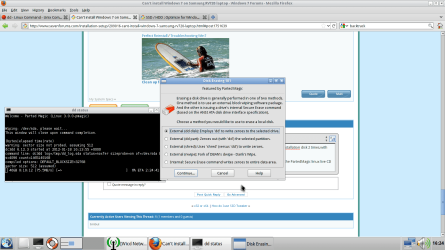
I noticed that I can't boot into some live CDs to, lets say Active@ Boot CD and Baktrack Linux. I am now using the PartedMagic linux live CD and trying to clean the hard disk (again), by writing all 00-s to it, with the method you see in the screenshot.

Hope this will help you to rescue me.
 

Attachments

  • Screenshot.png
    Screenshot.png
    91.4 KB · Views: 117

My Computer My Computer

At a glance

Windows 7
OS
Windows 7
If the DVD hangs again, reset the BIOS to defaults.

Make sure the DVD is clean.

Try extracting the ISO image from DVD or use the original ISO to write to flash stick as given earlier. This will eliminate the ISO, DVD and OD as cause.

The modern way to reinstall is to save a Win7 backup image of your completed setup then reapply the image to HD or it's replacement in 20 minutes.
 
thank you gregrocker! your first post helped me to find the solution. I used the format tool mentioned in my last post and then (just in case) the method from your post (but I guess it wasn't necessary, because the problem was resolved already), and now I have the Windows 7 installed from the DVD which cam with the laptop.

As a result I would like to mention that I couldn't use the DISKPART tool, but I have used a similar tool from PartedMagic linux live CD which comes with Hiren's Boot CD.

Thanks.
 

My Computer My Computer

At a glance

Windows 7
OS
Windows 7
Back
Top