Solved Install Windows 7 on HP 800 DM G4

siliconbeaver

New member
Guru
VIP
Local time
4:29 PM
Messages
350
my HP 800 DM G4 8600 is running Windows 11 Pro, I am thinking to install Windows 7 and reading all potential known issues as well as the solutions.

will this HP 800 G3 install media work for HP 800 G4? In SIW2 your G4 TWR install, had you made it to boot in install?
https://www.sevenforums.com/installation-setup/428285-hp-800-mini-g3-black-screen-when-install-windows-7-bios-csm-mbr-disk.html#post3519048
if boot, then I can try UHD630 driver (i5-8600/8th gen) on Windows 7

UHD630 driver. the link of win7_8th_i3_i5_Driver_2.0.rar is broken.
https://www.biostar.com.tw/app/en/ev...Driver_2.0.rar

USB 3.1 driver. it doesn't exist on Windows 7 ?
winraid has removed all of them.
--- Due to the reason of non resistance, all Intel related mod drivers will be removed from the shelf.
can I take it from Del web or Lenovo web?

Chipset Q370. it's reported, even NOT install, G4 worked fine.
besides, can drivers of SATA NVMe Audio be shared between G3 (Chipset Q270) and G4(Chipset Q370)? these hardware are with same specs between per HP.
 

My Computers My Computers

  • At a glance

    Windows 7 Pro 64-bitI7-970032 GB
    Computer type
    PC/Desktop
    Computer Manufacturer/Model Number
    HP Elite 800 G5
    OS
    Windows 7 Pro 64-bit
    CPU
    I7-9700
    Memory
    32 GB
  • At a glance

    Windows 7 Pro 64-bit
    Computer type
    Laptop
    System Manufacturer/Model Number
    ASUS UX305C
    OS
    Windows 7 Pro 64-bit

My Computers My Computers

  • At a glance

    7 X64i5 84002x8gb 3200mhz
    Computer type
    PC/Desktop
    OS
    7 X64
    CPU
    i5 8400
    Motherboard
    gigabyte b365m ds3h
    Memory
    2x8gb 3200mhz
    Hard Drives
    various
    PSU
    pure power 11 400w cm
    Case
    Coolermaster
    Cooling
    cryorig m9i
  • At a glance

    7x64g54008gb ddr4 2400
    Computer type
    PC/Desktop
    OS
    7x64
    CPU
    g5400
    Motherboard
    ga b365m ds3h
    Memory
    8gb ddr4 2400
    PSU
    xfx pro 450w

My Computers My Computers

  • At a glance

    Windows 7 Pro 64-bitI7-970032 GB
    Computer type
    PC/Desktop
    Computer Manufacturer/Model Number
    HP Elite 800 G5
    OS
    Windows 7 Pro 64-bit
    CPU
    I7-9700
    Memory
    32 GB
  • At a glance

    Windows 7 Pro 64-bit
    Computer type
    Laptop
    System Manufacturer/Model Number
    ASUS UX305C
    OS
    Windows 7 Pro 64-bit
No, I cant recommend that site, I got it using SDI. I know SDI is good.
 

My Computers My Computers

  • At a glance

    7 X64i5 84002x8gb 3200mhz
    Computer type
    PC/Desktop
    OS
    7 X64
    CPU
    i5 8400
    Motherboard
    gigabyte b365m ds3h
    Memory
    2x8gb 3200mhz
    Hard Drives
    various
    PSU
    pure power 11 400w cm
    Case
    Coolermaster
    Cooling
    cryorig m9i
  • At a glance

    7x64g54008gb ddr4 2400
    Computer type
    PC/Desktop
    OS
    7x64
    CPU
    g5400
    Motherboard
    ga b365m ds3h
    Memory
    8gb ddr4 2400
    PSU
    xfx pro 450w
Thanks,
Then I will go SDI solution you recommended.

looks I am late on the game, previous posts were about 2-5 years ago. most links got "404". my present hope is SDI . :D
 

My Computers My Computers

  • At a glance

    Windows 7 Pro 64-bitI7-970032 GB
    Computer type
    PC/Desktop
    Computer Manufacturer/Model Number
    HP Elite 800 G5
    OS
    Windows 7 Pro 64-bit
    CPU
    I7-9700
    Memory
    32 GB
  • At a glance

    Windows 7 Pro 64-bit
    Computer type
    Laptop
    System Manufacturer/Model Number
    ASUS UX305C
    OS
    Windows 7 Pro 64-bit
Its BIOS Admin is password-protected. (HP 800 DM G4)

I am stuck here. need to enable Legacy to boot USB stick of Windows 7 install media.
 

My Computers My Computers

  • At a glance

    Windows 7 Pro 64-bitI7-970032 GB
    Computer type
    PC/Desktop
    Computer Manufacturer/Model Number
    HP Elite 800 G5
    OS
    Windows 7 Pro 64-bit
    CPU
    I7-9700
    Memory
    32 GB
  • At a glance

    Windows 7 Pro 64-bit
    Computer type
    Laptop
    System Manufacturer/Model Number
    ASUS UX305C
    OS
    Windows 7 Pro 64-bit

My Computers My Computers

  • At a glance

    7 X64i5 84002x8gb 3200mhz
    Computer type
    PC/Desktop
    OS
    7 X64
    CPU
    i5 8400
    Motherboard
    gigabyte b365m ds3h
    Memory
    2x8gb 3200mhz
    Hard Drives
    various
    PSU
    pure power 11 400w cm
    Case
    Coolermaster
    Cooling
    cryorig m9i
  • At a glance

    7x64g54008gb ddr4 2400
    Computer type
    PC/Desktop
    OS
    7x64
    CPU
    g5400
    Motherboard
    ga b365m ds3h
    Memory
    8gb ddr4 2400
    PSU
    xfx pro 450w
There are two ways to achieve the goal, using SIW2's tool, present version 7UPv64R.

1. start from plain Win7 SP1 install media. when clean-install completed, activation is requested. this method is universal (applied to various motherboards).
2. since it's HP computer, I would start from Win7 install media by HP Cloud Recovery, it's automatically activated without online when clean-install done. this saves W7 key and activation procedure.

I tested both ways. and tried four combinations of boot.wim + install.wim.
it's found that Win7 automatic activation was HP boot.wim-related. in my test, if using SP1 boot.wim, no matter install.wim (SP1 or HP), always requested activation when Win7 clean install done.

Win10.esd format + modified Win7 install, worked too. again, Win7 activation was requested when install done.

Hence, the best solution is HP Win7 install media+SIW2's tool. saving W7 key and activation procedure.

note:
HP Win7 install media supports upto usb 3.0/TPM 1.2. For any new boards request usb3.1/3.2, have to add the driver and simplix update (including Win7 TPM2.0). SIW2's tool is a must-be in this case.
 

My Computers My Computers

  • At a glance

    Windows 7 Pro 64-bitI7-970032 GB
    Computer type
    PC/Desktop
    Computer Manufacturer/Model Number
    HP Elite 800 G5
    OS
    Windows 7 Pro 64-bit
    CPU
    I7-9700
    Memory
    32 GB
  • At a glance

    Windows 7 Pro 64-bit
    Computer type
    Laptop
    System Manufacturer/Model Number
    ASUS UX305C
    OS
    Windows 7 Pro 64-bit
It downloads two wim files

the first is win7 installation media

the second contains hp software and drivers

hp-rec-wims1.jpg

it extracts the two wim files to the usb stick
 
Last edited:

My Computers My Computers

  • At a glance

    7 X64i5 84002x8gb 3200mhz
    Computer type
    PC/Desktop
    OS
    7 X64
    CPU
    i5 8400
    Motherboard
    gigabyte b365m ds3h
    Memory
    2x8gb 3200mhz
    Hard Drives
    various
    PSU
    pure power 11 400w cm
    Case
    Coolermaster
    Cooling
    cryorig m9i
  • At a glance

    7x64g54008gb ddr4 2400
    Computer type
    PC/Desktop
    OS
    7x64
    CPU
    g5400
    Motherboard
    ga b365m ds3h
    Memory
    8gb ddr4 2400
    PSU
    xfx pro 450w
After my homework, it's realized that two drivers looked impossible.
1. AC9560 wifi (nowhere)
2. UHD630 graphics (invalid)

Globally, all forums were discussing them then ended up no found (winraid, MDL, reddit, ntlite, HP, Intel, archive, , , ,. could be previously "available" now "unavailable).

HP 800 G4 DM has Cat5 port. hence I use it to replace AC9560. its W7 ethernet /NIC driver, sp84719.exe.
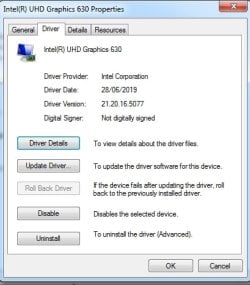
installed nic driver, went online, followed your method using SDI, got UHD630 driver installed (slow, took hours). this drive is working, no complaints.

" Display adapter driver version 21.20.16.5077" <--- right same as yours

my PC is up. two IDs are with yellow marks, AC9560(ID A370), and unknown (IFX0763, can be TPM 2.0).
 

My Computers My Computers

  • At a glance

    Windows 7 Pro 64-bitI7-970032 GB
    Computer type
    PC/Desktop
    Computer Manufacturer/Model Number
    HP Elite 800 G5
    OS
    Windows 7 Pro 64-bit
    CPU
    I7-9700
    Memory
    32 GB
  • At a glance

    Windows 7 Pro 64-bit
    Computer type
    Laptop
    System Manufacturer/Model Number
    ASUS UX305C
    OS
    Windows 7 Pro 64-bit
post the pnp id

msinfo32>components> highlight problem devices > click File >save as a text file
 

My Computers My Computers

  • At a glance

    7 X64i5 84002x8gb 3200mhz
    Computer type
    PC/Desktop
    OS
    7 X64
    CPU
    i5 8400
    Motherboard
    gigabyte b365m ds3h
    Memory
    2x8gb 3200mhz
    Hard Drives
    various
    PSU
    pure power 11 400w cm
    Case
    Coolermaster
    Cooling
    cryorig m9i
  • At a glance

    7x64g54008gb ddr4 2400
    Computer type
    PC/Desktop
    OS
    7x64
    CPU
    g5400
    Motherboard
    ga b365m ds3h
    Memory
    8gb ddr4 2400
    PSU
    xfx pro 450w
[Problem Devices]

Device PNP Device ID Error Code Not Available ACPI\IFX0763\2&DABA3FF&2 The drivers for this device are not installed. Network Controller PCI\VEN_8086&DEV_A370&SUBSYS_00308086&REV_10\3&11583659&0&A3 The drivers for this device are not installed.


presently, my HP 800 G4 DM setup is dual-boot. Win11 stays on WD SSD 512GB. Win7 is on Samsung SSD 256 GB. PC always boot onto Win11 by default. I would change to boot onto Win7 by default, how to do that? Thanks,
 

My Computers My Computers

  • At a glance

    Windows 7 Pro 64-bitI7-970032 GB
    Computer type
    PC/Desktop
    Computer Manufacturer/Model Number
    HP Elite 800 G5
    OS
    Windows 7 Pro 64-bit
    CPU
    I7-9700
    Memory
    32 GB
  • At a glance

    Windows 7 Pro 64-bit
    Computer type
    Laptop
    System Manufacturer/Model Number
    ASUS UX305C
    OS
    Windows 7 Pro 64-bit
PCI\VEN_8086&DEV_A370&SUBSYS_00308086&REV_10\3&11583659&0&A3

i dont think there are win7 drivers for that

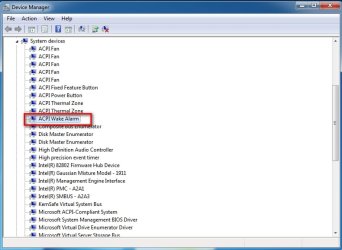
do you have this showing in device manager

:ar: View attachment acpitime-x64.zip

acpitime.jpg
 

My Computers My Computers

  • At a glance

    7 X64i5 84002x8gb 3200mhz
    Computer type
    PC/Desktop
    OS
    7 X64
    CPU
    i5 8400
    Motherboard
    gigabyte b365m ds3h
    Memory
    2x8gb 3200mhz
    Hard Drives
    various
    PSU
    pure power 11 400w cm
    Case
    Coolermaster
    Cooling
    cryorig m9i
  • At a glance

    7x64g54008gb ddr4 2400
    Computer type
    PC/Desktop
    OS
    7x64
    CPU
    g5400
    Motherboard
    ga b365m ds3h
    Memory
    8gb ddr4 2400
    PSU
    xfx pro 450w
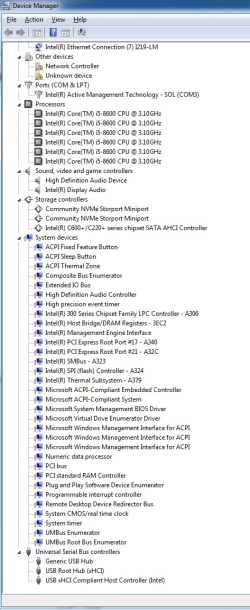
Here is mine. very similar to Win11's System devices (Win7 missing Hyper and V Virtual, two features)

image.png
 

My Computers My Computers

  • At a glance

    Windows 7 Pro 64-bitI7-970032 GB
    Computer type
    PC/Desktop
    Computer Manufacturer/Model Number
    HP Elite 800 G5
    OS
    Windows 7 Pro 64-bit
    CPU
    I7-9700
    Memory
    32 GB
  • At a glance

    Windows 7 Pro 64-bit
    Computer type
    Laptop
    System Manufacturer/Model Number
    ASUS UX305C
    OS
    Windows 7 Pro 64-bit
for AC9560 WIFI, there are two solutions.
  1. SIW2's suggestion, replace it. In my review, AC8265 is a good replace. Windows 7 driver exists.
  2. Setup dual-boot: Windows 7 and 10/11 on the DM. when WIFI needed, boot onto Windows 10/11. I tested. worked great.

An ongoing annoying issue, MR image restore was stuck when WINPE starts, mouse/keyboard stopped working. a sign USB 3.1 driver missing.
but,
The Macrium Reflect rescue disk was made on this DM after MR install. no idea how USB 3.1 driver could be still missing.
in my next try, USB 3.1 driver was fed into MR rescue disk WIM. however, still same symptom when WINPE start.
At this time, Win7 and MR installed. I have a backup image from the DM but no way to restore on the DM using MR rescue disk.

Any idea? :p

Thanks,
 

My Computers My Computers

  • At a glance

    Windows 7 Pro 64-bitI7-970032 GB
    Computer type
    PC/Desktop
    Computer Manufacturer/Model Number
    HP Elite 800 G5
    OS
    Windows 7 Pro 64-bit
    CPU
    I7-9700
    Memory
    32 GB
  • At a glance

    Windows 7 Pro 64-bit
    Computer type
    Laptop
    System Manufacturer/Model Number
    ASUS UX305C
    OS
    Windows 7 Pro 64-bit

My Computers My Computers

  • At a glance

    7 X64i5 84002x8gb 3200mhz
    Computer type
    PC/Desktop
    OS
    7 X64
    CPU
    i5 8400
    Motherboard
    gigabyte b365m ds3h
    Memory
    2x8gb 3200mhz
    Hard Drives
    various
    PSU
    pure power 11 400w cm
    Case
    Coolermaster
    Cooling
    cryorig m9i
  • At a glance

    7x64g54008gb ddr4 2400
    Computer type
    PC/Desktop
    OS
    7x64
    CPU
    g5400
    Motherboard
    ga b365m ds3h
    Memory
    8gb ddr4 2400
    PSU
    xfx pro 450w
I made a new MR rescue following your guide, updating the two *.msu and adding driver XHCI-UASPx64-SHA2

it still didn't work. mouse/keyboard stopped working when WINPE starts.

with same rescue, my tests performed on various gen,
on 6th/7th gen CPU --- Sky/ Kaby lake. no problem. boot, start. and mouse/keyboard working.
on 8th gen CPU --- Coffee Lake. no. it failed. tested on different USB ports. no luck.
 

My Computers My Computers

  • At a glance

    Windows 7 Pro 64-bitI7-970032 GB
    Computer type
    PC/Desktop
    Computer Manufacturer/Model Number
    HP Elite 800 G5
    OS
    Windows 7 Pro 64-bit
    CPU
    I7-9700
    Memory
    32 GB
  • At a glance

    Windows 7 Pro 64-bit
    Computer type
    Laptop
    System Manufacturer/Model Number
    ASUS UX305C
    OS
    Windows 7 Pro 64-bit

My Computers My Computers

  • At a glance

    7 X64i5 84002x8gb 3200mhz
    Computer type
    PC/Desktop
    OS
    7 X64
    CPU
    i5 8400
    Motherboard
    gigabyte b365m ds3h
    Memory
    2x8gb 3200mhz
    Hard Drives
    various
    PSU
    pure power 11 400w cm
    Case
    Coolermaster
    Cooling
    cryorig m9i
  • At a glance

    7x64g54008gb ddr4 2400
    Computer type
    PC/Desktop
    OS
    7x64
    CPU
    g5400
    Motherboard
    ga b365m ds3h
    Memory
    8gb ddr4 2400
    PSU
    xfx pro 450w
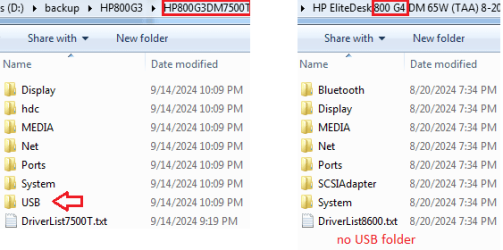
During my running double driver, HP G3 7500T shows USB folder. while HP G4 8600 doesn't display a USB folder. it's unusual.
(i.e. the double driver failed to see USB folder on HP 8600. no its backup)

image.png


I will try this way. Thanks,
borrow my pe and see if the usb3 works
:ar: 17514x64v30.iso

- - - Updated - - -

Update

hmm, bad luck. failed again. when MR WINPE starts, mouse/keyboard stopped working.

I tested various cases.
1st of all, tried your SIW2 WINPE/ 17514x64v30.iso. it run great on HP G4DM 8600. (the tool is really cool. it contains many apps, such as EasyBCD). mouse/keyboard were working fine.
next, run MR to make rescue disk, in advanced option, select to customize the wim and take the boot.wim from 17514x64v30.iso.

prior to this failure, on the G4 8600, I have tested Win7 (alone) and Win11 (dual-boot), made an MR rescue on either OS. however when boot with rescue USB disk, mouse/keyboard stopped working when MR WINPE started.
 

My Computers My Computers

  • At a glance

    Windows 7 Pro 64-bitI7-970032 GB
    Computer type
    PC/Desktop
    Computer Manufacturer/Model Number
    HP Elite 800 G5
    OS
    Windows 7 Pro 64-bit
    CPU
    I7-9700
    Memory
    32 GB
  • At a glance

    Windows 7 Pro 64-bit
    Computer type
    Laptop
    System Manufacturer/Model Number
    ASUS UX305C
    OS
    Windows 7 Pro 64-bit
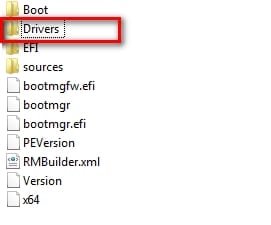
It could be that macrium is trying to force some drivers in when it starts up.

open the wim with 7-zip and delete the drivers folder.

macrium-wim-delete-drivers.jpg
 

My Computers My Computers

  • At a glance

    7 X64i5 84002x8gb 3200mhz
    Computer type
    PC/Desktop
    OS
    7 X64
    CPU
    i5 8400
    Motherboard
    gigabyte b365m ds3h
    Memory
    2x8gb 3200mhz
    Hard Drives
    various
    PSU
    pure power 11 400w cm
    Case
    Coolermaster
    Cooling
    cryorig m9i
  • At a glance

    7x64g54008gb ddr4 2400
    Computer type
    PC/Desktop
    OS
    7x64
    CPU
    g5400
    Motherboard
    ga b365m ds3h
    Memory
    8gb ddr4 2400
    PSU
    xfx pro 450w
Back
Top