Solved Install Windows 7 on HP 800 DM G4

Interesting,

this time I tried four boot.wim after deleted drivers folder.
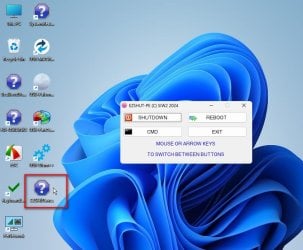
1. boot.wim from your 17514x64v30.iso. computer boot/started onto SIW2 WINPE! really no idea how could that be. should be MR WINPE. mouse/keyboard working. re-tested. same.

next three no this luck. mouse/keyboard stopped working once MR WIN PE started.
2. boot.wim from MR rescue generated on Windows 11 (I was thinking it had usb3.1 driver by default).
3. boot.wim from MR rescue generated on Windows 7.
4. boot.wim from MR rescue generated on Windows 7. another version when testing.
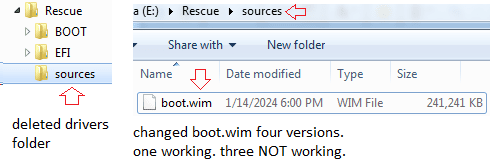
image.png
 

My Computers My Computers

  • At a glance

    Windows 7 Pro 64-bitI7-970032 GB
    Computer type
    PC/Desktop
    Computer Manufacturer/Model Number
    HP Elite 800 G5
    OS
    Windows 7 Pro 64-bit
    CPU
    I7-9700
    Memory
    32 GB
  • At a glance

    Windows 7 Pro 64-bit
    Computer type
    Laptop
    System Manufacturer/Model Number
    ASUS UX305C
    OS
    Windows 7 Pro 64-bit
- - - Updated - - -


extract the 17514x64v30M.iso
:ar: 17514x64v30M.iso

to usb stick using something like this
:ar: View attachment Usb7ice.zip

usb7ice.JPG

then look on the usb stick and inside the USBprograms folder run the get-macrium-files.cmd

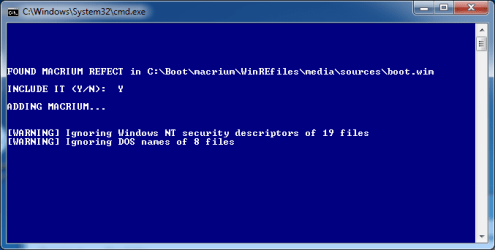
it will add your installed version of macrium to the usb stick

add-macrium1.jpg

add-macrium2.jpg


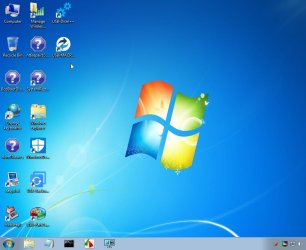
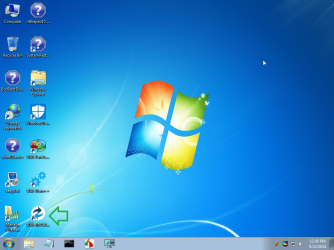
When you boot from the usb stick macrium reflect will be there on the desktop

17514v30M-1.jpg
 
Last edited:

My Computers My Computers

  • At a glance

    7 X64i5 84002x8gb 3200mhz
    Computer type
    PC/Desktop
    OS
    7 X64
    CPU
    i5 8400
    Motherboard
    gigabyte b365m ds3h
    Memory
    2x8gb 3200mhz
    Hard Drives
    various
    PSU
    pure power 11 400w cm
    Case
    Coolermaster
    Cooling
    cryorig m9i
  • At a glance

    7x64g54008gb ddr4 2400
    Computer type
    PC/Desktop
    OS
    7x64
    CPU
    g5400
    Motherboard
    ga b365m ds3h
    Memory
    8gb ddr4 2400
    PSU
    xfx pro 450w
Thank you, SIW2,
You're the man!
the 17514v30 WINPE is a magic tool. it finally works (as a vehicle of MR rescue disk).

my first test failed. when SIW2 WINPE started, it pop errors, Dr2, Dr3, , , something missing. tried whatever couldn't make it go.

then I made my 2nd test. when adding the installed version of macrium into the usb stick. it complained. WARNING below.

WARNING.png

I kept moving on until the USB stick completed.
When booting and SIW2 WINPE started from the usb drive, then slowing looking for USB sources, , ,macrium reflect was the last one there on the desktop.

image.png
 

My Computers My Computers

  • At a glance

    Windows 7 Pro 64-bitI7-970032 GB
    Computer type
    PC/Desktop
    Computer Manufacturer/Model Number
    HP Elite 800 G5
    OS
    Windows 7 Pro 64-bit
    CPU
    I7-9700
    Memory
    32 GB
  • At a glance

    Windows 7 Pro 64-bit
    Computer type
    Laptop
    System Manufacturer/Model Number
    ASUS UX305C
    OS
    Windows 7 Pro 64-bit
:-)

did you gather the macrium files from win10/11 ? It should be fine.

you can also change keyboard and other things by adding entries to USBprogs.ini . That saves making changes to the .wim

have a look at it with notepad


Createlnk
////////////////////////////////////////////////////////////
_SUB Createlnk

ENVI PECMD=PECMD.EXE
ENVI EDIT=notepad
REGI $HKCR\.wcs\=wcsfile
REGI $HKCR\wcsfile\=WCS File
REGI $HKCR\wcsfile\DefaultIcon\=%SystemRoot%\SYSTEM32\%PECMD%,0
REGI $HKCR\wcsfile\shell\open\command\=%PECMD% "LOAD "%L""
REGI $HKCR\wcsfile\shell\Edit\command\=%EDIT% %L
REGI $HKCR\inifile\shell\PECMD\=PECMD load
REGI $HKCR\inifile\shell\PECMD\command\=%PECMD% "LOAD "%L""
REGI $HKLM\SYSTEM\CurrentControlSet\Control\Session Manager\Environment\PATHEXT=.COM;.EXE;.NTR;.NTE;.NTX;.BAT;.CMD;.VBS;.VBE;.JS;.JSE;.WSF;.WSH;.WCS;.WCE;.WCX;.WCZ


//sets keyboard
exec !wpeutil SetKeyboardLayout 0809:00000809
// enable firewall
EXEC !wpeutil.exe EnableFirewall
//SETS LETTER OF THIS PARTITION TO Y
//LOAD %CurDir%\peusby.ini
//WAIT 1000

ENVI PECMN=%CurDir%\USBprograms
//LINK %StartMenu%\AV\USB-Eset,%PECMN%\ESET\ESETonlinescanner.exe
LINK %Desktop%\USB-Backupperx64,%PECMN%\AomeiBackupperx64\Backupper.exe
LINK %Desktop%\USB-Backupper,%PECMN%\AomeiBackupper\Backupper.exe
LINK %Desktop%\USB-PartAssist,%PECMN%\AomeiPartAssistx64\PartAssist.exe
LINK %Desktop%\USB-Palemoon,%PECMN%\Browser\Palemoon-portable.exe
LINK %Desktop%\USB-Dism++,%PECMN%\Dism++\Dism++x64.exe
LINK %StartMenu%\DiskTools\USB-DiskGenius,%PECMN%\DiskGeniusx64\DiskGenius.exe
LINK %StartMenu%\DataRecovery\USB-Recuva,%PECMN%\Recuva\Recuva64.exe
// and more stuff

ENVI PECMN=

_END
///////////////////////////////////////////////////////////////////////////////////////////////////////////////

- - - Updated - - -

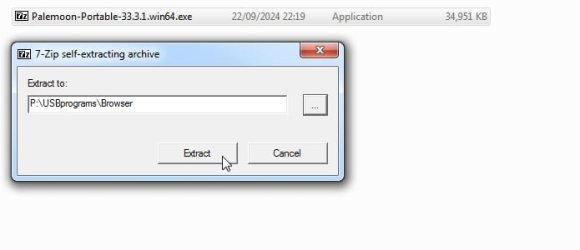
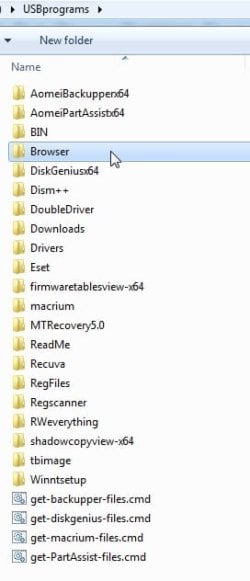
an internet browser can be added

for example my usb stick is P

so I extract palemoon to P:\USBprograms\browser

NOTE you might need an earlier version to support win7 or a different portable browser
Index of /palemoon/

palemoon-1.jpg

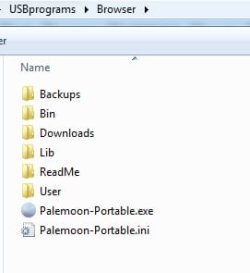
then after it has extracted look inside USBprograms\browser to find what you want to create a link to

palemoon-3.jpg

palemoon-4.jpg

add the line to USBprogs.ini

LINK %Desktop%\USB-Palemoon,%PECMN%\Browser\Palemoon-Portable.exe

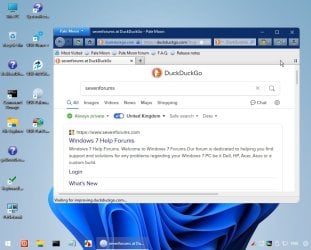
Here it is running in win11 pe

win11pe-palemoon.jpg
 
Last edited:

My Computers My Computers

  • At a glance

    7 X64i5 84002x8gb 3200mhz
    Computer type
    PC/Desktop
    OS
    7 X64
    CPU
    i5 8400
    Motherboard
    gigabyte b365m ds3h
    Memory
    2x8gb 3200mhz
    Hard Drives
    various
    PSU
    pure power 11 400w cm
    Case
    Coolermaster
    Cooling
    cryorig m9i
  • At a glance

    7x64g54008gb ddr4 2400
    Computer type
    PC/Desktop
    OS
    7x64
    CPU
    g5400
    Motherboard
    ga b365m ds3h
    Memory
    8gb ddr4 2400
    PSU
    xfx pro 450w
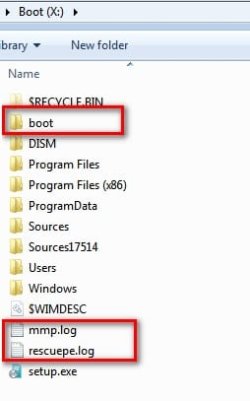
so its MR files should be obtained from Windows 7 OS C:\boot (although it's a dual-boot system).

it checks first if MR is installed
then it tries to find MR boot.wim in the %systemdrive%\boot folder from which the macrium files are extracted onto the usb stick
if it is not present in the boot folder
then it copies the needed files from %programfiles%\macrium\reflect folder onto the usb stick
 

My Computers My Computers

  • At a glance

    7 X64i5 84002x8gb 3200mhz
    Computer type
    PC/Desktop
    OS
    7 X64
    CPU
    i5 8400
    Motherboard
    gigabyte b365m ds3h
    Memory
    2x8gb 3200mhz
    Hard Drives
    various
    PSU
    pure power 11 400w cm
    Case
    Coolermaster
    Cooling
    cryorig m9i
  • At a glance

    7x64g54008gb ddr4 2400
    Computer type
    PC/Desktop
    OS
    7x64
    CPU
    g5400
    Motherboard
    ga b365m ds3h
    Memory
    8gb ddr4 2400
    PSU
    xfx pro 450w
the problem comes back again. same symptom on HP800G4.

1. 17514x64v30.iso boot/start no problem. mouse/keyboard worked. (but this version no MR rescue)
2. the revised 17514x64v30M.iso from USB stick. mouse/keyboard stopped working once SIW2 WINPE started. frustrated. :cry:
3. then I retested the USB stick on an HP800G1 (NOT G4). its mouse/keyboard worked. (no any problem. weird).

at this point, I re-made a USB stick. (thought this one was right like last one in new). however, it repeated the symptom. mouse/keyboard worked on G1 than G4.

Has MR added something new into both my G4 \boot path and my USB stick? hence G4 has been ruled out?
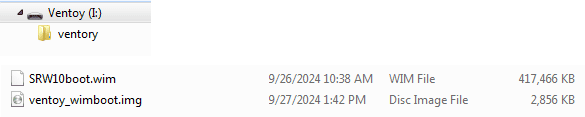
17514x64v30.iso, I am using ios version on ventoy. no this problem. (no write)


~~~~~~~~~~~~~~~~~~~~~~~~~~~~~~~~~~~~~~~~~~~~~~~~~~~~~~~~~~~~~~~~~
Update

I have removed MR from all my computers. feeling uncomfortable.

MR's performance looked choppy/unstable during my test to make it working on HP 800 G4/G5. its reaction and response were strange, simply against my practice and endeavors. sounded it's monitoring and tracking my doing.
it's reasonable to think, because G4/G5 are NOT supported by Windows 7. hence the Windows 7's MR NOT working on G4/G5. By inference, any computers NOT supported by Windows 11, would act similar on a day being clocked by MR.

freeware may always behave this way. Hasleo was on my test list. I stopped it for the same sake. avoid hassle.

I am re-taking system repair disks of Windows 7 and Windows 10. the latter one is more functional and useful.
 
Last edited:

My Computers My Computers

  • At a glance

    Windows 7 Pro 64-bitI7-970032 GB
    Computer type
    PC/Desktop
    Computer Manufacturer/Model Number
    HP Elite 800 G5
    OS
    Windows 7 Pro 64-bit
    CPU
    I7-9700
    Memory
    32 GB
  • At a glance

    Windows 7 Pro 64-bit
    Computer type
    Laptop
    System Manufacturer/Model Number
    ASUS UX305C
    OS
    Windows 7 Pro 64-bit
Has MR added something new into both my G4 \boot path and my USB stick?

MR has strange behaviour.

Before running MR

ramdik-before-MR.jpg


After running MR

ramdik-after-MR-1.jpg
 

My Computers My Computers

  • At a glance

    7 X64i5 84002x8gb 3200mhz
    Computer type
    PC/Desktop
    OS
    7 X64
    CPU
    i5 8400
    Motherboard
    gigabyte b365m ds3h
    Memory
    2x8gb 3200mhz
    Hard Drives
    various
    PSU
    pure power 11 400w cm
    Case
    Coolermaster
    Cooling
    cryorig m9i
  • At a glance

    7x64g54008gb ddr4 2400
    Computer type
    PC/Desktop
    OS
    7x64
    CPU
    g5400
    Motherboard
    ga b365m ds3h
    Memory
    8gb ddr4 2400
    PSU
    xfx pro 450w

My Computers My Computers

  • At a glance

    7 X64i5 84002x8gb 3200mhz
    Computer type
    PC/Desktop
    OS
    7 X64
    CPU
    i5 8400
    Motherboard
    gigabyte b365m ds3h
    Memory
    2x8gb 3200mhz
    Hard Drives
    various
    PSU
    pure power 11 400w cm
    Case
    Coolermaster
    Cooling
    cryorig m9i
  • At a glance

    7x64g54008gb ddr4 2400
    Computer type
    PC/Desktop
    OS
    7x64
    CPU
    g5400
    Motherboard
    ga b365m ds3h
    Memory
    8gb ddr4 2400
    PSU
    xfx pro 450w
It means bootable wim files can be placed directly on the ventoy main partition, they dont need to be inside an iso.
 

My Computers My Computers

  • At a glance

    7 X64i5 84002x8gb 3200mhz
    Computer type
    PC/Desktop
    OS
    7 X64
    CPU
    i5 8400
    Motherboard
    gigabyte b365m ds3h
    Memory
    2x8gb 3200mhz
    Hard Drives
    various
    PSU
    pure power 11 400w cm
    Case
    Coolermaster
    Cooling
    cryorig m9i
  • At a glance

    7x64g54008gb ddr4 2400
    Computer type
    PC/Desktop
    OS
    7x64
    CPU
    g5400
    Motherboard
    ga b365m ds3h
    Memory
    8gb ddr4 2400
    PSU
    xfx pro 450w
Thanks,

yes, that works. can simplify my test. main/root or ventoy folder both are ok. GPT or MBR, both are ok.

- - - Updated - - -

Update

I did test using *.wim this weekend. focusing on when the KB/mouse stop working.

since MR has been removed from all my PCs, while those rescue *.iso have been confirmed, were working but NOT working any more.
how to obtain *.wim files?
my test
1
17514v30M.wim from mounting 17514v30M.iso.
KB/mouse stopped working when "Loading files" ends, right when Microsoft Corp start.
2
bootG4W7.wim from mounting MacriumRescueG4.iso.
same as 17514v30M.wim. KB/mouse stopped working right when "Microsoft Corp" start.
no more tests *.wim by mounting *.iso.
3
my NAS. there is a backup of \boot\marcrium, from time stamp, could be first day when install. I copied its boot.wim, renamed as bootMRW7.wim
bootMRW7.wim in 1st test, KB/mouse were working under MR RE 3.1. that surprised me. at that time, my feeling had told me its next test would fail.
True, it's 2nd test failed. Very frustrated. KB/mouse stop working right when "Microsoft Corp" start.
I re-copied from NAS. renamed bootMRW6.wim (not same name) but my test failed again.
by now, my guess, all tested files, *.iso *.wim have been "infected". couldn't work on G4W7 any longer.

I am NOT sure how it happened. in my later test I had set test files "Read Only" (But I didn't do this at very beginning).

  • MR might access my test files and make them "infected". but that shouldn't infect test files on my NAS. unfortunately, test files on NAS indeed also NOT working any longer.
  • MR might lock my test file name. so next time will fail. well, I renamed my test file in purpose. still failed.
  • MR might setup hidden files on my C:\boot, to block/reset Windows 7 USB3.1/3.2 driver (already integrated into *.wim).

I have no ideas. I have closed this project. given MR RE wouldn't work on any PC Windows 7 shouldn't support.
 

Attachments

  • image.png
    image.png
    3.6 KB · Views: 41

My Computers My Computers

  • At a glance

    Windows 7 Pro 64-bitI7-970032 GB
    Computer type
    PC/Desktop
    Computer Manufacturer/Model Number
    HP Elite 800 G5
    OS
    Windows 7 Pro 64-bit
    CPU
    I7-9700
    Memory
    32 GB
  • At a glance

    Windows 7 Pro 64-bit
    Computer type
    Laptop
    System Manufacturer/Model Number
    ASUS UX305C
    OS
    Windows 7 Pro 64-bit
Works on my 8th/9th gen machines using 17514v30M

I don't know what MR is doing to yours. Are you using MR v8 ?

try the wim file from this iso. put the wim on your ventoy usb and it should find the USBprograms

:ar: 4169.iso
 
Last edited:

My Computers My Computers

  • At a glance

    7 X64i5 84002x8gb 3200mhz
    Computer type
    PC/Desktop
    OS
    7 X64
    CPU
    i5 8400
    Motherboard
    gigabyte b365m ds3h
    Memory
    2x8gb 3200mhz
    Hard Drives
    various
    PSU
    pure power 11 400w cm
    Case
    Coolermaster
    Cooling
    cryorig m9i
  • At a glance

    7x64g54008gb ddr4 2400
    Computer type
    PC/Desktop
    OS
    7x64
    CPU
    g5400
    Motherboard
    ga b365m ds3h
    Memory
    8gb ddr4 2400
    PSU
    xfx pro 450w
yes,
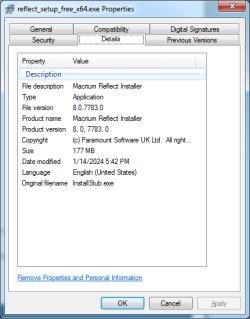
mine is MR free V8. 8.0.7783.0

image.png

keyboard/mouse stop working on macrium reflect rescue disk.
it's rare but happened.

Macrium reflect rescue media: mouse or keyboard not working, so unable - Windows 10 Forums
Macrium RE no mouse/keyboard support | Windows 11 Forum

my HP800G4 hardware could be unlucky one. when I saw the problem, I read online posts but none reported the solved. I had to try whatever I could. as result of my test, is NOT solved too.

one option is to dispose the hardware NOT working with MR RE. Test and keep those hardware working with MR RE.
It's known that, this version works on HP800G3 6th/7th, ASUS. NOT working on HP800G4 and Lenovo.

- - - Updated - - -

Update

Thanks for version 4169.iso,

its test re-run three times. each test passed. (it run much slower than your early version, 17514v30M). mouse/KB worked under MR RE 3.1.

an issue, If NOT launch MR RE, then PC can shutdown/restart down from "Start" button. however, if launch MR RE then Exit. "Start" bottom freezing up. click NOT working any more. cannot go shutdown/restart.
at this time, its desktop still running, so I opened a Command Prompt, typed the command shutdown /s to shutdown. or had to hard power down (held power button until device power off). I tried either way in my test to power down PC. it happened twice in my three tests.

Thanks SIW2,
This version's time stamp (2024-09-29 18:20) tells me you made its update tonight for me. I will keep this version.

I sincerely appreciate your help and support with this matter,
 

My Computers My Computers

  • At a glance

    Windows 7 Pro 64-bitI7-970032 GB
    Computer type
    PC/Desktop
    Computer Manufacturer/Model Number
    HP Elite 800 G5
    OS
    Windows 7 Pro 64-bit
    CPU
    I7-9700
    Memory
    32 GB
  • At a glance

    Windows 7 Pro 64-bit
    Computer type
    Laptop
    System Manufacturer/Model Number
    ASUS UX305C
    OS
    Windows 7 Pro 64-bit
Last edited:

My Computers My Computers

  • At a glance

    7 X64i5 84002x8gb 3200mhz
    Computer type
    PC/Desktop
    OS
    7 X64
    CPU
    i5 8400
    Motherboard
    gigabyte b365m ds3h
    Memory
    2x8gb 3200mhz
    Hard Drives
    various
    PSU
    pure power 11 400w cm
    Case
    Coolermaster
    Cooling
    cryorig m9i
  • At a glance

    7x64g54008gb ddr4 2400
    Computer type
    PC/Desktop
    OS
    7x64
    CPU
    g5400
    Motherboard
    ga b365m ds3h
    Memory
    8gb ddr4 2400
    PSU
    xfx pro 450w
addition is completed, thanks,

your tool helps to solve my issue, conversion between single-boot and dual-boot when Win7 vs. Win 11.
my G4 OS often swings between Win7 single-boot and Win 7/11 dual-boot.
from dual to single, MSCONFIG is easy.
while, from single to dual, involving Win7, can be easy if MR RE works, restores dual-boot. If fails, would be a headache, have to clean-install Windows 11 dual-boot once more.

oncoming days, Windows 7 future is dim, get Windows 11 ready. it's what I am doing.
 

My Computers My Computers

  • At a glance

    Windows 7 Pro 64-bitI7-970032 GB
    Computer type
    PC/Desktop
    Computer Manufacturer/Model Number
    HP Elite 800 G5
    OS
    Windows 7 Pro 64-bit
    CPU
    I7-9700
    Memory
    32 GB
  • At a glance

    Windows 7 Pro 64-bit
    Computer type
    Laptop
    System Manufacturer/Model Number
    ASUS UX305C
    OS
    Windows 7 Pro 64-bit
SIW2

my G4 has a sleep problem. have your G4/G5 experienced problem? how did you fix it? Thanks,

Symptom: If PC waking up from sleep, shutting-down PC will become re-start. To shutdown, have to redo shutdown once more.

google the issue, it's found that it's pretty common. and the solution varied, case-by-case. (please read ps at end of my post)

Out of my HP computers, HP 800 G2 or lower (HP 7800 to 8000 to 8300, and G1/G2), no this problem on Windows 7.
HP 800 G3 (6500/6500T, 6600T, 7500T), at the time I obtained them, they all had this problem on Windows 7 (each PC I had its logbook). when on Windows 10/11, the problem was gone. later they moved back to Windows 7, the problem was back again. for this sake, I was reluctant to move them back to Windows 7 (but Windows 10/11 degrading performances).
Then I tried various fixes on Windows 7, upgraded ME driver (I was thinking the sleep problem was ME-related). upgrade BIOS (my main concern). presently all run latest BIOS version.
Anyway, in my test last Summer. they all don't have this problem any longer. (let them go sleep, then wake-up, later power-down. they will be shutdown completely. no issue)
my guess, the fix is either by HP ME latest driver, or latest BIOS, on Windows 7.

my HP 800 G4 8600 now run into this right problem on Windows 7. it was shipped with Windows 10/11, no this problem at all. i.e. my Windows 7 install created this problem.
as HP no G4 support on Windows 7, I cannot try ME or BIOS W7 solution. I tried about ten fixes online google. according to my G3 experience, these online Google solution wouldn't go, must be something from HP BIOS or ME update. while HP no any G4 W7 update. no clue.

HP 800 G4 8600 becomes latest one and only one having the sleep problem on Windows 7. (G3 no this problem any longer)


ps, online google solution
Redirecting
Easily and Quickly to Fix Windows 10 Restarts After Shutdown - MiniTool Partition Wizard
How to Fix Computer Restarts After Shutdown - EaseUS
 

My Computers My Computers

  • At a glance

    Windows 7 Pro 64-bitI7-970032 GB
    Computer type
    PC/Desktop
    Computer Manufacturer/Model Number
    HP Elite 800 G5
    OS
    Windows 7 Pro 64-bit
    CPU
    I7-9700
    Memory
    32 GB
  • At a glance

    Windows 7 Pro 64-bit
    Computer type
    Laptop
    System Manufacturer/Model Number
    ASUS UX305C
    OS
    Windows 7 Pro 64-bit
I have not heard of that issue before. I haven't got a g4 or g5 now so I don't know.
 

My Computers My Computers

  • At a glance

    7 X64i5 84002x8gb 3200mhz
    Computer type
    PC/Desktop
    OS
    7 X64
    CPU
    i5 8400
    Motherboard
    gigabyte b365m ds3h
    Memory
    2x8gb 3200mhz
    Hard Drives
    various
    PSU
    pure power 11 400w cm
    Case
    Coolermaster
    Cooling
    cryorig m9i
  • At a glance

    7x64g54008gb ddr4 2400
    Computer type
    PC/Desktop
    OS
    7x64
    CPU
    g5400
    Motherboard
    ga b365m ds3h
    Memory
    8gb ddr4 2400
    PSU
    xfx pro 450w
A reason still running Windows 7 (re-post)
https://www.sevenforums.com/general...e-still-using-windows-7-a-19.html#post3531003

Windows 7 was released 2009, 15 yrs ago.
my daily work requests running of scripts of excel-macro and python previously developed on Windows 7.
I was stuck with old computers, such as HP Elite 7800-8300 because their re-installing Windows 7 was easy, W7 key was on the case, until I joined this forum.

With SF's knowledgement I learned, my choice extended onto HP 800 G1-G3, later then G4-G6. their re-installation is feasible. newer computer is with more powerful CPU. but their activation is still an issue (newer PC no W7 key). for this sake, I better stay with HP computer.

I have tried and tested Windows 11 many times. the scripts running test time on same computer with Windows 11 was about 50% or 100% slower (18 sec on W7 vs. 28 sec on W11). For my apps, Windows 11 is NOT worth (faster CPU but slower result). it has too much bloatware.
Also, python pyautogui, auto run under administration , , , many techical issues on Windows 11.

As long as my scripts run faster and better on Windows 7, Windows 7 will be my main OS until a new OS can beat Windows 7.

Indeed even Windows XP could run my macros and python scripts, but Windows XP doesn't support GPT, nor SSD. running test time is my gauge. hence I have disposed XP.
 

My Computers My Computers

  • At a glance

    Windows 7 Pro 64-bitI7-970032 GB
    Computer type
    PC/Desktop
    Computer Manufacturer/Model Number
    HP Elite 800 G5
    OS
    Windows 7 Pro 64-bit
    CPU
    I7-9700
    Memory
    32 GB
  • At a glance

    Windows 7 Pro 64-bit
    Computer type
    Laptop
    System Manufacturer/Model Number
    ASUS UX305C
    OS
    Windows 7 Pro 64-bit
Summary
Windows 7 can run on HP 800 G3/G4/G5 (Coffee/Kaby Lake architecture CPUs).
my test excluded i7/i9 because of their cost and technical difficulty.


what must-be in use
  1. Set CSM mode (F10 key when HP boot). even though on GPT disk.
  2. HP Windows 7 install media HP Cloud Recovery (it offers an HP basic display driver, similar to Microsoft Basic Display Adapter. plus, default Windows 7 activation). its latest version is for G3 6th gen CPU, supports upto USB 3.0/TPM 1.2. but can be used for higher gen CPUs with SIW2's update.
  3. Intel (7)I219-LM NIC driver. sp84719.exe.
  4. UHD 630 graphics driver, canonkong version. (graphics for intel 9th gen UHD 630 password: xiaofengmod)
  5. SIW2's tool, to update Windows 7 installation media (it offers full USB 3.0/3.1/3.2 drivers. other drivers (SATA NVMe , , ,) should be already in HP media). present version 7UPv64R. Update your Win 7 installation media

what known issues.

you can see, NIC is an easy solution for WIFI problem.
or you can replace those WIFI cards with AC8265, its Windows 7 driver exists. or set dualboot, use the WIFI in Windows 10/11.
HPIC000C can be ignored. no any impact on my HP performance as I don't run HP apps. Don't install the HPIC000C.zip. It causes BSOD.


Optional
SDI. it was used in my test (to obtain latest graphics driver version 21.20.16.5077). however, in my final install, UHD 630 graphics driver/canonkong version is simply applied (driver version 21.20.16.5068).

when clean install done, I made an image of HP 800 G4.
later restored/run it on G3 7500/7600, G4 8500/8600, G5 9500/9600. DM or SFF. no big problems except the known issues.

backup
you may run into backup software issue. I am using Ghost 11.5 but cannot backup its ESP, OS 100MB boot sector. common free Macrium Reflect/MacriumRescue (V8) wouldn't work. you can ask SIW2 for his special version (based on his 4169.iso). :D

dual-boot
in my practice, it's noticed that it's better setup dualboot on these hardware (i.e. Coffee/Kaby Lake architecture CPUs), easy to rescue and debug. and easy to install Windows 7.

given the computer came with Windows 10/11.
  1. Create a partition for Windows 7.
  2. Apply the image.
  3. Add a bootmenu entry. --- bcdboot E:\windows (where, E: is Win7 OS partition) https://www.sevenforums.com/install...in10-when-10-installed-first.html#post3532065

any time if crashed or corrupted, select Windows 10/11 on dualboot menu. re-do above procedure.


alternative graphics driver
(biostar graphics driver, upload failed)
 

My Computers My Computers

  • At a glance

    Windows 7 Pro 64-bitI7-970032 GB
    Computer type
    PC/Desktop
    Computer Manufacturer/Model Number
    HP Elite 800 G5
    OS
    Windows 7 Pro 64-bit
    CPU
    I7-9700
    Memory
    32 GB
  • At a glance

    Windows 7 Pro 64-bit
    Computer type
    Laptop
    System Manufacturer/Model Number
    ASUS UX305C
    OS
    Windows 7 Pro 64-bit
A
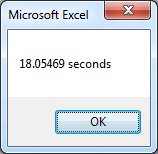
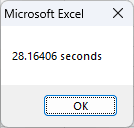
Test time of a same single script running on same computer (HP 800 G5)
Windows 7 (18 sec) vs. Windows 11 (28 sec). evil Windows 11, wasting CPU power.

w7g5testtime0630yf.png w11g4testtime.png


B
Testtime difference will be getting significant when long-time running because of RAM leak.
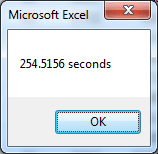
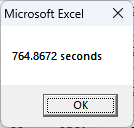
254.52 sec. on W7 vs. 737.72/764.87 sec. on W11, (nearly 3X longer on about 1100 charts).

w7g5testtime0213az.png (Win7 vs.) w11rg5testtime0213az.png (Win11 test)w11g5testtime0213az.png (Win 11 retest)
 

My Computers My Computers

  • At a glance

    Windows 7 Pro 64-bitI7-970032 GB
    Computer type
    PC/Desktop
    Computer Manufacturer/Model Number
    HP Elite 800 G5
    OS
    Windows 7 Pro 64-bit
    CPU
    I7-9700
    Memory
    32 GB
  • At a glance

    Windows 7 Pro 64-bit
    Computer type
    Laptop
    System Manufacturer/Model Number
    ASUS UX305C
    OS
    Windows 7 Pro 64-bit
Install Windows 7 on HP 800 G3/G4/G5 (Coffee/Kaby Lake CPU)

Windows 7

Old soldier never dies, he simply fades away.
 

My Computers My Computers

  • At a glance

    Windows 7 Pro 64-bitI7-970032 GB
    Computer type
    PC/Desktop
    Computer Manufacturer/Model Number
    HP Elite 800 G5
    OS
    Windows 7 Pro 64-bit
    CPU
    I7-9700
    Memory
    32 GB
  • At a glance

    Windows 7 Pro 64-bit
    Computer type
    Laptop
    System Manufacturer/Model Number
    ASUS UX305C
    OS
    Windows 7 Pro 64-bit
Back
Top