Can't install windows 7 ultimate on my notebook

gevi

New member
Local time
6:52 PM
Messages
29
Hello to everyone! I have a problem of installing windows 7 ultimate 32 bit on my notebook Packard Bell dot s. I've made my usb stick bootable by using "Windows 7 usb/dvd download tool". My notebook recognise it and start the installation but every time I got stuck on "Where do you want to install Windows". When i choose "next" it give me "Setup was unable to create a new system partition or locate an existing system partition.See the setup log files for more information. I followed this steps,found in this forum: DiskPart <ENTER>
list disk <ENTER>
select disk 0 <ENTER>
clean all <ENTER> (Will Take a While)
create partition primary align=1024 <ENTER>
format fs=ntfs <ENTER> (Will Take a While)
assign <ENTER>
active <ENTER>
exit <ENTER>
exit <ENTER>

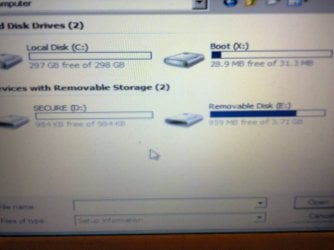
So I managed to create disk C obviously,here's my pic: I dont know if you see it. So made my local disk C,but the installation dont begin...
 

Attachments
  • Photo0618.jpg
    Photo0618.jpg
    173.1 KB · Views: 5

My Computer

Computer type
PC/Desktop
Computer Manufacturer/Model Number
Packard bell dot s
OS
Windows 7 Ultimate 32 bit
CPU
Intel Atom N2600
Motherboard
Intel GMA 3600
Memory
2GB
Graphics Card(s)
GMA 3600
Hard Drives
HDD 320GB

My Computer

Computer type
Laptop
Computer Manufacturer/Model Number
ACER ASPIRE 5742G
OS
Microsoft Windows 7 Home Premium 64-bits 7601 Multiprocessor Free Service Pack 1
CPU
Intel(R) Core(TM) i3 CPU M 370 @ 2.40GHz
Motherboard
Acer Aspire 5742G
Memory
4,00 GB
Graphics Card(s)
ATI Mobility Radeon HD 5400 Series
Sound Card
(1) AMD High Definition Audio Device (2) Realtek High Defi
Screen Resolution
1366 x 768 x 32 bits (4294967296 colors) @ 60 Hz
Hard Drives
WDC WD5000BEVT-22ZAT0
I set "clean all",and waited too long,the system just froze,then tried "create partition primary align=1024 <ENTER>" but it didnt allow me with the message that the disk is being cleaned,so I go back and made the same steps but without clean all but "format fs=ntfs <ENTER>" and waited at about 30 minutes... then tried again to return to the install,but got the same message "setup was unable to create new partition....". Then checked for drivers and I dont know exactly where I was and saw this (on my pic) The problem is that my usb flash have two partitions- secure F and public G,but here I see there are changes-secure F is secure D,and public G is Removable disk E...I just dont know how to procees and to find some drivers that the installer want me to load...I am not sure if i understand you... I make a fresh install-yes.
 

My Computer

Computer type
PC/Desktop
Computer Manufacturer/Model Number
Packard bell dot s
OS
Windows 7 Ultimate 32 bit
CPU
Intel Atom N2600
Motherboard
Intel GMA 3600
Memory
2GB
Graphics Card(s)
GMA 3600
Hard Drives
HDD 320GB
Code:
diskpart
 select  disk  0
 clean
 create  partition  primary
 format   fs=ntfs  label=Windows7  quick
 active
 exit
Whole procedure takes a few seconds to complete. No errors yet?
If all commands were succesfull install win7
 
Last edited:

My Computer

Computer type
Laptop
Computer Manufacturer/Model Number
ACER ASPIRE 5742G
OS
Microsoft Windows 7 Home Premium 64-bits 7601 Multiprocessor Free Service Pack 1
CPU
Intel(R) Core(TM) i3 CPU M 370 @ 2.40GHz
Motherboard
Acer Aspire 5742G
Memory
4,00 GB
Graphics Card(s)
ATI Mobility Radeon HD 5400 Series
Sound Card
(1) AMD High Definition Audio Device (2) Realtek High Defi
Screen Resolution
1366 x 768 x 32 bits (4294967296 colors) @ 60 Hz
Hard Drives
WDC WD5000BEVT-22ZAT0
Thank you,and sorry for my poor English...I'll try this way and then write a result...
 

My Computer

Computer type
PC/Desktop
Computer Manufacturer/Model Number
Packard bell dot s
OS
Windows 7 Ultimate 32 bit
CPU
Intel Atom N2600
Motherboard
Intel GMA 3600
Memory
2GB
Graphics Card(s)
GMA 3600
Hard Drives
HDD 320GB
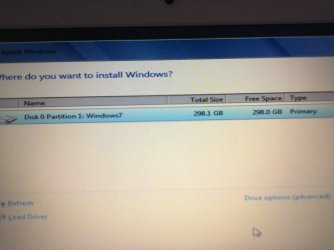
So i followed your steps,and everything went well. After I exit the cmd and restart I proceed with the installation and get to this :
 

Attachments

  • Photo0623.jpg
    Photo0623.jpg
    196.9 KB · Views: 2

My Computer

Computer type
PC/Desktop
Computer Manufacturer/Model Number
Packard bell dot s
OS
Windows 7 Ultimate 32 bit
CPU
Intel Atom N2600
Motherboard
Intel GMA 3600
Memory
2GB
Graphics Card(s)
GMA 3600
Hard Drives
HDD 320GB
So how can I proceed?
 

My Computer

Computer type
PC/Desktop
Computer Manufacturer/Model Number
Packard bell dot s
OS
Windows 7 Ultimate 32 bit
CPU
Intel Atom N2600
Motherboard
Intel GMA 3600
Memory
2GB
Graphics Card(s)
GMA 3600
Hard Drives
HDD 320GB

My Computer

Computer type
Laptop
Computer Manufacturer/Model Number
ACER ASPIRE 5742G
OS
Microsoft Windows 7 Home Premium 64-bits 7601 Multiprocessor Free Service Pack 1
CPU
Intel(R) Core(TM) i3 CPU M 370 @ 2.40GHz
Motherboard
Acer Aspire 5742G
Memory
4,00 GB
Graphics Card(s)
ATI Mobility Radeon HD 5400 Series
Sound Card
(1) AMD High Definition Audio Device (2) Realtek High Defi
Screen Resolution
1366 x 768 x 32 bits (4294967296 colors) @ 60 Hz
Hard Drives
WDC WD5000BEVT-22ZAT0
Pressed "Next",but it gave me the same message-Setup was unable to create a new system partition..." I am wrong somewhere but don't know where...
 

My Computer

Computer type
PC/Desktop
Computer Manufacturer/Model Number
Packard bell dot s
OS
Windows 7 Ultimate 32 bit
CPU
Intel Atom N2600
Motherboard
Intel GMA 3600
Memory
2GB
Graphics Card(s)
GMA 3600
Hard Drives
HDD 320GB
Code:
 diskpart
 select disk 0
 select part 1
 active
 exit
We forgot to make it active. commands successful? Is so try to install win7 again
 

My Computer

Computer type
Laptop
Computer Manufacturer/Model Number
ACER ASPIRE 5742G
OS
Microsoft Windows 7 Home Premium 64-bits 7601 Multiprocessor Free Service Pack 1
CPU
Intel(R) Core(TM) i3 CPU M 370 @ 2.40GHz
Motherboard
Acer Aspire 5742G
Memory
4,00 GB
Graphics Card(s)
ATI Mobility Radeon HD 5400 Series
Sound Card
(1) AMD High Definition Audio Device (2) Realtek High Defi
Screen Resolution
1366 x 768 x 32 bits (4294967296 colors) @ 60 Hz
Hard Drives
WDC WD5000BEVT-22ZAT0
This didnt work also... :(
 

My Computer

Computer type
PC/Desktop
Computer Manufacturer/Model Number
Packard bell dot s
OS
Windows 7 Ultimate 32 bit
CPU
Intel Atom N2600
Motherboard
Intel GMA 3600
Memory
2GB
Graphics Card(s)
GMA 3600
Hard Drives
HDD 320GB
Sure partition is active?
You still get this error? "Setup was unable to create a new system partition..."
 

My Computer

Computer type
Laptop
Computer Manufacturer/Model Number
ACER ASPIRE 5742G
OS
Microsoft Windows 7 Home Premium 64-bits 7601 Multiprocessor Free Service Pack 1
CPU
Intel(R) Core(TM) i3 CPU M 370 @ 2.40GHz
Motherboard
Acer Aspire 5742G
Memory
4,00 GB
Graphics Card(s)
ATI Mobility Radeon HD 5400 Series
Sound Card
(1) AMD High Definition Audio Device (2) Realtek High Defi
Screen Resolution
1366 x 768 x 32 bits (4294967296 colors) @ 60 Hz
Hard Drives
WDC WD5000BEVT-22ZAT0
and what exactly partition i have to select? only this one-disk 0 partition 1? Do I need some drivers or something? I have only the windows7 ultimate installation,without anything else...?!
 

My Computer

Computer type
PC/Desktop
Computer Manufacturer/Model Number
Packard bell dot s
OS
Windows 7 Ultimate 32 bit
CPU
Intel Atom N2600
Motherboard
Intel GMA 3600
Memory
2GB
Graphics Card(s)
GMA 3600
Hard Drives
HDD 320GB
and what exactly partition i have to select? only this one-disk 0 partition 1? Do I need some drivers or something? I have only the windows7 ultimate installation,without anything else...?!

disk 0 partition 1 is the only thing you have to select. Is it really an active partition?!
"Setup was unable to create a new system partition..." ??? There's no need to create a new system partition. No dvd drive in that notebook?
 

My Computer

Computer type
Laptop
Computer Manufacturer/Model Number
ACER ASPIRE 5742G
OS
Microsoft Windows 7 Home Premium 64-bits 7601 Multiprocessor Free Service Pack 1
CPU
Intel(R) Core(TM) i3 CPU M 370 @ 2.40GHz
Motherboard
Acer Aspire 5742G
Memory
4,00 GB
Graphics Card(s)
ATI Mobility Radeon HD 5400 Series
Sound Card
(1) AMD High Definition Audio Device (2) Realtek High Defi
Screen Resolution
1366 x 768 x 32 bits (4294967296 colors) @ 60 Hz
Hard Drives
WDC WD5000BEVT-22ZAT0
yes,I have no dvd drive,I use usb flash drive. I made the partition active as you told me to do,but the result is the same...I dont know what else to do and where I am wrong?
 

My Computer

Computer type
PC/Desktop
Computer Manufacturer/Model Number
Packard bell dot s
OS
Windows 7 Ultimate 32 bit
CPU
Intel Atom N2600
Motherboard
Intel GMA 3600
Memory
2GB
Graphics Card(s)
GMA 3600
Hard Drives
HDD 320GB

My Computer

Computer type
Laptop
Computer Manufacturer/Model Number
ACER ASPIRE 5742G
OS
Microsoft Windows 7 Home Premium 64-bits 7601 Multiprocessor Free Service Pack 1
CPU
Intel(R) Core(TM) i3 CPU M 370 @ 2.40GHz
Motherboard
Acer Aspire 5742G
Memory
4,00 GB
Graphics Card(s)
ATI Mobility Radeon HD 5400 Series
Sound Card
(1) AMD High Definition Audio Device (2) Realtek High Defi
Screen Resolution
1366 x 768 x 32 bits (4294967296 colors) @ 60 Hz
Hard Drives
WDC WD5000BEVT-22ZAT0
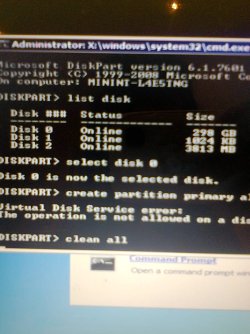
here are my disk parts:
 

Attachments

  • Photo0614.jpg
    Photo0614.jpg
    291.8 KB · Views: 0

My Computer

Computer type
PC/Desktop
Computer Manufacturer/Model Number
Packard bell dot s
OS
Windows 7 Ultimate 32 bit
CPU
Intel Atom N2600
Motherboard
Intel GMA 3600
Memory
2GB
Graphics Card(s)
GMA 3600
Hard Drives
HDD 320GB
Am I choose the right disk 0?
 

My Computer

Computer type
PC/Desktop
Computer Manufacturer/Model Number
Packard bell dot s
OS
Windows 7 Ultimate 32 bit
CPU
Intel Atom N2600
Motherboard
Intel GMA 3600
Memory
2GB
Graphics Card(s)
GMA 3600
Hard Drives
HDD 320GB
What is disk 1 (1024KB)?
What is disk 2 (about 4GB)? looks like the usb stick
 

My Computer

Computer type
Laptop
Computer Manufacturer/Model Number
ACER ASPIRE 5742G
OS
Microsoft Windows 7 Home Premium 64-bits 7601 Multiprocessor Free Service Pack 1
CPU
Intel(R) Core(TM) i3 CPU M 370 @ 2.40GHz
Motherboard
Acer Aspire 5742G
Memory
4,00 GB
Graphics Card(s)
ATI Mobility Radeon HD 5400 Series
Sound Card
(1) AMD High Definition Audio Device (2) Realtek High Defi
Screen Resolution
1366 x 768 x 32 bits (4294967296 colors) @ 60 Hz
Hard Drives
WDC WD5000BEVT-22ZAT0
Hmm,disk 1 is the second part of my usb stick(I told you that it has 2 parts,dont know why-secure F,and public G). And this disk 2 is probably the other part(public G). So disk 0 remain to be my HDD? My HDD is 320gb...So I guess i have to choose disk 2 then?
 

My Computer

Computer type
PC/Desktop
Computer Manufacturer/Model Number
Packard bell dot s
OS
Windows 7 Ultimate 32 bit
CPU
Intel Atom N2600
Motherboard
Intel GMA 3600
Memory
2GB
Graphics Card(s)
GMA 3600
Hard Drives
HDD 320GB
Back
Top