Can't install windows 7 ultimate on my notebook

I have 1 physical drive,yes. Ok,thanks,I'll try this from your tutorial :)
 

My Computer My Computer

Computer type
PC/Desktop
Computer Manufacturer/Model Number
Packard bell dot s
OS
Windows 7 Ultimate 32 bit
CPU
Intel Atom N2600
Motherboard
Intel GMA 3600
Memory
2GB
Graphics Card(s)
GMA 3600
Hard Drives
HDD 320GB
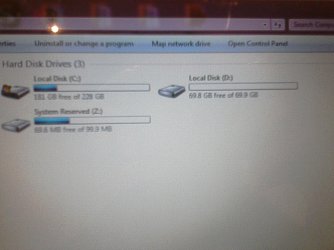
So,if I understood correctly-I want to shrink my disk C: to 69,9 GB,so that my disk D: have the rest GB of 228GB. In that case I have to delete disk D: and then to shrink my disk C: is that correct?
 

My Computer My Computer

Computer type
PC/Desktop
Computer Manufacturer/Model Number
Packard bell dot s
OS
Windows 7 Ultimate 32 bit
CPU
Intel Atom N2600
Motherboard
Intel GMA 3600
Memory
2GB
Graphics Card(s)
GMA 3600
Hard Drives
HDD 320GB
Yes. I'd consider making C a little larger depending upon how many programs you have, and whether you will be placing/linking from your User folders on D. In addition your System-Managed paging file will be approx the size of your RAM, and the Hibernate file may also take space - you can unhide System Files in Folder Options>View to see how much each occupies.

If you don't plan to use Win7 built-in backup imaging then you can place the User folders on D with this method: User Folders - Change Default Location. Just copy in the backed-up User folders and change the location for each in the new install to the copy.

If you plan to use Win7 backup imaging then to avoid D becoming a System partition due to User folders being relocated there, simply copy in the User folders from your backup and rightclick each to link to Library - Include a Folder - Windows 7 Forums then set each as your default Save folder this way: Library - Set Save Folder - Windows 7 Help Forums
 
Hey,guys! I have two more questions! I resently discovered that my "PrtSc" button doesn't work...And also when I put the netbook in sleeping or hibernating mode after waking up there are no sounds at all....?! What it should be the problem?
 

My Computer My Computer

Computer type
PC/Desktop
Computer Manufacturer/Model Number
Packard bell dot s
OS
Windows 7 Ultimate 32 bit
CPU
Intel Atom N2600
Motherboard
Intel GMA 3600
Memory
2GB
Graphics Card(s)
GMA 3600
Hard Drives
HDD 320GB
Is this a Clean Reinstall - Factory OEM Windows 7 yet or do you still have the factory preinstall?

If you have the superior Clean Reinstall then check the model's Support Downloads webpage for any function key drivers or software which may need to be added to get all keys working correctly.

After waking from sleep when sound is not working, type Troubleshoot in Start Search box, run the Audio Playback troubleshooter to see what it reports.

Make sure you have the latest Display driver for your model. Enable Automatically deliver drivers via Windows Update (Step 3) then Check for Updates first to install all Important and Optional, with reboots, keep checking until there are no more.

If you don't have the Clean Reinstall then follow those steps which should resolve all issues and give you the best possible install, instead of the worst possible install which is factory preinstalled Win7.
 
Hi,guys! First of all happy New Year-I hope you spent it well and also rest well!
 

My Computer My Computer

Computer type
PC/Desktop
Computer Manufacturer/Model Number
Packard bell dot s
OS
Windows 7 Ultimate 32 bit
CPU
Intel Atom N2600
Motherboard
Intel GMA 3600
Memory
2GB
Graphics Card(s)
GMA 3600
Hard Drives
HDD 320GB
I haven't yet divided my disks properly and that will be my second question! My Windows 7 is installed on disk C: so I suppose I can't shrink it,because the system won't allow me. But I can easily delete disk D: as you show me with your example! So I was given a program- Acronis Disk Direktor 11. so I can easily delete and then shrink the disks that I want without preinstall again Win7 and to divide disks properly. So what would you advice me?
 

My Computer My Computer

Computer type
PC/Desktop
Computer Manufacturer/Model Number
Packard bell dot s
OS
Windows 7 Ultimate 32 bit
CPU
Intel Atom N2600
Motherboard
Intel GMA 3600
Memory
2GB
Graphics Card(s)
GMA 3600
Hard Drives
HDD 320GB
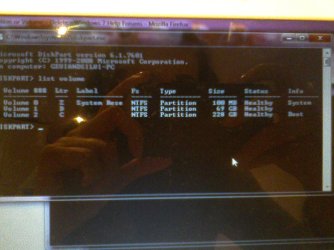
Here is my current situation:
 

Attachments

  • IMG_20140106_221647.jpg
    IMG_20140106_221647.jpg
    269.1 KB · Views: 0
  • IMG_20140106_220936.jpg
    IMG_20140106_220936.jpg
    297.3 KB · Views: 0

My Computer My Computer

Computer type
PC/Desktop
Computer Manufacturer/Model Number
Packard bell dot s
OS
Windows 7 Ultimate 32 bit
CPU
Intel Atom N2600
Motherboard
Intel GMA 3600
Memory
2GB
Graphics Card(s)
GMA 3600
Hard Drives
HDD 320GB
What is it exactly that you want to achieve?

I posted several series of steps for you to follow to which you didn't even reply, so I have no idea what you did or what you want to still do.

If you want a separate data partition from C to keep your backup image of C smaller, then decide how big you want to make it to leave enough space on C for any new programs you might want to install, use Partition Wizard to extend partition easily - video help. As shown in the video you will rightclick D to extend into C by the amount of space you want to move to D.

Once you have D the size you want, sort all data into you User data folders (Docs, Pics, Music, Downloads, Videos, Desktop, etc.) then copy them to D. From D Rightclick each to add the related Library - Include a Folder - Windows 7 Forums and then for each Library - Set Save Folder - Windows 7 Help Forums . Once this is done and you've confirmed the D User folders are copied intact, you can delete the content of each of the C User folders, but leave them in the Library so that if anything lands there you'll see it and can simply drag it to D.
 
You should remove the letter from the system reserved partition. Looks like some files have been written there.
 

My Computer My Computer

Computer type
PC/Desktop
Computer Manufacturer/Model Number
Skylake Special #666
OS
Windows 10 Pro x64
CPU
Intel Core i7 6700K
Motherboard
Asus Sabertooth Z170 Mark 1
Memory
GSkill TridentZ RGB 16GB 3600 16-16-16-36
Graphics Card(s)
EVGA GTX 980 Ti SC x2
Sound Card
Realtek High Definition
Monitor(s) Displays
AOC G2460PG
Screen Resolution
1920 x 1080 144Hz
Hard Drives
Samsung 860 Pro 256GB, Seagate Barracuda 4TB x2
PSU
EVGA 1000 P2, EVGA White Custom Braided Cables
Case
Corsair Vengeance C70 Gunmetal Black
Cooling
Corsair H100i v2, Corsair ML120 x2, Thermal Grizzly Kryonaut
Keyboard
Logitech G910 Orion Spectrum
Mouse
Logitech G700s
Internet Speed
Verizon Fios Quantum Gateway 75/75
Antivirus
Windows Defender, Malwarebytes Free 3.8.3
Browser
Chrome
Other Info
Corsair SP120 x4, LG Blu-ray Drive, Durabrand HT-395 100 Watt Dolby Digital Amp, Corsair H2100 Wireless 7.1 Headset
Post screenshot of disk management
 

My Computer My Computer

Computer type
Laptop
Computer Manufacturer/Model Number
ACER ASPIRE 5742G
OS
Microsoft Windows 7 Home Premium 64-bits 7601 Multiprocessor Free Service Pack 1
CPU
Intel(R) Core(TM) i3 CPU M 370 @ 2.40GHz
Motherboard
Acer Aspire 5742G
Memory
4,00 GB
Graphics Card(s)
ATI Mobility Radeon HD 5400 Series
Sound Card
(1) AMD High Definition Audio Device (2) Realtek High Defi
Screen Resolution
1366 x 768 x 32 bits (4294967296 colors) @ 60 Hz
Hard Drives
WDC WD5000BEVT-22ZAT0
Back
Top