Solved Can't log on to my profile (admin) Win7

No, I did not.
After a clean instal of windows I only installed Windows Office, AntiVir, and Mozila Firefox. Only been surfing Youtube, gmail and university webpage since that.

Ok - your system time is correct?
As for the users, could you confirm that nothing at all is listed in that folder? Even the Default one?
 

My Computer My Computer

At a glance

Win7 HP (x64)/Win7 Ultimate (x64)Core i7 9206 x 2GB Corsair XMS3CF HD4890
Computer Manufacturer/Model Number
Custom
OS
Win7 HP (x64)/Win7 Ultimate (x64)
CPU
Core i7 920
Motherboard
Intel X58
Memory
6 x 2GB Corsair XMS3
Graphics Card(s)
CF HD4890
Sound Card
Asus Xonar
Monitor(s) Displays
Dell 2408WFP
Screen Resolution
1920 x 1200
Hard Drives
2 x 150GB WDC Velociraptors (Raid 0)
1 x 1TB Seagate
1 x 1.5TB Seagate
PSU
Corsair HX1000W
Case
Antec 1200
Keyboard
Razer Lycosa/N52te
Mouse
Razer Lachesis
Yes it is correct. And yes absolutelly there is absolutelly nothing in that folder. But i have just discovered something ( i think ). When i'm in the Users folder, right click anywhere, then choose properties and previous versions tab on that, there are two previous versions of Users folder which i can open and they both have a folder named my old account and a folder named Public. But the restore button on that tab is unclickable, i can only click open and copy. Should i try to copy the folders to Users folder and restart?
 

My Computer My Computer

At a glance

Windows 7 Ultimate 32bitIntel Pentium T23904 GbAti Radeon HD 3470
Computer Manufacturer/Model Number
Asus F5SL
OS
Windows 7 Ultimate 32bit
CPU
Intel Pentium T2390
Memory
4 Gb
Graphics Card(s)
Ati Radeon HD 3470
Monitor(s) Displays
15.4'' WXGA
Hard Drives
250 GB - Serial ATA-150 - 5400 rpm
Yes it is correct. And yes absolutelly there is absolutelly nothing in that folder. But i have just discovered something ( i think ). When i'm in the Users folder, right click anywhere, then choose properties and previous versions tab on that, there are two previous versions of Users folder which i can open and they both have a folder named my old account and a folder named Public. But the restore button on that tab is unclickable, i can only click open and copy. Should i try to copy the folders to Users folder and restart?

Something to work with :)
Are you able to browse the folder of your old account?
Can you access the properties tab for the folder i.e. right-click the folder and select properties?

Edit

If you can, create a copy and save it on your D drive
 

My Computer My Computer

At a glance

Win7 HP (x64)/Win7 Ultimate (x64)Core i7 9206 x 2GB Corsair XMS3CF HD4890
Computer Manufacturer/Model Number
Custom
OS
Win7 HP (x64)/Win7 Ultimate (x64)
CPU
Core i7 920
Motherboard
Intel X58
Memory
6 x 2GB Corsair XMS3
Graphics Card(s)
CF HD4890
Sound Card
Asus Xonar
Monitor(s) Displays
Dell 2408WFP
Screen Resolution
1920 x 1200
Hard Drives
2 x 150GB WDC Velociraptors (Raid 0)
1 x 1TB Seagate
1 x 1.5TB Seagate
PSU
Corsair HX1000W
Case
Antec 1200
Keyboard
Razer Lycosa/N52te
Mouse
Razer Lachesis
Yes it is correct. And yes absolutelly there is absolutelly nothing in that folder. But i have just discovered something ( i think ). When i'm in the Users folder, right click anywhere, then choose properties and previous versions tab on that, there are two previous versions of Users folder which i can open and they both have a folder named my old account and a folder named Public. But the restore button on that tab is unclickable, i can only click open and copy. Should i try to copy the folders to Users folder and restart?

Something to work with :)
Are you able to browse the folder of your old account?
Can you access the properties tab for the folder i.e. right-click the folder and select properties?

Edit

If you can, create a copy and save it on your D drive

Yes, I am able to browse it and properties is accessible. And i now have it on my D disk.
Folder with a name of my profile has folders like my pictures, my music my documents etc, folder Public has folders like public music, public download etc.
 

My Computer My Computer

At a glance

Windows 7 Ultimate 32bitIntel Pentium T23904 GbAti Radeon HD 3470
Computer Manufacturer/Model Number
Asus F5SL
OS
Windows 7 Ultimate 32bit
CPU
Intel Pentium T2390
Memory
4 Gb
Graphics Card(s)
Ati Radeon HD 3470
Monitor(s) Displays
15.4'' WXGA
Hard Drives
250 GB - Serial ATA-150 - 5400 rpm
Yes it is correct. And yes absolutelly there is absolutelly nothing in that folder. But i have just discovered something ( i think ). When i'm in the Users folder, right click anywhere, then choose properties and previous versions tab on that, there are two previous versions of Users folder which i can open and they both have a folder named my old account and a folder named Public. But the restore button on that tab is unclickable, i can only click open and copy. Should i try to copy the folders to Users folder and restart?

Something to work with :)
Are you able to browse the folder of your old account?
Can you access the properties tab for the folder i.e. right-click the folder and select properties?

Edit

If you can, create a copy and save it on your D drive

Yes, I am able to browse it and properties is accessible. And i now have it on my D disk.
Folder with a name of my profile has folders like my pictures, my music my documents etc, folder Public has folders like public music, public download etc.

Ok before going with that Bill has suggested, could you check if you are able to edit the permissions on your user folder (not the public one)?
Right click>Properties>Security Tab> Select Edit and see if the password prompt is accessible i.e. a dialogue prompts you for the PW - try the PW and see if it works
 

My Computer My Computer

At a glance

Win7 HP (x64)/Win7 Ultimate (x64)Core i7 9206 x 2GB Corsair XMS3CF HD4890
Computer Manufacturer/Model Number
Custom
OS
Win7 HP (x64)/Win7 Ultimate (x64)
CPU
Core i7 920
Motherboard
Intel X58
Memory
6 x 2GB Corsair XMS3
Graphics Card(s)
CF HD4890
Sound Card
Asus Xonar
Monitor(s) Displays
Dell 2408WFP
Screen Resolution
1920 x 1200
Hard Drives
2 x 150GB WDC Velociraptors (Raid 0)
1 x 1TB Seagate
1 x 1.5TB Seagate
PSU
Corsair HX1000W
Case
Antec 1200
Keyboard
Razer Lycosa/N52te
Mouse
Razer Lachesis
It does not prompt me for a password, but yes, it is accessible.
 

My Computer My Computer

At a glance

Windows 7 Ultimate 32bitIntel Pentium T23904 GbAti Radeon HD 3470
Computer Manufacturer/Model Number
Asus F5SL
OS
Windows 7 Ultimate 32bit
CPU
Intel Pentium T2390
Memory
4 Gb
Graphics Card(s)
Ati Radeon HD 3470
Monitor(s) Displays
15.4'' WXGA
Hard Drives
250 GB - Serial ATA-150 - 5400 rpm
It does not prompt me for a password, but yes, it is accessible.

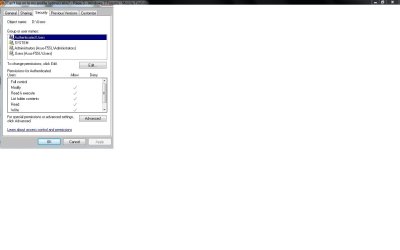
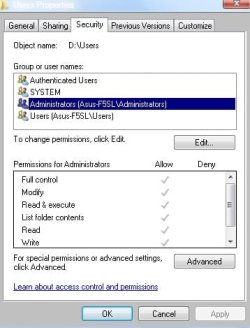
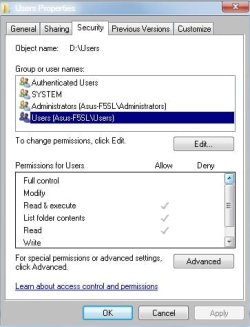
Can you post snips of the properties tab (may have to be multiple snips with each user name depicted and the respective permissions) ?
 

My Computer My Computer

At a glance

Win7 HP (x64)/Win7 Ultimate (x64)Core i7 9206 x 2GB Corsair XMS3CF HD4890
Computer Manufacturer/Model Number
Custom
OS
Win7 HP (x64)/Win7 Ultimate (x64)
CPU
Core i7 920
Motherboard
Intel X58
Memory
6 x 2GB Corsair XMS3
Graphics Card(s)
CF HD4890
Sound Card
Asus Xonar
Monitor(s) Displays
Dell 2408WFP
Screen Resolution
1920 x 1200
Hard Drives
2 x 150GB WDC Velociraptors (Raid 0)
1 x 1TB Seagate
1 x 1.5TB Seagate
PSU
Corsair HX1000W
Case
Antec 1200
Keyboard
Razer Lycosa/N52te
Mouse
Razer Lachesis
Are these the ones you wanted?

edit
The one permission you don't see is special permissions and it's unchecked in all of those.
 

Attachments

  • pr.jpg
    pr.jpg
    33.2 KB · Views: 12
  • pra.jpg
    pra.jpg
    27.1 KB · Views: 7
  • praa.jpg
    praa.jpg
    27.2 KB · Views: 3
  • praaa.jpg
    praaa.jpg
    27.6 KB · Views: 2

My Computer My Computer

At a glance

Windows 7 Ultimate 32bitIntel Pentium T23904 GbAti Radeon HD 3470
Computer Manufacturer/Model Number
Asus F5SL
OS
Windows 7 Ultimate 32bit
CPU
Intel Pentium T2390
Memory
4 Gb
Graphics Card(s)
Ati Radeon HD 3470
Monitor(s) Displays
15.4'' WXGA
Hard Drives
250 GB - Serial ATA-150 - 5400 rpm
Yes thanks.
Could you edit the permissions for the last user name (Users) and check allow for all the entries in the permissions? Once done, reboot and see if you can log-in to the previous account.
If that does not work, we are going to have to go the route suggested by Bill, sfc/scannow via the DVD media, if not for a clean reinstall. Sometimes permissions modification in 7 does not work out well

Keep us posted and regards
 

My Computer My Computer

At a glance

Win7 HP (x64)/Win7 Ultimate (x64)Core i7 9206 x 2GB Corsair XMS3CF HD4890
Computer Manufacturer/Model Number
Custom
OS
Win7 HP (x64)/Win7 Ultimate (x64)
CPU
Core i7 920
Motherboard
Intel X58
Memory
6 x 2GB Corsair XMS3
Graphics Card(s)
CF HD4890
Sound Card
Asus Xonar
Monitor(s) Displays
Dell 2408WFP
Screen Resolution
1920 x 1200
Hard Drives
2 x 150GB WDC Velociraptors (Raid 0)
1 x 1TB Seagate
1 x 1.5TB Seagate
PSU
Corsair HX1000W
Case
Antec 1200
Keyboard
Razer Lycosa/N52te
Mouse
Razer Lachesis
These screenshots were made of properties of a users folder when it was on D disk. When i copied the folder in to C:\Users, all the entries (except special permissionas) were checked and it worked. I can log on to my old account. It got its old appearance - the one it had after reinstal and other settings like firefox' history is lost, but i guess it's because this previous version of users folder it gave me was of two days old.
The most important thing is i can access my profile :) Thank You for Your precious time Lomai.
 

My Computer My Computer

At a glance

Windows 7 Ultimate 32bitIntel Pentium T23904 GbAti Radeon HD 3470
Computer Manufacturer/Model Number
Asus F5SL
OS
Windows 7 Ultimate 32bit
CPU
Intel Pentium T2390
Memory
4 Gb
Graphics Card(s)
Ati Radeon HD 3470
Monitor(s) Displays
15.4'' WXGA
Hard Drives
250 GB - Serial ATA-150 - 5400 rpm
These screenshots were made of properties of a users folder when it was on D disk. When i copied the folder in to C:\Users, all the entries (except special permissionas) were checked and it worked. I can log on to my old account. It got its old appearance - the one it had after reinstal and other settings like firefox' history is lost, but i guess it's because this previous version of users folder it gave me was of two days old.
The most important thing is i can access my profile :) Thank You for Your precious time Lomai.

Glad to know things worked out. Take care and regards - gonna turn in now its after 4am :sleep:
 

My Computer My Computer

At a glance

Win7 HP (x64)/Win7 Ultimate (x64)Core i7 9206 x 2GB Corsair XMS3CF HD4890
Computer Manufacturer/Model Number
Custom
OS
Win7 HP (x64)/Win7 Ultimate (x64)
CPU
Core i7 920
Motherboard
Intel X58
Memory
6 x 2GB Corsair XMS3
Graphics Card(s)
CF HD4890
Sound Card
Asus Xonar
Monitor(s) Displays
Dell 2408WFP
Screen Resolution
1920 x 1200
Hard Drives
2 x 150GB WDC Velociraptors (Raid 0)
1 x 1TB Seagate
1 x 1.5TB Seagate
PSU
Corsair HX1000W
Case
Antec 1200
Keyboard
Razer Lycosa/N52te
Mouse
Razer Lachesis
  • Like
Reactions: 8vs
Back
Top