Can't move pagefile

joe233

New member
Local time
5:20 PM
Messages
3
I'm trying to move my pagefile to my ssd for improved performance, but it removes itself and returns to the boot drive upon restart. I know that windows requires a pagefile on the boot drive for memory dumps, but after trying various sizes from 16 mb to 8 gb, nothing seems to work. The pagefile.sys file is gone once I restart the computer. I've been trying to figure this out on and off for weeks now and have basically given up. I'm pretty certain I've tried everything... permissions, safe mode, etc. Extremely frustrating. Any help would be appreciated. Thank you.
 

My Computer

Computer type
PC/Desktop
OS
Windows 7 x64 Pro OEM
Make a printscreen of advanced system settings (where pagefile settings are defined). Post it so we can see how it's configured.
 

My Computer

Computer type
Laptop
Computer Manufacturer/Model Number
ACER ASPIRE 5742G
OS
Microsoft Windows 7 Home Premium 64-bits 7601 Multiprocessor Free Service Pack 1
CPU
Intel(R) Core(TM) i3 CPU M 370 @ 2.40GHz
Motherboard
Acer Aspire 5742G
Memory
4,00 GB
Graphics Card(s)
ATI Mobility Radeon HD 5400 Series
Sound Card
(1) AMD High Definition Audio Device (2) Realtek High Defi
Screen Resolution
1366 x 768 x 32 bits (4294967296 colors) @ 60 Hz
Hard Drives
WDC WD5000BEVT-22ZAT0
Welcome to the forum.

Be sure that the SYSTEM account has full control over the root of the SSD drive.

So the SSD drive isn't the boot drive?
It would be useful to see a screenshot of Disk Manager to see what is where.
 

My Computer

Computer type
PC/Desktop
Computer Manufacturer/Model Number
HP
OS
Windows 7 Pro 64 bit
CPU
Xeon W3520
Memory
8 GB
Graphics Card(s)
Nvidia Geforce 210
Thanks for the replies.

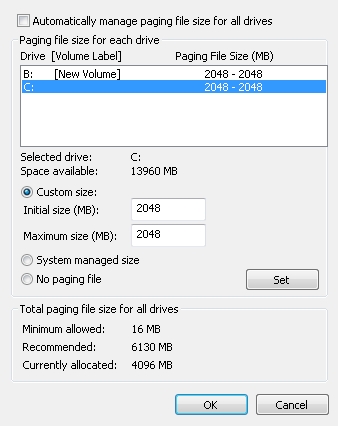
Here's what it looks like before reboot. I suppose I could just never turn off my computer or set the pagefile each time, but obviously I'm looking for something a little more practical. Also I'm not entirely sure it even sets properly in the first place.

Note the 4096 MB currently allocated. There's also a pagefile.sys on each drive.

zGZyCNk.jpg


And here it is after a restart. Only 2048 MB total and no pagefile.sys on the B drive.

79bSiQE.jpg


As I said, I've tested differing minimums and maximums and eventually settled on 2 gigs as it seems to provide the least amount of hitching and stuttering in certain games.

WRT permissions, it appears that SYSTEM does have full control of the B root. Everything is ticked except for special permissions. Is there maybe something else I might be overlooking there? I recall changing the owner of the drive to administrator at some point.

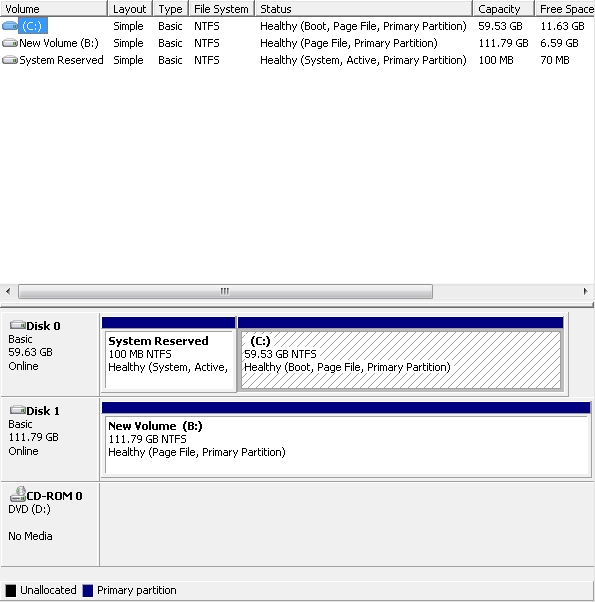
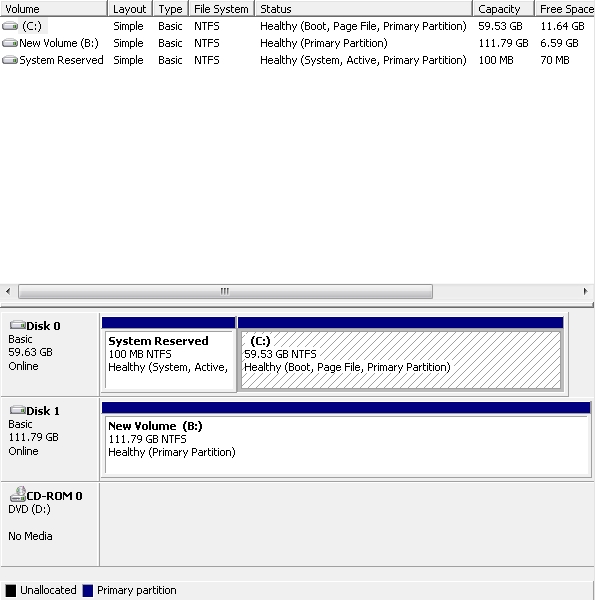
Here's disk management before and after reboot. Both are SSDs.

5c134zb.jpg


shKtYbv.jpg


Thanks again.
 

My Computer

Computer type
PC/Desktop
OS
Windows 7 x64 Pro OEM
Maybe it's because you are using B as the drive letter.
A and B drive letters are/were normally used for floppy drives.
Can you change the drive letter to D and see if that fixes the issue?
Changing the drive letter to D will break any links you have to B right now, but you can change it back to B if you want to.
 

My Computer

Computer type
PC/Desktop
Computer Manufacturer/Model Number
home built
OS
Multi-Boot W7_Pro_x64 W8.1_Pro_x64 W10_Pro_x64 +Linux_VMs +Chromium_VM
CPU
AMD Athlon II x4 620
Motherboard
Gigabyte GA-MA785G-UD3H
Memory
6GB GSkill DDR2 800
Graphics Card(s)
AMD 4670 GPU + AMD 4200 IGP
Sound Card
on board Realtek ALC889A
Monitor(s) Displays
RCA 40" LCD TV, Insignia 32" LCD TV, HP 15" LCD monitor
Screen Resolution
1680 x 1050
Hard Drives
OCZ Vertex 3 120GB,
Samsung F3 1TB (3),
Several others - WD, Seagate, Hitachi, ...
PSU
Corsair 500 W
Case
Rosewill mid tower
Cooling
CM 90mm rifle
Keyboard
Gyration wireless, Logitech wireless, Dell USB wired
Mouse
Gyration wireless, Logitech wireless, V7 USB wired
Internet Speed
Spectrum - 100Mbps D / 10Mbps U
Antivirus
Avast, MBAM3, EMET, WinPatrol
Browser
Pale Moon, Firefox, IE
Other Info
2 multi-boot PC's
Mainly HTPC/Office/Gen purpose (no gaming).
Trendnet USB KVM.
LG DVD burner/Blue Ray Player.
Tray system for removable SATA backup drives.

Not currently OCd, under-volted.
I use Hybrid sleep, rarely re-boot or shutdown.

Hauppauge HD-PVR, Avermedia PCIe TV Tuner, Hauppauge PCI TV Tuner.
Sounds like that's entirely possible though I'm a little hesitant to try it right away. I'm hoping there might be another solution offered but I'll definitely do it as a last resort. On more than one occasion Steam has inexplicably deleted entire games from my drive so it can be pretty fickle sometimes. I realize it's unlikely that anything will happen but I'd rather not risk it and have to re-download games, as my internet is limited and capped.
 

My Computer

Computer type
PC/Desktop
OS
Windows 7 x64 Pro OEM
Understood.
If you have an external drive you could create periodic backup images of your B drive.
That way if something ever does go wrong you can restore the backup image.
 

My Computer

Computer type
PC/Desktop
Computer Manufacturer/Model Number
home built
OS
Multi-Boot W7_Pro_x64 W8.1_Pro_x64 W10_Pro_x64 +Linux_VMs +Chromium_VM
CPU
AMD Athlon II x4 620
Motherboard
Gigabyte GA-MA785G-UD3H
Memory
6GB GSkill DDR2 800
Graphics Card(s)
AMD 4670 GPU + AMD 4200 IGP
Sound Card
on board Realtek ALC889A
Monitor(s) Displays
RCA 40" LCD TV, Insignia 32" LCD TV, HP 15" LCD monitor
Screen Resolution
1680 x 1050
Hard Drives
OCZ Vertex 3 120GB,
Samsung F3 1TB (3),
Several others - WD, Seagate, Hitachi, ...
PSU
Corsair 500 W
Case
Rosewill mid tower
Cooling
CM 90mm rifle
Keyboard
Gyration wireless, Logitech wireless, Dell USB wired
Mouse
Gyration wireless, Logitech wireless, V7 USB wired
Internet Speed
Spectrum - 100Mbps D / 10Mbps U
Antivirus
Avast, MBAM3, EMET, WinPatrol
Browser
Pale Moon, Firefox, IE
Other Info
2 multi-boot PC's
Mainly HTPC/Office/Gen purpose (no gaming).
Trendnet USB KVM.
LG DVD burner/Blue Ray Player.
Tray system for removable SATA backup drives.

Not currently OCd, under-volted.
I use Hybrid sleep, rarely re-boot or shutdown.

Hauppauge HD-PVR, Avermedia PCIe TV Tuner, Hauppauge PCI TV Tuner.
I know that windows requires a pagefile on the boot drive for memory dumps [..]

That's incorrect (?!??); Not sure whether it's covered in this article, but it looks like a nice resource, Pushing the Limits of Windows: Virtual Memory:
Code:
https://blogs.technet.com/b/markrussinovich/archive/2008/11/17/3155406.aspx

Also I'm not entirely sure it even sets properly in the first place.
It does, if it's displayed (and not present on the drive, where you don't want it; which isn't your case - unfortunately :))

I recall changing the owner of the drive to administrator at some point.
Meh (Crazy thing 2 do, mess w/teh permissions 4 no apparent reason)

P.S.
On more than one occasion Steam has inexplicably deleted entire games from my drive so it can be pretty fickle sometimes.
That's insane!.. Anywho, IIRC the worst that can happen is that 'things will stop working', if the change in the drive letter affects it.. Should NOT be a problem; to try, anyways. ;-$

Edit: Oh & btw., setting the pagefile to 1.5x the RAM was/is the acceptable practice (in Windows 7, it's the value already presented in that dialog); not what doesn't seem to glitch for certain games, hehe; if you should have it as static. xD
 

My Computer

Computer type
PC/Desktop
Computer Manufacturer/Model Number
Custom
OS
Windows 7 Professional x64 Service Pack 1
CPU
i7-3770 Ivy, MSI OC genie OC'd (default)
Motherboard
Z68A-G43 (G3), MSI
Memory
Vengeance 2x4GB 2133MHz (OC'd)
Graphics Card(s)
GTX 650 Gainward
Monitor(s) Displays
BenQ E2200HD
Screen Resolution
1920x1080
Hard Drives
WD 1TB 64MB sATA; LC-Power LC-PRO-25WU; IT-350SA
PSU
LC7600v2.3
Case
ALTO winwin.rs/
Cooling
Stock / standard
Keyboard
Logitech Alto
Mouse
Genius DeathTaker
Internet Speed
25 (megabits / second) = 3125 KBps = (25.600/2.048)
Antivirus
Comodo
Browser
Mozilla
Other Info
http://valid.canardpc.com/mcdty0
Back
Top