Solved "Can't Open ACPI ATK0100 kernel Mode Driver" error at boot.

Teekz

New member
Power User
Local time
4:20 AM
Messages
142
Location
Doncaster, UK.
Hi, everyone.

I hope someone here can help me, as I can't seem to solve this problem I'm having.

Basically, I have two laptops here. There is my brother's Toshiba Equium L40-156, and a HP Compaq 6720s.

I made an image of the hard drive in the Toshiba laptop, and restored that image to the HP laptop. I have spent the afternoon installing most of the necessary drivers so that the OS from the Toshiba laptop can run on the HP laptop.

The error I am having, as stated in the title, is that the message "Can't Open ACPI ATK0100 kernel Mode Driver" appears every time the system loads. I have tried researching this error, but I didn't have much luck. As suggested on various sites around the web, I have tried a few versions of the driver for the display adapter ("Mobile Intel(R) 965 Express Chipset Family"), but none seem to resolve the error. Nothing in Device Manager has a triangle to indicate an error.

Any insight into the situation would be greatly appreciated.

Thanks in advance,
Tom.
 

My Computer My Computer

At a glance

Windows 7 Ultimate (x64) Service Pack 1AMD Athlon 64 X2 Dual Core Processor 5600+ 2....4GB, Dual Channel, DDR2NVIDIA GeForce 8600 GT
OS
Windows 7 Ultimate (x64) Service Pack 1
CPU
AMD Athlon 64 X2 Dual Core Processor 5600+ 2.80 GHz
Motherboard
GIGABYTE GA-M720-US3
Memory
4GB, Dual Channel, DDR2
Graphics Card(s)
NVIDIA GeForce 8600 GT
Sound Card
Creative SB X-Fi
Monitor(s) Displays
Dual Screen - Dell SE198WFP (19"), & GRUNDIG GU37BLKSE (37")
Screen Resolution
1440x900, 1600x1200
Hard Drives
Hitachi HDS722020ALA330 (2TB Internal), WD 15EADS (1.5TB External)
Keyboard
Microsoft Wireless Laser Keyboard 7000
Mouse
Microsoft Wireless Laser Mouse 7000
I'm surprised this has worked at all for you to be honest, I wouldn't even know where to begin on all the problems you are likely to have with this scenario.

...wouldn't be surprised if authentication fails on you either.
 

My Computer My Computer

At a glance

Windows 7 x64Intel i7 2600kG.skill Ripjaw 16gigs @ 1866Nvidia gtx580 (evga)
Computer Manufacturer/Model Number
Insane hobo technologies. ;-)
OS
Windows 7 x64
CPU
Intel i7 2600k
Motherboard
Asrock z68 extreme 4 gen 3
Memory
G.skill Ripjaw 16gigs @ 1866
Graphics Card(s)
Nvidia gtx580 (evga)
Sound Card
Integrated HD audio + hdmi
Monitor(s) Displays
24" ASUS widescreen + 42" insignia
Screen Resolution
1080p (1920x1080)
Hard Drives
128 Samsung 830
256 Samsung 840
3 x 1tb storage drive (various)
1 western digital 1tb (eSATA)
1 Seagate 1tb (eSATA)
PSU
1 kilowatt SLI/Crossfire rated Silverstone modular
Case
NZXT Phantom + additional 220 fan
Cooling
Zalmann
Keyboard
Microsoft wireless 3000 (v2)
Mouse
MS - wireless 5000 (bluetrack)
Internet Speed
depends on if you ask me or my provider.
Other Info
The above information is provided as is, and the author assumes no responsibility for issues it may cause with your sanity or fanboyism.
The laptops have similar specifications, and with a few new drivers, everything seems to work flawlessly. Obviously, apart from this one error I can't seem to shake.

I can't actually tell what negative effects the error is having on the machine, if any at all. The graphics seem to work fine, aero is enabled, etc... The function keys all work as they should... It's just an annoyance having to close the error message window every time the system boots.
 

My Computer My Computer

At a glance

Windows 7 Ultimate (x64) Service Pack 1AMD Athlon 64 X2 Dual Core Processor 5600+ 2....4GB, Dual Channel, DDR2NVIDIA GeForce 8600 GT
OS
Windows 7 Ultimate (x64) Service Pack 1
CPU
AMD Athlon 64 X2 Dual Core Processor 5600+ 2.80 GHz
Motherboard
GIGABYTE GA-M720-US3
Memory
4GB, Dual Channel, DDR2
Graphics Card(s)
NVIDIA GeForce 8600 GT
Sound Card
Creative SB X-Fi
Monitor(s) Displays
Dual Screen - Dell SE198WFP (19"), & GRUNDIG GU37BLKSE (37")
Screen Resolution
1440x900, 1600x1200
Hard Drives
Hitachi HDS722020ALA330 (2TB Internal), WD 15EADS (1.5TB External)
Keyboard
Microsoft Wireless Laser Keyboard 7000
Mouse
Microsoft Wireless Laser Mouse 7000
An older version of this,

atk0110.png

and only found on Asus motherboards. That it got installed on the Toshiba says to me that it has an Asus motherboard in it. You're also not the only one to have the problem, only difference is this is on a Toshiba laptop,

Toshiba Support Forums: Satellite Pro L300 shows ACPI ATK0100 ...

One thing you can try to fix the error,

1. One Device manager and locate ATK0100 ACPI UTILITY

2. Right click and select Uninstall and also select "uninstall the driver software for this device"

3. Restart and check Device Manager again and it should be gone.

If the HP also has an Asus motherboard in it, it may very well still be there but only with the yellow triangle. If it does running Windows Update should get it detected and installed (has worked this way for me on any Asus board I have had).
 

My Computer My Computer

At a glance

Win 7 Ultimate x64FX-8350 @ 4.6 GHz so farADATA XPG V1 Series Black 8GB DDR3 1600Sapphire R9 270x Dual-X
Computer type
PC/Desktop
Computer Manufacturer/Model Number
Me
OS
Win 7 Ultimate x64
CPU
FX-8350 @ 4.6 GHz so far
Motherboard
Asus M5A97 EVO
Memory
ADATA XPG V1 Series Black 8GB DDR3 1600
Graphics Card(s)
Sapphire R9 270x Dual-X
Sound Card
Xonar DGX w/ Corsair Vengence 1300
Monitor(s) Displays
Acer S232HL Abid
Screen Resolution
1920x1080
Hard Drives
120 GB OCZ Vertex 3
500 GB Seagate 7200.12
PSU
Antec Earthwatts 650W Green
Case
Antec Three Hundred
Cooling
Cooler Master 212 EVO
Keyboard
Logitech G510
Mouse
Logitech G500s
Internet Speed
35000/3000
Thanks for the info, the only problem is that I can't find anything to do with the ATK0100 ACPI Utility in Device Manager. Is there any chance it's labelled as something else entirely?
 

My Computer My Computer

At a glance

Windows 7 Ultimate (x64) Service Pack 1AMD Athlon 64 X2 Dual Core Processor 5600+ 2....4GB, Dual Channel, DDR2NVIDIA GeForce 8600 GT
OS
Windows 7 Ultimate (x64) Service Pack 1
CPU
AMD Athlon 64 X2 Dual Core Processor 5600+ 2.80 GHz
Motherboard
GIGABYTE GA-M720-US3
Memory
4GB, Dual Channel, DDR2
Graphics Card(s)
NVIDIA GeForce 8600 GT
Sound Card
Creative SB X-Fi
Monitor(s) Displays
Dual Screen - Dell SE198WFP (19"), & GRUNDIG GU37BLKSE (37")
Screen Resolution
1440x900, 1600x1200
Hard Drives
Hitachi HDS722020ALA330 (2TB Internal), WD 15EADS (1.5TB External)
Keyboard
Microsoft Wireless Laser Keyboard 7000
Mouse
Microsoft Wireless Laser Mouse 7000

My Computer My Computer

At a glance

Win 7 Ultimate x64FX-8350 @ 4.6 GHz so farADATA XPG V1 Series Black 8GB DDR3 1600Sapphire R9 270x Dual-X
Computer type
PC/Desktop
Computer Manufacturer/Model Number
Me
OS
Win 7 Ultimate x64
CPU
FX-8350 @ 4.6 GHz so far
Motherboard
Asus M5A97 EVO
Memory
ADATA XPG V1 Series Black 8GB DDR3 1600
Graphics Card(s)
Sapphire R9 270x Dual-X
Sound Card
Xonar DGX w/ Corsair Vengence 1300
Monitor(s) Displays
Acer S232HL Abid
Screen Resolution
1920x1080
Hard Drives
120 GB OCZ Vertex 3
500 GB Seagate 7200.12
PSU
Antec Earthwatts 650W Green
Case
Antec Three Hundred
Cooling
Cooler Master 212 EVO
Keyboard
Logitech G510
Mouse
Logitech G500s
Internet Speed
35000/3000
Well, I took your advice, and I found the ACPI ATK0100 Utility in the Device Manager console!

I uninstalled and deleted this driver, but when I restarted, I found that the error still appears. Any idea on what I should do next? :/
 

My Computer My Computer

At a glance

Windows 7 Ultimate (x64) Service Pack 1AMD Athlon 64 X2 Dual Core Processor 5600+ 2....4GB, Dual Channel, DDR2NVIDIA GeForce 8600 GT
OS
Windows 7 Ultimate (x64) Service Pack 1
CPU
AMD Athlon 64 X2 Dual Core Processor 5600+ 2.80 GHz
Motherboard
GIGABYTE GA-M720-US3
Memory
4GB, Dual Channel, DDR2
Graphics Card(s)
NVIDIA GeForce 8600 GT
Sound Card
Creative SB X-Fi
Monitor(s) Displays
Dual Screen - Dell SE198WFP (19"), & GRUNDIG GU37BLKSE (37")
Screen Resolution
1440x900, 1600x1200
Hard Drives
Hitachi HDS722020ALA330 (2TB Internal), WD 15EADS (1.5TB External)
Keyboard
Microsoft Wireless Laser Keyboard 7000
Mouse
Microsoft Wireless Laser Mouse 7000
Start with having a looking in,

C:\Windows\System32\drivers

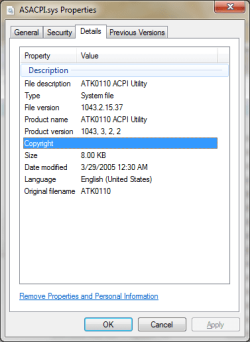
and see if ASACPI.sys is still there, if it is Windows likely re-installed it from the DriverStore folder,

C:\Windows\System32\DriverStore\FileRepository

On mine the folder it is in is called,

atk2000.inf_amd64_neutral_a91abe245a6c41c8

with yours being an older version it may have a slightly different name; should still have the atk, but the 2000 may be different (and the number/letter combo definitely will).

If that is what happened then uninstall again through Device Manager then go to the FileRepository folder and manually delete the atk folder. Windows won't let you delete it without changing the permissions on the folder, so you can do it manually or use this (if you haven't added it already),

http://www.sevenforums.com/tutorials/1911-take-ownership-shortcut.html

to add it to the context menu. Only take ownership of the atk folder and not the whole FileRepository folder.

Hopefully that should stop the error, but if it doesn't then it may take going into the registry an manually searching for and deleting any entries found for ATK0100.
 

My Computer My Computer

At a glance

Win 7 Ultimate x64FX-8350 @ 4.6 GHz so farADATA XPG V1 Series Black 8GB DDR3 1600Sapphire R9 270x Dual-X
Computer type
PC/Desktop
Computer Manufacturer/Model Number
Me
OS
Win 7 Ultimate x64
CPU
FX-8350 @ 4.6 GHz so far
Motherboard
Asus M5A97 EVO
Memory
ADATA XPG V1 Series Black 8GB DDR3 1600
Graphics Card(s)
Sapphire R9 270x Dual-X
Sound Card
Xonar DGX w/ Corsair Vengence 1300
Monitor(s) Displays
Acer S232HL Abid
Screen Resolution
1920x1080
Hard Drives
120 GB OCZ Vertex 3
500 GB Seagate 7200.12
PSU
Antec Earthwatts 650W Green
Case
Antec Three Hundred
Cooling
Cooler Master 212 EVO
Keyboard
Logitech G510
Mouse
Logitech G500s
Internet Speed
35000/3000
Right. I see "ATKACPI.sys" in System32/drivers, and have now deleted it.

There is no folder mentioning ATK in the FileRepository. (I imagine this was deleted when I checked the 'delete this driver' box when uninstalling earlier.

I have restarted again now that I have deleted the .sys file, and the error still appears! :(

Maybe if we figure out what keeps trying to open it, we could disable it there? Perhaps a registry setting or something?
 

My Computer My Computer

At a glance

Windows 7 Ultimate (x64) Service Pack 1AMD Athlon 64 X2 Dual Core Processor 5600+ 2....4GB, Dual Channel, DDR2NVIDIA GeForce 8600 GT
OS
Windows 7 Ultimate (x64) Service Pack 1
CPU
AMD Athlon 64 X2 Dual Core Processor 5600+ 2.80 GHz
Motherboard
GIGABYTE GA-M720-US3
Memory
4GB, Dual Channel, DDR2
Graphics Card(s)
NVIDIA GeForce 8600 GT
Sound Card
Creative SB X-Fi
Monitor(s) Displays
Dual Screen - Dell SE198WFP (19"), & GRUNDIG GU37BLKSE (37")
Screen Resolution
1440x900, 1600x1200
Hard Drives
Hitachi HDS722020ALA330 (2TB Internal), WD 15EADS (1.5TB External)
Keyboard
Microsoft Wireless Laser Keyboard 7000
Mouse
Microsoft Wireless Laser Mouse 7000
Let's see if setting it to disabled in the registry will do it then. Open regedit and navigate to (hopefully the same name if yours),

HKEY_LOCAL_MACHINE\SYSTEM\CurrentControlSet\services\MTsensor

and in the right window locate Start, right click and select Modify and set to 4. If the above location isn't correct on yours, do a search for ATK0100 till you find it in the same,

HKEY_LOCAL_MACHINE\SYSTEM\CurrentControlSet\services

location, then make the change.
 

My Computer My Computer

At a glance

Win 7 Ultimate x64FX-8350 @ 4.6 GHz so farADATA XPG V1 Series Black 8GB DDR3 1600Sapphire R9 270x Dual-X
Computer type
PC/Desktop
Computer Manufacturer/Model Number
Me
OS
Win 7 Ultimate x64
CPU
FX-8350 @ 4.6 GHz so far
Motherboard
Asus M5A97 EVO
Memory
ADATA XPG V1 Series Black 8GB DDR3 1600
Graphics Card(s)
Sapphire R9 270x Dual-X
Sound Card
Xonar DGX w/ Corsair Vengence 1300
Monitor(s) Displays
Acer S232HL Abid
Screen Resolution
1920x1080
Hard Drives
120 GB OCZ Vertex 3
500 GB Seagate 7200.12
PSU
Antec Earthwatts 650W Green
Case
Antec Three Hundred
Cooling
Cooler Master 212 EVO
Keyboard
Logitech G510
Mouse
Logitech G500s
Internet Speed
35000/3000
I've changed the MTsensor start value to 4, rebooted, and the message STILL appears! :(

Would I have the appropriate permissions to delete the entire MTsensor key? Would that help if I could, or should I take some different steps now?

I appreciate the help, by the way. Thanks a lot. :)
 

My Computer My Computer

At a glance

Windows 7 Ultimate (x64) Service Pack 1AMD Athlon 64 X2 Dual Core Processor 5600+ 2....4GB, Dual Channel, DDR2NVIDIA GeForce 8600 GT
OS
Windows 7 Ultimate (x64) Service Pack 1
CPU
AMD Athlon 64 X2 Dual Core Processor 5600+ 2.80 GHz
Motherboard
GIGABYTE GA-M720-US3
Memory
4GB, Dual Channel, DDR2
Graphics Card(s)
NVIDIA GeForce 8600 GT
Sound Card
Creative SB X-Fi
Monitor(s) Displays
Dual Screen - Dell SE198WFP (19"), & GRUNDIG GU37BLKSE (37")
Screen Resolution
1440x900, 1600x1200
Hard Drives
Hitachi HDS722020ALA330 (2TB Internal), WD 15EADS (1.5TB External)
Keyboard
Microsoft Wireless Laser Keyboard 7000
Mouse
Microsoft Wireless Laser Mouse 7000
You can but there is a lot more than just that one key, and more than one with a Start entry. Didn't think it would work just by how many references to it I found when doing a quick search through mine.

Is this the only driver that is causing a problem, or are there any others? Might be a better idea to do something like this,

http://www.sevenforums.com/tutorials/135077-windows-7-installation-transfer-new-computer.html

using method 1. Method 3 is the one that would have been used before moving the drive from one laptop to the other. Just make sure you have any necessary drivers handy for after to install for the bits that Windows doesn't install a default driver for.
 

My Computer My Computer

At a glance

Win 7 Ultimate x64FX-8350 @ 4.6 GHz so farADATA XPG V1 Series Black 8GB DDR3 1600Sapphire R9 270x Dual-X
Computer type
PC/Desktop
Computer Manufacturer/Model Number
Me
OS
Win 7 Ultimate x64
CPU
FX-8350 @ 4.6 GHz so far
Motherboard
Asus M5A97 EVO
Memory
ADATA XPG V1 Series Black 8GB DDR3 1600
Graphics Card(s)
Sapphire R9 270x Dual-X
Sound Card
Xonar DGX w/ Corsair Vengence 1300
Monitor(s) Displays
Acer S232HL Abid
Screen Resolution
1920x1080
Hard Drives
120 GB OCZ Vertex 3
500 GB Seagate 7200.12
PSU
Antec Earthwatts 650W Green
Case
Antec Three Hundred
Cooling
Cooler Master 212 EVO
Keyboard
Logitech G510
Mouse
Logitech G500s
Internet Speed
35000/3000
Yes, this seems to be the only driver causing a problem.

I'll try method one in the tutorial you linked to, and report back with my results.

Thanks! :)
 

My Computer My Computer

At a glance

Windows 7 Ultimate (x64) Service Pack 1AMD Athlon 64 X2 Dual Core Processor 5600+ 2....4GB, Dual Channel, DDR2NVIDIA GeForce 8600 GT
OS
Windows 7 Ultimate (x64) Service Pack 1
CPU
AMD Athlon 64 X2 Dual Core Processor 5600+ 2.80 GHz
Motherboard
GIGABYTE GA-M720-US3
Memory
4GB, Dual Channel, DDR2
Graphics Card(s)
NVIDIA GeForce 8600 GT
Sound Card
Creative SB X-Fi
Monitor(s) Displays
Dual Screen - Dell SE198WFP (19"), & GRUNDIG GU37BLKSE (37")
Screen Resolution
1440x900, 1600x1200
Hard Drives
Hitachi HDS722020ALA330 (2TB Internal), WD 15EADS (1.5TB External)
Keyboard
Microsoft Wireless Laser Keyboard 7000
Mouse
Microsoft Wireless Laser Mouse 7000
Well, after many failed attempts at using sysprep, I gave up trying to fix the many errors it threw at me, and just decided to install a fresh copy of Windows.

After I had finished installing Windows and most of the programs that he needs, I went to double-check I had installed everything I needed to by looking at the Add or Remove Programs list on the old laptop. I then saw a program called "AutoHotKeys" by ATK. I can't believe I missed this (I didn't know it was installed as a program, it isn't my laptop.). Still, I believe this is what was bringing up the error.

I think if I cloned the hard drive like I did the first time, without sysprep, but with this program uninstalled, it would have worked. Alas, I am not going to try this, since I have spent the day reinstalling programs and customising this new installation of Windows.

It was a rather silly mistake on my part, and for that, I apologise. :P

Thanks a lot for all the help!

Tom.
 

My Computer My Computer

At a glance

Windows 7 Ultimate (x64) Service Pack 1AMD Athlon 64 X2 Dual Core Processor 5600+ 2....4GB, Dual Channel, DDR2NVIDIA GeForce 8600 GT
OS
Windows 7 Ultimate (x64) Service Pack 1
CPU
AMD Athlon 64 X2 Dual Core Processor 5600+ 2.80 GHz
Motherboard
GIGABYTE GA-M720-US3
Memory
4GB, Dual Channel, DDR2
Graphics Card(s)
NVIDIA GeForce 8600 GT
Sound Card
Creative SB X-Fi
Monitor(s) Displays
Dual Screen - Dell SE198WFP (19"), & GRUNDIG GU37BLKSE (37")
Screen Resolution
1440x900, 1600x1200
Hard Drives
Hitachi HDS722020ALA330 (2TB Internal), WD 15EADS (1.5TB External)
Keyboard
Microsoft Wireless Laser Keyboard 7000
Mouse
Microsoft Wireless Laser Mouse 7000
All you needed to do from the very beginning was go to Control Panel/Programs/ATK Package/ Click Repair

I had the same issue on an ASUS K53TA laptop and after doing this and restarting the problem was gone.
 

My Computer My Computer

At a glance

Windows 7 Ultimate 64 bitAMD Phenom II x4 96516gb Corsair XMS DDR3GTX 560 2gb
Computer Manufacturer/Model Number
Custom built
OS
Windows 7 Ultimate 64 bit
CPU
AMD Phenom II x4 965
Motherboard
Asus M4A79T Deluxe
Memory
16gb Corsair XMS DDR3
Graphics Card(s)
GTX 560 2gb
Sound Card
Creative
Monitor(s) Displays
32" Sony HDTV and 22" Vizio HDTV
Screen Resolution
1920 x 1080p
Hard Drives
1 Samsung 128 gb SSD
2 Western Digital 7200 rpm 1tb
1 Western Digital 5900 rpm 500gb
1 Western Digital 500gb external hdd
1 Seagate 2tb external hdd
1 Toshiba 500gb external hdd
1 Toshiba 1tb external hdd
PSU
OCZ 850 watt
Case
NZXT Phantom black
Cooling
Corsair A70 and 7 Case Fans
Keyboard
Firefly Boralis
Mouse
Logitech MX1100
Internet Speed
High Speed Cable Modem
Hello.

Thanks to everyone for the discussion.

I just add a bit of information. For an absolutely new AV55 / K55VD ASUS machine I have found the same problem. No ATK package in the "Programs" section of the Control Panel so no possibility of repairing it. No driver found anywhere in the computer.

I "simply" went to the Asus support web ASUSTeK Computer Inc. -Support- Drivers and Download A55VD and downloaded the latest version (2012.07.18) of the ATKPACPI "Utility".

It solved the problem. Now I have the ATK package installed in the system and I can see it in the programs section of the control panel. No need of reinstalling any other thing.

Good luck.
 

My Computer My Computer

At a glance

Windows 7 Ultimate x64
OS
Windows 7 Ultimate x64

For what ever is worth just found the same problem changing system in some HP all in one computers I have and went in all motions of solving the problem with no luck. Finally I did what most of us don't do out of habit. Check into the OPTIONAL UPDATES of Microsoft and the fix is there to download.

This post it means for people as me who come late to the problem as I see this thread is old and is for the users who have their machines updating automatically and never check the site. :-).
 

My Computer My Computer

At a glance

Win 7 ultimate 32 bit and Win 7 Ultimate 64
Computer type
PC/Desktop
OS
Win 7 ultimate 32 bit and Win 7 Ultimate 64
I'm a bit late as well, but this thread is on #3 in the results when you search for ATK0100, so...

The ATK0100 utility is one of two utilities that handle your Fn keys. Well, Toshiba decided to replace them with Toshiba Flashcards in one of their Value Added Packs, and didn't tell anyone. Almost all of their updates are horribly undocumented though, so I guess it's just par for the course.
 

My Computer My Computer

At a glance

Windows 7 Ultimate x86
Computer type
Laptop
OS
Windows 7 Ultimate x86
2 utility combo

As mentioned earlier, Asus has modified their website (i have also come across url's that point to older sections of their server, which still host the older drivers)... you dont need those.

You must installl BOTH of the Driver Utilities that entertain the "Fn" key.

On the most recently patched version of the website,
navigate to your model and,
grab the ATK/ACPI and the KB Filter

Once you grab both of those, the function key will function.
 

My Computer My Computer

At a glance

Windows 7 Home Premium 64bit SP1
Computer type
PC/Desktop
Computer Manufacturer/Model Number
Asus
OS
Windows 7 Home Premium 64bit SP1
Back
Top