Can't open folders

Avinitlarge

New member
Local time
8:15 AM
Messages
13
I was working on my computer last night without any problems. Ive just come to it and tried to open a folder I was working with, It says

"This file does not have a program associated with it for performing this action, Please install a program or, if one is already installed, create an association in the default programs control panel"

I could understand this if it was a document, but a folder :sarc:

Forgot to say, It only does it if I double click the folder. If I right click and go to open the folder opens
 

My Computer

OS
Windows 7 Ultimate 32 & Windows XP Pro
CPU
AMD Athlon 64 3200+
Motherboard
ECS GS7610 Ultra V1.1
Memory
2GB
Graphics Card(s)
Asus EN9800GT 1Gb
Sound Card
Creative Soundblaster Live 24 Bit
Monitor(s) Displays
Philips 17" LCD
Hard Drives
160GB Split into 2 with XP and W7 (Dual Boot)
1TB for DL's
160Gb for doc, pics and Music
PSU
Trust 450W
Case
dunno
Cooling
6 fans
Keyboard
Logitech MX3000
Mouse
Logitech MX3000
Internet Speed
1mb
I was working on my computer last night without any problems. Ive just come to it and tried to open a folder I was working with, It says

"This file does not have a program associated with it for performing this action, Please install a program or, if one is already installed, create an association in the default programs control panel"

I could understand this if it was a document, but a folder :sarc:

Forgot to say, It only does it if I double click the folder. If I right click and go to open the folder opens


Try this:
Default File Type Associations Restore

Use the REG file for Folder Protocol
 

My Computer

Computer type
PC/Desktop
Computer Manufacturer/Model Number
Virtual Machine
OS
Windows 7 Professional 32-bit SP1
CPU
AMD A4/A6
Motherboard
Intel Corporation 440BX Desktop Reference Platform
Memory
3.00GB EDO
Graphics Card(s)
VMware SVGA 3D
Sound Card
High Definition Audio Device
Monitor(s) Displays
Generic Non-PnP Monitor on VMware SVGA 3D
Screen Resolution
1440x900
Hard Drives
1 x 60GB VMware Virtual SATA Hard Drive ATA Device
Antivirus
Kaspersky Total Security
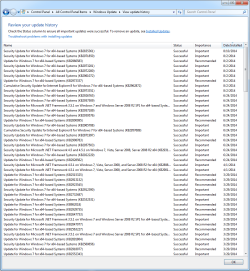
I encountered that problem after the MS update came out on Jan 12. Worked around it by doing a system restore. My computer auto-updated again last night and guess what? There's the problem again. I'd love a real fix here, just rebooted from another system restore. This time at least I had the sense to take a screen shot for documentation.
 

My Computer

OS
Windows 7 Professional 32bit
Although this may not be the 'real fix' you requested, for one thing, I'd cease allowing automatic updates because they sometimes conflict with something running on your system, causing problems. Instead you should consider setting your system to notify you when an update is ready, thereby giving you time to shut down EVERYTHING that's open: all running prgrams, apps, messengers, IMs, email clients, etc. After everything is shut down, then just download one update at a time, waiting at least a day or two between downloading them, to make sure that update has not caused any problems. That way you have several advantages: First, the update will be less likely to cause any corruption or conflict with something on your system, and second, if there should be a problem with that update, you'll know exactly which update it was that caused the problem, allowing you to take action. You can either uninstall it and try reinstalling it, do a System Restore, or take whatever other action is called for.

In regard to your current problem, you could try uninstalling the update and reinstalling it. Or, you could also try another System Restore to the most recent Restore Point prior to the last update's download.
 

My Computer

Computer Manufacturer/Model Number
HP Pavillion dv5t (generation 1)
OS
Vista 64 bit and 32 bit (SP2)
CPU
Intel(R) Core(TM)2 Duo Processor T9400 (2.53 GHz
Memory
4GB DDR2 System Memory (2 Dimm)
Graphics Card(s)
512 MB NVIDIA GeForce 9600M GT
Monitor(s) Displays
15.4" diagonal WSXGA+ High-Definition HP BrightView Widescre
Screen Resolution
1680 x 1050
Hard Drives
320GB 5400RPM SATA Hard Drive with HP ProtectSmart Hard Drive Protection
Keyboard
Built-in HP
Mouse
Built in - Synaptics TouchPad V6.5 on PS/2 Port
Internet Speed
Max
Other Info
~ Intel Next-Gen Wireless-N Mini-card w/Bluetooth ~ Blu-Ray ROM DVD+/-R/RW ~ Integ. HDTV Hybrid Tuner ~ 12 Cell Battery ~ MS Office (Home Premium) 2007 ~
The Reg mod worked. It happened after the update too. :confused:
 

My Computer

OS
Windows 7 Ultimate 32 & Windows XP Pro
CPU
AMD Athlon 64 3200+
Motherboard
ECS GS7610 Ultra V1.1
Memory
2GB
Graphics Card(s)
Asus EN9800GT 1Gb
Sound Card
Creative Soundblaster Live 24 Bit
Monitor(s) Displays
Philips 17" LCD
Hard Drives
160GB Split into 2 with XP and W7 (Dual Boot)
1TB for DL's
160Gb for doc, pics and Music
PSU
Trust 450W
Case
dunno
Cooling
6 fans
Keyboard
Logitech MX3000
Mouse
Logitech MX3000
Internet Speed
1mb
Ive got 2 other computers on 7, Ive just checked the folders and Both have the same problem too.
 

My Computer

OS
Windows 7 Ultimate 32 & Windows XP Pro
CPU
AMD Athlon 64 3200+
Motherboard
ECS GS7610 Ultra V1.1
Memory
2GB
Graphics Card(s)
Asus EN9800GT 1Gb
Sound Card
Creative Soundblaster Live 24 Bit
Monitor(s) Displays
Philips 17" LCD
Hard Drives
160GB Split into 2 with XP and W7 (Dual Boot)
1TB for DL's
160Gb for doc, pics and Music
PSU
Trust 450W
Case
dunno
Cooling
6 fans
Keyboard
Logitech MX3000
Mouse
Logitech MX3000
Internet Speed
1mb
Same thing here after windows update. But I noticed that the windows update put two new context menu entries in desktop and folders viz. cmd and find above open. I removed those entries and it is back to normal or folders are opening with double click since those two context menu entries above open are not there.......
 

My Computer

Computer type
Laptop
Computer Manufacturer/Model Number
Dell
OS
Windows 7 Ultimate x64
CPU
intell
Motherboard
intel
Memory
4 gb
Graphics Card(s)
intel
Hard Drives
Seagate
Antivirus
MSE
Browser
Chromium
the windows update

Could you plz Run... "wuapp" & click on View update history, to see what update caused this (bc it sounds impossible :))
 

Attachments

  • 2014-08-14_5-51-32.png
    2014-08-14_5-51-32.png
    36.8 KB · Views: 1

My Computer

Computer type
PC/Desktop
Computer Manufacturer/Model Number
Custom
OS
Windows 7 Professional x64 Service Pack 1
CPU
i7-3770 Ivy, MSI OC genie OC'd (default)
Motherboard
Z68A-G43 (G3), MSI
Memory
Vengeance 2x4GB 2133MHz (OC'd)
Graphics Card(s)
GTX 650 Gainward
Monitor(s) Displays
BenQ E2200HD
Screen Resolution
1920x1080
Hard Drives
WD 1TB 64MB sATA; LC-Power LC-PRO-25WU; IT-350SA
PSU
LC7600v2.3
Case
ALTO winwin.rs/
Cooling
Stock / standard
Keyboard
Logitech Alto
Mouse
Genius DeathTaker
Internet Speed
25 (megabits / second) = 3125 KBps = (25.600/2.048)
Antivirus
Comodo
Browser
Mozilla
Other Info
http://valid.canardpc.com/mcdty0
Back
Top