Solved CANT OPEN SHARE FOLDER on OS7

beret21

New member
Power User
Local time
2:48 AM
Messages
211
If i use XP i can simply open this folder by double clicking .......

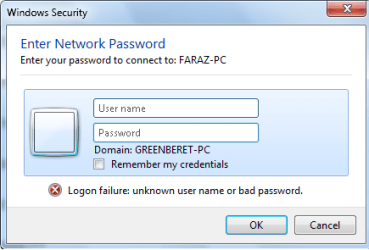
If i use windows 7 then it shows the following screen . . .

While there is no username password on the network or that shared folder or that pc
 

Attachments

  • asd.png
    asd.png
    11.3 KB · Views: 2

My Computer

Computer Manufacturer/Model Number
INTEL
OS
Windows 7 Ultimate x64
CPU
DUAL CORE e5700
Motherboard
DG41Wv
Memory
4GB ddr3 kingston
Graphics Card(s)
9500gt IGB ddr2
Sound Card
Built-in realteck
Monitor(s) Displays
SAMSUNG sync 73
Screen Resolution
1024x768
Hard Drives
80GB
PSU
400W Enermax
Case
SV
Cooling
Stock
Keyboard
-
Mouse
DELL
Internet Speed
1Mbps
Other Info
WHAT U WANNA KNOW !!!
Hello,

Create an identical User Name and Passwords on both computers (Windows 7 and XP), then try accessing each shared folder or drive.
 

My Computer

Computer Manufacturer/Model Number
Lenovo Desktop/Samsung Laptop
OS
Win7 & Win8 64bit
CPU
Intel i5
Internet Speed
Charter-20 Mbps
Antivirus
Avast
Browser
FF, IE9 and Chrome
Hello,

Create an identical User Name and Passwords on both computers (Windows 7 and XP), then try accessing each shared folder or drive.

NAmes are all already same .............
 

My Computer

Computer Manufacturer/Model Number
INTEL
OS
Windows 7 Ultimate x64
CPU
DUAL CORE e5700
Motherboard
DG41Wv
Memory
4GB ddr3 kingston
Graphics Card(s)
9500gt IGB ddr2
Sound Card
Built-in realteck
Monitor(s) Displays
SAMSUNG sync 73
Screen Resolution
1024x768
Hard Drives
80GB
PSU
400W Enermax
Case
SV
Cooling
Stock
Keyboard
-
Mouse
DELL
Internet Speed
1Mbps
Other Info
WHAT U WANNA KNOW !!!
If i use XP i can simply open this folder by double clicking .......

If i use windows 7 then it shows the following screen . . .

While there is no username password on the network or that shared folder or that pc
the problem is, you can access to a computer just when it is protected in the network with a user/pass.
try to make one in the target computer and in this box use its user/pass:busted:
 

My Computer

OS
Windows 7 Ultimate x64
CPU
core i7.
If you want to share folders between XP and 7 you should be using the Public folders.

You don't need to mess with the NTFS permission settings or passwords at all this way so using the Public folders is a much easier and secure method for sharing.

Sharing the main Public folder also share's it's subfolders.

Just go into the Public Folder at C: Users>Public> Sharing tab and set to share with Everyone read/write, apply setting hit OK.

This will instantly share that folder with everyone in the workgroup and the Homegroup if you have one set up.

 

My Computer

Computer type
PC/Desktop
Computer Manufacturer/Model Number
Home built
OS
Windows 7 Ult, Windows 8.1 Pro,
CPU
Q9650-4.275GHz, E8600 4.5GHz, E6750-3.8GHz
Motherboard
Evga 780i FTW
Memory
G.Skill PC2 9600 1200Mhz 5 5 5 15 2T
Graphics Card(s)
GTX480
Sound Card
Asus Xonar D2
Monitor(s) Displays
HannsG
Screen Resolution
1680X1050
Hard Drives
GSkill Phoenix Pro 120GB SSD
PSU
ThermalTake Toughpower 1000Watt modular
Case
ThermalTake XaserV
Cooling
Xigmatek S1283
Keyboard
Logitech G15
Mouse
Logitech G9
Internet Speed
T1
THnks all ..................... I quit . . . Not solved but closing the thread ..............
 

My Computer

Computer Manufacturer/Model Number
INTEL
OS
Windows 7 Ultimate x64
CPU
DUAL CORE e5700
Motherboard
DG41Wv
Memory
4GB ddr3 kingston
Graphics Card(s)
9500gt IGB ddr2
Sound Card
Built-in realteck
Monitor(s) Displays
SAMSUNG sync 73
Screen Resolution
1024x768
Hard Drives
80GB
PSU
400W Enermax
Case
SV
Cooling
Stock
Keyboard
-
Mouse
DELL
Internet Speed
1Mbps
Other Info
WHAT U WANNA KNOW !!!
Back
Top