Can't open system recovery?

TyGuy96

New member
Local time
1:06 AM
Messages
42
Location
Canada
I started up my old HP mini 210 today and it seemed slow. I powered it off and back up to find that it had a problem starting windows. Now every time I restart it, I get 2 options:
1) Launch Startup Repair (Recommended)
2) Start Windows Normally

2 just restarts my computer, bringing me back to that screen, and 1 starts up recovery manager. In the recovery manager window, The "I need help immediately" section and "I'd like to take precautions" section are both disabled. The only option I can choose is "Run Computer Checkup" where I can open the command prompt. I don't have the windows installation disk.

Any idea on how I can restore the system? There is no files I need on the computer, so I can delete whatever.

Thanks :)
 

My Computer

OS
Windows 7 Home Premium 64bit
Hi TyGuy96, welcome to 7F! :)

Can you restart your mini and while that's happening, reboot into "Last Known Good Configuration"?

See:http://www.sevenforums.com/tutorials/666-advanced-boot-options.html Usually you need to tap the F8 button while it's rebooting, but your system maybe different.

You may need Here's How Step #3 if you only have the one operating system on the mini. Once you make the selection let your mini reboot, then see how its reacting.
 

My Computer

Computer type
PC/Desktop
Computer Manufacturer/Model Number
Gateway DX4831-01e (Mid-Tower Desktop)
OS
Originally Win 7 Hm Prem x64 Ver 6.1.7600 Build 7601-SP1 | Upgraded to Windows 10 December 14, 2019
CPU
Intel i3 530 2.93GHz, 2933MHz 2 Cores 4 Logical Processors
Motherboard
Gateway H57M01 133 megahertz
Memory
6GB of 1,333MHz DDR3 SDRAM
Graphics Card(s)
32MB Intel Graphics Media Accelerator HD IGChip
Sound Card
Realtek High Definition Audio
Monitor(s) Displays
Gateway HX2000 20inch TFT active matrix TN
Screen Resolution
1600 x 900 x 59 hertz
Hard Drives
WDC WD10EADS-00M2B0 [HDD] (1000.20 GB) -- drive 0,
HL-DT-ST DVDRAM GH41N [CD-ROM dr]
Four card readers, and Four USB 2.0
PSU
300watts.
Case
Mid-Tower Desktop
Cooling
Stock from Gateway
Keyboard
Natural Ergonomic Keyboard 4000, see Other Info
Mouse
Orig. Gateway wore out now using Insignia USB wired optical
Internet Speed
Vz FIOS 10ms png 57.64Mbps down 65.53Mbps up Speedtest.org
Antivirus
Zamana Anti-logger with Anti-malware, MSE, Windows Firewall,
Browser
IE11.0.9600.19399-Upd ver11.0.135, Firefox 68.0.1 x64
Other Info
System Specs by Belarc.

BIOS: American Megatrends Inc. P01-A0 11/17/2009

Replaced the MS 'Natural' Standard PS/2 Enhanced 101-102 Keyboard with a new Natural Ergonomic Keyboard 4000 on August 1st 2014.

Canon Pixma MG3222 Printer.

Updated to IE11 on 12102015 | Fios Quantum Router g1100

Additional AV: SpywareBlaster, manual Mbam, SAS
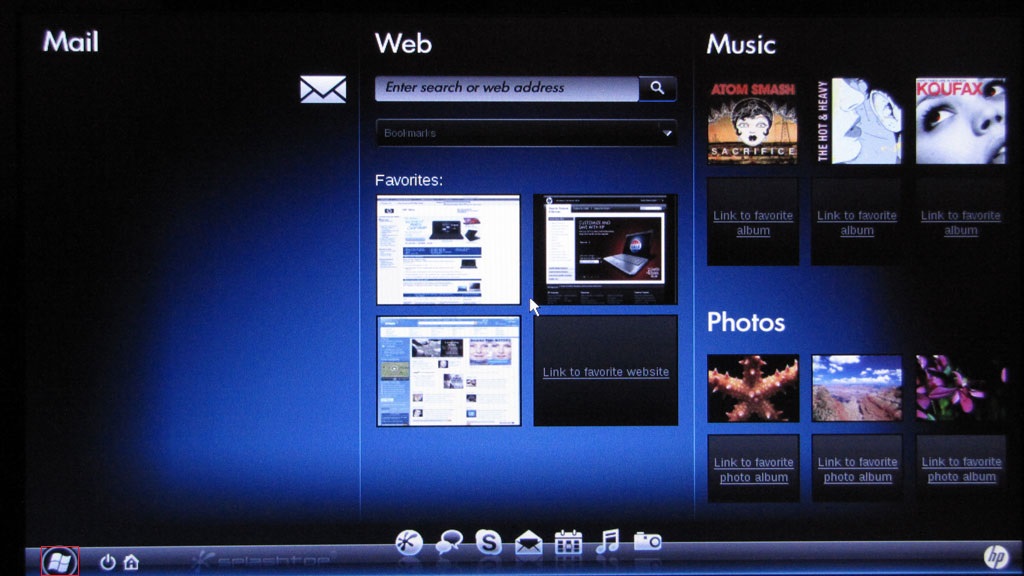
When I start the mini, this screen pops up:
P6PqAJM.jpg


When I click the button in the bottom left, it starts booting up windows. I press F8, but it just brings up the 2 options I mentioned before. There is no "Last Known Good Configuration".
 

My Computer

OS
Windows 7 Home Premium 64bit

My Computer

Computer type
PC/Desktop
Computer Manufacturer/Model Number
Gateway DX4831-01e (Mid-Tower Desktop)
OS
Originally Win 7 Hm Prem x64 Ver 6.1.7600 Build 7601-SP1 | Upgraded to Windows 10 December 14, 2019
CPU
Intel i3 530 2.93GHz, 2933MHz 2 Cores 4 Logical Processors
Motherboard
Gateway H57M01 133 megahertz
Memory
6GB of 1,333MHz DDR3 SDRAM
Graphics Card(s)
32MB Intel Graphics Media Accelerator HD IGChip
Sound Card
Realtek High Definition Audio
Monitor(s) Displays
Gateway HX2000 20inch TFT active matrix TN
Screen Resolution
1600 x 900 x 59 hertz
Hard Drives
WDC WD10EADS-00M2B0 [HDD] (1000.20 GB) -- drive 0,
HL-DT-ST DVDRAM GH41N [CD-ROM dr]
Four card readers, and Four USB 2.0
PSU
300watts.
Case
Mid-Tower Desktop
Cooling
Stock from Gateway
Keyboard
Natural Ergonomic Keyboard 4000, see Other Info
Mouse
Orig. Gateway wore out now using Insignia USB wired optical
Internet Speed
Vz FIOS 10ms png 57.64Mbps down 65.53Mbps up Speedtest.org
Antivirus
Zamana Anti-logger with Anti-malware, MSE, Windows Firewall,
Browser
IE11.0.9600.19399-Upd ver11.0.135, Firefox 68.0.1 x64
Other Info
System Specs by Belarc.

BIOS: American Megatrends Inc. P01-A0 11/17/2009

Replaced the MS 'Natural' Standard PS/2 Enhanced 101-102 Keyboard with a new Natural Ergonomic Keyboard 4000 on August 1st 2014.

Canon Pixma MG3222 Printer.

Updated to IE11 on 12102015 | Fios Quantum Router g1100

Additional AV: SpywareBlaster, manual Mbam, SAS
I have the hp mini 210-1071CA.
When I try that recovery method, after I press F11 it takes me to the screen I mentioned in option 2.

Edit: Bump
 
Last edited:

My Computer

OS
Windows 7 Home Premium 64bit
From: Computer Does not Start (Windows 7, Vista, XP) HP Mini 210-1071CA PC | HP® Support Let's try the first step, the hard reset.

If you'd like a more visual approach: Computer Does Not Start Up or Boot Properly - HP Support Center
Still, stay with the hard reset, but if you see any other steps that fit your situation please try them.

This could be a power problem, how long has it been since you started the mini last? You might have to run it strictly on AC power for a while before you depend on the battery.


Manuals for HP Mini 210-1071CA PC | HP® Support
 

My Computer

Computer type
PC/Desktop
Computer Manufacturer/Model Number
Gateway DX4831-01e (Mid-Tower Desktop)
OS
Originally Win 7 Hm Prem x64 Ver 6.1.7600 Build 7601-SP1 | Upgraded to Windows 10 December 14, 2019
CPU
Intel i3 530 2.93GHz, 2933MHz 2 Cores 4 Logical Processors
Motherboard
Gateway H57M01 133 megahertz
Memory
6GB of 1,333MHz DDR3 SDRAM
Graphics Card(s)
32MB Intel Graphics Media Accelerator HD IGChip
Sound Card
Realtek High Definition Audio
Monitor(s) Displays
Gateway HX2000 20inch TFT active matrix TN
Screen Resolution
1600 x 900 x 59 hertz
Hard Drives
WDC WD10EADS-00M2B0 [HDD] (1000.20 GB) -- drive 0,
HL-DT-ST DVDRAM GH41N [CD-ROM dr]
Four card readers, and Four USB 2.0
PSU
300watts.
Case
Mid-Tower Desktop
Cooling
Stock from Gateway
Keyboard
Natural Ergonomic Keyboard 4000, see Other Info
Mouse
Orig. Gateway wore out now using Insignia USB wired optical
Internet Speed
Vz FIOS 10ms png 57.64Mbps down 65.53Mbps up Speedtest.org
Antivirus
Zamana Anti-logger with Anti-malware, MSE, Windows Firewall,
Browser
IE11.0.9600.19399-Upd ver11.0.135, Firefox 68.0.1 x64
Other Info
System Specs by Belarc.

BIOS: American Megatrends Inc. P01-A0 11/17/2009

Replaced the MS 'Natural' Standard PS/2 Enhanced 101-102 Keyboard with a new Natural Ergonomic Keyboard 4000 on August 1st 2014.

Canon Pixma MG3222 Printer.

Updated to IE11 on 12102015 | Fios Quantum Router g1100

Additional AV: SpywareBlaster, manual Mbam, SAS
Yes, that is my machine.
Windows 7 Starter 32-bit is on it.
No SSD. 160Gb HDD.

The hard reset didn't change anything.
I haven't started the mini in a few months (probably 8 at the most), and it was dead when I first tried turning it on. It has been running off of AC since then.
 

My Computer

OS
Windows 7 Home Premium 64bit

My Computer

Computer type
PC/Desktop
Computer Manufacturer/Model Number
Gateway DX4831-01e (Mid-Tower Desktop)
OS
Originally Win 7 Hm Prem x64 Ver 6.1.7600 Build 7601-SP1 | Upgraded to Windows 10 December 14, 2019
CPU
Intel i3 530 2.93GHz, 2933MHz 2 Cores 4 Logical Processors
Motherboard
Gateway H57M01 133 megahertz
Memory
6GB of 1,333MHz DDR3 SDRAM
Graphics Card(s)
32MB Intel Graphics Media Accelerator HD IGChip
Sound Card
Realtek High Definition Audio
Monitor(s) Displays
Gateway HX2000 20inch TFT active matrix TN
Screen Resolution
1600 x 900 x 59 hertz
Hard Drives
WDC WD10EADS-00M2B0 [HDD] (1000.20 GB) -- drive 0,
HL-DT-ST DVDRAM GH41N [CD-ROM dr]
Four card readers, and Four USB 2.0
PSU
300watts.
Case
Mid-Tower Desktop
Cooling
Stock from Gateway
Keyboard
Natural Ergonomic Keyboard 4000, see Other Info
Mouse
Orig. Gateway wore out now using Insignia USB wired optical
Internet Speed
Vz FIOS 10ms png 57.64Mbps down 65.53Mbps up Speedtest.org
Antivirus
Zamana Anti-logger with Anti-malware, MSE, Windows Firewall,
Browser
IE11.0.9600.19399-Upd ver11.0.135, Firefox 68.0.1 x64
Other Info
System Specs by Belarc.

BIOS: American Megatrends Inc. P01-A0 11/17/2009

Replaced the MS 'Natural' Standard PS/2 Enhanced 101-102 Keyboard with a new Natural Ergonomic Keyboard 4000 on August 1st 2014.

Canon Pixma MG3222 Printer.

Updated to IE11 on 12102015 | Fios Quantum Router g1100

Additional AV: SpywareBlaster, manual Mbam, SAS
Yes, I held it for at least 15 seconds.
No, I am not getting any error messages.
There are no beeps/blinks. I'm not sure what you mean by "memory modules.

I noticed that when I select start windows normally, that it starts loading, then the BSOD flashes then the HP restarts.
 

My Computer

OS
Windows 7 Home Premium 64bit
Memory modules are the ram sticks in your mini, did you see the explanation below the "beep codes"?


Check for loose connections and test the memory

Blink codes are often displayed after a user adds memory to the computer but does not seat the module properly. The LEDs may also blink error codes if a hardware component is loose because the computer was dropped or jarred. Some HP Notebook PCs come with one stick of memory but have two memory slots. The problem could be that the stick of memory or one of the memory slots has a bad connection.

The memory module compartment on most notebooks is located on the bottom of the case. The exact position varies by model. However, on some models, the memory compartment is under the keyboard. See your User Guide for the exact location of memory modules on your notebook.

NOTE: Removing and reseating memory modules requires the use of tools and the partial disassembly of the computer. If you do not feel comfortable doing this work yourself, take the computer to an authorized retailer for technical service.

Check for loose memory modules


Source: Troubleshooting LED Blink Codes or Beep Codes During Startup or Boot - HP Support Center
Even if you didn't fool with the "memory", pull them out and re-seat them.
It doesn't look that hard, and shouldn't need "special tools" just pop the little door, pull them out make sure there is no corrosion and pop them back in.

Just pay attention to how they came out.


   Note
You said you're not getting any errors?? What is this reference to BSOD's, Is it a true BSOD blue or black screen or just a flash?

Can you get a screenshot of what it is and post it? http://www.sevenforums.com/tutorials/9733-screenshots-files-upload-post-seven-forums.html


By the way, Please do not "bump" your threads, It is against Forum rules.

2) No useless posts, e.g., thread bumping, useless one liners, junk posting to increase post count, and identical multi-postings in different forums.
Source: http://www.sevenforums.com/general-discussion/8-forum-rules-info-please-read.html
 

My Computer

Computer type
PC/Desktop
Computer Manufacturer/Model Number
Gateway DX4831-01e (Mid-Tower Desktop)
OS
Originally Win 7 Hm Prem x64 Ver 6.1.7600 Build 7601-SP1 | Upgraded to Windows 10 December 14, 2019
CPU
Intel i3 530 2.93GHz, 2933MHz 2 Cores 4 Logical Processors
Motherboard
Gateway H57M01 133 megahertz
Memory
6GB of 1,333MHz DDR3 SDRAM
Graphics Card(s)
32MB Intel Graphics Media Accelerator HD IGChip
Sound Card
Realtek High Definition Audio
Monitor(s) Displays
Gateway HX2000 20inch TFT active matrix TN
Screen Resolution
1600 x 900 x 59 hertz
Hard Drives
WDC WD10EADS-00M2B0 [HDD] (1000.20 GB) -- drive 0,
HL-DT-ST DVDRAM GH41N [CD-ROM dr]
Four card readers, and Four USB 2.0
PSU
300watts.
Case
Mid-Tower Desktop
Cooling
Stock from Gateway
Keyboard
Natural Ergonomic Keyboard 4000, see Other Info
Mouse
Orig. Gateway wore out now using Insignia USB wired optical
Internet Speed
Vz FIOS 10ms png 57.64Mbps down 65.53Mbps up Speedtest.org
Antivirus
Zamana Anti-logger with Anti-malware, MSE, Windows Firewall,
Browser
IE11.0.9600.19399-Upd ver11.0.135, Firefox 68.0.1 x64
Other Info
System Specs by Belarc.

BIOS: American Megatrends Inc. P01-A0 11/17/2009

Replaced the MS 'Natural' Standard PS/2 Enhanced 101-102 Keyboard with a new Natural Ergonomic Keyboard 4000 on August 1st 2014.

Canon Pixma MG3222 Printer.

Updated to IE11 on 12102015 | Fios Quantum Router g1100

Additional AV: SpywareBlaster, manual Mbam, SAS
I removed and re-seated the memory module.

I didn't see the bsod earlier, but it only appears for a split second. Yes, I am sure it it the bsod and not a blank screen. There is no way for me to screenshot it, because I wouldn't be able to reach my desktop to open it.
 

My Computer

OS
Windows 7 Home Premium 64bit
Are you able to: Enter Safe Mode (Windows 7) | HP® Support and choose safe mode with a command prompt?

If you can, try running SFC /scannow, type that command (cmd) at the prompt and see if it will run, even if you don't get any violations run it again after restarting and getting back into safe mode with command prompt.

Then try running system restore.

If that still won't work then get back into safe mode with command prompt and run: Start System Restore from a command prompt.

Instead of typing in the SFC cmd you'll use rstrui.exe instead.


If this doesn't work you'll need to create a: http://www.sevenforums.com/tutorials/2083-system-repair-disc-create.html and put it on a flash drive because your mini doesn't show any optical drives cd or dvd. See the tip box below step #7 for how to.
 

My Computer

Computer type
PC/Desktop
Computer Manufacturer/Model Number
Gateway DX4831-01e (Mid-Tower Desktop)
OS
Originally Win 7 Hm Prem x64 Ver 6.1.7600 Build 7601-SP1 | Upgraded to Windows 10 December 14, 2019
CPU
Intel i3 530 2.93GHz, 2933MHz 2 Cores 4 Logical Processors
Motherboard
Gateway H57M01 133 megahertz
Memory
6GB of 1,333MHz DDR3 SDRAM
Graphics Card(s)
32MB Intel Graphics Media Accelerator HD IGChip
Sound Card
Realtek High Definition Audio
Monitor(s) Displays
Gateway HX2000 20inch TFT active matrix TN
Screen Resolution
1600 x 900 x 59 hertz
Hard Drives
WDC WD10EADS-00M2B0 [HDD] (1000.20 GB) -- drive 0,
HL-DT-ST DVDRAM GH41N [CD-ROM dr]
Four card readers, and Four USB 2.0
PSU
300watts.
Case
Mid-Tower Desktop
Cooling
Stock from Gateway
Keyboard
Natural Ergonomic Keyboard 4000, see Other Info
Mouse
Orig. Gateway wore out now using Insignia USB wired optical
Internet Speed
Vz FIOS 10ms png 57.64Mbps down 65.53Mbps up Speedtest.org
Antivirus
Zamana Anti-logger with Anti-malware, MSE, Windows Firewall,
Browser
IE11.0.9600.19399-Upd ver11.0.135, Firefox 68.0.1 x64
Other Info
System Specs by Belarc.

BIOS: American Megatrends Inc. P01-A0 11/17/2009

Replaced the MS 'Natural' Standard PS/2 Enhanced 101-102 Keyboard with a new Natural Ergonomic Keyboard 4000 on August 1st 2014.

Canon Pixma MG3222 Printer.

Updated to IE11 on 12102015 | Fios Quantum Router g1100

Additional AV: SpywareBlaster, manual Mbam, SAS
I can't enter Safe mode w/ cmd prompt, nor can I enter any other mode. I can however bring up the command prompt. The directory for commands is "X:\Windows\RM>".

When I typed in SFC /scannow it tells me to restart the computer, but when I do, it just keeps telling me to do the same thing.

Typing in rstrui.exe gives the error:

To use System Restore, you must specify which Windows installation to restore.
Restart this computer, select an operating system, and then select System Restore.

The problem is, when I select start windows normally, it BSOD's.


I tried creating a system repair disk, but the Microsoft: Windows 7 Direct Download Links didn't have Windows 7 Starter 32-bit.
 

My Computer

OS
Windows 7 Home Premium 64bit
I went through your thread and didn't see any mention of being able to enter your BIOS. I hope you can because you will have to change the boot order to USB Memory Device for this possible solution to succeed.

You will have to follow the instructions in either one of these two links: http://www.sevenforums.com/tutorials/219487-clean-reinstall-factory-oem-windows-7-a.html#post1839164 or: Downloading Windows 7 starter ? - Microsoft Community

Both links describe how to use the eicfg tool to unlock the versions on the OS disk. In either case it would be best if you used Home Premium to start with because of the mini's system limitations, and in both cases you will need to burn the OS .iso to a flash drive (at least 4GB). You will also need the COA of your starter edition, usually found on a sticker on the back of the mini.

I would read through both tutorials to completely familiarize yourself with each procedure, and to see which one would be better suited for your situation. You may even be able to blend both of them (up to a point), but it is your call as to which one you are most comfortable with, there is good advice in both.
 

My Computer

Computer type
PC/Desktop
Computer Manufacturer/Model Number
Gateway DX4831-01e (Mid-Tower Desktop)
OS
Originally Win 7 Hm Prem x64 Ver 6.1.7600 Build 7601-SP1 | Upgraded to Windows 10 December 14, 2019
CPU
Intel i3 530 2.93GHz, 2933MHz 2 Cores 4 Logical Processors
Motherboard
Gateway H57M01 133 megahertz
Memory
6GB of 1,333MHz DDR3 SDRAM
Graphics Card(s)
32MB Intel Graphics Media Accelerator HD IGChip
Sound Card
Realtek High Definition Audio
Monitor(s) Displays
Gateway HX2000 20inch TFT active matrix TN
Screen Resolution
1600 x 900 x 59 hertz
Hard Drives
WDC WD10EADS-00M2B0 [HDD] (1000.20 GB) -- drive 0,
HL-DT-ST DVDRAM GH41N [CD-ROM dr]
Four card readers, and Four USB 2.0
PSU
300watts.
Case
Mid-Tower Desktop
Cooling
Stock from Gateway
Keyboard
Natural Ergonomic Keyboard 4000, see Other Info
Mouse
Orig. Gateway wore out now using Insignia USB wired optical
Internet Speed
Vz FIOS 10ms png 57.64Mbps down 65.53Mbps up Speedtest.org
Antivirus
Zamana Anti-logger with Anti-malware, MSE, Windows Firewall,
Browser
IE11.0.9600.19399-Upd ver11.0.135, Firefox 68.0.1 x64
Other Info
System Specs by Belarc.

BIOS: American Megatrends Inc. P01-A0 11/17/2009

Replaced the MS 'Natural' Standard PS/2 Enhanced 101-102 Keyboard with a new Natural Ergonomic Keyboard 4000 on August 1st 2014.

Canon Pixma MG3222 Printer.

Updated to IE11 on 12102015 | Fios Quantum Router g1100

Additional AV: SpywareBlaster, manual Mbam, SAS

My Computer

OS
Windows 7 Home Premium 64bit
When I tried the http://www.sevenforums.com/tutorials/219487-clean-reinstall-factory-oem-windows-7-a.html#post1839164 method, I stopped at step 4 because I can't create a Recovery Image because I can't access anything.
That is understandable, it is why I mentioned that you might be able to blend the two tutorials. #4 would have been the logical place to stop and move on to the other tutorial.

Things were going better in the Downloading Windows 7 starter ? - Microsoft Community method, but when I got to the "Where do you want to install Windows?" window, the C: drive was not an option... nothing was.
I believe you, but, I would have thought that there would be no option.

There was no button to just continue?


Maybe I'm missing something here, I'm going to ask for more help, so hang in there.
 

My Computer

Computer type
PC/Desktop
Computer Manufacturer/Model Number
Gateway DX4831-01e (Mid-Tower Desktop)
OS
Originally Win 7 Hm Prem x64 Ver 6.1.7600 Build 7601-SP1 | Upgraded to Windows 10 December 14, 2019
CPU
Intel i3 530 2.93GHz, 2933MHz 2 Cores 4 Logical Processors
Motherboard
Gateway H57M01 133 megahertz
Memory
6GB of 1,333MHz DDR3 SDRAM
Graphics Card(s)
32MB Intel Graphics Media Accelerator HD IGChip
Sound Card
Realtek High Definition Audio
Monitor(s) Displays
Gateway HX2000 20inch TFT active matrix TN
Screen Resolution
1600 x 900 x 59 hertz
Hard Drives
WDC WD10EADS-00M2B0 [HDD] (1000.20 GB) -- drive 0,
HL-DT-ST DVDRAM GH41N [CD-ROM dr]
Four card readers, and Four USB 2.0
PSU
300watts.
Case
Mid-Tower Desktop
Cooling
Stock from Gateway
Keyboard
Natural Ergonomic Keyboard 4000, see Other Info
Mouse
Orig. Gateway wore out now using Insignia USB wired optical
Internet Speed
Vz FIOS 10ms png 57.64Mbps down 65.53Mbps up Speedtest.org
Antivirus
Zamana Anti-logger with Anti-malware, MSE, Windows Firewall,
Browser
IE11.0.9600.19399-Upd ver11.0.135, Firefox 68.0.1 x64
Other Info
System Specs by Belarc.

BIOS: American Megatrends Inc. P01-A0 11/17/2009

Replaced the MS 'Natural' Standard PS/2 Enhanced 101-102 Keyboard with a new Natural Ergonomic Keyboard 4000 on August 1st 2014.

Canon Pixma MG3222 Printer.

Updated to IE11 on 12102015 | Fios Quantum Router g1100

Additional AV: SpywareBlaster, manual Mbam, SAS
This is troubling:
..... but when I got to the "Where do you want to install Windows?" window, the C: drive was not an option... nothing was.
If the machine can boot into Windows, albeit slow, have you tried HP Recovery mgr from inside Windows? If you can, and you're not concerned with any data on the machine, go straight to System Recovery.
HP said:
Advanced Recovery Manager options available from Windows
When starting the Recovery Manager from within the Windows operating system, there are other maintenance options available.


When Recovery Manager starts from within Windows, click the Advanced button to view the following options:
Computer Checkup. Provides extensive testing of files on the hard disk, including file data verification and security verification, and will report any errors that this test could not fix.

Software program re-installation. Install or restore individual HP software programs that may be missing or corrupted to return the computer to operating condition.

Hardware driver re-installation. Install or restore individual HP device drivers that may be missing or corrupted to return the computer to operating condition.

Microsoft System Restore. Access the Microsoft Restore utility and return the computer's settings to the condition they were in at a previously designated point in time. This option does not modify your personal data.

File Backup Program. Select the types of files that you want to save in a backup; Pictures, Music and other audio, Videos and movies, Recorded TV shows, Documents, spreadsheets and presentations, e-mails, internet favorites, and settings.

System recovery. Recover the computer to its original factory image. A system recovery erases and reformats the hard disk drive. All personal data files and any software programs, including antivirus programs, will be deleted.
Otherwise, create a repair disk (or borrow one) and boot from it. Select Command Prompt from the menu
and post a screen shot of the a diskpart command

diskpart
lis dis
lis par
lis vol
exit
 

My Computer

Computer type
Laptop
Computer Manufacturer/Model Number
HP Pavilion dv6-6c10us
OS
x64 (6.3.9600) Win8.1 Pro & soon dual boot x64 (6.1.7601) Win7_SP1 HomePrem
CPU
AMD A6-3420M APU with Radeon(tm) HD Graphics
Motherboard
Hewlett-Packard 1805
Memory
6.00 GB
Graphics Card(s)
AMD Radeon(TM) HD 6520G
Sound Card
(1) AMD High Definition Audio Device (2) IDT High Definiti
Monitor(s) Displays
HP W2072a 20" LCD (1600 x 900) @ 60 Hz
Screen Resolution
1366 x 768 x 32 bits (4294967296 colors) @ 60 Hz
Hard Drives
ST640LM0 00 HM641JI SATA Disk Device
Keyboard
Logitech k520 wireless KB
Mouse
Logitech m320 wireless mouse (bundled with KB)
Internet Speed
15/5 | 54 MB Wireless 'n'
Antivirus
Realtime: Defender or Avast | On-demand: Malwarebytes, ESET
Browser
IE 11 on Win8, IE 10 on win 7
Other Info
Media: [Gimp, Audacity, VLC] || Comm: [WEmail 2012, Skype] || Productivity: [OpenOffice,| Textpad] || Utils: [Sysinternals, cCleaner, Speccy, Defraggler]
The machine cannot boot into windows, so I can't access recovery manager.

To create a repair disk, I need another 32-bit computer, but the only other one I have is an HP mini 210-1010CA which doesn't have a disk slot. In order to make a repair usb, I need to convert it from a disk... which again, I can't.
 

My Computer

OS
Windows 7 Home Premium 64bit
First of all I would like to thank Slartybart for pitchin' in. :thumbsup:

There might be a problem in how you are trying to enter recovery.

You said, you click on the windows orb/button in the lower left corner? Try restarting the mini and start tapping the escape button, see if that re-enables the "I need help immediately" section.

If not we'll have to re-think the flash drive,

Do I understand this correctly?
You have a good HP mini 210-1010CA, and a bad HP mini 210-1071CA, and they both have Starter on them?

Is using the 1010 how were you were able to create a universal OS flash drive, the one where you were stopped because of no drive choices?

See the second post down by Daniel_Potyrala: USB Recovery Key for 210-2081NR - HP Support Forum - 534419 It will lead you to: Using the Downloadable USB Recovery Flash Disk Creation Utility HP Mini 210-2081nr PC | HP® Support

This might allow you to make a recovery flash for the mini1010, that might work in the 1071.

Again, please read over the tutorial to familiarize yourself with the steps and make sure you have everything ready. It says you should have a 16GB flash drive to use.


More:
HP Mini 210-1071CA PC | HP® Support

Solve a problem HP Mini 210-1071CA PC | HP® Support

System Recovery / Backup / Restore HP Mini 210-1071CA PC | HP® Support

System Recovery May Fail or Display Error Message (Windows 7, or Vista) HP Mini 210-1071CA PC | HP® Support
 

My Computer

Computer type
PC/Desktop
Computer Manufacturer/Model Number
Gateway DX4831-01e (Mid-Tower Desktop)
OS
Originally Win 7 Hm Prem x64 Ver 6.1.7600 Build 7601-SP1 | Upgraded to Windows 10 December 14, 2019
CPU
Intel i3 530 2.93GHz, 2933MHz 2 Cores 4 Logical Processors
Motherboard
Gateway H57M01 133 megahertz
Memory
6GB of 1,333MHz DDR3 SDRAM
Graphics Card(s)
32MB Intel Graphics Media Accelerator HD IGChip
Sound Card
Realtek High Definition Audio
Monitor(s) Displays
Gateway HX2000 20inch TFT active matrix TN
Screen Resolution
1600 x 900 x 59 hertz
Hard Drives
WDC WD10EADS-00M2B0 [HDD] (1000.20 GB) -- drive 0,
HL-DT-ST DVDRAM GH41N [CD-ROM dr]
Four card readers, and Four USB 2.0
PSU
300watts.
Case
Mid-Tower Desktop
Cooling
Stock from Gateway
Keyboard
Natural Ergonomic Keyboard 4000, see Other Info
Mouse
Orig. Gateway wore out now using Insignia USB wired optical
Internet Speed
Vz FIOS 10ms png 57.64Mbps down 65.53Mbps up Speedtest.org
Antivirus
Zamana Anti-logger with Anti-malware, MSE, Windows Firewall,
Browser
IE11.0.9600.19399-Upd ver11.0.135, Firefox 68.0.1 x64
Other Info
System Specs by Belarc.

BIOS: American Megatrends Inc. P01-A0 11/17/2009

Replaced the MS 'Natural' Standard PS/2 Enhanced 101-102 Keyboard with a new Natural Ergonomic Keyboard 4000 on August 1st 2014.

Canon Pixma MG3222 Printer.

Updated to IE11 on 12102015 | Fios Quantum Router g1100

Additional AV: SpywareBlaster, manual Mbam, SAS
Look if you have one good machine then surely you can make a stick with the clean OEM install on it.

To be honest with you I ave had a couple of these machines and they are extremely easy to muck up from an owners perspective and it sounds like the wonky drive is about to eat the biscuit. I'd be very tempted to stick another drive in the darn thing get it going and then try and retrieve any data off the old one if you can.

One other option is:-
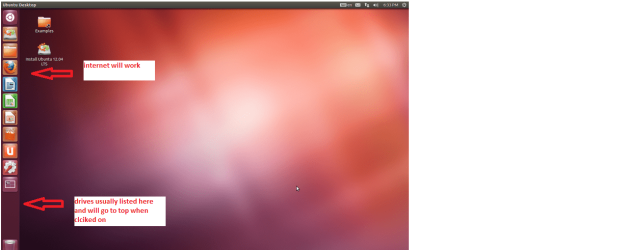
Make a bootable stick with Ubuntu set the boot in BIOS to the USB. Boot up and use the TRY NOT the INSTALL Once in Ubuntu you can access the net and download any scanners or just see what is in that drive it will slow up any drives attached to the machine and just go in and open them up copy paste whatever the data to a stick if all you want to do is save data and scan.
 

Attachments

  • Ubuntu screen.PNG
    Ubuntu screen.PNG
    123.3 KB · Views: 4

My Computer

Computer type
PC/Desktop
Computer Manufacturer/Model Number
Own build (new) Desk1 / Asus ROG Win 7 / Desk2 1st build
OS
Desk1 7 Home Prem / Desk2 10 Pro / Main lap Asus ROG 10 Pro 2 laptop Toshiba 7 Pro Asus P2520 7 & 10
CPU
Desk1 i5 3750K / Laptop i7 GTX 860M / Desk2 i5 2500
Motherboard
Desk1 Asus P877-V / Desk2 Gigabyte H67 UD3H / Laptop ?
Memory
Desk1 8GB (1866) / Desk2 16GB (1333) / Laptop 8Gb DDR3
Graphics Card(s)
Desk 1& 2NVidia GTX 650 & Laptops on board Intel
Sound Card
Desk 1 & 2 -XONAR DG Realtek High Def audio Laptop
Monitor(s) Displays
Desk 1 Benq HD 2450 / Desk2 Philips 24" / Laptop 17.5"
Screen Resolution
1920x1080 D1 & D2 & Laptop 1
Hard Drives
Desk1 Samsung 120GB 830 SSD
Asus ROG 256GB 850 Pro SSD
Desk2 Samsung 840 256 SSD
Toshiba 120GB EVO
PSU
Desk 1 Corsair HX 1050/ Laptop ? / Desk 2 Corsair HX 650
Case
Desk 1 Cooler HAF XM ? Toshiba laptop / Desk2 Coolermaster
Cooling
Fans on all Desk1 -2 Desk2 - all Coolermasters 5 Laptop ?
Keyboard
Desk 1 MS Sidewinder X6 Desk 2 MS Sidewinder X 4
Mouse
Desk 1&2 - Gigabyte MS 900 gamer - laptop - Logitec wireless
Internet Speed
ADSL2+
Other Info
One other Desktop (tester) and spare Toshba laptop both with SSD's
Running Kaspersky 2016 ISS on all machines config'd identically
Logitec audio stereo systems on each machine (x3)
Canon MG5250MFC
Router/modem TP-Link running WPA2SK
Back
Top