Solved Can’t Print – says “Error Printing” in queue

DaveBrock

New member
Local time
9:30 AM
Messages
28
Can’t Print – says “Error Printing” in queue

Hi,
I have 2 laptops and a desktop in the office, all 3 of them running Windows 7. Printer has been running fine on all computers for years.

Last week the printer stopped working on 1 laptop. When I print a document from MS Word, the queue says “Printing” but nothing happens. After approx. 1 minute the queue says “Error Printing”

The printer is connected to a WiFi router. The desktop is connected by cable to the router, and the 2 Laptops connected via WiFi. Printer still works fine on 1 of the laptops.

I went to Services, and stopped the Print Spooler, and then restarted. Still would not print.

I cancelled all documents in the queue, and tired again. Still would not print.

I can ping the printer from the laptop which won’t print.

I have stopped the printer and restarted it, and stopped and restarted the router, and also shutdown and restarted the laptop... still won't print from that 1 laptop.

Any suggestions?

Thanks in advance,
Dave
 

My Computer

Computer type
PC/Desktop
Computer Manufacturer/Model Number
PS Specialist UK
OS
Microsoft Windows 7 Professional 64-bit 7601 Multiprocessor Free Service Pack 1
CPU
Intel(R) Core(TM) i7-4900MQ CPU @ 2.80GHz
Motherboard
Notebook W350STQ/W370ST
Memory
16.00 GB
Graphics Card(s)
(1) NVIDIA GeForce GTX 765M (2) Intel(R) HD Graphics 4
Sound Card
VIA High Definition Audio
Screen Resolution
0 x 0 x 0 bits (0 colors) @ 0 Hz
Hard Drives
(1) ATA INTEL SSDSC2BW24 SCSI Disk Device (2) ATA INTEL SSDSC2BW24 SCSI Disk Device
Ok Dave mate it would be good for you to follow this please
Now before we can help we do need to know what is in your machine so please do this System Info - See Your System Specs
or either enter the specs of your system in your forum profile the specs will appear when we click on that little box bottom left of the post screen it is for me the preferable option as it is easy. As you may appreciate it is very hard when you don’t know what one is working with for example a diesel or petrol engine.
*(pretyped to save time)

Now my first thought is that you should run these
SFC /SCANNOW Command - System File Checker
Disk Check < if necessary include the /f switch and if this does not make any improvement then just run this switch instead /r in the command line as per Option2
Run these in safe mode and the sfc often best run for two to three runs – you can leave out the /r switch in ckdsk if you feel it not necessary

if no fix then these

SUPERAntiSpyware | Remove Malware | Remove Spyware - AntiMalware, AntiSpyware, AntiAdware!
Malwarebytes | Malwarebytes Premium
AdwCleaner Download
ADW download from bleeping computer delete any rubbish found with the malware scans
(NB If you are running Kaspersky as the main AV then it might need disabling it when trying ADW because it does not like it at times)

Next I would update the driver for the printer in the machine that is not working and as I don't know what you have I cannot link you to anything.

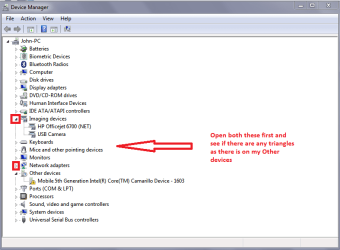
You could also look in the Device Manager and look for any devices that have yellow triangles alongside them.
 

Attachments

  • DAVE.PNG
    DAVE.PNG
    19.4 KB · Views: 0

My Computer

Computer type
PC/Desktop
Computer Manufacturer/Model Number
Own build (new) Desk1 / Asus ROG Win 7 / Desk2 1st build
OS
Desk1 7 Home Prem / Desk2 10 Pro / Main lap Asus ROG 10 Pro 2 laptop Toshiba 7 Pro Asus P2520 7 & 10
CPU
Desk1 i5 3750K / Laptop i7 GTX 860M / Desk2 i5 2500
Motherboard
Desk1 Asus P877-V / Desk2 Gigabyte H67 UD3H / Laptop ?
Memory
Desk1 8GB (1866) / Desk2 16GB (1333) / Laptop 8Gb DDR3
Graphics Card(s)
Desk 1& 2NVidia GTX 650 & Laptops on board Intel
Sound Card
Desk 1 & 2 -XONAR DG Realtek High Def audio Laptop
Monitor(s) Displays
Desk 1 Benq HD 2450 / Desk2 Philips 24" / Laptop 17.5"
Screen Resolution
1920x1080 D1 & D2 & Laptop 1
Hard Drives
Desk1 Samsung 120GB 830 SSD
Asus ROG 256GB 850 Pro SSD
Desk2 Samsung 840 256 SSD
Toshiba 120GB EVO
PSU
Desk 1 Corsair HX 1050/ Laptop ? / Desk 2 Corsair HX 650
Case
Desk 1 Cooler HAF XM ? Toshiba laptop / Desk2 Coolermaster
Cooling
Fans on all Desk1 -2 Desk2 - all Coolermasters 5 Laptop ?
Keyboard
Desk 1 MS Sidewinder X6 Desk 2 MS Sidewinder X 4
Mouse
Desk 1&2 - Gigabyte MS 900 gamer - laptop - Logitec wireless
Internet Speed
ADSL2+
Other Info
One other Desktop (tester) and spare Toshba laptop both with SSD's
Running Kaspersky 2016 ISS on all machines config'd identically
Logitec audio stereo systems on each machine (x3)
Canon MG5250MFC
Router/modem TP-Link running WPA2SK
Hi ICIT2LOL,
I ran the System Info and updated my specs... so you can see that I am running petrol instead of diesel.

I read about the SCF / SCANNOW you recommend and it said

"Be aware that if you have modified your system files as in theming explorer/system files, running sfc /scannow will revert the system files such as explorer.exe back to it's default state. Make the appropriate backups of your system files that you have modified for theming if you wish to save them before running sfc /scannow. "

It's a good few years since I have changed the Explorer settings (and probably many more settings) to get Windows 7 the way I like it, and I can't remember all the work and all the settings I have changed a few years ago.

I am running up to date Bitdefender Total Security on all 3 of my machines.

I also checked the device manager as you suggested, and all looks normal... with no triangles.

From Devices and Printers, when I click on the printer, and then Printer Properties, and click Print Test Page, it goes to the queue and status is "Printing". Nothing happens at the printer. Approx 1 minute later, the status changes to "Error - Printing".

Is there a log file that I can check, to see why the status went from Printing to Error-Printing ?

Any ideas what could have changed so that 1 of my laptops does not print, but the other two machines are fine?

Thanks,
Dave
 

My Computer

Computer type
PC/Desktop
Computer Manufacturer/Model Number
PS Specialist UK
OS
Microsoft Windows 7 Professional 64-bit 7601 Multiprocessor Free Service Pack 1
CPU
Intel(R) Core(TM) i7-4900MQ CPU @ 2.80GHz
Motherboard
Notebook W350STQ/W370ST
Memory
16.00 GB
Graphics Card(s)
(1) NVIDIA GeForce GTX 765M (2) Intel(R) HD Graphics 4
Sound Card
VIA High Definition Audio
Screen Resolution
0 x 0 x 0 bits (0 colors) @ 0 Hz
Hard Drives
(1) ATA INTEL SSDSC2BW24 SCSI Disk Device (2) ATA INTEL SSDSC2BW24 SCSI Disk Device
I enabled Print Logging;

'Start->Administration Tools->EventViewer->Applicationsand ServiceLogs-> Microsoft->Windows->Print Service->Operational - Right click and select Enable log''

And saw this error in the Event Log

Event Properties – Event 372, PrintService

The document Test Page, owned by Dave, failed to print on printer Kyocera FS-C5400DN. Try to print the document again, or restart the print spooler.
Data type: NT EMF 1.008. Size of the spool file in bytes: 196608. Number of bytes printed: 0. Total number of pages in the document: 1. Number of pages printed: 0. Client computer: \\DAVE-LAPTOP. Win32 error code returned by the print processor: 2250. This network connection does not exist.

Does this give any information, on what may be causing the error?
 

My Computer

Computer type
PC/Desktop
Computer Manufacturer/Model Number
PS Specialist UK
OS
Microsoft Windows 7 Professional 64-bit 7601 Multiprocessor Free Service Pack 1
CPU
Intel(R) Core(TM) i7-4900MQ CPU @ 2.80GHz
Motherboard
Notebook W350STQ/W370ST
Memory
16.00 GB
Graphics Card(s)
(1) NVIDIA GeForce GTX 765M (2) Intel(R) HD Graphics 4
Sound Card
VIA High Definition Audio
Screen Resolution
0 x 0 x 0 bits (0 colors) @ 0 Hz
Hard Drives
(1) ATA INTEL SSDSC2BW24 SCSI Disk Device (2) ATA INTEL SSDSC2BW24 SCSI Disk Device
As its reporting --- network does not exist,
recreate the link,
note check the printer log as well, might give you a clue as to when the connection was dropped, what was happening on the lappy at that time.

Roy
 

My Computer

Computer type
PC/Desktop
Computer Manufacturer/Model Number
medionl/Aspire 6930G/acer x55a
OS
W7 home premium 32bit/W7HP 64bit/w10 tp insider ring
CPU
E5300 dual core
Motherboard
medion MS7366
Memory
3gb
Graphics Card(s)
Nvidia Geforce 7100 Nforce 630i
Monitor(s) Displays
avixc
Internet Speed
n (isp resticted to 72)
Antivirus
mse/pands
Browser
palemoon
Other Info
Belkin Fd7050 n USB using Railink RT2870 drivers, more upto date
Hi Roy,
I am not sure what you meant by 'create the link again', so I went to Printers and Devices, and deleted the printer 'Kyocera FS-C5400DN'.

I then clicked 'add printer', selected 'Router printer', and entered the IP address and type of printer, and that seemed to add the printer ok.

I then printed a test page, but nothing happened.

In the Event View, under Printer Operation log there are no errors.

Last few Informational Messages were as follows;

Printer Kyocera FS-C5400DN will be deleted. No user action is required.
Printer Kyocera FS-C5400DN shared as Kyocera FS-C5400DN was unshared by the print spooler.
Settings for printer Kyocera FS-C5400DN Laptop were changed. No user action is required.
Printer Kyocera FS-C5400DN Laptop was created. No user action is required.
Printer Kyocera FS-C5400DN Laptop was shared by the print spooler as Kyocera FS-C5400DN Laptop.
Settings for printer Kyocera FS-C5400DN Laptop were changed. No user action is required.
Spooling job 3.
Printing job 3.

In Event Viewer under Printer Admin, messages as follows;

The default printer was changed to Send To OneNote 2013,winspool,nul:. See the event user data for context information.
The default printer was changed to Kyocera FS-C5400DN Laptop. See the event user data for context information.

Any ideas?

Dave
 

My Computer

Computer type
PC/Desktop
Computer Manufacturer/Model Number
PS Specialist UK
OS
Microsoft Windows 7 Professional 64-bit 7601 Multiprocessor Free Service Pack 1
CPU
Intel(R) Core(TM) i7-4900MQ CPU @ 2.80GHz
Motherboard
Notebook W350STQ/W370ST
Memory
16.00 GB
Graphics Card(s)
(1) NVIDIA GeForce GTX 765M (2) Intel(R) HD Graphics 4
Sound Card
VIA High Definition Audio
Screen Resolution
0 x 0 x 0 bits (0 colors) @ 0 Hz
Hard Drives
(1) ATA INTEL SSDSC2BW24 SCSI Disk Device (2) ATA INTEL SSDSC2BW24 SCSI Disk Device
Quick query Dave - I am wondering why in your specs this is quoted as the motherboard??

"Notebook W350STQ/W370ST"
 

My Computer

Computer type
PC/Desktop
Computer Manufacturer/Model Number
Own build (new) Desk1 / Asus ROG Win 7 / Desk2 1st build
OS
Desk1 7 Home Prem / Desk2 10 Pro / Main lap Asus ROG 10 Pro 2 laptop Toshiba 7 Pro Asus P2520 7 & 10
CPU
Desk1 i5 3750K / Laptop i7 GTX 860M / Desk2 i5 2500
Motherboard
Desk1 Asus P877-V / Desk2 Gigabyte H67 UD3H / Laptop ?
Memory
Desk1 8GB (1866) / Desk2 16GB (1333) / Laptop 8Gb DDR3
Graphics Card(s)
Desk 1& 2NVidia GTX 650 & Laptops on board Intel
Sound Card
Desk 1 & 2 -XONAR DG Realtek High Def audio Laptop
Monitor(s) Displays
Desk 1 Benq HD 2450 / Desk2 Philips 24" / Laptop 17.5"
Screen Resolution
1920x1080 D1 & D2 & Laptop 1
Hard Drives
Desk1 Samsung 120GB 830 SSD
Asus ROG 256GB 850 Pro SSD
Desk2 Samsung 840 256 SSD
Toshiba 120GB EVO
PSU
Desk 1 Corsair HX 1050/ Laptop ? / Desk 2 Corsair HX 650
Case
Desk 1 Cooler HAF XM ? Toshiba laptop / Desk2 Coolermaster
Cooling
Fans on all Desk1 -2 Desk2 - all Coolermasters 5 Laptop ?
Keyboard
Desk 1 MS Sidewinder X6 Desk 2 MS Sidewinder X 4
Mouse
Desk 1&2 - Gigabyte MS 900 gamer - laptop - Logitec wireless
Internet Speed
ADSL2+
Other Info
One other Desktop (tester) and spare Toshba laptop both with SSD's
Running Kaspersky 2016 ISS on all machines config'd identically
Logitec audio stereo systems on each machine (x3)
Canon MG5250MFC
Router/modem TP-Link running WPA2SK
From command prompt, when I type in
wmic baseboard get product, manufacturer, model it displays
Manufacturer Model Product
Notebook W350STQ/W370ST

This laptop I have had since 2013 and runs excellently.

Just 1 week ago, suddenly it would not print.

I had installed Windows Updates 1 day previously as far as i can recall.

Please see my previous entry reply to Roy, when I deleted the printer, and then added printer again to see if this gives any clues to the problem.

When I try to print, and look in the Event Viewer this is the message;

The document Test Page, owned by Dave, failed to print on printer Kyocera FS-C5400DN Laptop. Try to print the document again, or restart the print spooler.
Data type: NT EMF 1.008. Size of the spool file in bytes: 101556. Number of bytes printed: 0. Total number of pages in the document: 1. Number of pages printed: 0. Client computer: \\DAVE-LAPTOP. Win32 error code returned by the print processor: 2250. This network connection does not exist.
 

My Computer

Computer type
PC/Desktop
Computer Manufacturer/Model Number
PS Specialist UK
OS
Microsoft Windows 7 Professional 64-bit 7601 Multiprocessor Free Service Pack 1
CPU
Intel(R) Core(TM) i7-4900MQ CPU @ 2.80GHz
Motherboard
Notebook W350STQ/W370ST
Memory
16.00 GB
Graphics Card(s)
(1) NVIDIA GeForce GTX 765M (2) Intel(R) HD Graphics 4
Sound Card
VIA High Definition Audio
Screen Resolution
0 x 0 x 0 bits (0 colors) @ 0 Hz
Hard Drives
(1) ATA INTEL SSDSC2BW24 SCSI Disk Device (2) ATA INTEL SSDSC2BW24 SCSI Disk Device
Hi Dave,

Looks like for some reason OneNotes is getting in the way,
OneNote 2013,winspool,>>> nul:.<<< that means NO printing
OneNote(XPS) showing in devices??

do you have this option available when Right clicking on the Kyocera printer

select Set as default printer,(tick it)
or if not
Click the "Manage default printers" button in the menu bar.

Select the "Always use the same printer as my default printer" option in the dialog box that opens up and click the "Apply" and "OK" buttons.


If you have other devices in devices\printers you could try removing them, if the above option is not offered.

Roy

.


Last edited:

My Computer

Computer type
PC/Desktop
Computer Manufacturer/Model Number
medionl/Aspire 6930G/acer x55a
OS
W7 home premium 32bit/W7HP 64bit/w10 tp insider ring
CPU
E5300 dual core
Motherboard
medion MS7366
Memory
3gb
Graphics Card(s)
Nvidia Geforce 7100 Nforce 630i
Monitor(s) Displays
avixc
Internet Speed
n (isp resticted to 72)
Antivirus
mse/pands
Browser
palemoon
Other Info
Belkin Fd7050 n USB using Railink RT2870 drivers, more upto date
Thanks again Roy...
I already had 'Set as Default printer' in the Printers and Devices section.

I can't see any option " Click the "Manage default printers" button in the menu bar. "

I also tried to Print from Wordpad, and same behaviour.... status first says "printing" and then approx 1 minute later status changes to "Error - printing".

In Devices and Printers I also have
Adobe PDF
Fax
Kyocera FS-C5400DN Laptop (set as default)
Microsoft XPS Document writer
Send to OneNote 2013


I just noticed another strange behaviour...

When I print a document (from Word), the status is 'printing' although nothing prints, and then changes to 'error - printing'.

So I then 'cancel all documents'... and the strange thing is that in Printers and Devices, a slightly greyed out image of the old printer "Kyocera FS-C5400DN" then just appears as one of the printers.

When I added a new printer yesterday I named it "Kyocera FS-C5400DN laptop" so I could tell the difference.

I wonder what could be causing this 'old printer' name to be appearing?
 

My Computer

Computer type
PC/Desktop
Computer Manufacturer/Model Number
PS Specialist UK
OS
Microsoft Windows 7 Professional 64-bit 7601 Multiprocessor Free Service Pack 1
CPU
Intel(R) Core(TM) i7-4900MQ CPU @ 2.80GHz
Motherboard
Notebook W350STQ/W370ST
Memory
16.00 GB
Graphics Card(s)
(1) NVIDIA GeForce GTX 765M (2) Intel(R) HD Graphics 4
Sound Card
VIA High Definition Audio
Screen Resolution
0 x 0 x 0 bits (0 colors) @ 0 Hz
Hard Drives
(1) ATA INTEL SSDSC2BW24 SCSI Disk Device (2) ATA INTEL SSDSC2BW24 SCSI Disk Device
Hi Dave,

old printers, (deleted) still leave traces on the system, and can/do cause problems in some cases

As i said earlier Word is set to Nul, it will not print.


Create a restore point,(an image would be better)

REMOVE ALL the other devices in that section
try printing.

If that still fails i suspect the "remnants" are causing a problem
(have to play find the registry entry:()

Roy
note removing devices will NOT affect the programs
 

My Computer

Computer type
PC/Desktop
Computer Manufacturer/Model Number
medionl/Aspire 6930G/acer x55a
OS
W7 home premium 32bit/W7HP 64bit/w10 tp insider ring
CPU
E5300 dual core
Motherboard
medion MS7366
Memory
3gb
Graphics Card(s)
Nvidia Geforce 7100 Nforce 630i
Monitor(s) Displays
avixc
Internet Speed
n (isp resticted to 72)
Antivirus
mse/pands
Browser
palemoon
Other Info
Belkin Fd7050 n USB using Railink RT2870 drivers, more upto date

My Computer

Computer type
PC/Desktop
Computer Manufacturer/Model Number
medionl/Aspire 6930G/acer x55a
OS
W7 home premium 32bit/W7HP 64bit/w10 tp insider ring
CPU
E5300 dual core
Motherboard
medion MS7366
Memory
3gb
Graphics Card(s)
Nvidia Geforce 7100 Nforce 630i
Monitor(s) Displays
avixc
Internet Speed
n (isp resticted to 72)
Antivirus
mse/pands
Browser
palemoon
Other Info
Belkin Fd7050 n USB using Railink RT2870 drivers, more upto date
Thanks, I followed your suggestion.

Created restore point
Deleted all Printers listed
Shut down Laptop, and then started it again.

From Printers and Devices, selected Add a printer

Selected Router printer, but it could not find it automatically, so I selected custom, and added the
IP address 192.168.1.101
And manually selected the Manufacturer and Model: Kyocera FS-C5400DN

Message presented “Windows detected driver already installed for this printer”, so I proceeded with that,
and gave the printer a name “Kyocera FS-C5400DN-2” to recognise it from the previous two names used.

Printer Sharing screen was presented, so I selected ‘sharing’ and received message “You’ve successfully added the Kyocera FS-C5400DN-2” and then I clicked on ‘Test Page’, but as before… it did not print.

From Printers and Devices, the new printer shows up, with 1 document in the queue… but “no status” displayed.

In Event Viewer for PrintService, no error... simply information message "Spooling job 2"

Any other ideas?
 

My Computer

Computer type
PC/Desktop
Computer Manufacturer/Model Number
PS Specialist UK
OS
Microsoft Windows 7 Professional 64-bit 7601 Multiprocessor Free Service Pack 1
CPU
Intel(R) Core(TM) i7-4900MQ CPU @ 2.80GHz
Motherboard
Notebook W350STQ/W370ST
Memory
16.00 GB
Graphics Card(s)
(1) NVIDIA GeForce GTX 765M (2) Intel(R) HD Graphics 4
Sound Card
VIA High Definition Audio
Screen Resolution
0 x 0 x 0 bits (0 colors) @ 0 Hz
Hard Drives
(1) ATA INTEL SSDSC2BW24 SCSI Disk Device (2) ATA INTEL SSDSC2BW24 SCSI Disk Device
Hello Dave now I don't know if Roy would agree but it might be worth checking in the registry > Software in both the HKEYS LOCAL and USER for any left over Kyocera entries ??

John
 

My Computer

Computer type
PC/Desktop
Computer Manufacturer/Model Number
Own build (new) Desk1 / Asus ROG Win 7 / Desk2 1st build
OS
Desk1 7 Home Prem / Desk2 10 Pro / Main lap Asus ROG 10 Pro 2 laptop Toshiba 7 Pro Asus P2520 7 & 10
CPU
Desk1 i5 3750K / Laptop i7 GTX 860M / Desk2 i5 2500
Motherboard
Desk1 Asus P877-V / Desk2 Gigabyte H67 UD3H / Laptop ?
Memory
Desk1 8GB (1866) / Desk2 16GB (1333) / Laptop 8Gb DDR3
Graphics Card(s)
Desk 1& 2NVidia GTX 650 & Laptops on board Intel
Sound Card
Desk 1 & 2 -XONAR DG Realtek High Def audio Laptop
Monitor(s) Displays
Desk 1 Benq HD 2450 / Desk2 Philips 24" / Laptop 17.5"
Screen Resolution
1920x1080 D1 & D2 & Laptop 1
Hard Drives
Desk1 Samsung 120GB 830 SSD
Asus ROG 256GB 850 Pro SSD
Desk2 Samsung 840 256 SSD
Toshiba 120GB EVO
PSU
Desk 1 Corsair HX 1050/ Laptop ? / Desk 2 Corsair HX 650
Case
Desk 1 Cooler HAF XM ? Toshiba laptop / Desk2 Coolermaster
Cooling
Fans on all Desk1 -2 Desk2 - all Coolermasters 5 Laptop ?
Keyboard
Desk 1 MS Sidewinder X6 Desk 2 MS Sidewinder X 4
Mouse
Desk 1&2 - Gigabyte MS 900 gamer - laptop - Logitec wireless
Internet Speed
ADSL2+
Other Info
One other Desktop (tester) and spare Toshba laptop both with SSD's
Running Kaspersky 2016 ISS on all machines config'd identically
Logitec audio stereo systems on each machine (x3)
Canon MG5250MFC
Router/modem TP-Link running WPA2SK
>>Delete the following registry under:
>>KEY_CURRENT_USER\Printers\Connections\<Printer>
>>Please replace <Printer> with the actual printer that you want to delete.

I Went into Regedit

Under HKEY_CURRENT_USER
Printers
Connections has "Value not set" under data.

Under HKEY_CURRENT_USER
Printers
Defaults is set to Kyocera FS-C5400DN-2

which is the name I gave the printer when I added it yesterday.


I also searched for "Kyocera" (which was part of the name given to previous times I added the printer), and no occurrences found other than the default value mentioned above.


Any other ideas?

Dave
 

My Computer

Computer type
PC/Desktop
Computer Manufacturer/Model Number
PS Specialist UK
OS
Microsoft Windows 7 Professional 64-bit 7601 Multiprocessor Free Service Pack 1
CPU
Intel(R) Core(TM) i7-4900MQ CPU @ 2.80GHz
Motherboard
Notebook W350STQ/W370ST
Memory
16.00 GB
Graphics Card(s)
(1) NVIDIA GeForce GTX 765M (2) Intel(R) HD Graphics 4
Sound Card
VIA High Definition Audio
Screen Resolution
0 x 0 x 0 bits (0 colors) @ 0 Hz
Hard Drives
(1) ATA INTEL SSDSC2BW24 SCSI Disk Device (2) ATA INTEL SSDSC2BW24 SCSI Disk Device
Hmm Dave I would have thought there would have been an entry in the registry > Software I actually cleaned an old printer from my laptop's registry - just last night after uninstalling it from the Control Panel.

Now on a slightly different tack I am wondering if the wifi is actually working? but if you can still use the net etc I suppose it must be. I have had this problem myself before and my fix was uninstalling the printer driver deleting those reg entries and then reinstalling the printer software. Now I remember not installing the HP help stuff so does the Kyocera have those add on bloatware kind of stuff??

Just thought too the AV on that machine just what is it and have you tried disabling it and hen try the print??
 

My Computer

Computer type
PC/Desktop
Computer Manufacturer/Model Number
Own build (new) Desk1 / Asus ROG Win 7 / Desk2 1st build
OS
Desk1 7 Home Prem / Desk2 10 Pro / Main lap Asus ROG 10 Pro 2 laptop Toshiba 7 Pro Asus P2520 7 & 10
CPU
Desk1 i5 3750K / Laptop i7 GTX 860M / Desk2 i5 2500
Motherboard
Desk1 Asus P877-V / Desk2 Gigabyte H67 UD3H / Laptop ?
Memory
Desk1 8GB (1866) / Desk2 16GB (1333) / Laptop 8Gb DDR3
Graphics Card(s)
Desk 1& 2NVidia GTX 650 & Laptops on board Intel
Sound Card
Desk 1 & 2 -XONAR DG Realtek High Def audio Laptop
Monitor(s) Displays
Desk 1 Benq HD 2450 / Desk2 Philips 24" / Laptop 17.5"
Screen Resolution
1920x1080 D1 & D2 & Laptop 1
Hard Drives
Desk1 Samsung 120GB 830 SSD
Asus ROG 256GB 850 Pro SSD
Desk2 Samsung 840 256 SSD
Toshiba 120GB EVO
PSU
Desk 1 Corsair HX 1050/ Laptop ? / Desk 2 Corsair HX 650
Case
Desk 1 Cooler HAF XM ? Toshiba laptop / Desk2 Coolermaster
Cooling
Fans on all Desk1 -2 Desk2 - all Coolermasters 5 Laptop ?
Keyboard
Desk 1 MS Sidewinder X6 Desk 2 MS Sidewinder X 4
Mouse
Desk 1&2 - Gigabyte MS 900 gamer - laptop - Logitec wireless
Internet Speed
ADSL2+
Other Info
One other Desktop (tester) and spare Toshba laptop both with SSD's
Running Kaspersky 2016 ISS on all machines config'd identically
Logitec audio stereo systems on each machine (x3)
Canon MG5250MFC
Router/modem TP-Link running WPA2SK
Hi Icit2lol,
I can use the WiFi fine for surfing the internet etc. and I can ping the printer at 192.168.1.101 and replys fine, so I am guessing the internet is working fine.

I am running BitDefender total security 2017. I followed your suggestion, and disabled Firewall, and tried to print a document.

Still would not print.

The document is sitting in the queue with no status.

Sounds like it is something in Windows 7 that is not running correctly?

I don't remember ever installing printer software... but it is many years back and I may have forgotten. I think that I just specified the Printer and model at the time.

Dave
 

My Computer

Computer type
PC/Desktop
Computer Manufacturer/Model Number
PS Specialist UK
OS
Microsoft Windows 7 Professional 64-bit 7601 Multiprocessor Free Service Pack 1
CPU
Intel(R) Core(TM) i7-4900MQ CPU @ 2.80GHz
Motherboard
Notebook W350STQ/W370ST
Memory
16.00 GB
Graphics Card(s)
(1) NVIDIA GeForce GTX 765M (2) Intel(R) HD Graphics 4
Sound Card
VIA High Definition Audio
Screen Resolution
0 x 0 x 0 bits (0 colors) @ 0 Hz
Hard Drives
(1) ATA INTEL SSDSC2BW24 SCSI Disk Device (2) ATA INTEL SSDSC2BW24 SCSI Disk Device
Ok Dave well mate I would install any drivers you can find for that printer - at worst nothing will change and best it works;)

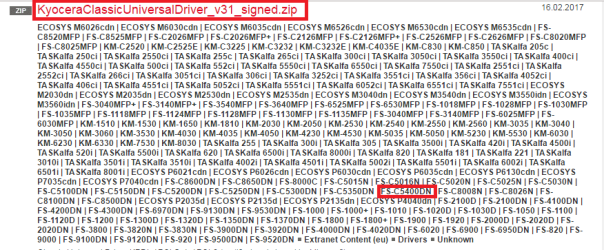
Easy enough to uninstall if nothing happens. Now the Kyocera site is a bit of a nightmare but I think on page 1 in this is the Microsoft certified universal driver KYOsearch

I do find such support sites really frustrating because they can never give you what you are looking for but I think the one I mentioned maybe the one you need. See pic and it is included with a whole lot of other models but am guessing it is as they say a universal driver. Am also guesin if one were to search through all those pages there maybe a dedicated driver for your machine.

Now I don't know how much this printer does or if you really like it but an alternative would bea new printer.
Myself if the device is old would go for that option and if you wnat my own personal prefrence an HP as after having Canons for for many years I fid the HP not only more economiclal but qyuieter too. My current printer is this HP Officejet Pro 8600 e-All-in-One Printer - N911a Drivers and Downloads | HP(R) Customer Support - I bought mine for around $240 and it does just about everything print, scan, copy , and fax - plus I cannot fault the support either. But the choice and budget is yours of course
 

Attachments

  • KYO.PNG
    KYO.PNG
    17.6 KB · Views: 0

My Computer

Computer type
PC/Desktop
Computer Manufacturer/Model Number
Own build (new) Desk1 / Asus ROG Win 7 / Desk2 1st build
OS
Desk1 7 Home Prem / Desk2 10 Pro / Main lap Asus ROG 10 Pro 2 laptop Toshiba 7 Pro Asus P2520 7 & 10
CPU
Desk1 i5 3750K / Laptop i7 GTX 860M / Desk2 i5 2500
Motherboard
Desk1 Asus P877-V / Desk2 Gigabyte H67 UD3H / Laptop ?
Memory
Desk1 8GB (1866) / Desk2 16GB (1333) / Laptop 8Gb DDR3
Graphics Card(s)
Desk 1& 2NVidia GTX 650 & Laptops on board Intel
Sound Card
Desk 1 & 2 -XONAR DG Realtek High Def audio Laptop
Monitor(s) Displays
Desk 1 Benq HD 2450 / Desk2 Philips 24" / Laptop 17.5"
Screen Resolution
1920x1080 D1 & D2 & Laptop 1
Hard Drives
Desk1 Samsung 120GB 830 SSD
Asus ROG 256GB 850 Pro SSD
Desk2 Samsung 840 256 SSD
Toshiba 120GB EVO
PSU
Desk 1 Corsair HX 1050/ Laptop ? / Desk 2 Corsair HX 650
Case
Desk 1 Cooler HAF XM ? Toshiba laptop / Desk2 Coolermaster
Cooling
Fans on all Desk1 -2 Desk2 - all Coolermasters 5 Laptop ?
Keyboard
Desk 1 MS Sidewinder X6 Desk 2 MS Sidewinder X 4
Mouse
Desk 1&2 - Gigabyte MS 900 gamer - laptop - Logitec wireless
Internet Speed
ADSL2+
Other Info
One other Desktop (tester) and spare Toshba laptop both with SSD's
Running Kaspersky 2016 ISS on all machines config'd identically
Logitec audio stereo systems on each machine (x3)
Canon MG5250MFC
Router/modem TP-Link running WPA2SK
Firstly a Big Thank you to all of you who have kept giving me suggestions on what to try next.

I found the disc that came with the Printer and uninstalled the old driver, but it would not let me install the new driver, even though I tried this many times.

Anyhow I kept trying different things, and found the Kyocera Driver on their website and downloaded it (even though I don't think this was the one that eventually was used).

I then deleted the Printer again.

And shut down and restarted the laptop.

I then added the Printer (Router printer), and it installed it, but seemed to use the driver UNIDRV.DLL which assume it pulled from the internet.

I could hardly believe it when I printed the test page and it worked.

By the way... I have used Canon printers for years, but about 6 years ago moved to the Kyocera printer which was expensive to buy, but the toner costs less that 1/3 of the price from the Canon Toner. I print a lot (1000's) of A4 colour posters from time to time. The Kyocera is fast, great quality, and cheap to run.

And now is working again ;-)

Thanks again guys.

Best Wishes,
Dave
 

My Computer

Computer type
PC/Desktop
Computer Manufacturer/Model Number
PS Specialist UK
OS
Microsoft Windows 7 Professional 64-bit 7601 Multiprocessor Free Service Pack 1
CPU
Intel(R) Core(TM) i7-4900MQ CPU @ 2.80GHz
Motherboard
Notebook W350STQ/W370ST
Memory
16.00 GB
Graphics Card(s)
(1) NVIDIA GeForce GTX 765M (2) Intel(R) HD Graphics 4
Sound Card
VIA High Definition Audio
Screen Resolution
0 x 0 x 0 bits (0 colors) @ 0 Hz
Hard Drives
(1) ATA INTEL SSDSC2BW24 SCSI Disk Device (2) ATA INTEL SSDSC2BW24 SCSI Disk Device
I then added the Printer (Router printer), and it installed it, but seemed to use the driver UNIDRV.DLL which assume it pulled from the internet.

Now just out of interest Dave was that the same as the link I sent?? Just want to know for future use if so.

Anyway glad it is all up and going and I am guessing in this day and age of so many models of printer being put out by the different companies is why there are so many drivers for this and that. I find it all a bit tedious chasing down drivers for anything now and it could be so easy.

The other thing that I wish they would make sure of is the CD's they put out with their products is up to date with the driver info or at least give you the URL of the driver support site direct instead of going from one convoluted window to another convoluted window etc etc:rolleyes:
 

My Computer

Computer type
PC/Desktop
Computer Manufacturer/Model Number
Own build (new) Desk1 / Asus ROG Win 7 / Desk2 1st build
OS
Desk1 7 Home Prem / Desk2 10 Pro / Main lap Asus ROG 10 Pro 2 laptop Toshiba 7 Pro Asus P2520 7 & 10
CPU
Desk1 i5 3750K / Laptop i7 GTX 860M / Desk2 i5 2500
Motherboard
Desk1 Asus P877-V / Desk2 Gigabyte H67 UD3H / Laptop ?
Memory
Desk1 8GB (1866) / Desk2 16GB (1333) / Laptop 8Gb DDR3
Graphics Card(s)
Desk 1& 2NVidia GTX 650 & Laptops on board Intel
Sound Card
Desk 1 & 2 -XONAR DG Realtek High Def audio Laptop
Monitor(s) Displays
Desk 1 Benq HD 2450 / Desk2 Philips 24" / Laptop 17.5"
Screen Resolution
1920x1080 D1 & D2 & Laptop 1
Hard Drives
Desk1 Samsung 120GB 830 SSD
Asus ROG 256GB 850 Pro SSD
Desk2 Samsung 840 256 SSD
Toshiba 120GB EVO
PSU
Desk 1 Corsair HX 1050/ Laptop ? / Desk 2 Corsair HX 650
Case
Desk 1 Cooler HAF XM ? Toshiba laptop / Desk2 Coolermaster
Cooling
Fans on all Desk1 -2 Desk2 - all Coolermasters 5 Laptop ?
Keyboard
Desk 1 MS Sidewinder X6 Desk 2 MS Sidewinder X 4
Mouse
Desk 1&2 - Gigabyte MS 900 gamer - laptop - Logitec wireless
Internet Speed
ADSL2+
Other Info
One other Desktop (tester) and spare Toshba laptop both with SSD's
Running Kaspersky 2016 ISS on all machines config'd identically
Logitec audio stereo systems on each machine (x3)
Canon MG5250MFC
Router/modem TP-Link running WPA2SK
Back
Top