Can't read hover and other text

mmstone

New member
Local time
8:23 AM
Messages
2
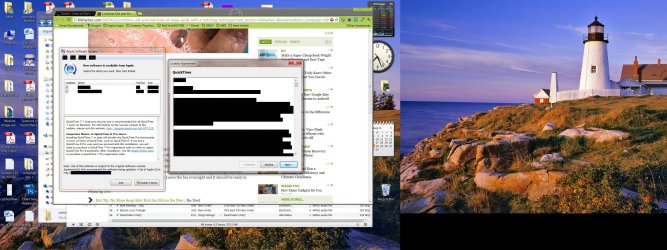
Don't know what I did, but now I can't read text in hover popups, other windows. Here is a screenshot. Any ideas would be greatly appreciated!
 

Attachments

  • Problem screenshot.jpg
    Problem screenshot.jpg
    557.1 KB · Views: 138

My Computer

OS
windows 7 Professional x64
which bit are you having problems with - it all looks OK from here..??

- mind you, that could be my PC (- or my eyesight..!!):geek:
 

My Computer

Computer type
PC/Desktop
Computer Manufacturer/Model Number
benchtec, built to personal specs
OS
Windows10 Pro - 64Bit vs.10547
CPU
i7-965 Extreme Edition (8 Cores) at 3.3GHz (no OC)
Motherboard
BloodRageX58 (Socket1366)
Memory
12G Corsair Dominator DDR3 - tripled
Graphics Card(s)
2xAMD SapphireNITRO R9 380(4G) crossfire
Sound Card
Sonar(SB)X-Fi onboard
Monitor(s) Displays
SyncMaster P2050 20"
Screen Resolution
1600x900 (widescreen)
Hard Drives
480G\OCZSolid3SSD, 64G\OCZVertex3SSD,60G\OCZVertex2SSD, 1TB\spinpointF1SATAHDD
PSU
1200w Power Station Gold
Case
ANTEC 900/2 all blue lights, etc..
Cooling
Noctua SE1366 NH-U12P - a tight fit, but a monster cooler!!
Keyboard
Logitech G19 (wired)
Mouse
Logitech G9 Laser (wired)
Internet Speed
150mb unlimited
Browser
IE11(RP)
Other Info
Xbox One, Nokia735 Windows10 mobile, LG HD/DVD/Blu-Ray r/w, CyberlinkPowerDVD15, LogitechZ5500-SS(5.1), LogitechG35Phones-SS(7.1),MSOffice 2007,CorelDrawX7,Painter2016, Wacom Intuos Pro-SE
Sorry, didn't point out the problem. Do you see the black bars in the front-most windows (the apple software window and license agreement window)? I am having that problem in some menus, hover text (like over icons on the desktop), etc. I can't read the text; for some reason, the background for the text field is black.

For the life of me I can't figure what I did to get this, but I sure can't find a way to fix it. Have tried many settings in Personalization CP/Advanced Options. I don't even know exactly what you would call the features I'm having trouble with.

Again any help would be greatly appreciated.

BTW, this seems to happen only in Aero. I switched to a regular windows theme, and the problem is resolved. And I wasn't using a custom Aero theme.

mms
 

My Computer

OS
windows 7 Professional x64
BTW, this seems to happen only in Aero. I switched to a regular windows theme, and the problem is resolved. And I wasn't using a custom Aero theme.

mms
Welcome to the Seven Forums
I am not sure I can help but I have a couple of question have you use a custom third-party theme or have one installed? When you say you switched to a regular Windows theme are you switching to Windows 7 basic or Windows classic?
You could try this http://www.sevenforums.com/tutorials/1538-sfc-scannow-command-system-file-checker.html it will not harm the programs or data you have saved on your computer.
Jerry
 

My Computer

Computer type
Laptop
Computer Manufacturer/Model Number
Sager NP9170
OS
Win 7 Pro x64 / Win 10 Pro
CPU
Intel(R) Core(TM) i7-3630QM CPU @ 2.40GHz
Motherboard
CLEVO P170EM
Memory
12 GB
Graphics Card(s)
(1) Intel(R) HD Graphics 4000 (2) NVIDIA GeForce GTX 675M
Sound Card
(1) Realtek High Definition Audio (2) Intel(R) Display Aud
Monitor(s) Displays
17.3
Screen Resolution
1920x1080
Hard Drives
(1) Samsung 860 EVO 500GB(OS) (1) Samsung 860 EVO 500GB(Data)
Keyboard
Backlite
Antivirus
MSE, Malwarebytes Pro
Browser
Firefox
Other Info
DESKTOP: Custom-built.
OS: Win 10 Pro x64.
CASE: Rosewill R5.
CPU: Intel I5 4670K CPU @ 3.40GHz.
CPU COOLER: Cool Master Hyper 212 EVO.
MOTHERBOARD: Asus Z87-A.
MEMORY: Kingston HyperX 2x4 GB.
GPU: Nvidia Geforce 650 TI.
PSU: Corsair TX750.
DRIVES: (1) Samsung 840 120 GB SSD (2) Western Digital blue 500 GB 7200 RPM.
I am having the same issue. My Aero themes have seemingly all started this black bar thing as well. I have run the recommended sfc /scannow and have had no luck resolving the issue with that tool. As mmstone is claiming, I am only seeing this on the Aero themes. I have swapped to the Windows 7 Basic theme for usability now, not the windows classic.
I am not sure what I could have done, this appeared out of the blue this week. I do notice that we are both running 64 bit Pro, that may be helpful as a common link. I have never used any downloaded themes, the theme I set up was based on the windows aero theme, the only thing I had changed was the backgrounds, I had set those to a random 15 minute changing photo. That was all I have really ever changed on my theme, and I suddenly am having this issue.
 

My Computer

OS
Windows 7 X64 PRO
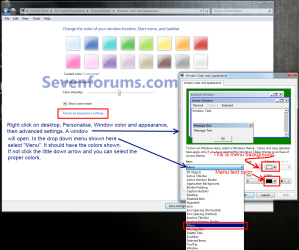
It would appear you both have your menu and font colors set to black hence not showing text.
 

My Computer

Computer type
PC/Desktop
Computer Manufacturer/Model Number
Home Built Desktop By DataTech
OS
Windows 7 Ultimate X64 SP1
CPU
Intel i5-2550K, Differing ~4.4-4.8GHz No built in GPU
Motherboard
ASUS P8Z68-V PRO/GEN3
Memory
16GB G.Skill Sniper 1866MHz @ 2133MHz 2x8GB
Graphics Card(s)
ASUS GTX650TIB-DC2OC-2GD5, (650TI Boost)
Sound Card
Onboard Realtek 5-1
Monitor(s) Displays
Samsung P2570HD
Screen Resolution
1920x1080
Hard Drives
Samsung 840 Pro 256GB SSD for OS, 500GB Seagate Constellation (Enterprise drive) for Data
PSU
Corsair HX650W
Case
Inwin Dragon Rider
Cooling
Hyper 212 EVO w/two Noctua fans, push-pull, @1300 RPM
Keyboard
E-Z Eyes, bright yellow keys with large characters
Mouse
steelseries SENSEI Laser Pro Gaming
Internet Speed
48-51Mbs Mbs down, 11 Mbs up Xfinity Cable
Antivirus
Norton Internet Security 2013
Browser
IE 10, Opera, Pale Moon if needed
Other Info
4 case fans, LG BluRay-RE, ASUS DVD-RW, Mr. Fusion power supply, 1.21 gigawatts.
After I changed nothing? I have already gone through my windows menu settings with no change. I have explored the entire menu and no change I make in there affects this issue. I would believe that if I had myself instigated a change to the theme or menu settings. I did not do any such action, so the change of the menu settings is out also in my book.
Also I believe by the wording in MMstones message that he looked in that part of the settings as well.
Edit:Also it only performs the blackening in floating windows. Other windows do not have any effect until after I scroll across a menu item, then they stay highlighted in black, even after deselecting the item the field remains black.

Not sure how it could be a menu settings on black issue Britton30 but am willing to listen to an explanation on what item in the menu settings I should be looking at that would cause the window to remain in black highlight after it has been deselected. I typically think people deal with a path towards a solution rather than a shot in the dark. "You have a cough, you may have cancer" approach doesn't truly help my diagnosing. But what should I be checking for this.

I am open to suggestions for exploring the issue more. I do have a rather diagnostic personality first off, so I have already probed the issue to the best of my windows knowledge.
 
Last edited:

My Computer

OS
Windows 7 X64 PRO
Have a look at the snip below.
Untitled.png
If your colors are set as shown, I have no further ideas and I'm stumped.
   Note
Click snip, then click again to open it full-size
 

My Computer

Computer type
PC/Desktop
Computer Manufacturer/Model Number
Home Built Desktop By DataTech
OS
Windows 7 Ultimate X64 SP1
CPU
Intel i5-2550K, Differing ~4.4-4.8GHz No built in GPU
Motherboard
ASUS P8Z68-V PRO/GEN3
Memory
16GB G.Skill Sniper 1866MHz @ 2133MHz 2x8GB
Graphics Card(s)
ASUS GTX650TIB-DC2OC-2GD5, (650TI Boost)
Sound Card
Onboard Realtek 5-1
Monitor(s) Displays
Samsung P2570HD
Screen Resolution
1920x1080
Hard Drives
Samsung 840 Pro 256GB SSD for OS, 500GB Seagate Constellation (Enterprise drive) for Data
PSU
Corsair HX650W
Case
Inwin Dragon Rider
Cooling
Hyper 212 EVO w/two Noctua fans, push-pull, @1300 RPM
Keyboard
E-Z Eyes, bright yellow keys with large characters
Mouse
steelseries SENSEI Laser Pro Gaming
Internet Speed
48-51Mbs Mbs down, 11 Mbs up Xfinity Cable
Antivirus
Norton Internet Security 2013
Browser
IE 10, Opera, Pale Moon if needed
Other Info
4 case fans, LG BluRay-RE, ASUS DVD-RW, Mr. Fusion power supply, 1.21 gigawatts.
^I would agree. However, if anything, try updating your graphics drivers too. Since virtually everything in Aero are rendered in your GPU, it might just work.
 

My Computer

Computer Manufacturer/Model Number
Asus G73SW-XN2
OS
Windows 2000 5.0 Build 2195
CPU
Intel Core i7-2630QM@2GHz(2.9GHz Turbo Boost) [Sandy Bridge]
Motherboard
Asus G73SW (Intel HM65 Chipset)
Memory
Kingston DDR3 1333 16GB (4GBx4)
Graphics Card(s)
nVidia GTX 460m 1.5GB
Sound Card
EAX Advanced HD 5.0, THX TruStudio
Monitor(s) Displays
17.3 in. primary & 23 in. secondary
Screen Resolution
1920x1080
Hard Drives
Seagate Momentus XT (SATA II) 500 GB @ 7200 RPM
Hitachi (SATA II) 500GB @ 7200 RPM

Non Raid because ASUS was crappy to choose an HM65 Chipset
Keyboard
Built-in 102-Key Backlit Keyboard
Other Info
It's a Laptop.
The update to the graphics card did the trick. I had not tried that:o

Thanks for the suggestion, and thanks for trying britton30 although that was not the issue.
 

My Computer

OS
Windows 7 X64 PRO
+1 Arkhi, very noob of me not to suggest a GFX driver upgrade.:o
 

My Computer

Computer type
PC/Desktop
Computer Manufacturer/Model Number
Home Built Desktop By DataTech
OS
Windows 7 Ultimate X64 SP1
CPU
Intel i5-2550K, Differing ~4.4-4.8GHz No built in GPU
Motherboard
ASUS P8Z68-V PRO/GEN3
Memory
16GB G.Skill Sniper 1866MHz @ 2133MHz 2x8GB
Graphics Card(s)
ASUS GTX650TIB-DC2OC-2GD5, (650TI Boost)
Sound Card
Onboard Realtek 5-1
Monitor(s) Displays
Samsung P2570HD
Screen Resolution
1920x1080
Hard Drives
Samsung 840 Pro 256GB SSD for OS, 500GB Seagate Constellation (Enterprise drive) for Data
PSU
Corsair HX650W
Case
Inwin Dragon Rider
Cooling
Hyper 212 EVO w/two Noctua fans, push-pull, @1300 RPM
Keyboard
E-Z Eyes, bright yellow keys with large characters
Mouse
steelseries SENSEI Laser Pro Gaming
Internet Speed
48-51Mbs Mbs down, 11 Mbs up Xfinity Cable
Antivirus
Norton Internet Security 2013
Browser
IE 10, Opera, Pale Moon if needed
Other Info
4 case fans, LG BluRay-RE, ASUS DVD-RW, Mr. Fusion power supply, 1.21 gigawatts.
Back
Top