Can't Reinstall IE11 on Win 7 x64 SP1 - Error Code 9C59

gguevara

New member
Local time
1:26 PM
Messages
9
Hello,

I have a Win 7 Ultimate x64 SP1 machine. AMD dual core processor 2.4GHz and 4GB ram.
I already had IE11 on my machine for a couple of years (via normal updates). But it always ran kind of slow and clunky. My idea was to uninstall it in order to reinstall it again. That is when I discovered I couldn't install it again. I kept on getting the dreaded error code 9C59.

About a month ago I fixed this same issue on another machine (my wife's). However, her machine never had IE11, it only had IE10. For her machine I had to uninstall all IE updates and revert back to IE8. I ran some sfc scans and the SURT. I was then able to do a manual offline update to IE11. It worked for her machine. Then I noticed her IE11 ran much smoother than my IE11.

So anyways, I uninstalled IE11 and it reverted back to IE10. I tried to reinstall it but it failed. I tried to manually install all of the prerequisite updates for Win 7 x64. It said I either already had the updates or they were not needed. The install still did not work. I then uninstalled IE10 and IE9. So now I am back to the original IE8. I again tried sfc scan and SURT several times, but IE11 still does not install.

I know that every machine is different, and the causes for error code 9C59 are different almost every time. I was able to fix it on my wife's machine, but I have tried everything for my machine and it still does not work. Can you please help me with this. I need IE11 for both work and school reasons, so it is important that I get IE11 installed properly on my machine.

Here are the logs and screen shot of the error. The CBS folder is large so I think I will need to share it via Google Drive. I think this is because I ran it several times, and because of older historical logs in the folder.

All help will be greatly appreciated. For now, I am using Firefox. Please help me... :(
Here is the Google Drive link to the CBS.zip:
https://drive.google.com/open?id=0B8botx_IHgNIZXBwbThpYlZ1SDQ

Thanks,
ggee
 

Attachments
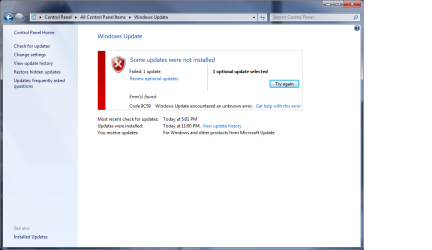
  • Error Code 9C59.png
    Error Code 9C59.png
    43.1 KB · Views: 0

My Computer My Computer

At a glance

Windows 7 Ultimate x64 SP1AMD Athlon 64 X2 4800+ 2.40Ghz4GBNvidia GeFprce 7800 GS
Computer type
PC/Desktop
OS
Windows 7 Ultimate x64 SP1
CPU
AMD Athlon 64 X2 4800+ 2.40Ghz
Motherboard
ASUS A8V Deluxe
Memory
4GB
Graphics Card(s)
Nvidia GeFprce 7800 GS
Hard Drives
Western Digital WD32 300GB
Western Digital WD50 500GB
Antivirus
Avira Free Antivirus
Browser
IE11, Firefox
Theres no way i can look at 1.3GB data on that doc.
Please post the last day's entries from windowsUpdate log please.

and d/l this prog to your desktop and run it (its safe please ignore any warning)
http://www.sysnative.com/niemiro/apps/SFCFix.exe
post those results as well.

Roy
 

My Computer My Computer

At a glance

W7 home premium 32bit/W7HP 64bit/w10 tp insid...E5300 dual core3gbNvidia Geforce 7100 Nforce 630i
Computer type
PC/Desktop
Computer Manufacturer/Model Number
medionl/Aspire 6930G/acer x55a
OS
W7 home premium 32bit/W7HP 64bit/w10 tp insider ring
CPU
E5300 dual core
Motherboard
medion MS7366
Memory
3gb
Graphics Card(s)
Nvidia Geforce 7100 Nforce 630i
Monitor(s) Displays
avixc
Internet Speed
n (isp resticted to 72)
Antivirus
mse/pands
Browser
palemoon
Other Info
Belkin Fd7050 n USB using Railink RT2870 drivers, more upto date
Hello Roy,

Thank you for helping me. I really appreciated it a lot.
For the CBS logs, I removed all the old historical log. Now you should only see the logs from the last date I ran them (4/24/16).

The CBS.zip is much smaller now:
https://drive.google.com/open?id=0B8botx_IHgNIOU0tSm1ib1VqaXM

I also attached the result of the SFCFix.


Thanks,
ggee
 

Attachments

My Computer My Computer

At a glance

Windows 7 Ultimate x64 SP1AMD Athlon 64 X2 4800+ 2.40Ghz4GBNvidia GeFprce 7800 GS
Computer type
PC/Desktop
OS
Windows 7 Ultimate x64 SP1
CPU
AMD Athlon 64 X2 4800+ 2.40Ghz
Motherboard
ASUS A8V Deluxe
Memory
4GB
Graphics Card(s)
Nvidia GeFprce 7800 GS
Hard Drives
Western Digital WD32 300GB
Western Digital WD50 500GB
Antivirus
Avira Free Antivirus
Browser
IE11, Firefox
Hi GGee,
that new file is still 3GB+ after extraction, please post the last day of the windows update log.
The SURT came back clean (sfc.exe)

Roy
 

My Computer My Computer

At a glance

W7 home premium 32bit/W7HP 64bit/w10 tp insid...E5300 dual core3gbNvidia Geforce 7100 Nforce 630i
Computer type
PC/Desktop
Computer Manufacturer/Model Number
medionl/Aspire 6930G/acer x55a
OS
W7 home premium 32bit/W7HP 64bit/w10 tp insider ring
CPU
E5300 dual core
Motherboard
medion MS7366
Memory
3gb
Graphics Card(s)
Nvidia Geforce 7100 Nforce 630i
Monitor(s) Displays
avixc
Internet Speed
n (isp resticted to 72)
Antivirus
mse/pands
Browser
palemoon
Other Info
Belkin Fd7050 n USB using Railink RT2870 drivers, more upto date
Hi Roy,

Ok... so what I did was make a copy of the original CBS folder (to keep as a backup copy).
Then I temporarily stopped the Windows Installer Services.
This then allowed me to deleted all the log files in the original CBS folder (including the CBS.log file).
Then I restarted the Windows Installer Services (which created a new CBS.log file).
So this pretty much left an empty CBS folder, with one current CBS.log file (in order to start fresh again).

I did a reboot, just for good measure.
Then I re-ran the SURT and it completed with no errors.
I also re-ran a new sfc /scannow (as usual it found some corrupt files it could not fix).
I did not attempt to install IE11 (I will wait for further instructions from you on this)

So now I can re-post the results in a much much smaller CBS.zip, and also re-post the SFCFix.txt from yesterday (I did not re-run this). I hope this helps and gets us started on the resolution.

Thanks for helping me on this.
ggee
 

Attachments

My Computer My Computer

At a glance

Windows 7 Ultimate x64 SP1AMD Athlon 64 X2 4800+ 2.40Ghz4GBNvidia GeFprce 7800 GS
Computer type
PC/Desktop
OS
Windows 7 Ultimate x64 SP1
CPU
AMD Athlon 64 X2 4800+ 2.40Ghz
Motherboard
ASUS A8V Deluxe
Memory
4GB
Graphics Card(s)
Nvidia GeFprce 7800 GS
Hard Drives
Western Digital WD32 300GB
Western Digital WD50 500GB
Antivirus
Avira Free Antivirus
Browser
IE11, Firefox
Hi Ggee,

If you are >>only<< experiencing problems with the install of IE11, and as you use FF
It is not a pre-requisite and can be turned OFF via progs/features >> turn features on/off , a new window will open, uncheck IE.
REBOOT

IF you want to carry on, or let sleeping dogs lie, its up to you
Anyway back to the logs
3 sets of problems, which may all be cleared by the first instruction.

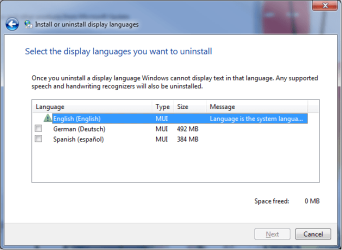
1 Its having trouble "smashing" a language pack change >> uninstall << any extras you have on your comp REBOOT

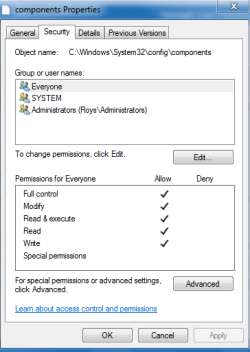
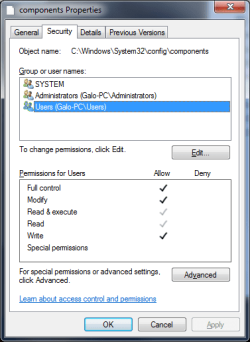
2 Access denied components hive compare your access rights with mine, screenshot.
run >> regedit >> click on HLKM >> click file top left >> another window will open >> right click on components >> all 3 entries should be ticked (1 dark 2 light)

AND i hope we havnt still got this one
Iassdo file corrupt.

After No 2, please copy/post the latest dated run of sfc scannow.

Roy
 

Attachments

  • compsec.PNG
    compsec.PNG
    11.9 KB · Views: 30

My Computer My Computer

At a glance

W7 home premium 32bit/W7HP 64bit/w10 tp insid...E5300 dual core3gbNvidia Geforce 7100 Nforce 630i
Computer type
PC/Desktop
Computer Manufacturer/Model Number
medionl/Aspire 6930G/acer x55a
OS
W7 home premium 32bit/W7HP 64bit/w10 tp insider ring
CPU
E5300 dual core
Motherboard
medion MS7366
Memory
3gb
Graphics Card(s)
Nvidia Geforce 7100 Nforce 630i
Monitor(s) Displays
avixc
Internet Speed
n (isp resticted to 72)
Antivirus
mse/pands
Browser
palemoon
Other Info
Belkin Fd7050 n USB using Railink RT2870 drivers, more upto date
Hello Roy,

1- Yes, I definitely need to have IE11 installed again. I need it for work and school, thus it is important. As I mentioned above, it was already installed on my machine before. Then I uninstalled it in order to reinstall it because it always ran slow (since originally installed as a windows update).

2- Your instructions are too short and vague on details. Can you please be more specific going forward. I had to guess as to what you needed me to do. For example, for #1 - I'm not sure what you meant with "smashing a language pack" or how to uninstall it. I had to google search what I think you wanted me to do (I hope what I did was what you meant for me to do).

3- I noticed we are in different time zones. I am in the NYC area, and you are in the UK. In an effort to reduce the amount of time, because of our time zones and time gap between communications - can you please make sure to provide detailed instructions and screen shots if needed. In this way, we can reduce any questions or misunderstandings that will add another day of time gap.

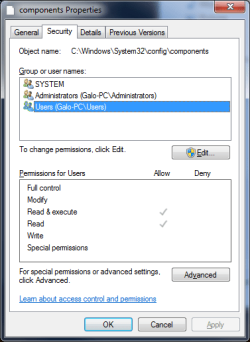
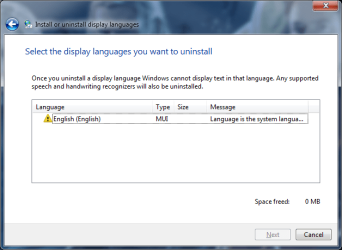
I have attached the before and after screen shots of the language pack uninstalls, as well as the permission settings for the one user name that needed to be updated. I made sure to reboot before re-running the sfc /scannow (see attached log).

Please let me know what the next steps are.
(NOTE: please notice the yellow caution sign on the English language pack. Is this an issue?)

Thanks again for the help.
ggee
 

Attachments

  • After.png
    After.png
    14.2 KB · Views: 27
  • Before.png
    Before.png
    14 KB · Views: 27
  • Display Language After Uninstall.png
    Display Language After Uninstall.png
    24.2 KB · Views: 26
  • Display Language Before Uninstall.png
    Display Language Before Uninstall.png
    18.2 KB · Views: 27

My Computer My Computer

At a glance

Windows 7 Ultimate x64 SP1AMD Athlon 64 X2 4800+ 2.40Ghz4GBNvidia GeFprce 7800 GS
Computer type
PC/Desktop
OS
Windows 7 Ultimate x64 SP1
CPU
AMD Athlon 64 X2 4800+ 2.40Ghz
Motherboard
ASUS A8V Deluxe
Memory
4GB
Graphics Card(s)
Nvidia GeFprce 7800 GS
Hard Drives
Western Digital WD32 300GB
Western Digital WD50 500GB
Antivirus
Avira Free Antivirus
Browser
IE11, Firefox

My Computers My Computers

  • At a glance

    Windows 7 pro/Windows 10 ProIntel i7 860 Quad core 2.8 ghz8 gbATI Radeon HD 5770 1 gb ram
    Computer type
    PC/Desktop
    Computer Manufacturer/Model Number
    HP Pavillion Elite HPE-250f
    OS
    Windows 7 pro/Windows 10 Pro
    CPU
    Intel i7 860 Quad core 2.8 ghz
    Memory
    8 gb
    Graphics Card(s)
    ATI Radeon HD 5770 1 gb ram
    Monitor(s) Displays
    Alienware 25 AW2521HF & Viewsonic
    Screen Resolution
    1920 x1080 & 1680x1050
    Hard Drives
    WD blue 1 tb & 500 gb.
    Browser
    FF of course.
    Other Info
    https://www.bestbuy.com/site/hp-pavilion-elite-desktop-intel-core-i7-processor-8gb-memory-1tb-hard-drive/9921493.p?skuId=9921493
  • At a glance

    Windows 2012 R2 Data center/Linux Minti3 9100 3.6GHz, 8M cache, 4C/4T8GB 2666MT/s DDR4 ECC UDIMM
    Computer type
    PC/Desktop
    System Manufacturer/Model Number
    Dell Poweredge T140
    OS
    Windows 2012 R2 Data center/Linux Mint
    CPU
    i3 9100 3.6GHz, 8M cache, 4C/4T
    Memory
    8GB 2666MT/s DDR4 ECC UDIMM
    Monitor(s) Displays
    Viewsonic
    Screen Resolution
    1680x1050
    Hard Drives
    1 TB & 750 GB
    Other Info
    https://www.dell.com/en-us/work/shop/productdetailstxn/poweredge-t140?~ck=bt
Hi GGee,
Smashing the language pack was the terminology used in the Cbs log.

As you had installed the language packs, i thought you therefor new where togo to remove them.

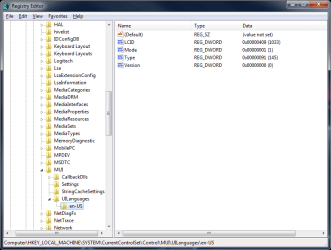
Regarding the error shown on the language pack, that would be caused by a registry change, read the 2nd to last post in this tutorial, you will need to check that yours matches his
https://www.google.co.uk/url?sa=t&rct=j&q=&esrc=s&source=web&cd=11&cad=rja&uact=8&ved=0ahUKEwjmhIrtmbLMAhVsCcAKHaIaCVYQFghlMAo&url=http%3A%2F%2Fwww.sevenforums.com%2Ftutorials%2F87313-display-language-packs-install-uninstall.html&usg=AFQjCNEEprHl8Ivi5mwkUwzSrV1CtvP0hQ

run >> regedit >> scroll to the following

[HKEY_LOCAL_MACHINE\SYSTEM\CurrentControlSet\Control\MUI\UILanguages]

[HKEY_LOCAL_MACHINE\SYSTEM\CurrentControlSet\Control\MUI\UILanguages\en-US]
"LCID"=dword:00000409
"Type"=dword:00000091
"Version"=dword:00000000
"Mode"=dword:00000001


reviewing logs now

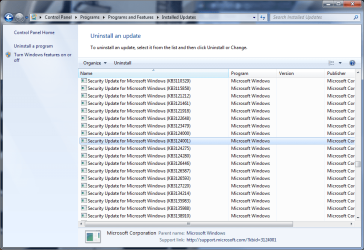
Please hide updates
KB3124001
KB3004375

Have you used any registry cleaner or tune up tools if so which
Roy
 
Last edited:

My Computer My Computer

At a glance

W7 home premium 32bit/W7HP 64bit/w10 tp insid...E5300 dual core3gbNvidia Geforce 7100 Nforce 630i
Computer type
PC/Desktop
Computer Manufacturer/Model Number
medionl/Aspire 6930G/acer x55a
OS
W7 home premium 32bit/W7HP 64bit/w10 tp insider ring
CPU
E5300 dual core
Motherboard
medion MS7366
Memory
3gb
Graphics Card(s)
Nvidia Geforce 7100 Nforce 630i
Monitor(s) Displays
avixc
Internet Speed
n (isp resticted to 72)
Antivirus
mse/pands
Browser
palemoon
Other Info
Belkin Fd7050 n USB using Railink RT2870 drivers, more upto date
Hello Roy,

I have not used any registry cleaners or tools, other than what you have instructed me to use.
In the past I have used registry cleaners, but I stopped because I always heard they can cause issues in general (I'm talking several years ago).

So to answer your question - No, I have not used any tools on this issue besides the ones you have instructed me to use so far.

I will reply back once I complete your current instructions.

Thanks,
ggee
 
Last edited:

My Computer My Computer

At a glance

Windows 7 Ultimate x64 SP1AMD Athlon 64 X2 4800+ 2.40Ghz4GBNvidia GeFprce 7800 GS
Computer type
PC/Desktop
OS
Windows 7 Ultimate x64 SP1
CPU
AMD Athlon 64 X2 4800+ 2.40Ghz
Motherboard
ASUS A8V Deluxe
Memory
4GB
Graphics Card(s)
Nvidia GeFprce 7800 GS
Hard Drives
Western Digital WD32 300GB
Western Digital WD50 500GB
Antivirus
Avira Free Antivirus
Browser
IE11, Firefox
Hello Roy,

So I completed the two instructions you gave me.

1- For the Registry Editor - I only had the same entries for the "LCID" and "Type". I add the other two to match and look the same as the post you referred me to. I then rebooted for safe measure (see the screen shot).

2- For the two "KB" updates you wanted me to hide - I can't hide them because they are already installed (per the Installed Update screen shots). Do you need for me to uninstall these Security Updates before moving forward?

Note: I still see the yellow error symbol on the English language pack. If this is an issue that contributes to my IE11 (9C59) issue, than I guess we will need to fix it. But if it does not contribute to my IE11 issue, then I can live with it for another time. The priority is resolving the IE11 issue.

Thanks,
ggee
 

Attachments

  • Registry Editor.png
    Registry Editor.png
    20.6 KB · Views: 0
  • Installed Update KB3124001.png
    Installed Update KB3124001.png
    50.5 KB · Views: 0
  • Installed Update KB3004375.png
    Installed Update KB3004375.png
    53.7 KB · Views: 0

My Computer My Computer

At a glance

Windows 7 Ultimate x64 SP1AMD Athlon 64 X2 4800+ 2.40Ghz4GBNvidia GeFprce 7800 GS
Computer type
PC/Desktop
OS
Windows 7 Ultimate x64 SP1
CPU
AMD Athlon 64 X2 4800+ 2.40Ghz
Motherboard
ASUS A8V Deluxe
Memory
4GB
Graphics Card(s)
Nvidia GeFprce 7800 GS
Hard Drives
Western Digital WD32 300GB
Western Digital WD50 500GB
Antivirus
Avira Free Antivirus
Browser
IE11, Firefox
Hello forum,

Can I please receive next steps. I understand that there are time zone difference, as well as time needed to take a look at the logs. But it has been a full week (7 days) and I am still nowhere closer to resolving the issue of IE11 not installing on to my machine. I am now falling behind on work and school related matters. Yes, I know there are other browsers (I am temporally using Firefox for now). I there are specific reasons why I most also be able to IE11 installed again.

I am truly grateful for the help from the forum and its volunteers. However, this is still time critical for me.
Moving along, I don't understand how, if I already had IE11 installed through normal windows updates - why it would not reinstall again. I have made no changes to my machine since IE11 was originally updated, other than normal windows updates, that would prevent IE11 from installing again.

Please, I need to be able get this issue fixed as soon as possible. Anyone....., donations can be made.

Thank you for all your help so far.
ggee
 

My Computer My Computer

At a glance

Windows 7 Ultimate x64 SP1AMD Athlon 64 X2 4800+ 2.40Ghz4GBNvidia GeFprce 7800 GS
Computer type
PC/Desktop
OS
Windows 7 Ultimate x64 SP1
CPU
AMD Athlon 64 X2 4800+ 2.40Ghz
Motherboard
ASUS A8V Deluxe
Memory
4GB
Graphics Card(s)
Nvidia GeFprce 7800 GS
Hard Drives
Western Digital WD32 300GB
Western Digital WD50 500GB
Antivirus
Avira Free Antivirus
Browser
IE11, Firefox
Hi GGee,

Sorry bout delay Bank Holiday over here.

Uninstalling those 2 KB's, (newer versions are being referenced as problems), could clear the errors

AS your getting behind with your work.
I can can give you 3 options, That will not repair the error in situ, but are alternatives to get you back on track

A start-up repair - http://www.sevenforums.com/tutorials/681-startup-repair.html
note the above option also shows how to perform a system image re-install

A repair install - http://www.sevenforums.com/tutorials/3413-repair-install.html


Upgrade to W10 from the GWX flag, if its there?, bottom right of toolbar


Before you attempt any of the above,
It would be a good idea to make a system image using Macrium or Acronis, both free.

Roy
 

My Computer My Computer

At a glance

W7 home premium 32bit/W7HP 64bit/w10 tp insid...E5300 dual core3gbNvidia Geforce 7100 Nforce 630i
Computer type
PC/Desktop
Computer Manufacturer/Model Number
medionl/Aspire 6930G/acer x55a
OS
W7 home premium 32bit/W7HP 64bit/w10 tp insider ring
CPU
E5300 dual core
Motherboard
medion MS7366
Memory
3gb
Graphics Card(s)
Nvidia Geforce 7100 Nforce 630i
Monitor(s) Displays
avixc
Internet Speed
n (isp resticted to 72)
Antivirus
mse/pands
Browser
palemoon
Other Info
Belkin Fd7050 n USB using Railink RT2870 drivers, more upto date
Hi,
Installing a or more language packs will cause you to have to reinstall quite a few updates as most I've seen say so on the descriptions pages.

Reverting all you way back to ie8 was just insult to injury
Has this been used
https://www.microsoft.com/en-us/download/details.aspx?id=3132

I'll just add once I had this error but was fixed simply from going to msn.com and using the upgrade your browser message on it to upgrade to ie11 :)
 

My Computer My Computer

At a glance

Win-7-Pro64bit 7-H-Prem-64biti7-5930K 2nd i9-9940x both water blocked VRM'...Trident-z 3200C14 2nd Trident-z 3600C16EVGA 1080ti ftw3 2nd Titan Xp both water blocked
Computer type
PC/Desktop
Computer Manufacturer/Model Number
Custom assembled by me :}
OS
Win-7-Pro64bit 7-H-Prem-64bit
CPU
i7-5930K 2nd i9-9940x both water blocked VRM's too
Motherboard
ASUS SABERTOOTH X99 2nd ASUS x299 Apex
Memory
Trident-z 3200C14 2nd Trident-z 3600C16
Graphics Card(s)
EVGA 1080ti ftw3 2nd Titan Xp both water blocked
Sound Card
Built-in Realtek
Monitor(s) Displays
1-AOC G2460PG 24"G-Sync 144Hz/ 2nd 1-ASUS VG248QE 24" 144Hz
Screen Resolution
1920 x 1080 144Hz
Hard Drives
2-Samsung M.2 Evo & Evo Plus
2-Samsung 850 EVO 500GB SSD's/ 3-2.5 W.D. Black 1tb-&3-1tb/3-3.5 WD Black 1tb hdd's
PSU
EVGA SuperNOVA 1000-P2 2nd 1200-P2
Case
2-Corsair Obsidian Series 450D Black ATX Mid Tower
Cooling
Custom water loops
Keyboard
Logitech G710+/ 2nd Logitech G910
Mouse
2-RedDragon M901 Perdition 16400 dpi Gaming mouse = wired
Internet Speed
Comcast Ping 19ms 89.31mbps download speed 6.12mbps upload
Antivirus
Malwarebytes Pro/ Superantispyware Pro
Browser
FireFox & Pale moon
Other Info
2nd ASUS X299 Apex/Intel i9-9940x with Custom water loop/7H-Prem-x64/Corsair 450D case/Ram Trident-z 3600C16 4x8gb / Samsung970Evo plus 500gb SSD/Dual ssd EZ swap evo/PSU EVGA SuperNova 1200w-P2 80+Platinum/GPU Titan Xp /8-ML-140 on push-pull on 2-280GTX rads
Hello Roy/TrashZone,

Thanks for the reply.
To answer your two questions:
1- I have not uninstalled the two KB's yet. You only asked me to "hide" them, and I was waiting for you to reply if I should specifically uninstall them. I will officially uninstall these two KB's, reboot, and then try to install IE11. I will report the results.

2- I have already tried to use the SURT. It was one of the first things I did, per the forum's instructions on starting a new post. I also posted the log results. I will rerun the SURT again, once I finish with item #1. I will report the results and any logs.

Thanks,
ggee
 

My Computer My Computer

At a glance

Windows 7 Ultimate x64 SP1AMD Athlon 64 X2 4800+ 2.40Ghz4GBNvidia GeFprce 7800 GS
Computer type
PC/Desktop
OS
Windows 7 Ultimate x64 SP1
CPU
AMD Athlon 64 X2 4800+ 2.40Ghz
Motherboard
ASUS A8V Deluxe
Memory
4GB
Graphics Card(s)
Nvidia GeFprce 7800 GS
Hard Drives
Western Digital WD32 300GB
Western Digital WD50 500GB
Antivirus
Avira Free Antivirus
Browser
IE11, Firefox
Hi GG,

Please uninstall them, as the error reported in your last Cbs log, showed them as being a problem.

MS have been issuing KB's that are causing user problems, and then updating the same No: to clear them,
not very user friendly.

Roy
 

My Computer My Computer

At a glance

W7 home premium 32bit/W7HP 64bit/w10 tp insid...E5300 dual core3gbNvidia Geforce 7100 Nforce 630i
Computer type
PC/Desktop
Computer Manufacturer/Model Number
medionl/Aspire 6930G/acer x55a
OS
W7 home premium 32bit/W7HP 64bit/w10 tp insider ring
CPU
E5300 dual core
Motherboard
medion MS7366
Memory
3gb
Graphics Card(s)
Nvidia Geforce 7100 Nforce 630i
Monitor(s) Displays
avixc
Internet Speed
n (isp resticted to 72)
Antivirus
mse/pands
Browser
palemoon
Other Info
Belkin Fd7050 n USB using Railink RT2870 drivers, more upto date
Hello Roy,

I am posting this reply from IE11...., F#&%?$@ :cool:
I'm not sure what got it to install, but I will retrace my steps here in hopes that it will help someone in the future.

1- Over the weekend, because I did not hear back from anyone, I decided to try one of the downloads that TownsBG mentioned in post #8. I followed the link he posted, then downloaded and ran the Windows Update Agent from the Microsoft Download Center (for All supported x64-based versions of Windows 7 SP1). It completed successfully and I rebooted. But I did not try to install IE11 at that point because I wanted to wait for official next steps. So I stopped there until today. It could be that this alone might have been the reason for IE11 installing for me today (or not).

2- Today I followed your instructions to uninstalled the two KB's (KB3124001 and KB3004375). I rebooted and made sure to Hide these updates, per your instructions, in order to prevent them from installing via windows update. I did not try to install IE11 at this point yet.

3- Because I uninstalled these two KB's, another Security Update showed up on windows update (KB3031432). I decided to Hide this one as well, in order to prevent it from installing. It is currently still hidden as I write this (see screen shot). Should I install it?

4- At this point I re-ran the SURT and SFCFix.exe tool. Both completed successfully and I saved the logs. I then rebooted for good measure. I attached the logs on this reply for your review.

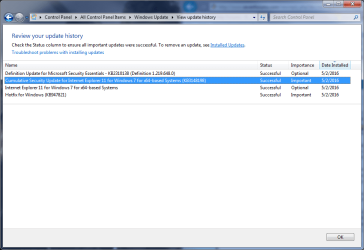
5- I then installed IE11 via windows update. It downloaded and installed successfully. I rebooted and then there were some additional "important" windows updates that I need to complete. I installed these successfully and I rebooted (see screen shot).

So now I have IE11 again. Thank you for your help. I would still like to know what exactly was causing the issue. Maybe the last logs I have attached will reveal the reasons.

Please let me know if I should install the KB from #3 above?
Also, is there anything else that is still unresolved at this point? Anything on the logs that you feel we should still fix?

Thanks again. I was really biting my nails there for a whole week. But it worked.
You guys are the best.

ggee :D
 

Attachments

  • Hidden KBs.png
    Hidden KBs.png
    37.5 KB · Views: 0
  • IE11 Updates.png
    IE11 Updates.png
    30.3 KB · Views: 1
  • SFCFix.txt
    SFCFix.txt
    950 bytes · Views: 1

My Computer My Computer

At a glance

Windows 7 Ultimate x64 SP1AMD Athlon 64 X2 4800+ 2.40Ghz4GBNvidia GeFprce 7800 GS
Computer type
PC/Desktop
OS
Windows 7 Ultimate x64 SP1
CPU
AMD Athlon 64 X2 4800+ 2.40Ghz
Motherboard
ASUS A8V Deluxe
Memory
4GB
Graphics Card(s)
Nvidia GeFprce 7800 GS
Hard Drives
Western Digital WD32 300GB
Western Digital WD50 500GB
Antivirus
Avira Free Antivirus
Browser
IE11, Firefox
Wow a lot of language packs :)
Every security update released seems to say they need to be reapplied if a language pack is installed after.
 

My Computer My Computer

At a glance

Win-7-Pro64bit 7-H-Prem-64biti7-5930K 2nd i9-9940x both water blocked VRM'...Trident-z 3200C14 2nd Trident-z 3600C16EVGA 1080ti ftw3 2nd Titan Xp both water blocked
Computer type
PC/Desktop
Computer Manufacturer/Model Number
Custom assembled by me :}
OS
Win-7-Pro64bit 7-H-Prem-64bit
CPU
i7-5930K 2nd i9-9940x both water blocked VRM's too
Motherboard
ASUS SABERTOOTH X99 2nd ASUS x299 Apex
Memory
Trident-z 3200C14 2nd Trident-z 3600C16
Graphics Card(s)
EVGA 1080ti ftw3 2nd Titan Xp both water blocked
Sound Card
Built-in Realtek
Monitor(s) Displays
1-AOC G2460PG 24"G-Sync 144Hz/ 2nd 1-ASUS VG248QE 24" 144Hz
Screen Resolution
1920 x 1080 144Hz
Hard Drives
2-Samsung M.2 Evo & Evo Plus
2-Samsung 850 EVO 500GB SSD's/ 3-2.5 W.D. Black 1tb-&3-1tb/3-3.5 WD Black 1tb hdd's
PSU
EVGA SuperNOVA 1000-P2 2nd 1200-P2
Case
2-Corsair Obsidian Series 450D Black ATX Mid Tower
Cooling
Custom water loops
Keyboard
Logitech G710+/ 2nd Logitech G910
Mouse
2-RedDragon M901 Perdition 16400 dpi Gaming mouse = wired
Internet Speed
Comcast Ping 19ms 89.31mbps download speed 6.12mbps upload
Antivirus
Malwarebytes Pro/ Superantispyware Pro
Browser
FireFox & Pale moon
Other Info
2nd ASUS X299 Apex/Intel i9-9940x with Custom water loop/7H-Prem-x64/Corsair 450D case/Ram Trident-z 3600C16 4x8gb / Samsung970Evo plus 500gb SSD/Dual ssd EZ swap evo/PSU EVGA SuperNova 1200w-P2 80+Platinum/GPU Titan Xp /8-ML-140 on push-pull on 2-280GTX rads
Hi GG,
Glad your back on track,
NOW BEFORE YOU DO ANYTHING ELSE

Make a system image using 1 of the 2 progs i referred to in my last post,
Then you will have an up to date copy, which you can use at any time, and certainly wont take a week to correct. (note after you have installed any other language packs and thier required updates make another copy).

I suspect it was a combination of your action in running the windows Update agent change and hiding these 2 updates.

From the previous CBS log

Package_for_KB3124001~31bf3856ad364e35~amd64~~6.1.1.0, ApplicableState: 112, CurrentState:112
2016-04-27 23:58:47, Info CBS Session: 30515458_1141806010 initialized by client WindowsUpdateAgent.
2016-04-27 23:58:47, Info CBS Failed to internally open package. [HRESULT = 0x800f0805 - CBS_E_INVALID_PACKAGE]

Package_for_KB3004375~31bf3856ad364e35~amd64~~6.1.3.1, ApplicableState: 112, CurrentState:112
2016-04-27 23:57:30, Info CBS Session: 30515458_371874369 initialized by client WindowsUpdateAgent.
2016-04-27 23:57:30, Info CBS Failed to internally open package. [HRESULT = 0x800f0805 - CBS_E_INVALID_PACKAGE]
2016-04-27 23:57:30, Info CBS Session: 30515458_372059916 initialized by client
WindowsUpdateAgent.
The above should not appear in your latest CBS log


After creating the >> 2nd system image <<, and a system restore point
Unhide the hidden updates and install them.
If they install correctly and IE11 still works properly, throw a party:party:
Any problem encountered, run system restore if that fails use the system image and hide the updates.


Finally Update your system image on a regular basis.


Happy Surfing

Roy
 

My Computer My Computer

At a glance

W7 home premium 32bit/W7HP 64bit/w10 tp insid...E5300 dual core3gbNvidia Geforce 7100 Nforce 630i
Computer type
PC/Desktop
Computer Manufacturer/Model Number
medionl/Aspire 6930G/acer x55a
OS
W7 home premium 32bit/W7HP 64bit/w10 tp insider ring
CPU
E5300 dual core
Motherboard
medion MS7366
Memory
3gb
Graphics Card(s)
Nvidia Geforce 7100 Nforce 630i
Monitor(s) Displays
avixc
Internet Speed
n (isp resticted to 72)
Antivirus
mse/pands
Browser
palemoon
Other Info
Belkin Fd7050 n USB using Railink RT2870 drivers, more upto date
Back
Top