Can't remove Boot Select Menu

cocus

New member
Local time
12:23 PM
Messages
8
Sorry to post on old post, but i have a little problem:
I've installed Win7 successfully on mi Netbook with Method #2.
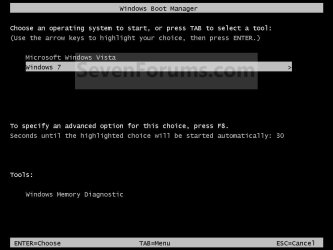
But when Windows start booting, apears the Boot Select Menu.

I can't disable that, i've used msconfig, EasyBCD, Win Installation Repair tool and other tools, and still apears. Anybody has an idea?
Sorry for my bad english :D
 
Last edited by a moderator:

My Computer

OS
Win7

My Computer

Computer type
PC/Desktop
Computer Manufacturer/Model Number
Self built custom
OS
64-bit Windows 11 Pro for Workstations
CPU
Intel i7-8700K OC'd to 5 GHz
Motherboard
ASUS ROG Maximus XI Formula Z390
Memory
64 GB (4x16GB) G.SKILL TridentZ RGB DDR4 3600 MHz
Graphics Card(s)
ASUS ROG-STRIX-GTX1080TI-O11G-GAMING
Sound Card
Integrated
Monitor(s) Displays
2 x Samsung Odyssey G7 27"
Screen Resolution
2560x1440
Hard Drives
1TB Samsung 990 PRO M.2,
4TB Samsung 990 PRO PRO M.2,
TerraMaster F8 SSD Plus NAS
PSU
Seasonic Prime Titanium 850W
Case
Thermaltake Core P3
Cooling
Corsair Hydro H115i
Keyboard
Logitech wireless K800
Mouse
Logitech MX Master 4
Internet Speed
2 Gb/s Download and 100 Mb/s Upload
Antivirus
Malwarebyte Anti-Malware Premium
Browser
Google Chrome
Other Info
Logitech Z625 speaker system,
Logitech BRIO 4K Pro webcam,
HP Color LaserJet Pro MFP M477fdn,
APC SMART-UPS RT 1000 XL - SURT1000XLI,
Galaxy S23 Plus phone
Hello Cocus, and welcome to Seven Forums.

If you mean the Windows Boot Manager where you select what OS you want to have startup at startup, then you can use the tutorial below to set the time to display this to 0 (or uncheck it) to not have it anymore.

http://www.sevenforums.com/tutorials/2285-operating-system-start-change-display-list-time.html

Hope this helps,
Shawn
I've tryed both solutions, but it still appearing. If i change 0 to another value, still the same. This may be a bug of my ISO?

Thanks.
 

My Computer

OS
Win7
Just to confirm though. This is what you are referring to??

Boot_Manager.jpg
 

My Computer

Computer type
PC/Desktop
Computer Manufacturer/Model Number
Self built custom
OS
64-bit Windows 11 Pro for Workstations
CPU
Intel i7-8700K OC'd to 5 GHz
Motherboard
ASUS ROG Maximus XI Formula Z390
Memory
64 GB (4x16GB) G.SKILL TridentZ RGB DDR4 3600 MHz
Graphics Card(s)
ASUS ROG-STRIX-GTX1080TI-O11G-GAMING
Sound Card
Integrated
Monitor(s) Displays
2 x Samsung Odyssey G7 27"
Screen Resolution
2560x1440
Hard Drives
1TB Samsung 990 PRO M.2,
4TB Samsung 990 PRO PRO M.2,
TerraMaster F8 SSD Plus NAS
PSU
Seasonic Prime Titanium 850W
Case
Thermaltake Core P3
Cooling
Corsair Hydro H115i
Keyboard
Logitech wireless K800
Mouse
Logitech MX Master 4
Internet Speed
2 Gb/s Download and 100 Mb/s Upload
Antivirus
Malwarebyte Anti-Malware Premium
Browser
Google Chrome
Other Info
Logitech Z625 speaker system,
Logitech BRIO 4K Pro webcam,
HP Color LaserJet Pro MFP M477fdn,
APC SMART-UPS RT 1000 XL - SURT1000XLI,
Galaxy S23 Plus phone
Are you dual booting with another OS? If so, check the same settings in it as well.
 

My Computer

Computer type
PC/Desktop
Computer Manufacturer/Model Number
Self built custom
OS
64-bit Windows 11 Pro for Workstations
CPU
Intel i7-8700K OC'd to 5 GHz
Motherboard
ASUS ROG Maximus XI Formula Z390
Memory
64 GB (4x16GB) G.SKILL TridentZ RGB DDR4 3600 MHz
Graphics Card(s)
ASUS ROG-STRIX-GTX1080TI-O11G-GAMING
Sound Card
Integrated
Monitor(s) Displays
2 x Samsung Odyssey G7 27"
Screen Resolution
2560x1440
Hard Drives
1TB Samsung 990 PRO M.2,
4TB Samsung 990 PRO PRO M.2,
TerraMaster F8 SSD Plus NAS
PSU
Seasonic Prime Titanium 850W
Case
Thermaltake Core P3
Cooling
Corsair Hydro H115i
Keyboard
Logitech wireless K800
Mouse
Logitech MX Master 4
Internet Speed
2 Gb/s Download and 100 Mb/s Upload
Antivirus
Malwarebyte Anti-Malware Premium
Browser
Google Chrome
Other Info
Logitech Z625 speaker system,
Logitech BRIO 4K Pro webcam,
HP Color LaserJet Pro MFP M477fdn,
APC SMART-UPS RT 1000 XL - SURT1000XLI,
Galaxy S23 Plus phone
How long does it appear for? Don't know if you are doing this, but make sure you are unchecking the box, not just setting the time to 0.
 

My Computer

Computer Manufacturer/Model Number
Custom
OS
Windows 7 Professional x64
CPU
Intel i7 2600K OC'd @ 4620 MHz
Motherboard
Asus P8Z68-V Pro
Memory
16GB GSkill Sniper 2133 Mhz (4x4GB)
Graphics Card(s)
EVGA GeForce GTX 480 SuperClocked+
Sound Card
Realtek High Definition Audio
Monitor(s) Displays
2x Acer S273HLbmii 27"
Screen Resolution
2 x 1920x1080
Hard Drives
64GB Crucial M4 SSD

Storage: Hitachi 1TB 5400RPM, Samsung 1.5TB 5400RPM
PSU
Corsair HW Series 750w (modular)
Case
Cooler Master HAF 932 Advanced Blue Edition
Cooling
CM Hyper 212+ CPU cooler, 3x 230mm + 1x 140mm case fans
Keyboard
Logitech MK320 (wireless)
Mouse
Logitech MK320 (wireless)
Internet Speed
30 Mb/s : 2 Mb/s
How long does it appear for? Don't know if you are doing this, but make sure you are unchecking the box, not just setting the time to 0.

It's unchecked. By the way, it's on 0 seconds. I't doesn't have a timer to auto select option, so it's like an eternal wait. This thing sound strange for me. I'm thinking that the kernel it's incorrect, it installed the installation kernal and not the W7 kernel. (i'm thinking that because, before select the system, appears the loading screen and it's the same of Win Vista, not the win7)
 

My Computer

OS
Win7
You said you used EasyBCD to attempt removal of the ghost listing, but did it even appear on the listings there?

I would also be bothered by why it appears after turning off in Easy, msnconfig>boot, and default timer settings. (BTW you can select that OS using up/down and Enter keys - don't need to wait out the timer)

At this point, I would put in my Win7 DVD and do a http://www.sevenforums.com/tutorials/3413-repair-install.html?ltr=R from the desktop.
 
You said you used EasyBCD to attempt removal of the ghost listing, but did it even appear on the listings there?

I would also be bothered by why it appears after turning off in Easy, msnconfig>boot, and default timer settings. (BTW you can select that OS using up/down and Enter keys - don't need to wait out the timer)

At this point, I would put in my Win7 DVD and do a http://www.sevenforums.com/tutorials/3413-repair-install.html?ltr=R from the desktop.

The reparation of win7 install say that there isn't any problems.

I'm going to try with another DVD of Win7. I will keep you updated. Thanks
 

My Computer

OS
Win7
You said you used EasyBCD to attempt removal of the ghost listing, but did it even appear on the listings there?

I would also be bothered by why it appears after turning off in Easy, msnconfig>boot, and default timer settings. (BTW you can select that OS using up/down and Enter keys - don't need to wait out the timer)

At this point, I would put in my Win7 DVD and do a http://www.sevenforums.com/tutorials/3413-repair-install.html?ltr=R from the desktop.

The reparation of win7 install say that there isn't any problems.

I'm going to try with another DVD of Win7. I will keep you updated. Thanks

That is not a repair install. What you did was boot into the Win7 DVD Repair console and it scanned for apparent start-up issues and found none.

Your situation rmay require a Repair Install which is an Upgrade over itself done from the Win7 desktop.

Put the DVD in the drive, select "Connect to Internet during install" for latest updates, then "Upgrade" and it will reinstall the OS while keeping all files, programs and settings in place. Afterward you only need to reactivate at Computer>Properties link.

For further information, click on the Repair Install link I embedded in my original post (above).
 
You said you used EasyBCD to attempt removal of the ghost listing, but did it even appear on the listings there?

I would also be bothered by why it appears after turning off in Easy, msnconfig>boot, and default timer settings. (BTW you can select that OS using up/down and Enter keys - don't need to wait out the timer)

At this point, I would put in my Win7 DVD and do a http://www.sevenforums.com/tutorials/3413-repair-install.html?ltr=R from the desktop.

The reparation of win7 install say that there isn't any problems.

I'm going to try with another DVD of Win7. I will keep you updated. Thanks

That is not a repair install. What you did was boot into the Win7 DVD Repair console and it scanned for apparent start-up issues and found none.

Your situation rmay require a Repair Install which is an Upgrade over itself done from the Win7 desktop.

Put the DVD in the drive, select "Connect to Internet during install" for latest updates, then "Upgrade" and it will reinstall the OS while keeping all files, programs and settings in place. Afterward you only need to reactivate at Computer>Properties link.

For further information, click on the Repair Install link I embedded in my original post (above).


before reading your message, I've install Windows 7 from another dvd. It worked well, but somehow the pc does not work as fast as before.
Thank you very much for the comments :D
 

My Computer

OS
Win7
Give it some time. It may be slowed by initial indexing and superprefetching.

I find the most important time to run CCleaner and Auslogics Defraggers is right after install is complete.
 
Well i have notices. I have password on my bios, so after POST, it ask the passowrd. If i disable that, the boot select menu dissapears. Very strange.

Anyway, thanks for the answers. BTW, nice forum :D
 

My Computer

OS
Win7
Cocus,

I'm happy to hear that you got it sorted. Thank you for posting back with your results. :)
 

My Computer

Computer type
PC/Desktop
Computer Manufacturer/Model Number
Self built custom
OS
64-bit Windows 11 Pro for Workstations
CPU
Intel i7-8700K OC'd to 5 GHz
Motherboard
ASUS ROG Maximus XI Formula Z390
Memory
64 GB (4x16GB) G.SKILL TridentZ RGB DDR4 3600 MHz
Graphics Card(s)
ASUS ROG-STRIX-GTX1080TI-O11G-GAMING
Sound Card
Integrated
Monitor(s) Displays
2 x Samsung Odyssey G7 27"
Screen Resolution
2560x1440
Hard Drives
1TB Samsung 990 PRO M.2,
4TB Samsung 990 PRO PRO M.2,
TerraMaster F8 SSD Plus NAS
PSU
Seasonic Prime Titanium 850W
Case
Thermaltake Core P3
Cooling
Corsair Hydro H115i
Keyboard
Logitech wireless K800
Mouse
Logitech MX Master 4
Internet Speed
2 Gb/s Download and 100 Mb/s Upload
Antivirus
Malwarebyte Anti-Malware Premium
Browser
Google Chrome
Other Info
Logitech Z625 speaker system,
Logitech BRIO 4K Pro webcam,
HP Color LaserJet Pro MFP M477fdn,
APC SMART-UPS RT 1000 XL - SURT1000XLI,
Galaxy S23 Plus phone
Back
Top