can't remove: network adapter Bitdefender Firewall NDI

Local time
4:35 AM
Messages
64
Location
Jakarta
I was once using bitdefenderTS2009, but then I uninstalled it and now I'm using 'Kaspersky Technical Preview for Windows 7'.

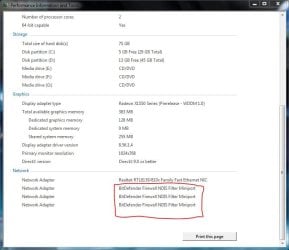
When I'm using Snipping Tool to save screenshot for my post at 'show your WEI score' thread on the forum I noticed this (see attachment)

I guess those are some leftovers from imperfect BDTS2009 uninstallation process. Any suggestion on how I could get rid of those?

For you know, I also have used the Uninstall Tool I got from Bitdefender website successfully.
 

Attachments
  • dfvsv.JPG
    dfvsv.JPG
    54.2 KB · Views: 338

My Computer

Computer Manufacturer/Model Number
Desktop
OS
Windows 7 build 7100, XP SP3
CPU
QX6850
Motherboard
DFI LANParty UT P45 T3RS
Memory
Patriot 4GB Viper II
Graphics Card(s)
ASUS HD4890
Monitor(s) Displays
Asus LS201 LCD 20"
Hard Drives
Hitachi 160GB x2
PSU
CoolerMaster Real Power 850w
Case
Thermaltake Armor
Internet Speed
768kbps DSL
anybody? no?
 

My Computer

Computer Manufacturer/Model Number
Desktop
OS
Windows 7 build 7100, XP SP3
CPU
QX6850
Motherboard
DFI LANParty UT P45 T3RS
Memory
Patriot 4GB Viper II
Graphics Card(s)
ASUS HD4890
Monitor(s) Displays
Asus LS201 LCD 20"
Hard Drives
Hitachi 160GB x2
PSU
CoolerMaster Real Power 850w
Case
Thermaltake Armor
Internet Speed
768kbps DSL
Yep...I'm guessing they might be tied into services possibly...you can remove them from the command prompt but it would help to know the command...

I don't off my head, so I use DameWare NT Utilities to view and then remove services local or on the network pcs.
 

My Computer

Computer Manufacturer/Model Number
self built
OS
7600.20510 x86
CPU
P4 550 3.4 GHz HT running at 3.5 GHz
Motherboard
MSI PM8M3-V (MS-7211 v1.x) Micro-ATX mainboard
Memory
OCZ 2 GB(2x1GB) DDR400mHz running @ 414 mHz
Graphics Card(s)
HIS Radeon HD 3850 IceQ 3 Turbo HDMI Dual DL-DVI AGP
Sound Card
MOTU Traveler firewire studio interface 192 kHz 24 bit
Monitor(s) Displays
22" widescreen Acer X223W LCD, 17" Compaq P75 CRT
Screen Resolution
1680x1050 and 1280x1024
Hard Drives
SATA I x2 WD, 400 GB and 120 GB, SATA 2 WD Caviar Black 1 TB
PSU
350W generic
Case
Cybertronpc, it glows blue
Cooling
stock cpu fan, Ice-Q 3 gpu and system, many case fans
Keyboard
Logitch Classical Keyboard 200
Mouse
Logitech Mediaplay cordless
Internet Speed
1792/448 kbits/sec
Other Info
SATA II PCI fake RAID adapter, 1 GB Readyboost, original ATI Remote Wonder (even works with WMC perfectly), Logitech Rumblepad 2 game controller x2
working on it, although I dont know what im tryin to do
 

My Computer

Computer Manufacturer/Model Number
Desktop
OS
Windows 7 build 7100, XP SP3
CPU
QX6850
Motherboard
DFI LANParty UT P45 T3RS
Memory
Patriot 4GB Viper II
Graphics Card(s)
ASUS HD4890
Monitor(s) Displays
Asus LS201 LCD 20"
Hard Drives
Hitachi 160GB x2
PSU
CoolerMaster Real Power 850w
Case
Thermaltake Armor
Internet Speed
768kbps DSL
I also found this
 

Attachments

  • Capture.JPG
    Capture.JPG
    56.5 KB · Views: 280

My Computer

Computer Manufacturer/Model Number
Desktop
OS
Windows 7 build 7100, XP SP3
CPU
QX6850
Motherboard
DFI LANParty UT P45 T3RS
Memory
Patriot 4GB Viper II
Graphics Card(s)
ASUS HD4890
Monitor(s) Displays
Asus LS201 LCD 20"
Hard Drives
Hitachi 160GB x2
PSU
CoolerMaster Real Power 850w
Case
Thermaltake Armor
Internet Speed
768kbps DSL
Hi Julio,

You might want to try looking in Device Manager and select 'View' and choose 'Show hidden devices' then 'View' again & 'Devices by connection'

This might show the (virtual) devices that seem to be installed. The other option is to run 'regedit' from the start menu (search bar). Try searching for anything relating to BitDefender and delete it. You may want to attempt 'regedit' in safe mode as it shouldn't load the devices your trying to delete.

Hope this helps :)

P.S sorry for the late reply
 

My Computer

Computer Manufacturer/Model Number
Compaq Desktop
OS
Windows 7 Ultimate x64
CPU
AMD Sempron Dual Core
Memory
3GB
Graphics Card(s)
NVIDIA GeForce 6150SE nForce 430
Screen Resolution
1024x768
Hard Drives
150GB Sata
You could also try the 'Change adapter settings' in the 'Network and sharing centre', from here you can 'Organize' & then 'Delete' them if they show up there.
 

My Computer

Computer Manufacturer/Model Number
Compaq Desktop
OS
Windows 7 Ultimate x64
CPU
AMD Sempron Dual Core
Memory
3GB
Graphics Card(s)
NVIDIA GeForce 6150SE nForce 430
Screen Resolution
1024x768
Hard Drives
150GB Sata
One thing I had to do here when removing one adapter totally for the next one was first replug the one being removed in order to see that redetected and made visible. When appearing in the device manager>network adapters you then simply right click on the item and choose the uninstall option plus check off the remove drivers for device box.

Whether ethernet or usb you are then free to unplug any external plugin type adapter with assurance the drivers are gone. I've been doing that quite a bit lately for the 64bit 7 as well as the trying out routers for hard wire/wireless and the change of ISPs.
 

My Computers

System One System Two

  • Computer type
    PC/Desktop
    Computer Manufacturer/Model Number
    Custom builds = 2
    OS
    W7 Ultimate x64/W10 Pro x64/W11 Pro Triple Boot - Main PC W7 Remote PC Micro ATX W7 Pro x64/W11 Pro
    CPU
    AMD Phenom II X4 975 Deneb 3.6ghz - 965 2nd remote pc
    Motherboard
    Gigabyte GA-790XTA-UD4-Gigabyte GA-880GM-D2H remote pc
    Memory
    Kingston Hyper X DDR3 1600 1.5v 16gb - Hyper X Fury 8gb 2nd
    Graphics Card(s)
    MSI HD Radeon 5750 1gb - MSI HD Radeon 6450 on mini tower
    Sound Card
    Creative Labs X-Fi Xtreme Audio P - Realtek onooard 2nd case
    Monitor(s) Displays
    ASUS VW199T-P 19" HP 2082a Main-HP 2082a 20" remote pc
    Screen Resolution
    Asus 1440x900 - HP 1600x900
    Hard Drives
    WD Black 1TB HD per OS W7, W10, and pending W11 presently on 500gb OS Drive - Pending Triple 1TB HDs for Spanned Storage/backup volume
    Single 2TB external USB enclosure, single 1TB System 7 Host/Boot drive, Pending 8TB external HD for system image b
    PSU
    Corsair 750TX - primary / Corsair CX600 - second
    Case
    Antec 900-2 - SSD compatible / NZXT Vulcan mini tower
    Cooling
    Zalman CNPS9900A
    Keyboard
    AZIO L70 Backlit Letters Gaming - ONN Cordless/USB
    Mouse
    MSI DS200 Programmable, Logitech Cordless
    Internet Speed
    30mbps upgrade - primary hard wired - mini tower usb WiFi
    Antivirus
    GFI VIPRE Internet Security 2014 on W7 2016 beta on W10,
    Browser
    Cyberfox, WaterFox 64bit FF variants, FireFox x64, Pale Moon
    Other Info
    Accomdata fan cooled usb 2.0 PIDE/Sata II, III external enclosure.
    Sambient usb/eSata PATA/Sata II, III external enclosure.
  • Computer type
    PC/Desktop
    System Manufacturer/Model Number
    CUSTOM ASSEMBLY
    OS
    W7 Pro x64/W11 Pro
    CPU
    AMD Deneb 3.6ghz - 965
    Motherboard
    Gigabyte GA-880GM-D2H remote pc
    Memory
    Kingston Hyper X Fury 8gb
    Graphics Card(s)
    MSI HD Radeon 6450 DVI Output
    Sound Card
    Realtek onooard Creative or Other separate PENDING
    Monitor(s) Displays
    VIZIO 32" LCD TV Separate LCD Pending
    Screen Resolution
    1600x1080
    Hard Drives
    WD 500GB OS Host/Boot WD Green 1TB Storage/Backup
    PSU
    Corsair 600W - THERMALTAKE 600W spare case
    Case
    NZXT Vulcan mini tower
    Cooling
    Twin 120mm Top Fans - 240mm Side Cover
    Keyboard
    ONN Cordless/USB Logitech Cordless
    Mouse
    ONN USB/Cordless - Logitech Cordless
    Internet Speed
    DSL 5G
    Browser
    MS Edge, FireFox, WaterFox x64, FireFox Nightly
    Other Info
    OS Testing-Remote Access to Main TeamViewer
thanks, better late then never.
I try the regedit and device manager but I can't find them, probably I missed them. But I'm able to uninstall the bitdefender filter from my ethernet network adapter properties somewhere in 'network and sharing center', thanks to you guys.
it shows no more at WEI screen.
it solved. :geek:
 

My Computer

Computer Manufacturer/Model Number
Desktop
OS
Windows 7 build 7100, XP SP3
CPU
QX6850
Motherboard
DFI LANParty UT P45 T3RS
Memory
Patriot 4GB Viper II
Graphics Card(s)
ASUS HD4890
Monitor(s) Displays
Asus LS201 LCD 20"
Hard Drives
Hitachi 160GB x2
PSU
CoolerMaster Real Power 850w
Case
Thermaltake Armor
Internet Speed
768kbps DSL
anyway, Lu Bu and Riddick, who kicks whose ass?
 

My Computer

Computer Manufacturer/Model Number
Desktop
OS
Windows 7 build 7100, XP SP3
CPU
QX6850
Motherboard
DFI LANParty UT P45 T3RS
Memory
Patriot 4GB Viper II
Graphics Card(s)
ASUS HD4890
Monitor(s) Displays
Asus LS201 LCD 20"
Hard Drives
Hitachi 160GB x2
PSU
CoolerMaster Real Power 850w
Case
Thermaltake Armor
Internet Speed
768kbps DSL
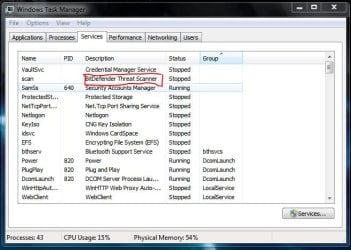
wait wait, the bitdefender service is still there, how can I remove it? is it safe to leave it be?
 

My Computer

Computer Manufacturer/Model Number
Desktop
OS
Windows 7 build 7100, XP SP3
CPU
QX6850
Motherboard
DFI LANParty UT P45 T3RS
Memory
Patriot 4GB Viper II
Graphics Card(s)
ASUS HD4890
Monitor(s) Displays
Asus LS201 LCD 20"
Hard Drives
Hitachi 160GB x2
PSU
CoolerMaster Real Power 850w
Case
Thermaltake Armor
Internet Speed
768kbps DSL
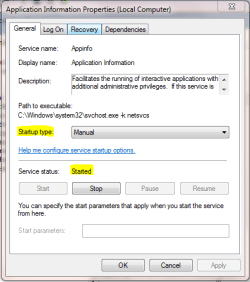
First, from the start menu if you type 'Services' and select Services. Navigate to bitdefender & right-click and choose properties. Make sure that it's set to manual & stopped (see highlights in pic).
 

Attachments

  • Capture.PNG
    Capture.PNG
    15.4 KB · Views: 52

My Computer

Computer Manufacturer/Model Number
Compaq Desktop
OS
Windows 7 Ultimate x64
CPU
AMD Sempron Dual Core
Memory
3GB
Graphics Card(s)
NVIDIA GeForce 6150SE nForce 430
Screen Resolution
1024x768
Hard Drives
150GB Sata
it is already manual and stopped, can I just delete it? is it safe to leave it be?
 

My Computer

Computer Manufacturer/Model Number
Desktop
OS
Windows 7 build 7100, XP SP3
CPU
QX6850
Motherboard
DFI LANParty UT P45 T3RS
Memory
Patriot 4GB Viper II
Graphics Card(s)
ASUS HD4890
Monitor(s) Displays
Asus LS201 LCD 20"
Hard Drives
Hitachi 160GB x2
PSU
CoolerMaster Real Power 850w
Case
Thermaltake Armor
Internet Speed
768kbps DSL
You can actually go one step further and disable that service entirely rather then the manual and stop option and not worry any longer. If you later find a need for it again you would return to see it enabled for use again at that time.
 

My Computers

System One System Two

  • Computer type
    PC/Desktop
    Computer Manufacturer/Model Number
    Custom builds = 2
    OS
    W7 Ultimate x64/W10 Pro x64/W11 Pro Triple Boot - Main PC W7 Remote PC Micro ATX W7 Pro x64/W11 Pro
    CPU
    AMD Phenom II X4 975 Deneb 3.6ghz - 965 2nd remote pc
    Motherboard
    Gigabyte GA-790XTA-UD4-Gigabyte GA-880GM-D2H remote pc
    Memory
    Kingston Hyper X DDR3 1600 1.5v 16gb - Hyper X Fury 8gb 2nd
    Graphics Card(s)
    MSI HD Radeon 5750 1gb - MSI HD Radeon 6450 on mini tower
    Sound Card
    Creative Labs X-Fi Xtreme Audio P - Realtek onooard 2nd case
    Monitor(s) Displays
    ASUS VW199T-P 19" HP 2082a Main-HP 2082a 20" remote pc
    Screen Resolution
    Asus 1440x900 - HP 1600x900
    Hard Drives
    WD Black 1TB HD per OS W7, W10, and pending W11 presently on 500gb OS Drive - Pending Triple 1TB HDs for Spanned Storage/backup volume
    Single 2TB external USB enclosure, single 1TB System 7 Host/Boot drive, Pending 8TB external HD for system image b
    PSU
    Corsair 750TX - primary / Corsair CX600 - second
    Case
    Antec 900-2 - SSD compatible / NZXT Vulcan mini tower
    Cooling
    Zalman CNPS9900A
    Keyboard
    AZIO L70 Backlit Letters Gaming - ONN Cordless/USB
    Mouse
    MSI DS200 Programmable, Logitech Cordless
    Internet Speed
    30mbps upgrade - primary hard wired - mini tower usb WiFi
    Antivirus
    GFI VIPRE Internet Security 2014 on W7 2016 beta on W10,
    Browser
    Cyberfox, WaterFox 64bit FF variants, FireFox x64, Pale Moon
    Other Info
    Accomdata fan cooled usb 2.0 PIDE/Sata II, III external enclosure.
    Sambient usb/eSata PATA/Sata II, III external enclosure.
  • Computer type
    PC/Desktop
    System Manufacturer/Model Number
    CUSTOM ASSEMBLY
    OS
    W7 Pro x64/W11 Pro
    CPU
    AMD Deneb 3.6ghz - 965
    Motherboard
    Gigabyte GA-880GM-D2H remote pc
    Memory
    Kingston Hyper X Fury 8gb
    Graphics Card(s)
    MSI HD Radeon 6450 DVI Output
    Sound Card
    Realtek onooard Creative or Other separate PENDING
    Monitor(s) Displays
    VIZIO 32" LCD TV Separate LCD Pending
    Screen Resolution
    1600x1080
    Hard Drives
    WD 500GB OS Host/Boot WD Green 1TB Storage/Backup
    PSU
    Corsair 600W - THERMALTAKE 600W spare case
    Case
    NZXT Vulcan mini tower
    Cooling
    Twin 120mm Top Fans - 240mm Side Cover
    Keyboard
    ONN Cordless/USB Logitech Cordless
    Mouse
    ONN USB/Cordless - Logitech Cordless
    Internet Speed
    DSL 5G
    Browser
    MS Edge, FireFox, WaterFox x64, FireFox Nightly
    Other Info
    OS Testing-Remote Access to Main TeamViewer
thanks, I think it's better to leave it alone manual and stopped. thanks to u guys. rep for you two.
 

My Computer

Computer Manufacturer/Model Number
Desktop
OS
Windows 7 build 7100, XP SP3
CPU
QX6850
Motherboard
DFI LANParty UT P45 T3RS
Memory
Patriot 4GB Viper II
Graphics Card(s)
ASUS HD4890
Monitor(s) Displays
Asus LS201 LCD 20"
Hard Drives
Hitachi 160GB x2
PSU
CoolerMaster Real Power 850w
Case
Thermaltake Armor
Internet Speed
768kbps DSL
late reply but i thought it might help
the services are under
Code:
HKEY_LOCAL_MACHINE\SYSTEM\CurrentControlSet\Services
and so if go there there should be something called scan from your services window...
also you can try from a elevated commandline
Code:
sc delete scan
 

My Computer

Computer Manufacturer/Model Number
Tx2500z Tablet Pc/Homemade Server
OS
Windows 7 Ult x64(x2), HomePrem x32(x4), Server 08 (+VM), 08 R2 (VM) , SuSe 11.2 (VM), XP 32 (VM)
CPU
Turion X2 ultra (oh well came with laptop)/P4 @3.2 (yes P4)
Motherboard
IDK HP Motherboard / Intel DG965SS
Memory
OCZ Dual Channel 4GB kit/ 1gb Dual Channel
Graphics Card(s)
HD 3200 graphics /GMA x3100 (yay for intergrated!!)
Sound Card
Realtek HD Audio(mic working, well sort of)/Siig IC-70012
Monitor(s) Displays
built-in Hp 12" laptop screen/ Acer 19"
Screen Resolution
1280x800 /1440x900
Cooling
All Air Cooled
Mouse
Logi MX Rev. /MS Wheel Optical 1.1A /Logitech Optical Mouse
Internet Speed
College baby but its still routed through vpn to 1536k...
Other Info
love my wacom pen and pressure sensitivity...
wished it worked in 7, SUSE for that matter though
Back
Top