Cant remove shortcut from Games folder?

DannyF

New member
Local time
3:20 PM
Messages
4
Hello, im new to windows 7 but im learning fast :)
I have put an iexplorer shortcut which goes straight to quakelive.com in the Games folder, but i accidentally put it in there twice. For some reason it does not let me remove or do anything to the iexplorer shortcut.... Please help.
 

My Computer

OS
Windows 7 Professional
Right click the games link on the Start Menu to open the games folder in a window. Right click the game and select delete. If for some reason the context menu doesn't have delete on it, select "organize" from the menu bar to find the delete command.
 

My Computer

Computer Manufacturer/Model Number
DIY
OS
W7x64 Pro, SuSe 12.1/** W7 x64 Pro, XP MCE
CPU
Phenom II 1090T w/Noctua NH-D14 /**4400+ X2 w/CM Hyper TX 3
Motherboard
ASRock 890FX Deluxe 4/**A8N-SLI
Memory
2 x 2GB Patriot PGS34g1600LLKA/**4x1GB Corsair VS
Graphics Card(s)
EVGA GTX460 SC/**EVGA 8800GTS
Sound Card
Asus Xonar D2X/**Xonar D1
Monitor(s) Displays
Acer X233H, Dell E152FPc /**LG M237-WD
Screen Resolution
1920x1080 & 1024x768/**1980x1080
Hard Drives
WDC 2TB, 1.5TB, 1TB, 500GB,Seagate 500GB , Maxtor 80GB /**500GB Seagate & WDC 1TB Black
PSU
CM RS600 w/ APC BX1000G/**Antec 500 TP w/ APC BX1000
Case
HAF922/**Antec 1040IIB
Cooling
3x200mm, 1x140 and 1x120mm/**5x80mm fans
Keyboard
Logitech Media USB/**Saitek Eclipse
Mouse
Cordless Trackman Wheel/**Ditto
Internet Speed
3.3Mbps
Other Info
SB 560 5.1 w/ Sennheiser RS140/**Creative T20 speakers, Dvico FusionHDTV7 Gold RT, Cisco E3000, HP 5510V AIO, Linksys E3000, Belkin F5U237 hub and **F5D8055 adapter
(** = 2nd rig)

My Computer

Computer type
PC/Desktop
Computer Manufacturer/Model Number
Self built custom
OS
64-bit Windows 11 Pro for Workstations
CPU
Intel i7-8700K OC'd to 5 GHz
Motherboard
ASUS ROG Maximus XI Formula Z390
Memory
64 GB (4x16GB) G.SKILL TridentZ RGB DDR4 3600 MHz
Graphics Card(s)
ASUS ROG-STRIX-GTX1080TI-O11G-GAMING
Sound Card
Integrated
Monitor(s) Displays
2 x Samsung Odyssey G7 27"
Screen Resolution
2560x1440
Hard Drives
1TB Samsung 990 PRO M.2,
4TB Samsung 990 PRO PRO M.2,
TerraMaster F8 SSD Plus NAS
PSU
Seasonic Prime Titanium 850W
Case
Thermaltake Core P3
Cooling
Corsair Hydro H115i
Keyboard
Logitech wireless K800
Mouse
Logitech MX Master 4
Internet Speed
2 Gb/s Download and 100 Mb/s Upload
Antivirus
Malwarebyte Anti-Malware Premium
Browser
Google Chrome
Other Info
Logitech Z625 speaker system,
Logitech BRIO 4K Pro webcam,
HP Color LaserJet Pro MFP M477fdn,
APC SMART-UPS RT 1000 XL - SURT1000XLI,
Galaxy S23 Plus phone
Thanks, but none of this works. When i right click the icon nothing happens at all, and when i go to delete it from the organise menu or just press delete button, nothing happens. I now have 3 icons with the same name and cannot delete any of them. Its a strange bug in windows 7. I tried restarting, and registry mechanic scan.
By the way im talking about the Games folder directly from the start menu, not the one in All Programs. For some reason there are different?
Try doing this to see for your self:
Create a shortcut to google.com on your desktop. copy and paste it into the Games folder (the one in front of the start menu where computer is etc) now try deleting it :)
games problem.jpg
 

My Computer

OS
Windows 7 Professional
Lets Try this:

http://www.sevenforums.com/tutorials/42496-games-explorer-folder-delete-game.html

1. Make sure Game Explorer Folder (GEF) is closed.
2. In the start menu type regedit and then press enter.
3. Find the game you don't want to be display in GEF.

  • should be in: HKEY_LOCAL_MACHINE\SOFTWARE\Microsoft\Windows\CurrentVersion\GameUX\
4. Just delete the Key that belongs to that game.
5. Open GEF and the game should be gone.

Example: If I want to delete Hidden & Dangerous 2 from my registry, I just need to delete this key.
{3F29E50B-538D-48A0-9F69-A632B5AA5308}.

Good Luck.
 

My Computer

Computer type
PC/Desktop
OS
Windows 7 Ultimate x64
CPU
Intel Core i5-2500K @4.5Ghz
Motherboard
Asus Maximus V GENE
Memory
x2 Kingston KHX1600C9D3/4G
Graphics Card(s)
NVIDIA GeForce GTS 250 - 1024MB
Sound Card
SupremeFX III built-in 8-Channel High Definition Audio
Monitor(s) Displays
Samsung Syncmaster P2270
Screen Resolution
1920x1080
Hard Drives
x1 Seagate Barracuda ST3160811AS
x2 Seagate Barracuda ST380817AS
PSU
Corsair TX750
Case
Cooler Master HAF 922 Side Window Model
Cooling
Stock Intel Cooler + Tuniq TX2
Keyboard
Dell SK-8135
Mouse
Logitech G5
Internet Speed
2 Mbps
Other Info
x2 Xbox 360 Wireless Controller for Windows
Logitech Z-5550
Sennheiser HD555
Thank you Rjck i found them and deleted them :)
One more question if its ok, i seem to lose my custom icons for some of my games and cannot see a way to change them. Any idea? Thanks
 

My Computer

OS
Windows 7 Professional
Thank you Rjck i found them and deleted them :)
One more question if its ok, i seem to lose my custom icons for some of my games and cannot see a way to change them. Any idea? Thanks

Glad to know it worked.
Now can you post a screenshot of the games to get a better idea.
 

My Computer

Computer type
PC/Desktop
OS
Windows 7 Ultimate x64
CPU
Intel Core i5-2500K @4.5Ghz
Motherboard
Asus Maximus V GENE
Memory
x2 Kingston KHX1600C9D3/4G
Graphics Card(s)
NVIDIA GeForce GTS 250 - 1024MB
Sound Card
SupremeFX III built-in 8-Channel High Definition Audio
Monitor(s) Displays
Samsung Syncmaster P2270
Screen Resolution
1920x1080
Hard Drives
x1 Seagate Barracuda ST3160811AS
x2 Seagate Barracuda ST380817AS
PSU
Corsair TX750
Case
Cooler Master HAF 922 Side Window Model
Cooling
Stock Intel Cooler + Tuniq TX2
Keyboard
Dell SK-8135
Mouse
Logitech G5
Internet Speed
2 Mbps
Other Info
x2 Xbox 360 Wireless Controller for Windows
Logitech Z-5550
Sennheiser HD555
Of course, here is an image showing you the custom icons in start menu and not appearing in the games folder:
 
Last edited by a moderator:

My Computer

OS
Windows 7 Professional
Of course, here is an image showing you the custom icons in start menu and not appearing in the games folder:

Thanks DannyF, now i can see what you mean.

Just to let you know, GEF in windows 7 is not like it just to be in Vista.

If you want to set a custom icon to your game you can modify some values in the registry editor, please take a look at this tutorial to learn more about.

If you got another question please let me know.
 
Last edited by a moderator:

My Computer

Computer type
PC/Desktop
OS
Windows 7 Ultimate x64
CPU
Intel Core i5-2500K @4.5Ghz
Motherboard
Asus Maximus V GENE
Memory
x2 Kingston KHX1600C9D3/4G
Graphics Card(s)
NVIDIA GeForce GTS 250 - 1024MB
Sound Card
SupremeFX III built-in 8-Channel High Definition Audio
Monitor(s) Displays
Samsung Syncmaster P2270
Screen Resolution
1920x1080
Hard Drives
x1 Seagate Barracuda ST3160811AS
x2 Seagate Barracuda ST380817AS
PSU
Corsair TX750
Case
Cooler Master HAF 922 Side Window Model
Cooling
Stock Intel Cooler + Tuniq TX2
Keyboard
Dell SK-8135
Mouse
Logitech G5
Internet Speed
2 Mbps
Other Info
x2 Xbox 360 Wireless Controller for Windows
Logitech Z-5550
Sennheiser HD555
Hi Im also having this problem but am having a hard time finding the game icon I am looking for inHKEY_LOCAL_MACHINE\SOFTWARE\Microsoft\Windows\CurrentVersion\GameUX\

I dragged a Bioshock shortcut on my desktop to my Games folder and want to get rid of it. The icon in the games folder is not even a picture and it doesn't even work.

How do I know which one of those entries is for the Bioshock shortcut? It doesn't say Bioshock anywhere.

Update: There is only one entry under GameUX/Games and it's for Bad Company 2 which I want to keep but there is nothing for the Bioshock shortcut..


NEVERMIND FIXED IT
 

My Computer

Computer Manufacturer/Model Number
Self-built
OS
Windows 7
CPU
i7 920 @ 3.8ghz
Motherboard
MSI X58 Pro-E
Memory
6GB Corsair Dominator
Graphics Card(s)
ATI Radeon HD5850
Sound Card
Musiland Monitor 02 US
Monitor(s) Displays
Dell 24"
Screen Resolution
1920x1200
Hard Drives
Intel X25-M 80GB SSD & Samsung Spinpoint F3 1TB
PSU
Antec EA650
Case
Antec 900
Cooling
Corsair H50
Keyboard
Logitech G11
Mouse
Logitech G9x
Internet Speed
23 mb/s
Steam games shortcuts not listed in the GAMEUX registry.

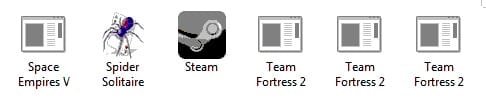
I went to the registry and the Steam shortcuts are not listed. I have two Empire and three Team Fortress 2 icons, BUT they look different like windows special icons. Is there any other ideas on how to delete them?

Lets Try this:

http://www.sevenforums.com/tutorials/42496-games-explorer-folder-delete-game.html

1. Make sure Game Explorer Folder (GEF) is closed.
2. In the start menu type regedit and then press enter.
3. Find the game you don't want to be display in GEF.

  • should be in: HKEY_LOCAL_MACHINE\SOFTWARE\Microsoft\Windows\CurrentVersion\GameUX\
4. Just delete the Key that belongs to that game.
5. Open GEF and the game should be gone.

Example: If I want to delete Hidden & Dangerous 2 from my registry, I just need to delete this key.
{3F29E50B-538D-48A0-9F69-A632B5AA5308}.

Good Luck.
 

Attachments

  • games icons.jpg
    games icons.jpg
    14.5 KB · Views: 25

My Computer

OS
windows 7 64bit
Back
Top