
Can't rename router USB Flash Drive's network shared folder

justsomeguy

New member
Local time
10:41 AM
Messages
16
[FONT=&quot]My Windows 7 Network tells me I have two items on my network, listed under the heading, “Computer (2)”:[/FONT]
[FONT=&quot]1. [/FONT][FONT=&quot]Laptop (my Windows laptop)[/FONT]
[FONT=&quot]2. [/FONT][FONT=&quot]ARRIS-LGW (my ARRIS wireless router/modem)[/FONT]

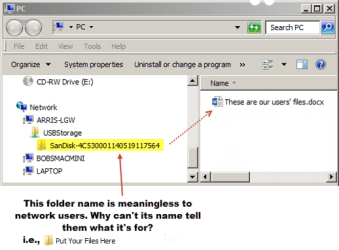
[FONT=&quot]When I ‘open’ ARRIS-LGW, I see a network folder icon named, “USBStorage Share” (because I’ve got a SanDisk USB Flash drive inserted into the USB port of my ARRIS wireless router/modem).[/FONT]

[FONT=&quot]When I open “USBStorage Share”, I see a standard folder named, “SanDisk-4C530001140519117564”.[/FONT]

[FONT=&quot]“SanDisk-4C530001140519117564” appears to be some identifier that Windows is retrieving from the SanDisk USB Flash drive.[/FONT]

[FONT=&quot]The problem is, a folder named “SanDisk-4C530001140519117564” is gibberish to network users, who would much prefer it be named “Put Your Files Here”.[/FONT]

[FONT=&quot]Is there some way I can access the Windows function that is retrieving the identifier "SanDisk-4C530001140519117564", and change it so that the resulting folder name generated by Windows Network, can be a much more meaningful, “Put Your Files Here”?[/FONT]

[FONT=&quot]When I try to rename it while logged in as admin (or even as “Administrator”), Windows says “The action can’t be completed because the folder or a file in it is open in another program”.[/FONT]

[FONT=&quot]I asked SanDisk about this, but their tech support claims this is a Windows issue, beyond their support limits.[/FONT]
 

Attachments
  • Example2.png
    Example2.png
    29 KB · Views: 48
Last edited:

My Computer My Computer

Computer type
Laptop
Computer Manufacturer/Model Number
Dell Latitude e6500
OS
62 bit Windows 7
Browser
Firefox
If you right click on it choose properties it should be the volume label which you can change
 

My Computer My Computer

Computer type
PC/Desktop
OS
win 8 32 bit
Can you create another folder at the same level as that folder, and then use the new folder as the shared folder? Also, you can probably right-click on the folder with the long name, choose Properties, then hide it so that no one will see it and try to use it.
 

My Computer My Computer

Computer type
PC/Desktop
Computer Manufacturer/Model Number
Dell
OS
Linux Mint 18.2 xfce 64-bit (VMWare host) / Windows 8.1 Pro 32-bit (VMWare guest)
CPU
Haswell
Memory
4 GB
Monitor(s) Displays
Acer 23"
Screen Resolution
1920 x 1080
Hard Drives
Two hard drives, 1TB each: One for Linux, one for my data.
Keyboard
IBM Model M
Antivirus
Sophos (Linux), Trend Micro (Windows)
Browser
Firefox, Opera
Other Info
I use Samba to share my data drive with the other computers at my house and with my guest session in VMWare Workstation Player.
Good suggestion, Samuria, but I already changed the volume label but Windows Network does not use the volume label. Windows is not looking at my Volume Label when it names the folder. It seems to be accessing some kind of hidden (flash drive) device name (SanDisk) and device ID number (4C530001140519117564) that are embedded into the flash drive.


I don't think the number 4C530001140519117564 is generated by Windows, because it is always the same number (the number survives restarts and Flash drive ejections/remounts). If the number was changing each time, I would be more likely to expect it's generated on the fly by Windows, but it never changes.
 

My Computer My Computer

Computer type
Laptop
Computer Manufacturer/Model Number
Dell Latitude e6500
OS
62 bit Windows 7
Browser
Firefox
MrJimPhelps, unfortunately Windows Network presents a dialog stating that "You need permission to perform this action", if I try to create a new folder next to the [FONT=&quot]“SanDisk-4C530001140519117564” folder, or if I try to copy a file into the location where the [/FONT][FONT=&quot][FONT=&quot]“SanDisk-4C530001140519117564” folder resides. That thwarting dialog appears regardless of whether I am logged in as a normal user, or an administrative user.[/FONT] [/FONT]
 

My Computer My Computer

Computer type
Laptop
Computer Manufacturer/Model Number
Dell Latitude e6500
OS
62 bit Windows 7
Browser
Firefox
The ID that is presented to the network of any resource, in this case the space on the USB stick, is set on the sharing device. In this case the router is the "Computer" sharing the USB drive,[as shown as it appears on the network as a computer], therefore you will need to set the share name (and possibly the router device name [not the SSID but the name that the network sees].

If you enter the router internal management interface you should find an area or section to setup the sharing parameters, to whatever you like, obviously there may be restrictions on characters but nothing to severe, you may also need to add the name of the local network "Workgroup" and possibly access passwords, depending on the router
 

My Computers My Computers

System One System Two

  • Computer type
    PC/Desktop
    Computer Manufacturer/Model Number
    ChillBlast - Custom to my design
    OS
    Windows 11 Pro x64 [Latest Release and Release Preview]
    CPU
    Ryzen 9 5950X, 3.8 - 5.2 MHz
    Motherboard
    Asus Prime X570-Pro
    Memory
    64GB [2 x 32GB] DDR4 3200MHz
    Graphics Card(s)
    4GB NVIDIA GEFORCE GTX 1650 Ti
    Sound Card
    On-board SPDIF to 5.1 System + HDMI [5.1 system]
    Monitor(s) Displays
    32" UHD 32 Bit HDR Monitor + 43" UHD 4K 32Bit HDR TV
    Screen Resolution
    2 x 3840 x 2160 @60Hz
    Hard Drives
    1TB M2 SSD OS, 500GB Fast Access SSD, 2 x 8TB Data + Various Externals from 1TB to 4TB, 10TB NAS
    PSU
    NZXT C750 80 PLUS Gold 750W Modular PSU
    Case
    Workstation Case [Matt Black]
    Cooling
    NZXT Kraken X63 280mm CPU Cooler +2x Quiet Case fans
    Keyboard
    Logitech Wireless MX Keys & K400 + others
    Mouse
    Logitech Wireless MX Master 3S
    Internet Speed
    920 MB Down 50 MB Up
    Antivirus
    BitDefender Total Security Pro
    Browser
    Chrome (always run latest Non-Beta)
    Other Info
    Also run ...
    Laptop - Quad 8GB - Windows 10 Pro x64
    Nexus 7 Android tablet x2
    Samsung 10.2" tablet
    Blackview TAB 8 4G Android Tablet c/w Keyboard
    Wacom Intuos Pro Medium Pen Pad
    Wacom Intuos Pro Small Pen Pad
    Wacom Expresskeys Remote
    Loopdeck+ Graphics Controller
    Shuttle Pro v2 Control
  • Computer type
    Laptop
    System Manufacturer/Model Number
    Dell XPS 17 10750H
    OS
    Windows 11 Pro x64 Latest RP
    CPU
    Intel I7 10750H 5.0GHz
    Motherboard
    Dell XPS
    Memory
    32GB [2x16GB] DDR4 2933 MHz
    Graphics Card(s)
    nVidia GTX1650Ti 4 GB GDDR6
    Sound Card
    Stock [Realtek] 4 Speaker
    Monitor(s) Displays
    17" IPS UHD+ Infinity Edge Touchscreen
    Screen Resolution
    3840 x 2400
    Hard Drives
    2TB M2 NVMe, 4TB External + various 500GB & 1TB External NVMe (also have access to spinner HDD from
    PSU
    Stock
    Case
    Stock XPS Aluminium & Carbon Fibre
    Cooling
    Stock - Active Fan Control
    Keyboard
    Backlit + Various Logitech
    Mouse
    Stock Track Pad + Logitech MX Trackball
    Internet Speed
    72 MB Down 18MB Up
    Browser
    Chrome
    Other Info
    Also run ...
    Laptop - Quad 8GB - Windows 10 Pro x64
    Nexus 7 Android tablet x2
    10.2" tablet
    Sony Z3 Android Smartphone
    Wacom Intuos Pro Medium Pen Pad
    Wacom Intuos Pro Small Pen Pad
    Wacom Expresskeys Remote
    Loopdeck+ Graphics Controller
    Shuttle Pro v2 Control Pad
    10TB NAS
Barman68, great post! - but alas, the Arris router internal management interface does not offer any access to share name, router device name, or sharing parameters. And Arris tech support only assists users in navigating and using the router's existing interface features. For anything else, their response is always, "this is beyond the scope of our tech support". But I bet you are right on, with the solution...if only there was a way to implement it!
 

My Computer My Computer

Computer type
Laptop
Computer Manufacturer/Model Number
Dell Latitude e6500
OS
62 bit Windows 7
Browser
Firefox
Indeed, I have stopped using the routers supplied by my ISP's many years ago - they are modified from the original spec to just allow the minimum possible configuration - am not familiar with the Arris range so cannot judge.

As a comparison my current Netgear Nighthawk allows me to share multiple partitions of a 4TB USB attached to the Router, and lock down access over the network.

There is one possible work around, and that is to flash the router with better firmware that does give a more practical set of options DD WRT router software is available for a number of router groups and may provide a cheap way to improve things rather than an expensive router replacement DD-WRT - Wikipedia
 

My Computers My Computers

System One System Two

  • Computer type
    PC/Desktop
    Computer Manufacturer/Model Number
    ChillBlast - Custom to my design
    OS
    Windows 11 Pro x64 [Latest Release and Release Preview]
    CPU
    Ryzen 9 5950X, 3.8 - 5.2 MHz
    Motherboard
    Asus Prime X570-Pro
    Memory
    64GB [2 x 32GB] DDR4 3200MHz
    Graphics Card(s)
    4GB NVIDIA GEFORCE GTX 1650 Ti
    Sound Card
    On-board SPDIF to 5.1 System + HDMI [5.1 system]
    Monitor(s) Displays
    32" UHD 32 Bit HDR Monitor + 43" UHD 4K 32Bit HDR TV
    Screen Resolution
    2 x 3840 x 2160 @60Hz
    Hard Drives
    1TB M2 SSD OS, 500GB Fast Access SSD, 2 x 8TB Data + Various Externals from 1TB to 4TB, 10TB NAS
    PSU
    NZXT C750 80 PLUS Gold 750W Modular PSU
    Case
    Workstation Case [Matt Black]
    Cooling
    NZXT Kraken X63 280mm CPU Cooler +2x Quiet Case fans
    Keyboard
    Logitech Wireless MX Keys & K400 + others
    Mouse
    Logitech Wireless MX Master 3S
    Internet Speed
    920 MB Down 50 MB Up
    Antivirus
    BitDefender Total Security Pro
    Browser
    Chrome (always run latest Non-Beta)
    Other Info
    Also run ...
    Laptop - Quad 8GB - Windows 10 Pro x64
    Nexus 7 Android tablet x2
    Samsung 10.2" tablet
    Blackview TAB 8 4G Android Tablet c/w Keyboard
    Wacom Intuos Pro Medium Pen Pad
    Wacom Intuos Pro Small Pen Pad
    Wacom Expresskeys Remote
    Loopdeck+ Graphics Controller
    Shuttle Pro v2 Control
  • Computer type
    Laptop
    System Manufacturer/Model Number
    Dell XPS 17 10750H
    OS
    Windows 11 Pro x64 Latest RP
    CPU
    Intel I7 10750H 5.0GHz
    Motherboard
    Dell XPS
    Memory
    32GB [2x16GB] DDR4 2933 MHz
    Graphics Card(s)
    nVidia GTX1650Ti 4 GB GDDR6
    Sound Card
    Stock [Realtek] 4 Speaker
    Monitor(s) Displays
    17" IPS UHD+ Infinity Edge Touchscreen
    Screen Resolution
    3840 x 2400
    Hard Drives
    2TB M2 NVMe, 4TB External + various 500GB & 1TB External NVMe (also have access to spinner HDD from
    PSU
    Stock
    Case
    Stock XPS Aluminium & Carbon Fibre
    Cooling
    Stock - Active Fan Control
    Keyboard
    Backlit + Various Logitech
    Mouse
    Stock Track Pad + Logitech MX Trackball
    Internet Speed
    72 MB Down 18MB Up
    Browser
    Chrome
    Other Info
    Also run ...
    Laptop - Quad 8GB - Windows 10 Pro x64
    Nexus 7 Android tablet x2
    10.2" tablet
    Sony Z3 Android Smartphone
    Wacom Intuos Pro Medium Pen Pad
    Wacom Intuos Pro Small Pen Pad
    Wacom Expresskeys Remote
    Loopdeck+ Graphics Controller
    Shuttle Pro v2 Control Pad
    10TB NAS
Ironically, I went the other way....to ensure that the Wifi Modem/Router would be compatible with Comcast, I intentionally chose from Comcast's list of compatible devices and chose the Arris because I didn't want to spend a lot on a device that Comcast Support could later blame any problems on me "because we don't support that device". Maybe I'll reconsider that decision; the Arris was only around $75 at WalMart...basically a throwaway.


The Arris has another issue that bugs me: in order to allow me to access email via my required pop-server port, i have to set my firewall to its LOWEST setting because the Arris software does not allow users to custom-select whatever ports they want included in their Low, Medium and High firewall settings. You are basically stuck with using only the Arris pre-configured port lists for each category.


Regarding firmware flashing, I looked at the link you provided but, alas, didn't find any firmware listed there for Arris routers.


Long Gone are the days when you could contact tech support and actually get a knowledgeable software engineer or programmer to actually address technical questions...now we only get some well-intentioned phone tech somewhere in Malaysia who struggles with English (God bless 'em!) and is only allowed (or knowledgeable enough) to answer basic, authorized operational questions. In the good old days, we could often get an engineer or programmer who could provide a script or talk us through a software or registry hack to resolve issues like these.
 

My Computer My Computer

Computer type
Laptop
Computer Manufacturer/Model Number
Dell Latitude e6500
OS
62 bit Windows 7
Browser
Firefox
Update: it turns out that the bizarre USB network name,
"SanDisk 010189d5392d5e057c3280e72a64c55eb29413578f8ef6bd8b3a2c07bc8cafc."

...is actually the flash drive's serial number. (disclosed by examining it with Mac Disk Utility).

I asked both Arris Support and SanDisk Support how to make the flash drive identify on the
Windows network by its user-preferred volume name instead of its serial number.

Sandisk Support pointed fingers at Arris: "I understand your concern, as such please allow me to
inform you that we have not tested our Flash drives connection over the routers. We have only
tested them with Mac/windows operating environment. It might be possible that the Router is
accessing and displaying the directory file name of the Flash drives. We do not have any expertise
over the interface of the Arris router, so it will be inconvenient for us to comment. We recommend
you to contact your device manufacturer support and check with them."

Arris seemed to blame it on Windows:
"Unfortunately, there is no way to change those names in the ARRIS device itself, is the computer
the one blocking the option to customize it. Try closing all the files and windows you have open
and try to rename those as normal folders. We apologize for the inconvenience this may cause."

Curiously, I also have a Mac on my Windows network. The Mac always correctly displays the
router-mounted flash drive by its user-preferred volume name.
 

My Computer My Computer

Computer type
Laptop
Computer Manufacturer/Model Number
Dell Latitude e6500
OS
62 bit Windows 7
Browser
Firefox
Back
Top