Can't restart and F8 wont work - help please....

odmassive

New member
Local time
1:14 PM
Messages
7
Hi all,


Firstly, thanks for all the help so far, I've found this forum a great resource.


I have a really big problem however that I'd really appreciate some help with (and please bare with me, I'm a novice at all this!)


I bought a new Dell Dimension desktop in Feb this year. It came with Windows 7 home premium. However, I needed to put XP SP3 on it to run some software.


I did this and all worked fine but now I cant reinstall Win7.


When I use a reinstall dvd it works fine and I setup a new user for Win 7 and can do anything I want but as soon as I shut down or restart I get this message (which I see is quite common)


Windows failed to start. A Recent hardware or software change might be the cause. To fix the problem:
1. Insert your windows installation disc and restart your computer.
2. Choose your langugae settings, and then click next
3. Click "repair your computer."
Status: 0xc000000e
Info: The boot selection failed because a required device is inaccessible.

It says press enter or escape, either way the machine just reboots.

I've tried hitting F8 but nothing happens it just goes to the same screen.

I've been through the reinstall process 4 times now and every time it just does this.


I guess it would be okay if I left the machine on until the end of time but its not really the ideal solution!!


Any ideas gratefully received.


Many thanks
OD
 

My Computer My Computer

At a glance

Window 7
OS
Window 7
My guess would be some sort of installation corruption. If it were me, I would re-install the OS. Does your Dell still have the hidden partition on it? Dell should have some sort of recovery software to reinstall from the hidden partition.
 

My Computer My Computer

At a glance

Windows 7 Ultimate 64 bitAMD Phenom II X4 965 Black EditionGSkill 4 X 2 GB PC 8500XFX Radeon HD 6790 D
Computer Manufacturer/Model Number
Custom built
OS
Windows 7 Ultimate 64 bit
CPU
AMD Phenom II X4 965 Black Edition
Motherboard
Gigabyte GA-MA790X-DS4
Memory
GSkill 4 X 2 GB PC 8500
Graphics Card(s)
XFX Radeon HD 6790 D
Sound Card
On board RealTek HD
Monitor(s) Displays
Dual monitors:Samsung SyncMaster S20B300
Screen Resolution
1600 X 900
Hard Drives
Seagate Barracuda 1TB (primary)
Seagate Barracuda 2 X 320 GB
PSU
Ultra X4 750 watt fully modular
Case
Thermaltake Overseer RX 1 full tower
Cooling
Core-Contact 92 mm CPU Cooler
Keyboard
Logitech G510
Mouse
Razor DeathAdder
Internet Speed
50/5 Mbps UL/DL
Other Info
Optical: Super Muliti DVD burner w/lightscribe, Hauppauge WinTV HVR-1800
Thanks for the quick reply, I have reinstalled about four times. From memory when I looked at Disk management there was three partitions - recovery, os and OEM?
 

My Computer My Computer

At a glance

Window 7
OS
Window 7
Status: 0xc000000e
Info: The boot selection failed because a required device is inaccessible.
=>in bootmenu is something like:

load winload.exe from disk with signature AF0098CD and on that disk take partition that starts at sector 564398
this is just an example of course. But it can't find that disk/partition!

Boot into recovery environment and do a startup repair http://www.sevenforums.com/tutorials/681-startup-repair.html

If it doesn't fix your problem... enter "command prompt" and do

Code:
bcdedit

I want to know what is on red spot
id {bootmgr}
device boot
path \bootmgr
description Windows Boot Manager
locale nl-NL
default {current}
resumeobject {9dc4384c-ed0f-11e1-a017-806e6f6e6963}
displayorder {current}
timeout 10
Windows-opstartlaadprogramma
----------------------------
id {default}
device partition=C:
path \Windows\system32\winload.exe
description Windows 7 Home Premium
locale nl-NL
recoverysequence {736323c3-1247-11e2-a92d-8aaa5ce884b2}
recoveryenabled Yes
osdevice partition=C:
systemroot \Windows
resumeobject {9dc4384c-ed0f-11e1-a017-806e6f6e6963}
usefirmwarepcisettings No
 

My Computer My Computer

At a glance

Microsoft Windows 7 Home Premium 64-bits 7601...Intel(R) Core(TM) i3 CPU M 370 @ 2.40GHz4,00 GBATI Mobility Radeon HD 5400 Series
Computer type
Laptop
Computer Manufacturer/Model Number
ACER ASPIRE 5742G
OS
Microsoft Windows 7 Home Premium 64-bits 7601 Multiprocessor Free Service Pack 1
CPU
Intel(R) Core(TM) i3 CPU M 370 @ 2.40GHz
Motherboard
Acer Aspire 5742G
Memory
4,00 GB
Graphics Card(s)
ATI Mobility Radeon HD 5400 Series
Sound Card
(1) AMD High Definition Audio Device (2) Realtek High Defi
Screen Resolution
1366 x 768 x 32 bits (4294967296 colors) @ 60 Hz
Hard Drives
WDC WD5000BEVT-22ZAT0
  • Like
Reactions: Arc
Thanks very much for this.

I can't seem to do a startup repair and where do I enter the "command prompt" as I can get off this screen?

Thanks
 

My Computer My Computer

At a glance

Window 7
OS
Window 7
Status: 0xc000000e
Info: The boot selection failed because a required device is inaccessible.
=>in bootmenu is something like:

load winload.exe from disk with signature AF0098CD and on that disk take partition that starts at sector 564398
this is just an example of course. But it can't find that disk/partition!

Boot into recovery environment and do a startup repair http://www.sevenforums.com/tutorials/681-startup-repair.html

If it doesn't fix your problem... enter "command prompt" and do

Code:
bcdedit

I want to know what is on red spot
id {bootmgr}
device boot
path \bootmgr
description Windows Boot Manager
locale nl-NL
default {current}
resumeobject {9dc4384c-ed0f-11e1-a017-806e6f6e6963}
displayorder {current}
timeout 10
Windows-opstartlaadprogramma
----------------------------
id {default}
device partition=C:
path \Windows\system32\winload.exe
description Windows 7 Home Premium
locale nl-NL
recoverysequence {736323c3-1247-11e2-a92d-8aaa5ce884b2}
recoveryenabled Yes
osdevice partition=C:
systemroot \Windows
resumeobject {9dc4384c-ed0f-11e1-a017-806e6f6e6963}
usefirmwarepcisettings No


Thanks for the help so far.

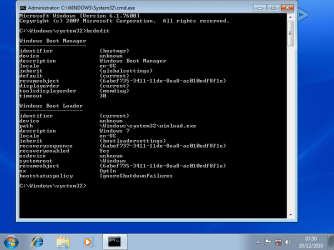
I have done as you said and here is a screengrab of what it says.

bcdedit.png
 

My Computer My Computer

At a glance

Window 7
OS
Window 7
Status: 0xc000000e
Info: The boot selection failed because a required device is inaccessible.
=>in bootmenu is something like:

load winload.exe from disk with signature AF0098CD and on that disk take partition that starts at sector 564398
this is just an example of course. But it can't find that disk/partition!

Boot into recovery environment and do a startup repair http://www.sevenforums.com/tutorials/681-startup-repair.html

If it doesn't fix your problem... enter "command prompt" and do

Code:
bcdedit
I want to know what is on red spot
id {bootmgr}
device boot
path \bootmgr
description Windows Boot Manager
locale nl-NL
default {current}
resumeobject {9dc4384c-ed0f-11e1-a017-806e6f6e6963}
displayorder {current}
timeout 10
Windows-opstartlaadprogramma
----------------------------
id {default}
device partition=C:
path \Windows\system32\winload.exe
description Windows 7 Home Premium
locale nl-NL
recoverysequence {736323c3-1247-11e2-a92d-8aaa5ce884b2}
recoveryenabled Yes
osdevice partition=C:
systemroot \Windows
resumeobject {9dc4384c-ed0f-11e1-a017-806e6f6e6963}
usefirmwarepcisettings No


Thanks for the help so far.

I have done as you said and here is a screengrab of what it says.

View attachment 238239
in screenshot it looks you're inside win7????!!! I thought win7 didn't boot?!
 

My Computer My Computer

At a glance

Microsoft Windows 7 Home Premium 64-bits 7601...Intel(R) Core(TM) i3 CPU M 370 @ 2.40GHz4,00 GBATI Mobility Radeon HD 5400 Series
Computer type
Laptop
Computer Manufacturer/Model Number
ACER ASPIRE 5742G
OS
Microsoft Windows 7 Home Premium 64-bits 7601 Multiprocessor Free Service Pack 1
CPU
Intel(R) Core(TM) i3 CPU M 370 @ 2.40GHz
Motherboard
Acer Aspire 5742G
Memory
4,00 GB
Graphics Card(s)
ATI Mobility Radeon HD 5400 Series
Sound Card
(1) AMD High Definition Audio Device (2) Realtek High Defi
Screen Resolution
1366 x 768 x 32 bits (4294967296 colors) @ 60 Hz
Hard Drives
WDC WD5000BEVT-22ZAT0
One other question
Code:
diskpart
list  disk
[COLOR=red]how many disks? I assume 1[/COLOR]
sel  dis  0
list  part
[COLOR=red]how many partitions?[/COLOR]
[COLOR=black]sel part 0[/COLOR]
[COLOR=#000000]det part[/COLOR]
[COLOR=#000000]sel part 1[/COLOR]
[COLOR=#000000]det part[/COLOR]
[COLOR=#000000]sel part 2[/COLOR]
[COLOR=#000000]det part[/COLOR]
Which partition is ACTIVE? And what is its drive letter?
What is drive letter of win7 OS partition?
 

My Computer My Computer

At a glance

Microsoft Windows 7 Home Premium 64-bits 7601...Intel(R) Core(TM) i3 CPU M 370 @ 2.40GHz4,00 GBATI Mobility Radeon HD 5400 Series
Computer type
Laptop
Computer Manufacturer/Model Number
ACER ASPIRE 5742G
OS
Microsoft Windows 7 Home Premium 64-bits 7601 Multiprocessor Free Service Pack 1
CPU
Intel(R) Core(TM) i3 CPU M 370 @ 2.40GHz
Motherboard
Acer Aspire 5742G
Memory
4,00 GB
Graphics Card(s)
ATI Mobility Radeon HD 5400 Series
Sound Card
(1) AMD High Definition Audio Device (2) Realtek High Defi
Screen Resolution
1366 x 768 x 32 bits (4294967296 colors) @ 60 Hz
Hard Drives
WDC WD5000BEVT-22ZAT0
I've reinstalled the win7 DVD and that works fine. It lets me set up user etc. it's only when I restart it goes back to the error message.

Thanks
 

My Computer My Computer

At a glance

Window 7
OS
Window 7
Status: 0xc000000e
Info: The boot selection failed because a required device is inaccessible.
=>in bootmenu is something like:

load winload.exe from disk with signature AF0098CD and on that disk take partition that starts at sector 564398
this is just an example of course. But it can't find that disk/partition!

Boot into recovery environment and do a startup repair http://www.sevenforums.com/tutorials/681-startup-repair.html

If it doesn't fix your problem... enter "command prompt" and do

Code:
bcdedit
I want to know what is on red spot
id {bootmgr}
device boot
path \bootmgr
description Windows Boot Manager
locale nl-NL
default {current}
resumeobject {9dc4384c-ed0f-11e1-a017-806e6f6e6963}
displayorder {current}
timeout 10
Windows-opstartlaadprogramma
----------------------------
id {default}
device partition=C:
path \Windows\system32\winload.exe
description Windows 7 Home Premium
locale nl-NL
recoverysequence {736323c3-1247-11e2-a92d-8aaa5ce884b2}
recoveryenabled Yes
osdevice partition=C:
systemroot \Windows
resumeobject {9dc4384c-ed0f-11e1-a017-806e6f6e6963}
usefirmwarepcisettings No


Thanks for the help so far.

I have done as you said and here is a screengrab of what it says.

View attachment 238239
in screenshot it looks you're inside win7????!!! I thought win7 didn't boot?!

I've reinstalled the win7 DVD and that works fine. It lets me set up user etc. it's only when I restart it goes back to the error message.

Thanks
 

My Computer My Computer

At a glance

Window 7
OS
Window 7
One other question
Code:
diskpart
list  disk
[COLOR=red]how many disks? I assume 1[/COLOR]
sel  dis  0
list  part
[COLOR=red]how many partitions?[/COLOR]
[COLOR=black]sel part 0[/COLOR]
[COLOR=#000000]det part[/COLOR]
[COLOR=#000000]sel part 1[/COLOR]
[COLOR=#000000]det part[/COLOR]
[COLOR=#000000]sel part 2[/COLOR]
[COLOR=#000000]det part[/COLOR]
Which partition is ACTIVE? And what is its drive letter?
What is drive letter of win7 OS partition?


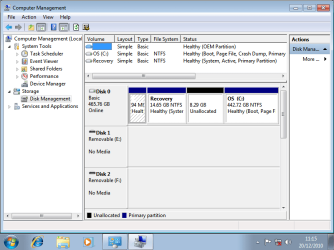
I'm not exactly sure what you mean but is this any help? Thanks
disk management.png
 

My Computer My Computer

At a glance

Window 7
OS
Window 7
look at http://www.sevenforums.com/attachme...-restart-f8-wont-work-help-please-bcdedit.png that you posted. The menu entry {current} is an alias of the boot entry you are currently in. It was started from osdevice unknown and device unknown. That's why it can't boot! But it was able to boot, because you are in win7!

Who the heck did change bootmenu entry after boot?
Or... who did change the physical disk signature after boot?
Or... who did change the start sector of C partition (very unlikely)

Do you want to keep RECOVERY partition? It's use to go to "factory settings". But you can do a reinstall from win7 install DVD as well (as you did). So why keep it? We can do that later if you wish

First do this in elevated command prompt:
Code:
bcdedit/set {current} osdevice partition=c:
bcdedit/set {current} device partition=c:
bcdedit/enum {current}

No osdevice unknown and device unknown anymore?
Code:
diskpart
sel  disk 0
uniqueid disk
[COLOR=red]write down the disk id![/COLOR]
[COLOR=black]sel  vol  c:[/COLOR]
[COLOR=#000000]det  part[/COLOR]
[COLOR=red]write down the offset![/COLOR]
exit

System boots fine? If so... do again:
Code:
bcdedit/enum {current}
osdevice and device are unknown again? If so do the diskpart command again. Did the disksignature change? Did the offset change?
 

My Computer My Computer

At a glance

Microsoft Windows 7 Home Premium 64-bits 7601...Intel(R) Core(TM) i3 CPU M 370 @ 2.40GHz4,00 GBATI Mobility Radeon HD 5400 Series
Computer type
Laptop
Computer Manufacturer/Model Number
ACER ASPIRE 5742G
OS
Microsoft Windows 7 Home Premium 64-bits 7601 Multiprocessor Free Service Pack 1
CPU
Intel(R) Core(TM) i3 CPU M 370 @ 2.40GHz
Motherboard
Acer Aspire 5742G
Memory
4,00 GB
Graphics Card(s)
ATI Mobility Radeon HD 5400 Series
Sound Card
(1) AMD High Definition Audio Device (2) Realtek High Defi
Screen Resolution
1366 x 768 x 32 bits (4294967296 colors) @ 60 Hz
Hard Drives
WDC WD5000BEVT-22ZAT0
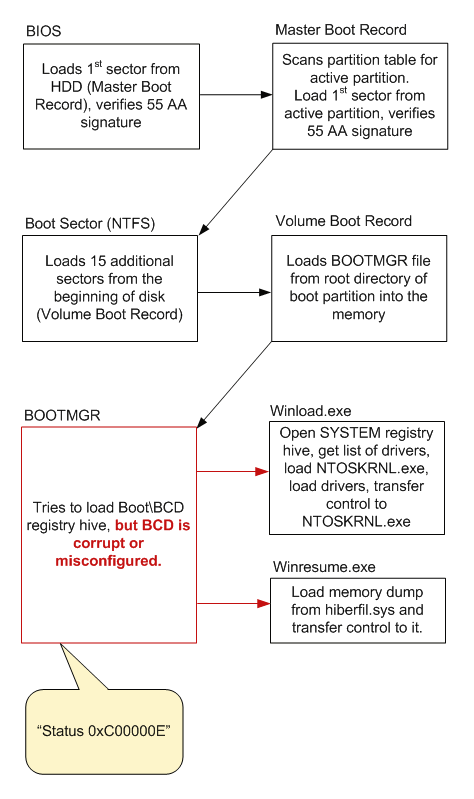
This is the problem btw

3. Defect in the boot sequence which leads to 'status 0xC000000E' boot error

Defect in the boot sequence which is a reason for '0xC000000E' error is shown below:

  1. BIOS loads 1st sector from HDD (Master Boot Record), verifies 55 AA signature and transfers control to Master Boot Record.
  2. Master Boot Record scans partition table for active partition. There is one active partition, so Master Boot Record loads 1st sector from active partition (Boot Sector), and transfers control to it.
  3. Boot Sector loads 15 additional sectors from the beginning of disk (Volume Boot Record) and transfers control to first additional sector of VBR.
  4. Volume Boot Record loads BOOTMGR file from root directory of boot partition into the memory and transfers control to it.
  5. BOOTMGR tries to load Boot\BCD registry hive, but BCD is corrupt or misconfigured.
  6. The rest of usual boot events does not happen.
 

My Computer My Computer

At a glance

Microsoft Windows 7 Home Premium 64-bits 7601...Intel(R) Core(TM) i3 CPU M 370 @ 2.40GHz4,00 GBATI Mobility Radeon HD 5400 Series
Computer type
Laptop
Computer Manufacturer/Model Number
ACER ASPIRE 5742G
OS
Microsoft Windows 7 Home Premium 64-bits 7601 Multiprocessor Free Service Pack 1
CPU
Intel(R) Core(TM) i3 CPU M 370 @ 2.40GHz
Motherboard
Acer Aspire 5742G
Memory
4,00 GB
Graphics Card(s)
ATI Mobility Radeon HD 5400 Series
Sound Card
(1) AMD High Definition Audio Device (2) Realtek High Defi
Screen Resolution
1366 x 768 x 32 bits (4294967296 colors) @ 60 Hz
Hard Drives
WDC WD5000BEVT-22ZAT0
Back
Top