
Right click an external USB hard drive (WD My Passport) > Properties > Tools > Error Checking > Check Now > Check Disk My Passport > Automatically fix... > click START.
The Check Disk My Passport box disappears as soon as I click START and nothing happens.
I started getting Delayed Write errors for.doc and .txt documents yesterday. The documents won't save my text additions. This is the reason I want to run chkdsk. Also, I open folders on the external drive that have files in them, but they show up empty. In the past when this has happened, a restart fixes this.
What is the problem here? Need advice. Thanks.
update: on Restart, Windows started installing device driver for a simple USB hub that the external drive uses. Why, I have no idea, because the hub has always been used The external WD My Passport was recently attached to it btw (about 2 days ago).
Now, the documents in question have all updated with my additions (that were previously not done, with the accompanying Delay Write notification as mentioned above) And the problem of folders appearing empty on the external drive has also been fixed after the restart and USB hub device driver install.
So, now my only question is, why did this all happen? Why would the computer need to install device driver for a generic USB hub, one that I've had attached for a long time?
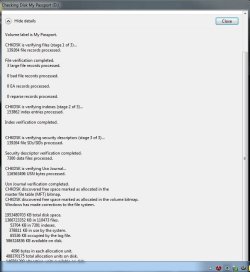
The chkdsk runs fine now and the details are below. It said 'some errors found'. Are there clues to what happened in the details?
The Check Disk My Passport box disappears as soon as I click START and nothing happens.
I started getting Delayed Write errors for.doc and .txt documents yesterday. The documents won't save my text additions. This is the reason I want to run chkdsk. Also, I open folders on the external drive that have files in them, but they show up empty. In the past when this has happened, a restart fixes this.
What is the problem here? Need advice. Thanks.
update: on Restart, Windows started installing device driver for a simple USB hub that the external drive uses. Why, I have no idea, because the hub has always been used The external WD My Passport was recently attached to it btw (about 2 days ago).
Now, the documents in question have all updated with my additions (that were previously not done, with the accompanying Delay Write notification as mentioned above) And the problem of folders appearing empty on the external drive has also been fixed after the restart and USB hub device driver install.
So, now my only question is, why did this all happen? Why would the computer need to install device driver for a generic USB hub, one that I've had attached for a long time?
The chkdsk runs fine now and the details are below. It said 'some errors found'. Are there clues to what happened in the details?
Attachments
Last edited:
My Computer
- OS
- Windows 7 Pro 64bit

