can't run programs as administrator in xp mode

mostafa0071

New member
Local time
1:20 PM
Messages
2
I installed xp mode to install a program that wasn't compatible with 7.
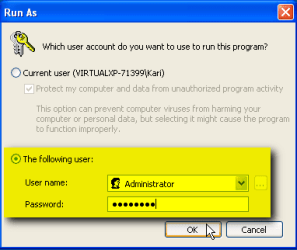
everything was fine untill I installed a program that needed to run as administrator,but when I choose "run as administrator" by right click on the program's icon and choose to run as administrator and clicked ok the following message appeared.

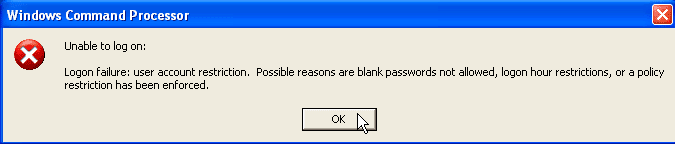
unable to log on:
logon failure:user account restriction. possible reasons are blank passwords not allowed,log on hour restrictions, or a policy restriction has been enforced.

I also tried to log off xp mode and log in as administrator but it didn't worked to,there was this restriction message here too.
What do I need to do to log into XP Mode as administrator and run programs as administrator in xp mode?
 

My Computer My Computer

OS
windows 7 ultimate x32
CPU
i5 760
Motherboard
Giga p55a-ud3l
Memory
kingmax 2GB
Graphics Card(s)
Nvidia 1GB
Monitor(s) Displays
samsung
Hello Mostafa, welcome to the Seven Forums.

When XP Mode is installed, the integration features are enabled by default. When integration is enabled on a Virtual PC vm, you can not use any user accounts without passwords. Logging in or in any other way using an account without password is only enabled when integration features are disabled.

Because the built-in administrator account by default has no password, it's impossible to use its rights or login to that account without either setting up a password for administrator account or disabling integration features.

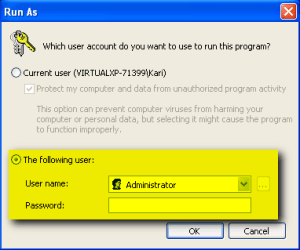
Trying to use administrative rights with blank password when integration is enabled only produces an error:

XPM_Admin_account_1.png
XPM_Admin_account_2.png

Here's what you can do:

Method 1 (a temporary workaround):
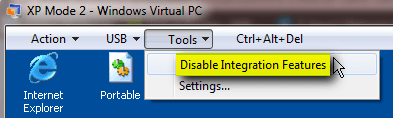
  • Disable Virtual PC integration features:
    .
    XPM_Admin_account_0.png
    .
  • Run the application as administrator with a blank password
  • Re-enable integration features
Method 2 (permanent solution):
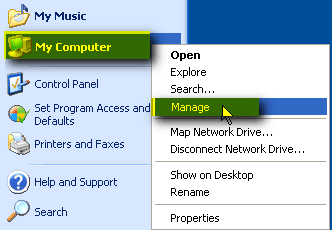
  • In XP Mode, right click My Computer, select Manage to open computer management console:
    .
    XPM_Admin_account_3.png
    .
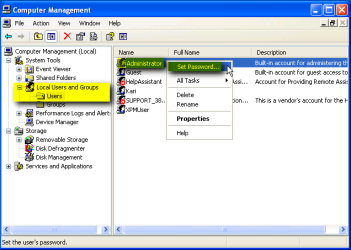
  • On the left pane, expand Local Users and Groups
  • Click Users
  • Right click Administrator, select Set password:
    .
    XPM_Admin_account_4.png
    .
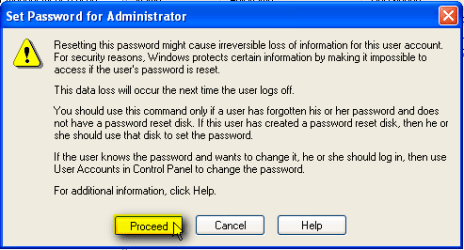
  • Read the warnings, click Proceed if you want to proceed:
    .
    XPM_Admin_account_5.png
    .
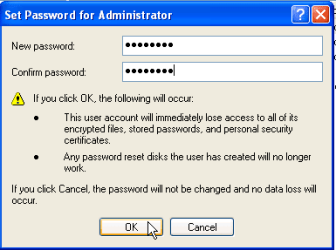
  • Type the new password, confirm it and save it by clicking OK:
    .
    XPM_Admin_account_6.png
    .
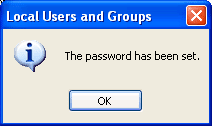
  • Click OK to close the confirmation dialog:
    .
    XPM_Admin_account_7.png
    .
  • Close management console

Now you can run any application using built-in administrative rights, using the password you created:

XPM_Admin_account_8.png

Kari
 

My Computer My Computer

Computer type
Laptop
Computer Manufacturer/Model Number
HP ENVY 17-1150eg
OS
Windows 10 Pro x64 EN-GB
CPU
1.6 GHz Intel Core i7-720QM Processor
Memory
6 GB
Graphics Card(s)
ATI Mobility Radeon HD 5850 Graphics
Sound Card
Beats sound system with integrated subwoofer
Monitor(s) Displays
17" laptop display, 22" LED and 32" Full HD TV through HDMI
Screen Resolution
1600*900 (1), 1920*1080 (2&3)
Hard Drives
Internal: 2 x 500 GB SATA Hard Disk Drive 7200 rpm
External: 2TB for backups, 3TB USB3 network drive for media
Cooling
As Envy runs a bit warm, I have it on a Cooler Master pad
Keyboard
Logitech diNovo Media Desktop Laser (bluetooth)
Mouse
Logitech Performance Mouse MX
Internet Speed
50/10 Mbps VDSL
Antivirus
Windows Defender 4.3.9431.0
Browser
Maxthon 3.5.2., IE11
Thank you for your help kari
I run the program successfully as you said.
 

My Computer My Computer

OS
windows 7 ultimate x32
CPU
i5 760
Motherboard
Giga p55a-ud3l
Memory
kingmax 2GB
Graphics Card(s)
Nvidia 1GB
Monitor(s) Displays
samsung
Nice to know you got it solved.

Kari
 

My Computer My Computer

Computer type
Laptop
Computer Manufacturer/Model Number
HP ENVY 17-1150eg
OS
Windows 10 Pro x64 EN-GB
CPU
1.6 GHz Intel Core i7-720QM Processor
Memory
6 GB
Graphics Card(s)
ATI Mobility Radeon HD 5850 Graphics
Sound Card
Beats sound system with integrated subwoofer
Monitor(s) Displays
17" laptop display, 22" LED and 32" Full HD TV through HDMI
Screen Resolution
1600*900 (1), 1920*1080 (2&3)
Hard Drives
Internal: 2 x 500 GB SATA Hard Disk Drive 7200 rpm
External: 2TB for backups, 3TB USB3 network drive for media
Cooling
As Envy runs a bit warm, I have it on a Cooler Master pad
Keyboard
Logitech diNovo Media Desktop Laser (bluetooth)
Mouse
Logitech Performance Mouse MX
Internet Speed
50/10 Mbps VDSL
Antivirus
Windows Defender 4.3.9431.0
Browser
Maxthon 3.5.2., IE11
Registered just to thank you so much, the solution workeD!

Tried many others but this is the only one that worked :D
 

My Computer My Computer

OS
Windows XP 32 bit
Thanks, Boywonder, and welcome to the Seven Forums.

Kari
 

My Computer My Computer

Computer type
Laptop
Computer Manufacturer/Model Number
HP ENVY 17-1150eg
OS
Windows 10 Pro x64 EN-GB
CPU
1.6 GHz Intel Core i7-720QM Processor
Memory
6 GB
Graphics Card(s)
ATI Mobility Radeon HD 5850 Graphics
Sound Card
Beats sound system with integrated subwoofer
Monitor(s) Displays
17" laptop display, 22" LED and 32" Full HD TV through HDMI
Screen Resolution
1600*900 (1), 1920*1080 (2&3)
Hard Drives
Internal: 2 x 500 GB SATA Hard Disk Drive 7200 rpm
External: 2TB for backups, 3TB USB3 network drive for media
Cooling
As Envy runs a bit warm, I have it on a Cooler Master pad
Keyboard
Logitech diNovo Media Desktop Laser (bluetooth)
Mouse
Logitech Performance Mouse MX
Internet Speed
50/10 Mbps VDSL
Antivirus
Windows Defender 4.3.9431.0
Browser
Maxthon 3.5.2., IE11
i have the same problem running a program

I did what you said but i still got an error that says :windows doesn t has the acces to program.You don t have the permision to acces it.
 

My Computer My Computer

OS
windows xp 32bit
i have the same problem running a program

I did what you said but i still got an error that says :windows doesn t has the acces to program.You don t have the permision to acces it.What should i do ?

Thanks, Boywonder, and welcome to the Seven Forums.

Kari
 

My Computer My Computer

OS
windows xp 32bit

My Computer My Computer

Computer type
Laptop
Computer Manufacturer/Model Number
HP ENVY 17-1150eg
OS
Windows 10 Pro x64 EN-GB
CPU
1.6 GHz Intel Core i7-720QM Processor
Memory
6 GB
Graphics Card(s)
ATI Mobility Radeon HD 5850 Graphics
Sound Card
Beats sound system with integrated subwoofer
Monitor(s) Displays
17" laptop display, 22" LED and 32" Full HD TV through HDMI
Screen Resolution
1600*900 (1), 1920*1080 (2&3)
Hard Drives
Internal: 2 x 500 GB SATA Hard Disk Drive 7200 rpm
External: 2TB for backups, 3TB USB3 network drive for media
Cooling
As Envy runs a bit warm, I have it on a Cooler Master pad
Keyboard
Logitech diNovo Media Desktop Laser (bluetooth)
Mouse
Logitech Performance Mouse MX
Internet Speed
50/10 Mbps VDSL
Antivirus
Windows Defender 4.3.9431.0
Browser
Maxthon 3.5.2., IE11
Back
Top