
Can't run WEI?

drazenn

New member
Power User
Local time
2:57 AM
Messages
177
Location
zagreb,croatia
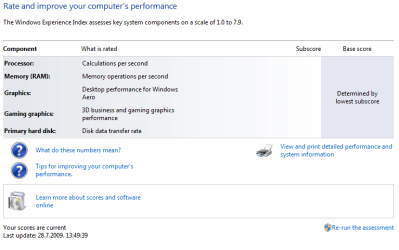
Since I haven't run WEI since build 7000,I TRIED to run it today.
After first failed attempt,I thought maybe it was my fault,because I was browsing net and opening other items in control panel.
Second time,I run WEI and didn't even touch my PC,and everything I got was blank scores,and option to re-run WEI.
Anybody had similar problem?
 

Attachments
  • WEI.PNG
    WEI.PNG
    15.5 KB · Views: 42

My Computer

Computer type
PC/Desktop
Computer Manufacturer/Model Number
intel x58 selfmade
OS
Windows 7 Ultimate x64
CPU
[email protected] (non overclocked)
Motherboard
x58
Memory
8gb DDR3
Graphics Card(s)
Asus 6850
Monitor(s) Displays
lg 22"
Hard Drives
1TB
PSU
Corsair 650w
Case
Gigabyte
Cooling
Scytech
Keyboard
noname
Mouse
Logitech wireless xy
Internet Speed
70GB
Antivirus
Windows Defender
Browser
Chrome (default)
drazenn
Could you go into event viewer (type event viewer in search) and look at the app and system tabs. see if there are errors listed and if so upload a picture of it to us

Ken
 

My Computer

Computer Manufacturer/Model Number
HP Pavillion dv-7 1005 Tx
OS
Win 8 Release candidate 8400
CPU
[email protected]
Memory
4 gigs
Graphics Card(s)
Nvidia 9600M
Sound Card
HD built-in
Monitor(s) Displays
17" Wxga
Screen Resolution
1440x900
Cooling
none
Internet Speed
45Mb down 5Mb up
drazenn
Could you go into event viewer (type event viewer in search) and look at the app and system tabs. see if there are errors listed and if so upload a picture of it to us

Ken

Uh,thank you on advice,but I'm lost in event viewer.There is few very big logs,and what I understood from them is almost nothing.
I haven't found any trace of WEI mentioned in those logs,but I discovered that some app is stopping my Desktop Window Manager(what is today's new problem).
Those logs are simply too big to post them here,but from all together I saw in them,I believe there is some problem with user's rights and logging on to account,what is on the other side,totally unacceptible because I am the only one using this desktop PC.
Uh,I forgot to mentioned,I tried System Restore yesterday,and even today when I lost aero after restart,but nothing happened.
Right now,I'm reading about some hack to get aero back,and WEI will wait.
 

My Computer

Computer type
PC/Desktop
Computer Manufacturer/Model Number
intel x58 selfmade
OS
Windows 7 Ultimate x64
CPU
[email protected] (non overclocked)
Motherboard
x58
Memory
8gb DDR3
Graphics Card(s)
Asus 6850
Monitor(s) Displays
lg 22"
Hard Drives
1TB
PSU
Corsair 650w
Case
Gigabyte
Cooling
Scytech
Keyboard
noname
Mouse
Logitech wireless xy
Internet Speed
70GB
Antivirus
Windows Defender
Browser
Chrome (default)
Just to keep this updated,and maybe help someone if one will have similar problem,I found what is disabling Windows Desktop Manager.
I read in some blog that Aero disables when some app what is not fully compatible with Win7 is installed.I remembered that I installed my old Genius cam "eye 312",and installed driver and WebMate app what needed restart.I haven't restarted my Pc right away but live it to be done later after finishing some torrents.And that was it,when I finally restarted PC,Desktop Window Manager was disabled,and there was no way to enable it again,even I did a system restore.
 

My Computer

Computer type
PC/Desktop
Computer Manufacturer/Model Number
intel x58 selfmade
OS
Windows 7 Ultimate x64
CPU
[email protected] (non overclocked)
Motherboard
x58
Memory
8gb DDR3
Graphics Card(s)
Asus 6850
Monitor(s) Displays
lg 22"
Hard Drives
1TB
PSU
Corsair 650w
Case
Gigabyte
Cooling
Scytech
Keyboard
noname
Mouse
Logitech wireless xy
Internet Speed
70GB
Antivirus
Windows Defender
Browser
Chrome (default)
Just to keep this updated,and maybe help someone if one will have similar problem,I found what is disabling Windows Desktop Manager.
I read in some blog that Aero disables when some app what is not fully compatible with Win7 is installed.I remembered that I installed my old Genius cam "eye 312",and installed driver and WebMate app what needed restart.I haven't restarted my Pc right away but live it to be done later after finishing some torrents.And that was it,when I finally restarted PC,Desktop Window Manager was disabled,and there was no way to enable it again,even I did a system restore.

Have you tried going into services and enabling it? type services.msc in search and find DWM, right click and start.

Might work

Ken
 

My Computer

Computer Manufacturer/Model Number
HP Pavillion dv-7 1005 Tx
OS
Win 8 Release candidate 8400
CPU
[email protected]
Memory
4 gigs
Graphics Card(s)
Nvidia 9600M
Sound Card
HD built-in
Monitor(s) Displays
17" Wxga
Screen Resolution
1440x900
Cooling
none
Internet Speed
45Mb down 5Mb up
Have you tried going into services and enabling it? type services.msc in search and find DWM, right click and start.

Might work

Ken

Yes,I tried to start it through search and right click,and tried to run it also directly DWM>enter but it didn't work neither way,but when I uninstalled that cheap Genius-Kye cam,it has re-enabled it self automatically right after restart.
So,I believe that WDM stopped due incompatibility.
This WEI thing will prolly wait till October 22nd,but thanks on your help anyway.
Cheers
 

My Computer

Computer type
PC/Desktop
Computer Manufacturer/Model Number
intel x58 selfmade
OS
Windows 7 Ultimate x64
CPU
[email protected] (non overclocked)
Motherboard
x58
Memory
8gb DDR3
Graphics Card(s)
Asus 6850
Monitor(s) Displays
lg 22"
Hard Drives
1TB
PSU
Corsair 650w
Case
Gigabyte
Cooling
Scytech
Keyboard
noname
Mouse
Logitech wireless xy
Internet Speed
70GB
Antivirus
Windows Defender
Browser
Chrome (default)
Back
Top