Can't search for TV shows to record

TheColdOne

New member
Local time
2:54 AM
Messages
78
I just recently switched back to cable, and I assumed everything would be simpler, but apparently not (not necessarily cable's fault).

I tried to search for shows to set up series recording, but when I put in ANYTHING it says that nothing came up in the results, and at the bottom of the page there's a yellow triangle with a "!" and next to it it says "Search result may be incomplete because the Guide listings are still being indexed."

It may go away tomorrow, it may not. All I know is that it's been several hours and it is still "indexing".
 

My Computer My Computer

At a glance

Windows 7 Professional 64-bitIntel Core2 Quad 2.5Ghz8GBGalaxy GTX 660 GC 2GB
Computer Manufacturer/Model Number
Dell XPS430
OS
Windows 7 Professional 64-bit
CPU
Intel Core2 Quad 2.5Ghz
Memory
8GB
Graphics Card(s)
Galaxy GTX 660 GC 2GB
Monitor(s) Displays
Dell 19"
Screen Resolution
1920x1080
Hard Drives
Hitachi 750GB

Western Digital 500GB
Cooling
Heat Sink + Fans
Mouse
N/A
Internet Speed
14 Mb/s
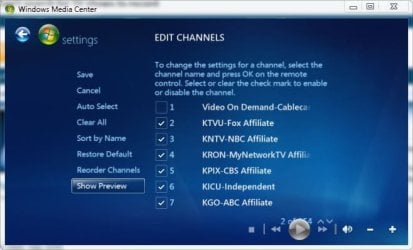
I'm not sure why it's taking so long, but if you go to settings, guide, edit channels, and just select the channels that you want (or actually receive) it would probably speed things up. Mine shows 500+ channels but I can't actually receive all those so I remove them from the list so it doesn't download guide data for them.
You can use the show preview button and it will let you know if you get that channel.
 

Attachments

  • show preview.JPG
    show preview.JPG
    37.6 KB · Views: 6
  • show preview 2.JPG
    show preview 2.JPG
    39.6 KB · Views: 2

My Computer My Computer

At a glance

Win 10 Pro x64Intel I5-2500K @3.3GHz16GB G.Skill Ripjaws X (4x4GB)EVGA GeForce 750 Ti SC 2GB
Computer type
PC/Desktop
Computer Manufacturer/Model Number
Self Built
OS
Win 10 Pro x64
CPU
Intel I5-2500K @3.3GHz
Motherboard
Asrock P67 Extreme4
Memory
16GB G.Skill Ripjaws X (4x4GB)
Graphics Card(s)
EVGA GeForce 750 Ti SC 2GB
Sound Card
ASUS Xonar DG 5.1 Channels 24-bit 96KHz PCI Interface Sound
Monitor(s) Displays
auria eq2367
Screen Resolution
1920 x 1080
Hard Drives
250GB Samsung 850 EVO SSD
1TB WD Blue
1TB Hitachi
PSU
SeaSonic X 650W 80 Plus Gold
Case
Corsair Obsidian 750D
Cooling
Corsair H60, Three 140mm case fans
Keyboard
Logitech Wireless Keyboard K520
Mouse
Logitech Wireless Mouse M310
Internet Speed
Wave Broadband ~ 100 dn 5 up
Antivirus
Windows Defender, Malwarebytes Premium
Browser
Edge, IE11, Chrome
Other Info
Laptop specs: HP g7-1365dx /
CPU: AMD A6-3420M APU with Radeon(tm) HD Graphics /
RAM: Crucial 8Gb (2x4Gb) /
SSD: Crucial M4-CT128M4SSD2 ATA Device/ FW 000F /
GFX: AMD Radeon HD 6520G /
OS: Windows 10 Pro x64
Changed the channels to just 2-33 (limited basic) and it STILL says that. Should I just try setting up the whole TV signal over again?
 

My Computer My Computer

At a glance

Windows 7 Professional 64-bitIntel Core2 Quad 2.5Ghz8GBGalaxy GTX 660 GC 2GB
Computer Manufacturer/Model Number
Dell XPS430
OS
Windows 7 Professional 64-bit
CPU
Intel Core2 Quad 2.5Ghz
Memory
8GB
Graphics Card(s)
Galaxy GTX 660 GC 2GB
Monitor(s) Displays
Dell 19"
Screen Resolution
1920x1080
Hard Drives
Hitachi 750GB

Western Digital 500GB
Cooling
Heat Sink + Fans
Mouse
N/A
Internet Speed
14 Mb/s
I have seen issues with it indexing. I would suggest re-configuring it and when it says downloading guide data, just let it run. I have seen issues where when it says it is doing something, clicking on "OK" and going to the next screen can cause it to never finishing indexing. I had similar issue with music, it says it could run in the4 background, but then every time I launched it it re-indexed every time and never finished.
 

My Computer My Computer

At a glance

Windows 7i5-7504GB DDR3 1600GT220
OS
Windows 7
CPU
i5-750
Motherboard
Asus
Memory
4GB DDR3 1600
Graphics Card(s)
GT220
I tried going through setting up the TV-signal completely from the beginning, and I still get that problem. I even went into the settings and told it to download the latest guide info, which I got the completion message a few minutes later, and I still get that message about still indexing.
 

My Computer My Computer

At a glance

Windows 7 Professional 64-bitIntel Core2 Quad 2.5Ghz8GBGalaxy GTX 660 GC 2GB
Computer Manufacturer/Model Number
Dell XPS430
OS
Windows 7 Professional 64-bit
CPU
Intel Core2 Quad 2.5Ghz
Memory
8GB
Graphics Card(s)
Galaxy GTX 660 GC 2GB
Monitor(s) Displays
Dell 19"
Screen Resolution
1920x1080
Hard Drives
Hitachi 750GB

Western Digital 500GB
Cooling
Heat Sink + Fans
Mouse
N/A
Internet Speed
14 Mb/s
Hmm. Try shutting off any power saving settings so it stays on. It seems like if it hibernates/sleeps, it stops and restarts any indexing from the beginning when it wakes. At least on mine it seems that way.
 

My Computer My Computer

At a glance

Windows 7i5-7504GB DDR3 1600GT220
OS
Windows 7
CPU
i5-750
Motherboard
Asus
Memory
4GB DDR3 1600
Graphics Card(s)
GT220
You mean for the main computer? They ARE off (hibernate and sleep). The only thing that I have on is that the monitor turns off after 15 minutes, but that shouldn't effect anything running on the computer.
 

My Computer My Computer

At a glance

Windows 7 Professional 64-bitIntel Core2 Quad 2.5Ghz8GBGalaxy GTX 660 GC 2GB
Computer Manufacturer/Model Number
Dell XPS430
OS
Windows 7 Professional 64-bit
CPU
Intel Core2 Quad 2.5Ghz
Memory
8GB
Graphics Card(s)
Galaxy GTX 660 GC 2GB
Monitor(s) Displays
Dell 19"
Screen Resolution
1920x1080
Hard Drives
Hitachi 750GB

Western Digital 500GB
Cooling
Heat Sink + Fans
Mouse
N/A
Internet Speed
14 Mb/s
Has anyone seen a solution to this issue? I have exactly the same problem; been there since the installation. The OS is Win7 Home. I've checked what is mentioned here, and all power saver settings are disabled. The system functions fine. Listings are present and scheduled recordings work fine. Listings are updated and are current. Search, from any of the three or four ways that you can get to listings search, just never produces results for ANYTHING that is typed in. I've tried upper, lower, and exact listing case, full spell and partial, actor, title, and keyword search. All just state None Found no matter what is entered. Very confused by this. This machine is a new install about 3 months old that has decent hardware (Core 2 DUO 2.33 Ghz, plenty of drive space, 3GB RAM, ...) and always on internet connection. Windows updates are on automatic and updating normally. No event log errors, just lots of informational messages about services starting and stopping; checked all log groups. My older Vista box did not have this problem. The Win7 Home OS install was a clean install to a blank HD, so no upgrade issues should have been present. This machine is ONLY used as an MCE storage/recording box, so it's relatively clean. Very confused. The only additional things on the machine are Ultra VNC for remote maintenance access and AVG 9.0 free version. I not of the mindset to completely reinstall since everything else works great. Any thoughts would be appreciated.
 

My Computer My Computer

At a glance

Windows 7Intel E85004GBATI 4870
Computer Manufacturer/Model Number
Dell
OS
Windows 7
CPU
Intel E8500
Motherboard
FoxCon
Memory
4GB
Graphics Card(s)
ATI 4870
Sound Card
Internal
Monitor(s) Displays
2 x HP W2408H 1920x1200
Hard Drives
2x500GB Seagate Barracuda ST3500630AS SATA II
PSU
650W
I'm personally still suffering from this issue.
 

My Computer My Computer

At a glance

Windows 7 Professional 64-bitIntel Core2 Quad 2.5Ghz8GBGalaxy GTX 660 GC 2GB
Computer Manufacturer/Model Number
Dell XPS430
OS
Windows 7 Professional 64-bit
CPU
Intel Core2 Quad 2.5Ghz
Memory
8GB
Graphics Card(s)
Galaxy GTX 660 GC 2GB
Monitor(s) Displays
Dell 19"
Screen Resolution
1920x1080
Hard Drives
Hitachi 750GB

Western Digital 500GB
Cooling
Heat Sink + Fans
Mouse
N/A
Internet Speed
14 Mb/s
Issue resolved by running adapter setup again

I finally resolved my issue, so I'm passing along my solution. Originally, when I installed, I added the TV tuner support manully. I had 2250 dual tuner card, and if memory serves, it was not plugged into cable when I added the adaptors. I also remember having to add analog and digital manually since there was no option to just detect and add both. I move the machine to a location that had both coax and monitor access and ran the cable tuner channel setup again. It warned that it would delete the existing configuration and could affect exisiting scheduled recordings. After running the setup, both tuners showed up and both analog and digital tuners were deteted and activate. I then let it scan for channel updates. I then tried a guide search and now it found "stuff". This never worked prior to running setup while plugged into the source.

Don't know if this helps you, but I hope it does.

If you need the specific settings menu option that I ran I can get that, but I think that there are only two options that are related to channels/tuner. You should be abel to find it:shock:.
 

My Computer My Computer

At a glance

Windows 7Intel E85004GBATI 4870
Computer Manufacturer/Model Number
Dell
OS
Windows 7
CPU
Intel E8500
Motherboard
FoxCon
Memory
4GB
Graphics Card(s)
ATI 4870
Sound Card
Internal
Monitor(s) Displays
2 x HP W2408H 1920x1200
Hard Drives
2x500GB Seagate Barracuda ST3500630AS SATA II
PSU
650W
Back
Top