Solved Can’t see drivers of my laptop when booting with Windows 7 DVD,

Jamal NUMAN

New member
Member
VIP
Local time
11:49 AM
Messages
144
Can’t see drivers of my laptop when booting with Windows 7 DVD,

Can’t see drivers of my laptop when booting with Windows 7 DVD,

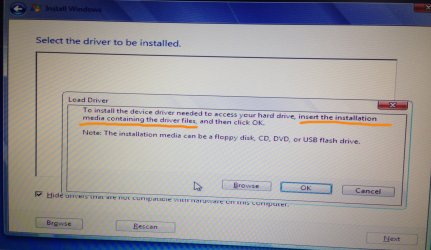
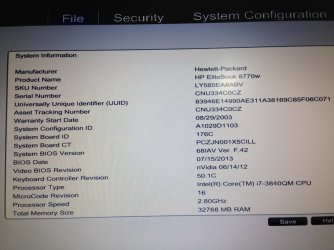
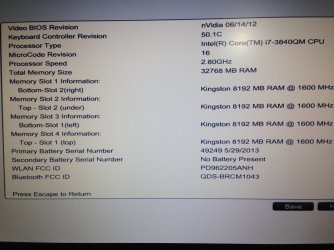
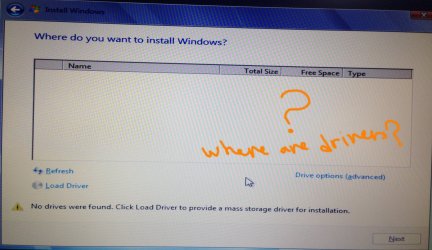
I wanted to format my laptop (HP EliteBook 8770w) and thus I booted with my windows 7 DVD but at the step of “Where do you want to install windows”, I can’t find any driver. As the “load driver” button is clicked, I got the message shown on the attached screenshot.

What might be the issue here?

Is there some settings at the BIOS level that make the drivers appear?

Thank you

Best

Jamal
 

Attachments
  • IMG_0524.JPG
    IMG_0524.JPG
    542.6 KB · Views: 0
  • IMG_0521.JPG
    IMG_0521.JPG
    479 KB · Views: 0
  • IMG_0522.jpg
    IMG_0522.jpg
    1 MB · Views: 0

My Computer My Computer

At a glance

Windows 7 Ultimate x64
OS
Windows 7 Ultimate x64

Attachments

  • IMG_0525.JPG
    IMG_0525.JPG
    980.3 KB · Views: 0
  • IMG_0526.JPG
    IMG_0526.JPG
    495.2 KB · Views: 0

My Computer My Computer

At a glance

Windows 7 Ultimate x64
OS
Windows 7 Ultimate x64
Go to your System Configuration, and check your drive settings.
You can also try resetting the BIOS to default settings.
 

My Computer My Computer

At a glance

Windows 7 Home Premium 64 bitIntel Core i7-4790G.SKILL 8GB (2 x 4GB) DDR3 F3-10666CL9D-8GBNTAMD Radeon R7 250
Computer type
PC/Desktop
Computer Manufacturer/Model Number
Custom Build
OS
Windows 7 Home Premium 64 bit
CPU
Intel Core i7-4790
Motherboard
GA-Z87X-D3H
Memory
G.SKILL 8GB (2 x 4GB) DDR3 F3-10666CL9D-8GBNT
Graphics Card(s)
AMD Radeon R7 250
Sound Card
Realtek ALC892
Monitor(s) Displays
Samsung UN32EH5000, Dell 1703FPT
Screen Resolution
1920 x 1080, 1280 x 1024
Hard Drives
WD5003AZEX
WD10EZEX
Samsung HD103SJ
Samsung 128 GB 840 PRO
PSU
SeaSonic M12II SS-500GM
Case
Fractal Design Define R4
Cooling
Zalman CNPS9900ALED
Keyboard
Logitech K800
Mouse
Logitech M705
Internet Speed
16 Mbps
Antivirus
Avast
Browser
Firefox
Other Info
Bose Companion 2 Multimedia Speakers
Go to your System Configuration, and check your drive settings.
You can also try resetting the BIOS to default settings.


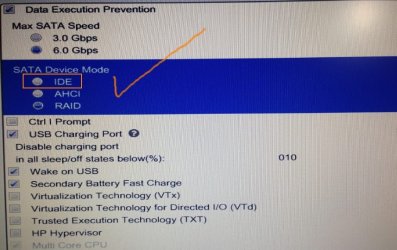
Many thanks Sardonicus. It works. I set the Sata Device mode to be “IDE” (attached)

Thanks

Best

Jamal
 

Attachments

  • Clip_150.jpg
    Clip_150.jpg
    69.7 KB · Views: 0

My Computer My Computer

At a glance

Windows 7 Ultimate x64
OS
Windows 7 Ultimate x64
I would want SATA controller set to AHCI for latest features.

The prompt for drivers can also mean a bad installer. Did it complete install in IDE mode? If not try a new ISO burned/written using tool provided in Clean Reinstall - Factory OEM Windows 7 which steps will assure a perfect install, even for retail.
 
I would want SATA controller set to AHCI for latest features.

The prompt for drivers can also mean a bad installer. Did it complete install in IDE mode? If not try a new ISO burned/written using tool provided in Clean Reinstall - Factory OEM Windows 7 which steps will assure a perfect install, even for retail.


Many thanks gregrocker. It works fine

Best

Jamal
 

My Computer My Computer

At a glance

Windows 7 Ultimate x64
OS
Windows 7 Ultimate x64
Back
Top