Can't Share With Homegroup

pcdragin

New member
Local time
3:46 PM
Messages
19
When I try to share a folder on my desktop computer with my

homegroup, the only thing that appears on the "Share With" Menu is

"Advanced Sharing". Homegroup does not appear. How do I share a

folder with only my homegroup?

Thanx,

Randy
 

My Computer

Computer Manufacturer/Model Number
Dell Inspiron D530
OS
Windows 7

My Computer

Computer Manufacturer/Model Number
Homebrew PC - "Alpha_Dawg"
OS
Windows 7 Ultimate 64 bit Steve Ballmer Signature Edition
CPU
Intel Core 2 Quad - Q9550 - 2.83GHz stock - OC'd to 3.6GHz
Motherboard
Gigabyte EP45-UD3P
Memory
4GB DDR2 800MHz (PC6400) OCZ Reaper
Graphics Card(s)
Nvidia GE Force 8800 GTS
Sound Card
Asus Xonar DX
Monitor(s) Displays
Samsung SyncMaster 2333HD
Screen Resolution
1920 x 1080
Hard Drives
WD Caviar Black 750GB - 7200RPM - 32MB cache
WD Caviar Green 1.5TB - 5400RPM - 64MB cache
WD Caviar Green 2.0TB - 5400RPM - 64MB cache
PSU
PC Power & Cooling Silencer 750
Case
Gigabyte 3D Aurora
Cooling
Case is Air - 5ea. 120mm fans (mix of Arctic and Xigmatec)
Keyboard
MS Natural Wireless KB
Mouse
MS Wireless Mouse
Internet Speed
50 mbps down/5 mbps up
Other Info
AVerMedia - AVerTVHD G2 Dual Tuner Card
Darryl,

1st of all, I have a coffee mug given to me by my deceased daughter that has "I see dumb people" engraved on it.

2nd, according to the microsoft article, the "Advanced Sharing" option appears "sometimes" for security reasons. As far as I know, there are not any security issues with my Desktop since my network is only a home setup with two desktops and a laptop connected. The only difference in the three is that two are connected wirelessly and the problem PC is hardwired. Could this possibly be the problem? If so, how do I resolve it? The desktop does not have a wireless card.

Thanx,

Randy
 

My Computer

Computer Manufacturer/Model Number
Dell Inspiron D530
OS
Windows 7
Are you sure that the wired desktop is in same workgroup and same IP subnet? Im assuming yes...
 

My Computer

Computer Manufacturer/Model Number
Homebrew PC - "Alpha_Dawg"
OS
Windows 7 Ultimate 64 bit Steve Ballmer Signature Edition
CPU
Intel Core 2 Quad - Q9550 - 2.83GHz stock - OC'd to 3.6GHz
Motherboard
Gigabyte EP45-UD3P
Memory
4GB DDR2 800MHz (PC6400) OCZ Reaper
Graphics Card(s)
Nvidia GE Force 8800 GTS
Sound Card
Asus Xonar DX
Monitor(s) Displays
Samsung SyncMaster 2333HD
Screen Resolution
1920 x 1080
Hard Drives
WD Caviar Black 750GB - 7200RPM - 32MB cache
WD Caviar Green 1.5TB - 5400RPM - 64MB cache
WD Caviar Green 2.0TB - 5400RPM - 64MB cache
PSU
PC Power & Cooling Silencer 750
Case
Gigabyte 3D Aurora
Cooling
Case is Air - 5ea. 120mm fans (mix of Arctic and Xigmatec)
Keyboard
MS Natural Wireless KB
Mouse
MS Wireless Mouse
Internet Speed
50 mbps down/5 mbps up
Other Info
AVerMedia - AVerTVHD G2 Dual Tuner Card
Yes, same workgroup, same subnet.

Thanx,

Randy
 

My Computer

Computer Manufacturer/Model Number
Dell Inspiron D530
OS
Windows 7
Some quick ideas and then im out the door to work...

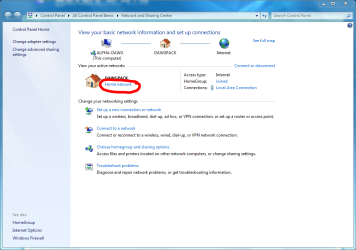
Make sure all Homegroup PC's are in a Home Network in the Network and Sharing Center...

homegroup_1.PNG

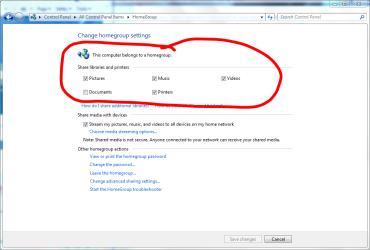
Make sure you are sharing at least 1 Library on each PC in Homegroup settings...

homegroup_2.PNG

I gotta go... I'll check in on you later today! Good Luck!
 

My Computer

Computer Manufacturer/Model Number
Homebrew PC - "Alpha_Dawg"
OS
Windows 7 Ultimate 64 bit Steve Ballmer Signature Edition
CPU
Intel Core 2 Quad - Q9550 - 2.83GHz stock - OC'd to 3.6GHz
Motherboard
Gigabyte EP45-UD3P
Memory
4GB DDR2 800MHz (PC6400) OCZ Reaper
Graphics Card(s)
Nvidia GE Force 8800 GTS
Sound Card
Asus Xonar DX
Monitor(s) Displays
Samsung SyncMaster 2333HD
Screen Resolution
1920 x 1080
Hard Drives
WD Caviar Black 750GB - 7200RPM - 32MB cache
WD Caviar Green 1.5TB - 5400RPM - 64MB cache
WD Caviar Green 2.0TB - 5400RPM - 64MB cache
PSU
PC Power & Cooling Silencer 750
Case
Gigabyte 3D Aurora
Cooling
Case is Air - 5ea. 120mm fans (mix of Arctic and Xigmatec)
Keyboard
MS Natural Wireless KB
Mouse
MS Wireless Mouse
Internet Speed
50 mbps down/5 mbps up
Other Info
AVerMedia - AVerTVHD G2 Dual Tuner Card
Both of these are setup as you recommended.

Thanx,

Randy
 

My Computer

Computer Manufacturer/Model Number
Dell Inspiron D530
OS
Windows 7
Did that help you get it working?
 

My Computer

Computer Manufacturer/Model Number
Homebrew PC - "Alpha_Dawg"
OS
Windows 7 Ultimate 64 bit Steve Ballmer Signature Edition
CPU
Intel Core 2 Quad - Q9550 - 2.83GHz stock - OC'd to 3.6GHz
Motherboard
Gigabyte EP45-UD3P
Memory
4GB DDR2 800MHz (PC6400) OCZ Reaper
Graphics Card(s)
Nvidia GE Force 8800 GTS
Sound Card
Asus Xonar DX
Monitor(s) Displays
Samsung SyncMaster 2333HD
Screen Resolution
1920 x 1080
Hard Drives
WD Caviar Black 750GB - 7200RPM - 32MB cache
WD Caviar Green 1.5TB - 5400RPM - 64MB cache
WD Caviar Green 2.0TB - 5400RPM - 64MB cache
PSU
PC Power & Cooling Silencer 750
Case
Gigabyte 3D Aurora
Cooling
Case is Air - 5ea. 120mm fans (mix of Arctic and Xigmatec)
Keyboard
MS Natural Wireless KB
Mouse
MS Wireless Mouse
Internet Speed
50 mbps down/5 mbps up
Other Info
AVerMedia - AVerTVHD G2 Dual Tuner Card
No, I sill can't share files and folders with Homegroup. The "Share With" Menu still only lists "Advanced Sharing", and not the Homegroup options.

Thanx,

Randy
 

My Computer

Computer Manufacturer/Model Number
Dell Inspiron D530
OS
Windows 7
type advanced sharing in the start box, click on the icon, configure the sharing needs.
 

My Computer

Computer type
PC/Desktop
Computer Manufacturer/Model Number
Bruce ... somewhere in his 40's
OS
Windows 7 Ultimate 32bit SP1
CPU
Intel(R) Core(TM)2 Quad CPU @ 2.40GHz, 2400 MHz
Motherboard
INTEL/D975XBX2
Memory
4 GB
Graphics Card(s)
ATI Radeon HD 2600 Pro
Monitor(s) Displays
Samsung SyncMaster 914v
Screen Resolution
1280 x 1024
Hard Drives
2/500GB each ... ST3500630AS ATA Device.
One is not connected
PSU
Rocketfish 700 W
Case
G.Skill Gigabyte Chassis
Keyboard
Standard PS/2 Keyboard
Mouse
Microsoft PS/2 Mouse
Internet Speed
DSL
Antivirus
Avira Internet Security
Browser
IE 11
Other Info
ATI HDMI Audio
No, I sill can't share files and folders with Homegroup. The "Share With" Menu still only lists "Advanced Sharing", and not the Homegroup options.

Thanx,

Randy

So you dont see the The HomeGroup sharing screen through Control panel? Or do you?

Several people have had issues with antivirus and or firewalls... uninstall your av and try it. You should be able to reinstall it after you get HG working. Also disable your firewall and try.
 

My Computer

Computer Manufacturer/Model Number
Homebrew PC - "Alpha_Dawg"
OS
Windows 7 Ultimate 64 bit Steve Ballmer Signature Edition
CPU
Intel Core 2 Quad - Q9550 - 2.83GHz stock - OC'd to 3.6GHz
Motherboard
Gigabyte EP45-UD3P
Memory
4GB DDR2 800MHz (PC6400) OCZ Reaper
Graphics Card(s)
Nvidia GE Force 8800 GTS
Sound Card
Asus Xonar DX
Monitor(s) Displays
Samsung SyncMaster 2333HD
Screen Resolution
1920 x 1080
Hard Drives
WD Caviar Black 750GB - 7200RPM - 32MB cache
WD Caviar Green 1.5TB - 5400RPM - 64MB cache
WD Caviar Green 2.0TB - 5400RPM - 64MB cache
PSU
PC Power & Cooling Silencer 750
Case
Gigabyte 3D Aurora
Cooling
Case is Air - 5ea. 120mm fans (mix of Arctic and Xigmatec)
Keyboard
MS Natural Wireless KB
Mouse
MS Wireless Mouse
Internet Speed
50 mbps down/5 mbps up
Other Info
AVerMedia - AVerTVHD G2 Dual Tuner Card
SOLVED - How to share custom library with Homegroup?

After Darryl's suggestions, searching other sites, & some trial & error on my own; I finally found a solution to this problem. See below:

How To Share Folders With Homegroup

1.[FONT=&quot] [/FONT]Open “Control Panel” & click on “Folder Options”.

2.[FONT=&quot] [/FONT]In the folder options dialog box, make sure “Use Sharing Wizard” is selected.

3.[FONT=&quot] [/FONT]Click on “OK”.

4.[FONT=&quot] [/FONT]Right Click on your “Libraries” folder & hover the mouse over “New”.
5.[FONT=&quot] [/FONT]Select “Library”.
6.[FONT=&quot] [/FONT]Give the new library a name.
7.[FONT=&quot] [/FONT]Right Click on the folder you want to share, and hover the mouse over “Include In Library”.
8.[FONT=&quot] [/FONT]Select the library that you created earlier.
9.[FONT=&quot] [/FONT]The folder will now appear in the library you created.
10.[FONT=&quot] [/FONT]Right Click on the new library & hover the mouse over “Share With”.
11.[FONT=&quot] [/FONT]A Pop-Up menu will appear; select the sharing option that you want:
a.[FONT=&quot] [/FONT]Nobody
b.[FONT=&quot] [/FONT]Homegroup (Read)
c.[FONT=&quot] [/FONT]Homegroup (Read/Write)
d.[FONT=&quot] [/FONT]Specific People…
12.[FONT=&quot] [/FONT]The new library will now appear in the Homegroup folder of any Computers in your Homegroup.


Randy
 

My Computer

Computer Manufacturer/Model Number
Dell Inspiron D530
OS
Windows 7
After Darryl's suggestions, searching other sites, & some trial & error on my own; I finally found a solution to this problem. See below:

How To Share Folders With Homegroup

1.Open “Control Panel” & click on “Folder Options”.

2.In the folder options dialog box, make sure “Use Sharing Wizard” is selected.

3.Click on “OK”.

4.Right Click on your “Libraries” folder & hover the mouse over “New”.
5.Select “Library”.
6.Give the new library a name.
7.Right Click on the folder you want to share, and hover the mouse over “Include In Library”.
8.Select the library that you created earlier.
9.The folder will now appear in the library you created.
10.Right Click on the new library & hover the mouse over “Share With”.
11.A Pop-Up menu will appear; select the sharing option that you want:
a.Nobody
b.Homegroup (Read)
c.Homegroup (Read/Write)
d.Specific People…
12.The new library will now appear in the Homegroup folder of any Computers in your Homegroup.

Randy

Thanks Randy! Great tips for all! Reps on the way!
 

My Computer

Computer Manufacturer/Model Number
Homebrew PC - "Alpha_Dawg"
OS
Windows 7 Ultimate 64 bit Steve Ballmer Signature Edition
CPU
Intel Core 2 Quad - Q9550 - 2.83GHz stock - OC'd to 3.6GHz
Motherboard
Gigabyte EP45-UD3P
Memory
4GB DDR2 800MHz (PC6400) OCZ Reaper
Graphics Card(s)
Nvidia GE Force 8800 GTS
Sound Card
Asus Xonar DX
Monitor(s) Displays
Samsung SyncMaster 2333HD
Screen Resolution
1920 x 1080
Hard Drives
WD Caviar Black 750GB - 7200RPM - 32MB cache
WD Caviar Green 1.5TB - 5400RPM - 64MB cache
WD Caviar Green 2.0TB - 5400RPM - 64MB cache
PSU
PC Power & Cooling Silencer 750
Case
Gigabyte 3D Aurora
Cooling
Case is Air - 5ea. 120mm fans (mix of Arctic and Xigmatec)
Keyboard
MS Natural Wireless KB
Mouse
MS Wireless Mouse
Internet Speed
50 mbps down/5 mbps up
Other Info
AVerMedia - AVerTVHD G2 Dual Tuner Card
Still having issues

I'm having a rough time with this. I'd had simple filesharing turned off, and had tried several methods that worked on XP to share folders.

So far I've followed this guide and gotten it to allow me read access to the files, but I have no write access. I've checked permissions in the computer management interface, and it has "Everyone" set to full access (is that even safe?) and Administrators. Don't see anything about homegroup groups though.

"Destination Folder Access Denied"
You need permission to perform this action

What gives?
 
Last edited:

My Computer

OS
Windows 7 Ultimate
CPU
AMD Athlon X2 5200+
Motherboard
MSI K9N Neo v1
Memory
4GB DDR2 800
Graphics Card(s)
nVidia GeForce 9400 GT
Sound Card
Creative Soundblaster Audigy ZS 2
Monitor(s) Displays
Crappy old Envision 710e
Hard Drives
2x 160G Maxtor SATA2
PSU
700W Antec
Case
Generic
Cooling
Fan
Any ideas? I've racked my head with this now for a while, and from what I'm seeing, it should work fine. I have checked permissions, and I have read and write permissions, but when accessing a homegroup folder I can only read. No write access at all.
 

My Computer

OS
Windows 7 Ultimate
CPU
AMD Athlon X2 5200+
Motherboard
MSI K9N Neo v1
Memory
4GB DDR2 800
Graphics Card(s)
nVidia GeForce 9400 GT
Sound Card
Creative Soundblaster Audigy ZS 2
Monitor(s) Displays
Crappy old Envision 710e
Hard Drives
2x 160G Maxtor SATA2
PSU
700W Antec
Case
Generic
Cooling
Fan
Any ideas? I've racked my head with this now for a while, and from what I'm seeing, it should work fine. I have checked permissions, and I have read and write permissions, but when accessing a homegroup folder I can only read. No write access at all.

Are you doing this thru simple file shares or Homegroup?
 

My Computer

Computer Manufacturer/Model Number
Homebrew PC - "Alpha_Dawg"
OS
Windows 7 Ultimate 64 bit Steve Ballmer Signature Edition
CPU
Intel Core 2 Quad - Q9550 - 2.83GHz stock - OC'd to 3.6GHz
Motherboard
Gigabyte EP45-UD3P
Memory
4GB DDR2 800MHz (PC6400) OCZ Reaper
Graphics Card(s)
Nvidia GE Force 8800 GTS
Sound Card
Asus Xonar DX
Monitor(s) Displays
Samsung SyncMaster 2333HD
Screen Resolution
1920 x 1080
Hard Drives
WD Caviar Black 750GB - 7200RPM - 32MB cache
WD Caviar Green 1.5TB - 5400RPM - 64MB cache
WD Caviar Green 2.0TB - 5400RPM - 64MB cache
PSU
PC Power & Cooling Silencer 750
Case
Gigabyte 3D Aurora
Cooling
Case is Air - 5ea. 120mm fans (mix of Arctic and Xigmatec)
Keyboard
MS Natural Wireless KB
Mouse
MS Wireless Mouse
Internet Speed
50 mbps down/5 mbps up
Other Info
AVerMedia - AVerTVHD G2 Dual Tuner Card
I've actually tried both. Something seems wierd with the windows 7 file sharing from what I'm used to.
If I make a folder on either machine (they both have the same two username/passwords as well), set it to shared, and have full access to the user. I can read, but not write, unless I make the "Everyone" account have full control, which is not quite secure, nor how I would think it should work.
Both systems are running windows 7, same version, same username/passwords. Something just isn't working correctly.

Right now, to change files, I am having to use RDP, which kicks my wife off her session (about to apply the terminal patch for that now that I've read enough about it). Have to copy in rdp, minimize, paste, go back to rdp, delete the file... its a pain. Making me want to chuck win7 and go back to XP professional. This is killing productivity.

But yes, the homegroup feature is what I'm trying to use, mainly for simplicity's sake. My wife understands "Share with>Homegroup (Read/Write)" much better than setting up a share manually :P
 
Last edited:

My Computer

OS
Windows 7 Ultimate
CPU
AMD Athlon X2 5200+
Motherboard
MSI K9N Neo v1
Memory
4GB DDR2 800
Graphics Card(s)
nVidia GeForce 9400 GT
Sound Card
Creative Soundblaster Audigy ZS 2
Monitor(s) Displays
Crappy old Envision 710e
Hard Drives
2x 160G Maxtor SATA2
PSU
700W Antec
Case
Generic
Cooling
Fan
Which version of Win7 are you using and where did you acquire it?
 

My Computer

Computer Manufacturer/Model Number
Homebrew PC - "Alpha_Dawg"
OS
Windows 7 Ultimate 64 bit Steve Ballmer Signature Edition
CPU
Intel Core 2 Quad - Q9550 - 2.83GHz stock - OC'd to 3.6GHz
Motherboard
Gigabyte EP45-UD3P
Memory
4GB DDR2 800MHz (PC6400) OCZ Reaper
Graphics Card(s)
Nvidia GE Force 8800 GTS
Sound Card
Asus Xonar DX
Monitor(s) Displays
Samsung SyncMaster 2333HD
Screen Resolution
1920 x 1080
Hard Drives
WD Caviar Black 750GB - 7200RPM - 32MB cache
WD Caviar Green 1.5TB - 5400RPM - 64MB cache
WD Caviar Green 2.0TB - 5400RPM - 64MB cache
PSU
PC Power & Cooling Silencer 750
Case
Gigabyte 3D Aurora
Cooling
Case is Air - 5ea. 120mm fans (mix of Arctic and Xigmatec)
Keyboard
MS Natural Wireless KB
Mouse
MS Wireless Mouse
Internet Speed
50 mbps down/5 mbps up
Other Info
AVerMedia - AVerTVHD G2 Dual Tuner Card
Windows 7 Ultimate, 2 copies, at best buy. Doubt they accept a return though. Is there some issue with different distributors or versions? I know that lower-end versions had features that make life simpler missing, as it did with XP, which is why I spent the extra money on Ultimate.
 

My Computer

OS
Windows 7 Ultimate
CPU
AMD Athlon X2 5200+
Motherboard
MSI K9N Neo v1
Memory
4GB DDR2 800
Graphics Card(s)
nVidia GeForce 9400 GT
Sound Card
Creative Soundblaster Audigy ZS 2
Monitor(s) Displays
Crappy old Envision 710e
Hard Drives
2x 160G Maxtor SATA2
PSU
700W Antec
Case
Generic
Cooling
Fan
Back
Top