
Hi. I've read lots and used lots from this forum - thanks! - but first time posting here. I've searched, but haven't found a similar issue to this.
My issue:
I was using Aero with no problem. I had customized it a little, but only basic things through the Personalize section of Control Panel. I turned off transparency, and it worked perfectly.
I downloaded some themes from different sources (deviantart, etc). They were full themes that changed dlls. I tried them for a while.
Recently I switched back to my normal slightly-customized Aero theme. Everything from my theme is back and working correctly.... except opaque window tops.
Now when using my customized aero-theme, I can't turn off the transparency of the top bar of open windows. It affects all applications: Explorer, Firefox, Skype, etc...
Here's a snapshot of how it looks:
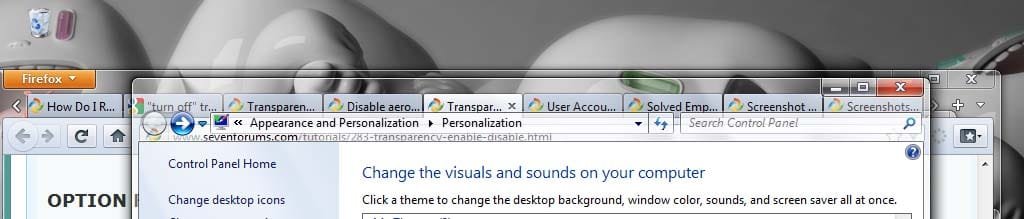
In this example above, the Control Panel is on top, but through it you can see Firefox... and through Firefox, you can see the desktop. It's a mess to figure out where one window ends and another beings, so clicking, dragging, sizing, even reading it are all a hassle.
I want to disable that so the tops of the windows are solid, but I can't make it solid and still keep aero peek.
Steps I've tried:
- in Control Panel\Appearance and Personalization\Personalization, I unchecked "enable transparency."
- in Performance Options, I turned off everything that could be causing it. Here's a shot of my current settings:
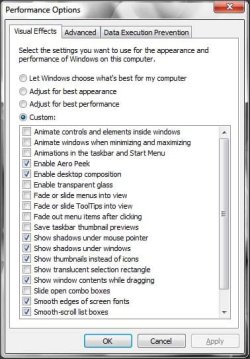
- in the registry, I confirmed that Colorization Opaque Blend is set to 1 (=disabled). Here's a copy of the DWN settings in the registry:
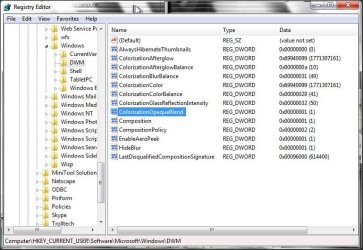
None of this works. I tested the theme "Windows 7 Basic". It successfully made the tops of the windows opaque. However, it doesn't have aero peek, etc, which I want.
Any suggestions on what I must change to make my customized-aero theme disable transparency again and have opaque window tops?
Thanks!
My issue:
I was using Aero with no problem. I had customized it a little, but only basic things through the Personalize section of Control Panel. I turned off transparency, and it worked perfectly.
I downloaded some themes from different sources (deviantart, etc). They were full themes that changed dlls. I tried them for a while.
Recently I switched back to my normal slightly-customized Aero theme. Everything from my theme is back and working correctly.... except opaque window tops.
Now when using my customized aero-theme, I can't turn off the transparency of the top bar of open windows. It affects all applications: Explorer, Firefox, Skype, etc...
Here's a snapshot of how it looks:
In this example above, the Control Panel is on top, but through it you can see Firefox... and through Firefox, you can see the desktop. It's a mess to figure out where one window ends and another beings, so clicking, dragging, sizing, even reading it are all a hassle.
I want to disable that so the tops of the windows are solid, but I can't make it solid and still keep aero peek.
Steps I've tried:
- in Control Panel\Appearance and Personalization\Personalization, I unchecked "enable transparency."
- in Performance Options, I turned off everything that could be causing it. Here's a shot of my current settings:
- in the registry, I confirmed that Colorization Opaque Blend is set to 1 (=disabled). Here's a copy of the DWN settings in the registry:
None of this works. I tested the theme "Windows 7 Basic". It successfully made the tops of the windows opaque. However, it doesn't have aero peek, etc, which I want.
Any suggestions on what I must change to make my customized-aero theme disable transparency again and have opaque window tops?
Thanks!
My Computer
At a glance
Windows 7 Ultimate 32bit
- OS
- Windows 7 Ultimate 32bit

 Thanks!