
You are using an out of date browser. It may not display this or other websites correctly.
You should upgrade or use an alternative browser.
You should upgrade or use an alternative browser.
Can't turn on Network Discovery in Win 7
- Thread starter Bill1950
- Start date

To fix this problem you usually need to reset winsock.
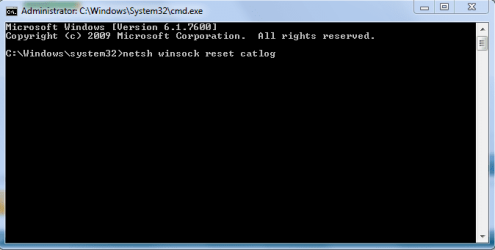
At your command prompt run as Admin, type the command highlighted in bold below then hit enter and you should be prompted to reboot. The picture below shows how.
http://www.sevenforums.com/tutorials/783-elevated-command-prompt.html
Test to see that the Network Discovery button stays on after another reboot.
You may need to set your networking services to Automatic in services.msc
netsh winsock reset catalog (reset winsock entries)
At your command prompt run as Admin, type the command highlighted in bold below then hit enter and you should be prompted to reboot. The picture below shows how.
http://www.sevenforums.com/tutorials/783-elevated-command-prompt.html
Test to see that the Network Discovery button stays on after another reboot.
You may need to set your networking services to Automatic in services.msc
netsh winsock reset catalog (reset winsock entries)
Attachments
My Computer
- Computer type
- PC/Desktop
- Computer Manufacturer/Model Number
- Home built
- OS
- Windows 7 Ult, Windows 8.1 Pro,
- CPU
- Q9650-4.275GHz, E8600 4.5GHz, E6750-3.8GHz
- Motherboard
- Evga 780i FTW
- Memory
- G.Skill PC2 9600 1200Mhz 5 5 5 15 2T
- Graphics Card(s)
- GTX480
- Sound Card
- Asus Xonar D2
- Monitor(s) Displays
- HannsG
- Screen Resolution
- 1680X1050
- Hard Drives
- GSkill Phoenix Pro 120GB SSD
- PSU
- ThermalTake Toughpower 1000Watt modular
- Case
- ThermalTake XaserV
- Cooling
- Xigmatek S1283
- Keyboard
- Logitech G15
- Mouse
- Logitech G9
- Internet Speed
- T1
No change
I checked the networking services and ran the netsh command as admin, but Network Discovery still insists on staying Off. My original problem is that this PC (#2) was not able to join the Homegroup on my first machine. I was getting messages saying that IPv6 needed to be enabled even though I confirmed several times that it is enable on both machines. At that time, machine #2 wanted to join #1 Homegroup, but the IPv6 message persisted. Now, #2 can't even see #1 as it wants now to create a Homegroup.
Very frustrating! I installed Win 7 to get easier sharing capability.
I checked the networking services and ran the netsh command as admin, but Network Discovery still insists on staying Off. My original problem is that this PC (#2) was not able to join the Homegroup on my first machine. I was getting messages saying that IPv6 needed to be enabled even though I confirmed several times that it is enable on both machines. At that time, machine #2 wanted to join #1 Homegroup, but the IPv6 message persisted. Now, #2 can't even see #1 as it wants now to create a Homegroup.
Very frustrating! I installed Win 7 to get easier sharing capability.
My Computer
- OS
- Windows 7 32 bit

Some possibilities here. It's for Vista but still applies: Re: Cannot turn on Network Discovery and File Sharing
My Computer
- Computer type
- PC/Desktop
- Computer Manufacturer/Model Number
- Lenovo IdeaCenter 450
- OS
- Windows 10 Pro X64
- CPU
- Intel Quad Core i7-4770 @ 3.4Ghz
- Memory
- 16.0GB PC3-12800 DDR3 SDRAM 1600 MHz
- Graphics Card(s)
- Intel Integrated HD Graphics
- Sound Card
- Realtek HD Audio
- Monitor(s) Displays
- HP 22" LCD
- Screen Resolution
- 1680 x 1050
- Hard Drives
- 250GB Samsung EVO SATA-3 SSD
2TB Seagate ST2000DM001 SATA-2
1.5TB Seagate ST3150041AS SATA
- Keyboard
- Dell USB
- Mouse
- Lenovo USB
- Internet Speed
- Cable via Road Runner 3MB Upload, 30MB Download
- Antivirus
- Windows Defender, MBAM Pro, MBAE
- Browser
- Seamonkey
- Other Info
- UEFI/GPT
PLDS DVD-RW DH16AERSH
Still Trying
Eveything check on the sevices started and ping checks. Take a look at this.
Microsoft Windows [Version 6.1.7600]
Copyright (c) 2009 Microsoft Corporation. All rights reserved.
C:\Windows\system32>nbtstat -n
Local Area Connection:
Node IpAddress: [192.168.0.4] Scope Id: []
NetBIOS Local Name Table
Name Type Status
---------------------------------------------
JENNIFER-PC <00> UNIQUE Registered
WORKGROUP <00> GROUP Registered
JENNIFER-PC <20> UNIQUE Registered
WORKGROUP <1E> GROUP Registered
WORKGROUP <1D> UNIQUE Registered
..__MSBROWSE__.<01> GROUP Registered
Wireless Network Connection:
Node IpAddress: [0.0.0.0] Scope Id: []
No names in cache
C:\Windows\system32>ipconfig /all
Windows IP Configuration
Host Name . . . . . . . . . . . . : Jennifer-PC
Primary Dns Suffix . . . . . . . :
Node Type . . . . . . . . . . . . : Hybrid
IP Routing Enabled. . . . . . . . : No
WINS Proxy Enabled. . . . . . . . : No
Wireless LAN adapter Wireless Network Connection:
Media State . . . . . . . . . . . : Media disconnected
Connection-specific DNS Suffix . :
Description . . . . . . . . . . . : Intel(R) Wireless WiFi Link 4965AGN
Physical Address. . . . . . . . . : 00-1D-E0-22-AB-91
DHCP Enabled. . . . . . . . . . . : Yes
Autoconfiguration Enabled . . . . : Yes
Ethernet adapter Local Area Connection:
Connection-specific DNS Suffix . :
Description . . . . . . . . . . . : Realtek RTL8168B/8111B Family PCI-E Gigab
it Ethernet NIC (NDIS 6.0)
Physical Address. . . . . . . . . : 00-1B-24-EA-9B-85
DHCP Enabled. . . . . . . . . . . : Yes
Autoconfiguration Enabled . . . . : Yes
IPv4 Address. . . . . . . . . . . : 192.168.0.4(Preferred)
Subnet Mask . . . . . . . . . . . : 255.255.255.0
Lease Obtained. . . . . . . . . . : Tuesday, November 09, 2010 8:27:44 PM
Lease Expires . . . . . . . . . . : Tuesday, November 09, 2010 11:27:48 PM
Default Gateway . . . . . . . . . : 192.168.0.1
DHCP Server . . . . . . . . . . . : 192.168.0.1
DNS Servers . . . . . . . . . . . : 209.18.47.61
209.18.47.62
NetBIOS over Tcpip. . . . . . . . : Enabled
C:\Windows\system32>
Eveything check on the sevices started and ping checks. Take a look at this.
Microsoft Windows [Version 6.1.7600]
Copyright (c) 2009 Microsoft Corporation. All rights reserved.
C:\Windows\system32>nbtstat -n
Local Area Connection:
Node IpAddress: [192.168.0.4] Scope Id: []
NetBIOS Local Name Table
Name Type Status
---------------------------------------------
JENNIFER-PC <00> UNIQUE Registered
WORKGROUP <00> GROUP Registered
JENNIFER-PC <20> UNIQUE Registered
WORKGROUP <1E> GROUP Registered
WORKGROUP <1D> UNIQUE Registered
..__MSBROWSE__.<01> GROUP Registered
Wireless Network Connection:
Node IpAddress: [0.0.0.0] Scope Id: []
No names in cache
C:\Windows\system32>ipconfig /all
Windows IP Configuration
Host Name . . . . . . . . . . . . : Jennifer-PC
Primary Dns Suffix . . . . . . . :
Node Type . . . . . . . . . . . . : Hybrid
IP Routing Enabled. . . . . . . . : No
WINS Proxy Enabled. . . . . . . . : No
Wireless LAN adapter Wireless Network Connection:
Media State . . . . . . . . . . . : Media disconnected
Connection-specific DNS Suffix . :
Description . . . . . . . . . . . : Intel(R) Wireless WiFi Link 4965AGN
Physical Address. . . . . . . . . : 00-1D-E0-22-AB-91
DHCP Enabled. . . . . . . . . . . : Yes
Autoconfiguration Enabled . . . . : Yes
Ethernet adapter Local Area Connection:
Connection-specific DNS Suffix . :
Description . . . . . . . . . . . : Realtek RTL8168B/8111B Family PCI-E Gigab
it Ethernet NIC (NDIS 6.0)
Physical Address. . . . . . . . . : 00-1B-24-EA-9B-85
DHCP Enabled. . . . . . . . . . . : Yes
Autoconfiguration Enabled . . . . : Yes
IPv4 Address. . . . . . . . . . . : 192.168.0.4(Preferred)
Subnet Mask . . . . . . . . . . . : 255.255.255.0
Lease Obtained. . . . . . . . . . : Tuesday, November 09, 2010 8:27:44 PM
Lease Expires . . . . . . . . . . : Tuesday, November 09, 2010 11:27:48 PM
Default Gateway . . . . . . . . . : 192.168.0.1
DHCP Server . . . . . . . . . . . : 192.168.0.1
DNS Servers . . . . . . . . . . . : 209.18.47.61
209.18.47.62
NetBIOS over Tcpip. . . . . . . . : Enabled
C:\Windows\system32>
My Computer
- OS
- Windows 7 32 bit
Network Discovery
Well, for the moment my network discovery problem is solved by way of a different thread in the same subject. Seems to have bee some soecific services settings.
However, I still can't join the Homegroup on PC #2 with PC #1. I am sill told IPv6 need to be enabled when I know it is on both PCs. Any clue?
Well, for the moment my network discovery problem is solved by way of a different thread in the same subject. Seems to have bee some soecific services settings.
However, I still can't join the Homegroup on PC #2 with PC #1. I am sill told IPv6 need to be enabled when I know it is on both PCs. Any clue?
My Computer
- OS
- Windows 7 32 bit
The IPv6 problem is a bit different and requires that you adjust the registry or create a new key in the registry if it's not there.
This is a common problem, please follow the steps below to fix this problem.
1. Temporarily disable Firewall and third party antivirus program on the computer for a test.
2. Verify relevant services
=========================
a. Click "Start", type "services.msc" (without quotation marks) in Search Bar and press Enter.
Note: If you are prompted for an administrator password or confirmation, type your password, or click Continue.
b. Right click the "Peer Networking Grouping" service and choose Properties.
c. Please check if the service is started; if not, please click the Start button and see if it works.
d. You may also choose Automatic next to Startup type.
e. Click OK.
f. Please repeat the above steps with another service: PNRP Machine Name Publication Service.
3. Modify IPv6 registry key to enable IPV6
==========================
a. Click Start, type regedit in Search Bar, and then click regedit in the Programs list.
Note: If you are prompted for an administrator password or confirmation, type your password or click Continue.
b. Locate and then click the following registry subkey:
HKEY_LOCAL_MACHINE\SYSTEM\CurrentControlSet\services\TCPIP6\Parameters
c. Check whether the "DisabledComponents" registry key exists. If so, let's move on the next steps.
d. Double click the "DisabledComponents" registry key and modify the value to 0.
(If the key doesn't exist, please create the key above and assign the value 0)
e. Exit Registry Editor, and then restart the computer.
Source> HomeGroup get an error of must have IPv6 enabled
This is a common problem, please follow the steps below to fix this problem.
1. Temporarily disable Firewall and third party antivirus program on the computer for a test.
2. Verify relevant services
=========================
a. Click "Start", type "services.msc" (without quotation marks) in Search Bar and press Enter.
Note: If you are prompted for an administrator password or confirmation, type your password, or click Continue.
b. Right click the "Peer Networking Grouping" service and choose Properties.
c. Please check if the service is started; if not, please click the Start button and see if it works.
d. You may also choose Automatic next to Startup type.
e. Click OK.
f. Please repeat the above steps with another service: PNRP Machine Name Publication Service.
3. Modify IPv6 registry key to enable IPV6
==========================
a. Click Start, type regedit in Search Bar, and then click regedit in the Programs list.
Note: If you are prompted for an administrator password or confirmation, type your password or click Continue.
b. Locate and then click the following registry subkey:
HKEY_LOCAL_MACHINE\SYSTEM\CurrentControlSet\services\TCPIP6\Parameters
c. Check whether the "DisabledComponents" registry key exists. If so, let's move on the next steps.
d. Double click the "DisabledComponents" registry key and modify the value to 0.
(If the key doesn't exist, please create the key above and assign the value 0)
e. Exit Registry Editor, and then restart the computer.
Source> HomeGroup get an error of must have IPv6 enabled
My Computer
- Computer type
- PC/Desktop
- Computer Manufacturer/Model Number
- Home built
- OS
- Windows 7 Ult, Windows 8.1 Pro,
- CPU
- Q9650-4.275GHz, E8600 4.5GHz, E6750-3.8GHz
- Motherboard
- Evga 780i FTW
- Memory
- G.Skill PC2 9600 1200Mhz 5 5 5 15 2T
- Graphics Card(s)
- GTX480
- Sound Card
- Asus Xonar D2
- Monitor(s) Displays
- HannsG
- Screen Resolution
- 1680X1050
- Hard Drives
- GSkill Phoenix Pro 120GB SSD
- PSU
- ThermalTake Toughpower 1000Watt modular
- Case
- ThermalTake XaserV
- Cooling
- Xigmatek S1283
- Keyboard
- Logitech G15
- Mouse
- Logitech G9
- Internet Speed
- T1
Thank you chev65
you solved my network discovery problem
That's good cube, glad I could help.
For anyone else with the Network Discovery won't stay turned on problem, its likely that the base filtering engine is corrupted and requires a rebuild which can be done by following the ESET link below which shows you how to fix this problem.
This solution can also work even if the base filtering engine appears to be running in Windows Services.
I receive the message that my ESET installation ended prematurely - ESET Knowledgebase
My Computer
- Computer type
- PC/Desktop
- Computer Manufacturer/Model Number
- Home built
- OS
- Windows 7 Ult, Windows 8.1 Pro,
- CPU
- Q9650-4.275GHz, E8600 4.5GHz, E6750-3.8GHz
- Motherboard
- Evga 780i FTW
- Memory
- G.Skill PC2 9600 1200Mhz 5 5 5 15 2T
- Graphics Card(s)
- GTX480
- Sound Card
- Asus Xonar D2
- Monitor(s) Displays
- HannsG
- Screen Resolution
- 1680X1050
- Hard Drives
- GSkill Phoenix Pro 120GB SSD
- PSU
- ThermalTake Toughpower 1000Watt modular
- Case
- ThermalTake XaserV
- Cooling
- Xigmatek S1283
- Keyboard
- Logitech G15
- Mouse
- Logitech G9
- Internet Speed
- T1
Similar threads
- Replies
- 2
- Views
- 6K

- Replies
- 3
- Views
- 6K

- Replies
- 6
- Views
- 3K

