
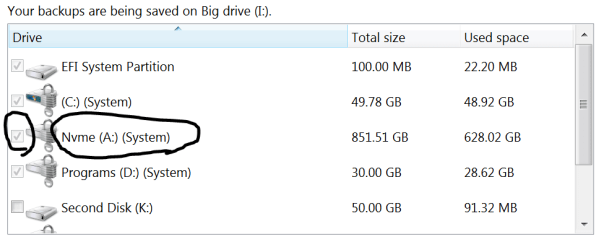
Im having a hard time trying to make a backup on my pc. When I try to create a system image, I can not unselect a partition that is on the same disk as the os partition . I used to be able to create system images with this current installation without this other partition being backup. But out of nowhere, I can not unselect it. The window says this partition is a system partition , but im not sure how to unmake the drive as a system partition . I have tried searching the web for the last day, and can not find anything related. My goal is to move my current os to a diffrent drive, hence why im trying to make a system image. All drives are bitlocker secured, so I can not make the partition invisible with minitool partition wizard. If there is a why to make the partition invisible to windows, it would solve my issue. I am trying to limit the write cycles to this drive, as it is a M.2 Ssd. So copying everything on is a last resort. Message me if you need more info about my problem.
- - - Updated - - -
Might have found the issuse. I have a program installed to the disk. I'll report back soon.
- - - Updated - - -
Might have found the issuse. I have a program installed to the disk. I'll report back soon.
Attachments
My Computers
-
At a glance
Windows 7 Ultimate x64i6700kGskill 4x8 GBAsus strix 1070- Computer type
- PC/Desktop
- Computer Manufacturer/Model Number
- Asus
- OS
- Windows 7 Ultimate x64
- CPU
- i6700k
- Motherboard
- Maximus ix extreme
- Memory
- Gskill 4x8 GB
- Graphics Card(s)
- Asus strix 1070
- Sound Card
- On Board
- Monitor(s) Displays
- Asus PG279
- Screen Resolution
- 1440p 16:9
- Hard Drives
- Nvme M.2 for boot GPT, Raid 0 on hhd. More hdd's.
- PSU
- Asus Thor 750 watt.
- Case
- Cooler master Haf x
- Cooling
- Custom water cooling.
- Keyboard
- Rog Claymore I
- Mouse
- Rog Sparta
- Internet Speed
- Gigabit
- Antivirus
- Windows defender.
- Browser
- Chrome.
- Other Info
- Hard drives are a mess, so much data everywhere.
-
- Computer type
- PC/Desktop


