Can't update guide

whipple

New member
Local time
1:31 PM
Messages
14
I can not get the guide to update. I've disabled my virus program thinking that was stopping it but it still won't download. I used restore one time and that worked but after I did a windows update the guide stopped working.
Bob
 

My Computer

Computer Manufacturer/Model Number
HP p6232p
OS
win7
Settings>General>Windows Media Center Setup>Run Setup Again

rerun MC Setup and give the Guide long enough to update which may take some time on a slower connection...in doing so it is important to make sure you choose the correct region and location, and follow all prompts related to the Guide and Updates for WMC.
 
Well I rerun setup and made sure I had the right zip code etc. I'm running on cable and still can not get it to update the guide. I do get a message of " right click on Windows Media Center systen tray Icon and look at the download history"
Bob
 

My Computer

Computer Manufacturer/Model Number
HP p6232p
OS
win7
I don't know how to do a screen shot. Also not sure what its to show.

It tells me to right click on system tray icon and veiw the update log. I can't find that either. I guess I don't know what the system tray is. I feel pretty dumb this morning. Bob
 

My Computer

Computer Manufacturer/Model Number
HP p6232p
OS
win7

My Computer

Computer type
Laptop
Computer Manufacturer/Model Number
HP ENVY 17-1150eg
OS
Windows 10 Pro x64 EN-GB
CPU
1.6 GHz Intel Core i7-720QM Processor
Memory
6 GB
Graphics Card(s)
ATI Mobility Radeon HD 5850 Graphics
Sound Card
Beats sound system with integrated subwoofer
Monitor(s) Displays
17" laptop display, 22" LED and 32" Full HD TV through HDMI
Screen Resolution
1600*900 (1), 1920*1080 (2&3)
Hard Drives
Internal: 2 x 500 GB SATA Hard Disk Drive 7200 rpm
External: 2TB for backups, 3TB USB3 network drive for media
Cooling
As Envy runs a bit warm, I have it on a Cooler Master pad
Keyboard
Logitech diNovo Media Desktop Laser (bluetooth)
Mouse
Logitech Performance Mouse MX
Internet Speed
50/10 Mbps VDSL
Antivirus
Windows Defender 4.3.9431.0
Browser
Maxthon 3.5.2., IE11
I reinstalled Win7 and was able to update the download guide for a couple of weeks and now its stopped downloading. I'm guessing its something to do with updateing win 7. I hate to keep reinstalling win7.
Bob
 

My Computer

Computer Manufacturer/Model Number
HP p6232p
OS
win7
When I did a restore to an earlier setting it worked but now I think after the computer updated its won't download the guide. I did not mean to post in different threads.
Bob
 

My Computer

Computer Manufacturer/Model Number
HP p6232p
OS
win7
Whipple,

I cannot provide any further troubleshoting steps without additional info as we have requested.
 
Windows 7 Media Center Guide

Looks like we're headed right back to the same old problems as all the other versions of Windows. This issue with the Media Center guide is beginning to surface frequently. My cable provider broadcasts all of their channels in digital clear QAM format but they also simulcast the first 20 channels (their basic service) in analog format. When I change the signal type to analog in setup I can download the guide for those 20 channels and view only those channels. When I change back to clear QAM digital I can get the channel numbers in the guide but no guide info. When I update the guide it will go thru the process, which takes quite a bit of time, and then I get the message that "THE GUIDE HAS BEEN UPDATED" but the info does still not appear. I have tried a number of things, including disabling the antivirus software, to no avail. All hardware is brand new state of the art in the last 60 days, i7-950 6GB DDR3-1600, etc.,ect. I did speak with one guy who works for the cable provider who had the same problem. He said he was able to correct the problem but couldn't remember what the fix was so apparently it is correctable. Also having a big problem, as are apparently others, with Logitech Mx revolution mouse and set point software. Would appreciate any assistance.

 

My Computer

Computer Manufacturer/Model Number
Microflex 95C
OS
windows 7 64 bit
CPU
Intel i7 950
Motherboard
Gigabite EX58-UD5
Memory
6 GB DDR3-1600
Graphics Card(s)
ATI Radeon HD4890, 1GB
Sound Card
Creative Xfi extreme gamer
Monitor(s) Displays
Vizio 26
Hard Drives
WD 1TB
PSU
750 W
Hello Vshop, welcome to the Seven Forums.

Also having a big problem, as are apparently others, with Logitech Mx revolution mouse and set point software. Would appreciate any assistance.
Using Setpoint with my diNovo Media Laser keyboard & MX Mouse combo. I'm having one minor issue as told here, other than that version 4.80 Setpoint is working well.

You could either search Seven Forums for related issues and solutions, or start your own thread.

Here are some search results:
http://www.sevenforums.com/hardware-devices/56037-logitech-ex-310-windows-7-setpoint.html
http://www.sevenforums.com/drivers/41664-logitech-setpoint-4-8-x64-vc8-library.html
http://www.sevenforums.com/hardware-devices/31369-bluetooth-kb-mouse-not-recognized.html

Kari
 

My Computer

Computer type
Laptop
Computer Manufacturer/Model Number
HP ENVY 17-1150eg
OS
Windows 10 Pro x64 EN-GB
CPU
1.6 GHz Intel Core i7-720QM Processor
Memory
6 GB
Graphics Card(s)
ATI Mobility Radeon HD 5850 Graphics
Sound Card
Beats sound system with integrated subwoofer
Monitor(s) Displays
17" laptop display, 22" LED and 32" Full HD TV through HDMI
Screen Resolution
1600*900 (1), 1920*1080 (2&3)
Hard Drives
Internal: 2 x 500 GB SATA Hard Disk Drive 7200 rpm
External: 2TB for backups, 3TB USB3 network drive for media
Cooling
As Envy runs a bit warm, I have it on a Cooler Master pad
Keyboard
Logitech diNovo Media Desktop Laser (bluetooth)
Mouse
Logitech Performance Mouse MX
Internet Speed
50/10 Mbps VDSL
Antivirus
Windows Defender 4.3.9431.0
Browser
Maxthon 3.5.2., IE11
Looks like we're headed right back to the same old problems as all the other versions of Windows. This issue with the Media Center guide is beginning to surface frequently. My cable provider broadcasts all of their channels in digital clear QAM format but they also simulcast the first 20 channels (their basic service) in analog format. When I change the signal type to analog in setup I can download the guide for those 20 channels and view only those channels. When I change back to clear QAM digital I can get the channel numbers in the guide but no guide info. When I update the guide it will go thru the process, which takes quite a bit of time, and then I get the message that "THE GUIDE HAS BEEN UPDATED" but the info does still not appear. I have tried a number of things, including disabling the antivirus software, to no avail. All hardware is brand new state of the art in the last 60 days, i7-950 6GB DDR3-1600, etc.,ect. I did speak with one guy who works for the cable provider who had the same problem. He said he was able to correct the problem but couldn't remember what the fix was so apparently it is correctable. Also having a big problem, as are apparently others, with Logitech Mx revolution mouse and set point software. Would appreciate any assistance.

Use a TV Tuner with dual tuners - one analog - one digital. Split the cable line tapping each input and set up two tuners in WMC.

Mine would do this although that is not required for me as I am using a STB.

"Technically speaking: WinTV-HVR-1600 is a single slot PCI board, with two tuners: an analog 125-channel cable ready TV tuner, with a built-in hardware MPEG-2 encoder, and an ATSC/QAM digital TV tuner for digital TV reception. The ATSC or QAM transport stream and the encoded MPEG-2 program stream for analog TV is sent to the PC over the PCI bus. Note: Media Center currently does not support clear QAM TV."

http://www.hauppauge.com/site/products/data_hvr1600mckit.html
 
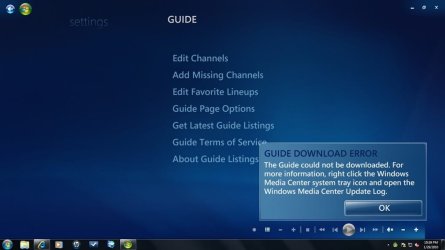
This is the error message I get when I try to download the updated program list.
 

Attachments

  • Untitled.jpg
    Untitled.jpg
    38.6 KB · Views: 59

My Computer

Computer Manufacturer/Model Number
HP p6232p
OS
win7
Mr. Whipple, please re-read the (whole) thread - we believe that you could not download the guide and are trying to help you ascertain why.
 
I'm sorry if I mis led you. I guess I should have said that I can't Get the latest guide listing?
 

My Computer

Computer Manufacturer/Model Number
HP p6232p
OS
win7
Shoul I start a new thread about "Downloading the guide?"
 

My Computer

Computer Manufacturer/Model Number
HP p6232p
OS
win7
whipple

I don't know if this will help but are you aware that you need to setup a 6 hour time frame that the computer is on so it can download the latest guide?
Please take another look in the setup area

Tasks
Settings
General
Automatic Download Options
Set Automatic Download (check box)
Set time for 6 hrs space and also double check the AM/PM settings
Save

If you want to update the guide then you can also check the DOWNLOAD NOW icon.

Does this help?
 

My Computer

Computer type
PC/Desktop
Computer Manufacturer/Model Number
Self Built
OS
Windows 10 Pro
CPU
Intel i5
Motherboard
I have a fatherboard
Memory
I'm old and lost a few chips
Graphics Card(s)
Yup
Sound Card
Yup
Monitor(s) Displays
Samsung 32" UHD
Screen Resolution
3840 x 2160
Hard Drives
Samsung 860 EVO drives
PSU
450 Watt and some fans that blow
Case
Small tower
Cooling
Yes I am cool. lol
Keyboard
Who needs a keyboard?
Mouse
Logitech Laser G7 wireless
Internet Speed
Zippy fast UP and DOWN
Antivirus
I got a shot
Browser
The new Improved EDGE 2020
Media Center Guide

Whipple, no I did not know that you had to set a time period, thanks. However, I don't think that is my problem. Perhaps I didn't explain this correctly. It's not just the update, I can't get it at all, I have never been able to get it. When I go thru the manual process all indications are that the computer is processing the download, and it will take quite a while. Eventually I get a message that says "download complete" but when I go to the guide, every time period displays "no data available". Because I just purchased a new computer (Windows 7 64 bit), at first I thought it was just a setup problem but then I put an identical card in my old machine (Windows 7 32 bit, no antivirus software) and I have the same exact problem. It appears that the guide is being provided by zap2it.com, and when I go to their website the correct information, signal type, cable provider, etc., does exist. It almost seems that it is a matter of not being able to display the info rather than not being able to download it. I'm becoming very disenchanted with Window 7, there is so much software and hardware that will not run in it.
 

My Computer

Computer Manufacturer/Model Number
Microflex 95C
OS
windows 7 64 bit
CPU
Intel i7 950
Motherboard
Gigabite EX58-UD5
Memory
6 GB DDR3-1600
Graphics Card(s)
ATI Radeon HD4890, 1GB
Sound Card
Creative Xfi extreme gamer
Monitor(s) Displays
Vizio 26
Hard Drives
WD 1TB
PSU
750 W
Back
Top