Can't View Downloaded Files ... Security Problem?

rlane4

New member
Local time
12:49 PM
Messages
4
Location
Indiana
I am a Windows XP user who just got a new computer with Windows 7. I seem to be having trouble understanding how to do some things I was doing in XP. I think it may be security-related, but being new to Windows 7, I could be wrong.

I regularly download documents in .jpg format from a web site. I select the document and click the Save button on the web site. I get a Save As box where I select where to save the file, and save it. In XP, I had setup a folder on the C: drive specifically for these files. I created the same folder in Win7. I went through the same process and selected the folder in the Save As process, but got an error "You don't have permission to save in this location....Would you like to save in the My Pictures location instead?". I clicked Yes. When I opened Windows Explorer and looked at My Pictures, the file wasn't there. I went back to the web site and saved the document again. However, the file appeared in the Save As box, and I was asked if I wanted to overwrite the file. Again, when I looked in Explorer, it didn't show the file. I even tried searching the entire C: drive, it says the file doesn't exist.

I am the only user account on my machine and have Admin privileges. I use IE8 with security set at medium-high. UAC setting is one below Always Notify. I looked at the properties on the folder I wanted to use, my Admin account has full rights. I set my regular user account to have full rights, but this did nothing to fix the problem.

This is extremely frustrating because it's a function I use regularly and I can't do it with Win7. What am I missing? Is there some security setting I'm missing? The computer seems to look at these files as web content, if that means anything. Any help would be appreciated.
 

My Computer

Computer Manufacturer/Model Number
Compaq CQ5320F
OS
Windows 7 Home Premium
CPU
AMD Atrhlon II X2 240 2.90 GHz
Memory
3 GB
Graphics Card(s)
Nvidia GeForce61505E nForce 430
Welcome,
Go to tools, internet options, advanced, reset. This will remove all addons, which you will have to replace later on.

does not work then

Lets try an experiment. Download another browser, Chrome or FireFox is nice. See if you can save your website then.
 

My Computer

Computer type
PC/Desktop
Computer Manufacturer/Model Number
Dell XPS 420
OS
Windows 10, Home Clean Install
CPU
Intel Core2 processsor Q8200(2.33Ghz 1333FSB) Quad Core Tech
Motherboard
Dell
Memory
6 gb
Graphics Card(s)
ATI Radeon 256MB HD3650
Sound Card
Intergrated 7.1 Channel Audio
Monitor(s) Displays
Dell SP2009W 20"
Hard Drives
640 GB Serial ATA Hard drive
Cooling
Fan
Keyboard
Dell USB Keyboard
Mouse
Dell Premium Optical USB
Internet Speed
DSL 2.85
  • Like
Reactions: JMH
What happens when in save as box after the file is downloded you right click the file and choose open containing folder?
 

My Computer

Computer Manufacturer/Model Number
Micro-Star International/MS-7529
OS
Windows 7 Ultimate x32
CPU
DualCore Intel Pentium E2200, 2218 MHz (11 x 202)
Motherboard
MSI G31M3 V2 (MS-7529) (2 PCI, 1 PCI-E x16,2 DDR2 DIMM)
Memory
2 GB DDR2-800 DDR2 SDRAM
Graphics Card(s)
nVIDIA GeForce 9500GT 1GB
Sound Card
Realtek ALC888/1200 @ Intel 82801GB ICH7
Monitor(s) Displays
Samsung SyncMaster 2253BW (Digital) 22'' LCD
Screen Resolution
1680x1050
Hard Drives
SAMSUNG HD322IJ ATA Device (298 GB , IDE)
When the Save As box was visible, I right-clicked the file in the list and tried a number of the options in the menu, such as Select, Open, Preview. I got a message saying "A website wants to open web content using this program on your computer, OIS.exe". I clicked the Allow button, but nothing happened. The right-click menu included cut/copy/paste, which I also tried out without success. I don't see a menu selection called "open containing folder". There is one called "open file location", which simply changes the view of the folder.

I will download Firefox and see what happens.
 

My Computer

Computer Manufacturer/Model Number
Compaq CQ5320F
OS
Windows 7 Home Premium
CPU
AMD Atrhlon II X2 240 2.90 GHz
Memory
3 GB
Graphics Card(s)
Nvidia GeForce61505E nForce 430
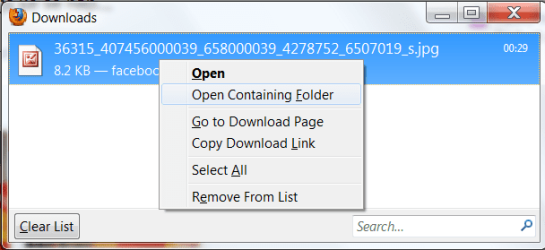
this is what I get with FF, without any problems:
Capture1.PNG

"ois.exe is a process belonging to the Microsoft Office Suite, which relates to the Microsoft Office Picture Manager, a bundled utility which allows for the organization of your personal photographs. "This program is a non-essential process, but should not be terminated unless suspected to be causing problems."
ois.exe - What is ois.exe?
change your default pics viewing program and see will the problem still appear.
 

My Computer

Computer Manufacturer/Model Number
Micro-Star International/MS-7529
OS
Windows 7 Ultimate x32
CPU
DualCore Intel Pentium E2200, 2218 MHz (11 x 202)
Motherboard
MSI G31M3 V2 (MS-7529) (2 PCI, 1 PCI-E x16,2 DDR2 DIMM)
Memory
2 GB DDR2-800 DDR2 SDRAM
Graphics Card(s)
nVIDIA GeForce 9500GT 1GB
Sound Card
Realtek ALC888/1200 @ Intel 82801GB ICH7
Monitor(s) Displays
Samsung SyncMaster 2253BW (Digital) 22'' LCD
Screen Resolution
1680x1050
Hard Drives
SAMSUNG HD322IJ ATA Device (298 GB , IDE)
I downloaded the Firefox browser, then I opened the site and downloaded the file. I found the file in the Downloads folder. Perhaps the problem is IE8?
 

My Computer

Computer Manufacturer/Model Number
Compaq CQ5320F
OS
Windows 7 Home Premium
CPU
AMD Atrhlon II X2 240 2.90 GHz
Memory
3 GB
Graphics Card(s)
Nvidia GeForce61505E nForce 430
Welcome,
Go to tools, internet options, advanced, reset. This will remove all addons, which you will have to replace later on.

does not work then

Lets try an experiment. Download another browser, Chrome or FireFox is nice. See if you can save your website then.

That was my thought, try IE without the add-ons. That may work
 

My Computer

Computer type
PC/Desktop
Computer Manufacturer/Model Number
Dell XPS 420
OS
Windows 10, Home Clean Install
CPU
Intel Core2 processsor Q8200(2.33Ghz 1333FSB) Quad Core Tech
Motherboard
Dell
Memory
6 gb
Graphics Card(s)
ATI Radeon 256MB HD3650
Sound Card
Intergrated 7.1 Channel Audio
Monitor(s) Displays
Dell SP2009W 20"
Hard Drives
640 GB Serial ATA Hard drive
Cooling
Fan
Keyboard
Dell USB Keyboard
Mouse
Dell Premium Optical USB
Internet Speed
DSL 2.85
This has been an interesting experience. The site causing the problem is a very popular one - Ancestry.com. When you first use it, it opens the images with default no-frills viewer. However, it checks for the enhanced viewer and prompts you to install it if it doesn't find it. I've installed it on all of my computers in the past, going back as far as IE6 (maybe IE5), and everything worked fine. However, this addin seems to be the problem.

I reset IE8 and used the site with the default viewer. I was able to download images with no problem. Then, I installed the enhanced viewer and the problem returned. Interestingly, after installation, I found that I could turn the enhanced viewer on and off, and could successfully download images when the enhanced viewer was turned off.

Something else interesting. When I installed Firefox, I decided to to download the .exe file instead of running it, to see if I would have the same problem as I did with the .jpg files (the enhanced viewer was on at the time because I didn't know that it was the problem). Same problem, Explorer couldn't find the file. After figuring out the problem, I turned the enhanced viewer off and downloaded the file. Everything worked fine, which means that this addin affects more than just the Ancestry web site. Seems to me that either Ancestry or Microsoft need to fix something.

At least I know how to get around the problem. Thanks to everyone for their advice. This would have taken me ages to figure out on my own, and I really appreciate the help.
 

My Computer

Computer Manufacturer/Model Number
Compaq CQ5320F
OS
Windows 7 Home Premium
CPU
AMD Atrhlon II X2 240 2.90 GHz
Memory
3 GB
Graphics Card(s)
Nvidia GeForce61505E nForce 430
Glad to help. Be sure to return to the forum. You can learn from us and share your expertise with us
 

My Computer

Computer type
PC/Desktop
Computer Manufacturer/Model Number
Dell XPS 420
OS
Windows 10, Home Clean Install
CPU
Intel Core2 processsor Q8200(2.33Ghz 1333FSB) Quad Core Tech
Motherboard
Dell
Memory
6 gb
Graphics Card(s)
ATI Radeon 256MB HD3650
Sound Card
Intergrated 7.1 Channel Audio
Monitor(s) Displays
Dell SP2009W 20"
Hard Drives
640 GB Serial ATA Hard drive
Cooling
Fan
Keyboard
Dell USB Keyboard
Mouse
Dell Premium Optical USB
Internet Speed
DSL 2.85
Back
Top