
Changing existing/newly account's profile folder not work perfectly
Hi,
While logging into another admin user account I tried copying and pasting the exiting user account.
First of all: Windows CardSpace was working well while the existing account's profile folder was still in the default location 'C:\'.
I was intending to Change an existing account's profile folder from the default location C:\ to another one. However, while pasting the existing account's profile folder from the C: to D: for instance, I found that 'Windows CardSpace' was a folder access denied as shown in this screen shot below.
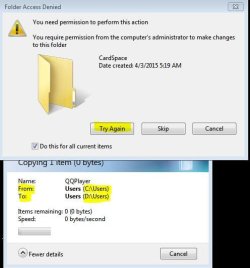
I had to choose 'skip', then the copy process completed. Next, I continued changing the user account in the registry from C:\ to D:\
However, when the existing account was completely(in the Registry, and in the Windows explore) moved to the new location, I found opening Windows CardSpace gave me this error below, since it looks corrupted.

When changing back the existing account's profile folder to its default location 'C:', then Windows CardSpace' returned opening well.
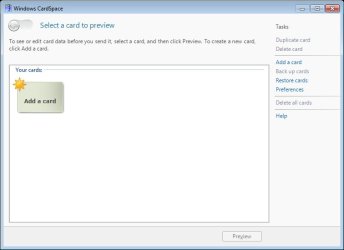
What is the solution of the above problem? In my humble experience, there is no solution other than creating a newly user account. But, I don't want to do a newly user account I need to fix this one.
However, for Changing any newly user account's profile folder from default (C:\) to another one, no problem at all with Windows CardSpace since the account's profile folder is not yet created, and it will be created on the new location.
In addition::: This fault is for all existing accounts and newly accounts whose profile folders became on another location other than default C:
Even in device and printer, selecting Plugging external WD hard disk drive to my computer shows a different icon and detailed information for the HDD plugged while the existing account is on the default location 'C' as follows:
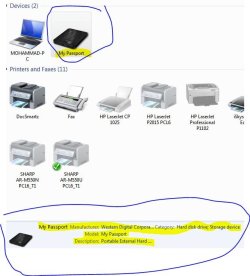
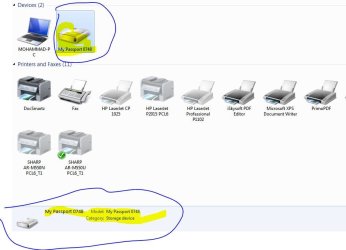
However, once existing account is on another location, the icon and information for the same HDD plugged to the PC are different as follows:
Hi,
While logging into another admin user account I tried copying and pasting the exiting user account.
First of all: Windows CardSpace was working well while the existing account's profile folder was still in the default location 'C:\'.
I was intending to Change an existing account's profile folder from the default location C:\ to another one. However, while pasting the existing account's profile folder from the C: to D: for instance, I found that 'Windows CardSpace' was a folder access denied as shown in this screen shot below.
I had to choose 'skip', then the copy process completed. Next, I continued changing the user account in the registry from C:\ to D:\
However, when the existing account was completely(in the Registry, and in the Windows explore) moved to the new location, I found opening Windows CardSpace gave me this error below, since it looks corrupted.
When changing back the existing account's profile folder to its default location 'C:', then Windows CardSpace' returned opening well.
What is the solution of the above problem? In my humble experience, there is no solution other than creating a newly user account. But, I don't want to do a newly user account I need to fix this one.
However, for Changing any newly user account's profile folder from default (C:\) to another one, no problem at all with Windows CardSpace since the account's profile folder is not yet created, and it will be created on the new location.
In addition::: This fault is for all existing accounts and newly accounts whose profile folders became on another location other than default C:
Even in device and printer, selecting Plugging external WD hard disk drive to my computer shows a different icon and detailed information for the HDD plugged while the existing account is on the default location 'C' as follows:
However, once existing account is on another location, the icon and information for the same HDD plugged to the PC are different as follows:
Last edited:
My Computer
At a glance
Windows 7 Home Premium 64BitIntel Core i5, 2.3GHzDDR3- 6GBIntel Graphics Family, Radeon HD 6770M
- Computer type
- Laptop
- Computer Manufacturer/Model Number
- HP, Pavilion
- OS
- Windows 7 Home Premium 64Bit
- CPU
- Intel Core i5, 2.3GHz
- Motherboard
- Hewlett-Packard- Model 1657
- Memory
- DDR3- 6GB
- Graphics Card(s)
- Intel Graphics Family, Radeon HD 6770M
- Hard Drives
- Toshiba 700GB
- Antivirus
- Microsot Secuirty Eessentials
- Browser
- MS IE, Google Chrom, and FireFox

