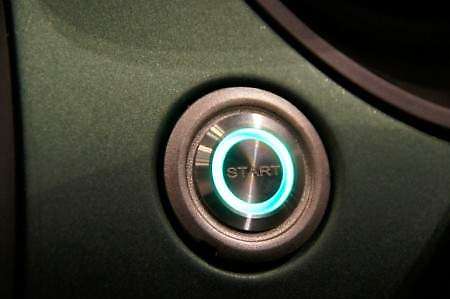
Start Button - Customize
While this may seem like a difficult mod, with a basic understanding of electronics you can easily do it!
The start button on your computer is what is called a momentary switch. This means that it will default to the off position, and pressing it only gives a burst of power. If you replace your button with a button or switch, it needs to be a momentary button or switch. Ask your local electronics retailer if you need help with that.
Items Needed:
New case power button (Momentary)
22 Gauge Wire
Wire clippers
Heat Shrink (optional, but highly recommended)
Solder and Soldering Iron (or pliers and cable connectors if you don't mind it)
*This tutorial will assume that you know how to solder, and that is the method you will use. If you have any questions about soldering or using connectors, feel free to ask*
Set up:
Set up your Soldering station to your preference, and make sure you have wire (and connectors) and solder. I used 22 Gauge wire because it is about the same size as the wire used in the fan already. You will need your wire clippers to cut the button wires. I also recommend you use a Test PSU to test this mod until you are sure it works.
Step 1:
You will need to open your case, and local the lead that connects from the start button to the motherboard. It should be white and blue twisted wires leading somewhere to the front of the case.
Step 2:
Find the actual start button in your case, and unscrew it and pull out the whole button and wire.
This step depends on your case, so I will not cover exactly how to get it.
Step 3:
Clip the 2 wires AT THE BUTTON, and strip the ends about 1/2" (13mm)
Step 4:
The old button is unneeded. Take the new button and solder the leads to each prong. This will depend on your switch, but there should only be 2 prongs on the switch. It should not matter which lead goes where, as long as they are insulated (I need to test that)
Step 5:
Now that your new start button is connected, plug the lead into your motherboard, and try to start the computer.
Step 6:
If successful, install the switch where you would like it, and enjoy. Impress and amaze your friends with your start button failing, only to start your computer with a key switch, or an aircraft cover switch!
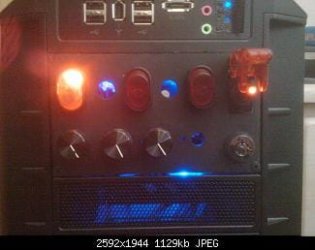
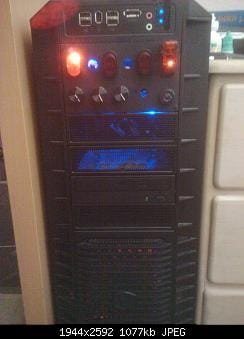
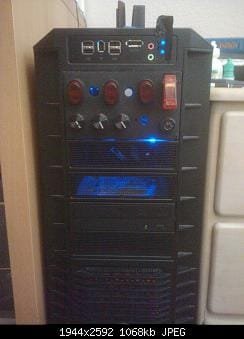
Here is my semi-completed project. I have utilized all 5 sections of this series. To the right is my keyed start switch (the key switch at bottom right and aircraft safety toggle switch). On the top is my cathode switch and my soon-to-be fan light switches. The bottom has 3 of my 4 potentiometer speed controllers.
Hope this helps out the modders!
~Lordbob
How to Customize your Case Power Button
Information
This tutorial will explain how to change the start button in your computer to another button of your choice
Warning
This project involves soldering and bare wire leads. Always take the appropriate cautions when working with electrical parts.
While this may seem like a difficult mod, with a basic understanding of electronics you can easily do it!
The start button on your computer is what is called a momentary switch. This means that it will default to the off position, and pressing it only gives a burst of power. If you replace your button with a button or switch, it needs to be a momentary button or switch. Ask your local electronics retailer if you need help with that.
Items Needed:
New case power button (Momentary)
22 Gauge Wire
Wire clippers
Heat Shrink (optional, but highly recommended)
Solder and Soldering Iron (or pliers and cable connectors if you don't mind it)
*This tutorial will assume that you know how to solder, and that is the method you will use. If you have any questions about soldering or using connectors, feel free to ask*
Set up:
Set up your Soldering station to your preference, and make sure you have wire (and connectors) and solder. I used 22 Gauge wire because it is about the same size as the wire used in the fan already. You will need your wire clippers to cut the button wires. I also recommend you use a Test PSU to test this mod until you are sure it works.
Step 1:
You will need to open your case, and local the lead that connects from the start button to the motherboard. It should be white and blue twisted wires leading somewhere to the front of the case.
Step 2:
Find the actual start button in your case, and unscrew it and pull out the whole button and wire.
This step depends on your case, so I will not cover exactly how to get it.
Step 3:
Clip the 2 wires AT THE BUTTON, and strip the ends about 1/2" (13mm)
Step 4:
The old button is unneeded. Take the new button and solder the leads to each prong. This will depend on your switch, but there should only be 2 prongs on the switch. It should not matter which lead goes where, as long as they are insulated (I need to test that)
Step 5:
Now that your new start button is connected, plug the lead into your motherboard, and try to start the computer.
Step 6:
If successful, install the switch where you would like it, and enjoy. Impress and amaze your friends with your start button failing, only to start your computer with a key switch, or an aircraft cover switch!
Here is my semi-completed project. I have utilized all 5 sections of this series. To the right is my keyed start switch (the key switch at bottom right and aircraft safety toggle switch). On the top is my cathode switch and my soon-to-be fan light switches. The bottom has 3 of my 4 potentiometer speed controllers.
Hope this helps out the modders!
~Lordbob
Related Tutorials
Computer Mod Series:
Computer Mod Series:
1. PSU - Jump Start
2. Start Button - Customize
3. Fans - Speed Controller
4. Lights - Add An On/Off Switch
2. Start Button - Customize
3. Fans - Speed Controller
4. Lights - Add An On/Off Switch
Last edited by a moderator: