
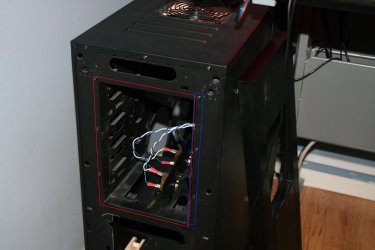
Back with another question I cant get answered by googling for days, I want to party remove my 5.25 inch bay, by looking at the image attached I would like to remove the part colored red, the blue part is something I have to keep atm since my motherboard plate is connected with those 3 rivets, but the red part is not really attached to anything other then those 3 rivets but im not sure how the chassi would be if I removed that part, personally I cant see that it would be a problem but asking to be sure. The reason why is because im removing the default front panel and making a new one that im planning to have 2x 140 fans mounted on.
Edit 1: after a closer look with a flash light it seems like the motherboard plate is locked in position with a piece that is part of the core chassit so the rivets and 3 screws that are there seem to be there to hold the 5.25 inch bay in place and not the other way around.
Edit 1: after a closer look with a flash light it seems like the motherboard plate is locked in position with a piece that is part of the core chassit so the rivets and 3 screws that are there seem to be there to hold the 5.25 inch bay in place and not the other way around.
Attachments
My Computer
- Computer type
- PC/Desktop
- OS
- Windows 7 Home Premium x64
- CPU
- Intel Core i7 860 (Lynnfield)
- Motherboard
- Asus P7P55D (LGA1156)
- Memory
- Corsair Vengeance 9,9,9,24 1600Mhz 1.50v 2x4G
- Graphics Card(s)
- Asus nVidia 560 GTX
- Sound Card
- Asus Xonar DG
- Monitor(s) Displays
- Acer P235H & NEC E201W
- Screen Resolution
- 1920x1080 & 900x1600
- Hard Drives
- 2
- PSU
- Corsair 650 Modular
- Case
- Corsair 800D
- Cooling
- Corsair H80 with Noctua fans
- Keyboard
- Ducky Shine
- Mouse
- tT Theron
- Internet Speed
- 100/100
- Browser
- IE10

