Catalyst Control Center missing/Wont install

mansun37

New member
Local time
11:19 AM
Messages
23
Hello,

I've seen some useful information on this site so I really hope someone can help.

I recently upgraded to a HD6870. Installation went OK, have a much better experience with the new card. Then I learnt about Eyefinity and thought I'd give it a go having some spare monitors around.

I've got all 3 monitors set up and per some video guide I found I went to open the Catalyst Control Center so complete the setup...except its no where to be found.

Its driving me insane, I've uninstalled, reinstalled, cleaned drivers, checked for the windows/assembly key problem, but nothing seems to work.

When running the driver install file I click custom, and I can't see CCC in the options, so I don't even know if it's installed.

Running Win 7 32 bit and am at a loss as to what to try next.

Any suggestions?
 

My Computer

OS
Windows 7 32 bit
Hello and welcome to the forums, mansun37!

May I know the source of the driver install file you're using?

All legitimate, AMD driver packages that are downloaded from AMD's website contain the following components as shown in the screenshot i took of a package i just downloaded for my own AMD card:-

Capture3.PNG

The CCC has now been renamed to the CPCC (Catalyst Pro Control Center), but serves the same function.

Get the proper latest driver package from AMD from their website linked below:-

AMD Catalyst
 

My Computer

Computer Manufacturer/Model Number
DELL SXPS 1640
OS
Windows 7 x64 Professional SP1
CPU
Intel C2D T9550 2.66 GHz @ 2.793 GHz (Thanks ThrottleStop!!)
Motherboard
Intel PM45
Memory
8 GB DDR3
Graphics Card(s)
ATI MOBILITY RADEON 4670
Sound Card
CREATIVE XFI AUDIO NOTEBOOK
Monitor(s) Displays
16.1 WLED
Screen Resolution
1920x1080
Hard Drives
Seagate ST9500420AS 500GB (465GiBi) 7200 RPM Drive

External Drives:-
2 TB WD Essentials x 3
1 TB WD Mybook Gen 1
1 TB WD Mybook Gen 2
1 TB Seagate
1 TB Seagate
320 GB WD Scorpio Black (enclosed)
PSU
90W Dell Power Brick
Case
Dell Chassis
Cooling
Coolermaster Cooling Pad
Keyboard
Built-in backlighted Keyboard
Mouse
Logitech Wireless Mini Mouse
Internet Speed
4/0.5
Hello,

Drivers are official. Tried manually downloading them and by using the auto detect feature. Tried downloading again via the provided link and still no joy:


As you can see there is no option for me to install the control center.
 

Attachments

  • ATI.png
    ATI.png
    21.3 KB · Views: 77
Last edited:

My Computer

OS
Windows 7 32 bit
It looks like the installer is not even detecting your Graphics Card properly, 2 very important entries, AMD Display Driver and Catalyst Pro Control Center are not even listed.

Let's try something a little different here:-

Can you run the command pnputil -e in an elevated command prompt and upload the txt file using the following instructions?

1. Click Start Orb

2. In search box, type cmd

3. Right-click on cmd.exe, and choose 'Run as Administrator'

4. In the command prompt, type in pnputil -e >pnp.txt

5. Upload and attach the pnp.txt file that you created using this tutorial :-

http://www.sevenforums.com/tutorials/9733-screenshots-files-upload-post-seven-forums.html

Thanks in advance!

EDIT:-

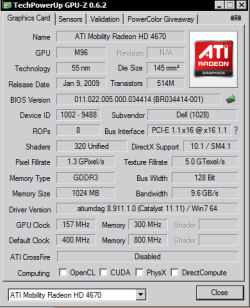
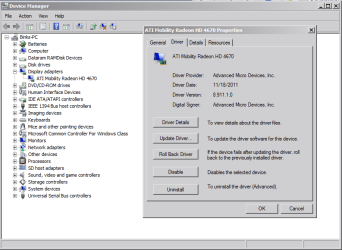
It'd also be helpful if you could post a screenshot from GPUz (http://www.techpowerup.com/gpuz/) and an entry from your Device Manager (Start|type in device manager|enter) like the ones below:-

Capture1.PNG Capture3.PNG
 

My Computer

Computer Manufacturer/Model Number
DELL SXPS 1640
OS
Windows 7 x64 Professional SP1
CPU
Intel C2D T9550 2.66 GHz @ 2.793 GHz (Thanks ThrottleStop!!)
Motherboard
Intel PM45
Memory
8 GB DDR3
Graphics Card(s)
ATI MOBILITY RADEON 4670
Sound Card
CREATIVE XFI AUDIO NOTEBOOK
Monitor(s) Displays
16.1 WLED
Screen Resolution
1920x1080
Hard Drives
Seagate ST9500420AS 500GB (465GiBi) 7200 RPM Drive

External Drives:-
2 TB WD Essentials x 3
1 TB WD Mybook Gen 1
1 TB WD Mybook Gen 2
1 TB Seagate
1 TB Seagate
320 GB WD Scorpio Black (enclosed)
PSU
90W Dell Power Brick
Case
Dell Chassis
Cooling
Coolermaster Cooling Pad
Keyboard
Built-in backlighted Keyboard
Mouse
Logitech Wireless Mini Mouse
Internet Speed
4/0.5
Hi,

Requested info attached. I'm off to work now so won't be able to reply for some time, but I shall be happy to supply further information/try anything you can suggest later this evening. Many thanks for taking the time to look at this.
 

Attachments

  • pnp.txt
    pnp.txt
    13.1 KB · Views: 40
  • device man.png
    device man.png
    45.3 KB · Views: 69
  • GPU Z.gif
    GPU Z.gif
    24.8 KB · Views: 56

My Computer

OS
Windows 7 32 bit
Thanks for the reply and the attachments.

From your attached pnp.txt file, I note various driver entries/issues that could arise to complicate the detection of your AMD graphics card by the Catalyst Install Manager.

Code:
Published name :            oem13.inf
Driver package provider :   NVIDIA
Class :                     Display adapters
Driver date and version :   09/27/2009 8.16.11.9107
Signer name :               Microsoft Windows Hardware Compatibility Publisher

Published name :            oem24.inf
Driver package provider :   NVIDIA
Class :                     Display adapters
Driver date and version :   07/09/2010 8.17.12.5896
Signer name :               Microsoft Windows Hardware Compatibility Publisher

Published name :            oem40.inf
Driver package provider :   Advanced Micro Devices
Class :                     Sound, video and game controllers
Driver date and version :   02/23/2012 7.12.0.7706
Signer name :               Microsoft Windows Hardware Compatibility Publisher

Published name :            oem41.inf
Driver package provider :   ATI Technologies Inc.
Class :                     Display adapters
Driver date and version :   [B]04/19/2011 8.850.0.0000[/B]
Signer name :               Microsoft Windows Hardware Compatibility Publisher
Before we proceed, I need some further information.


Did you properly uninstall all of the driver software that your NVIDIA card was using prior to upgrading to your new AMD graphics card?


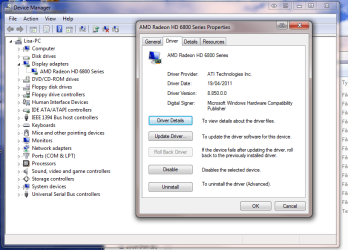
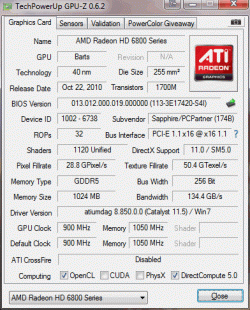
You've somehow managed to get a somewhat outdated set of AMD drivers (Catalyst 11.5, dated 04/19/2011) to install on your system, that much is verified by your pnputil output, GPUz and Hardware Devices screenshot.


Was the initial driver installation done using drivers provided with your card on a CD/DVD disc?


Thanks in advance, and i hope to hear your reply soon.
 

My Computer

Computer Manufacturer/Model Number
DELL SXPS 1640
OS
Windows 7 x64 Professional SP1
CPU
Intel C2D T9550 2.66 GHz @ 2.793 GHz (Thanks ThrottleStop!!)
Motherboard
Intel PM45
Memory
8 GB DDR3
Graphics Card(s)
ATI MOBILITY RADEON 4670
Sound Card
CREATIVE XFI AUDIO NOTEBOOK
Monitor(s) Displays
16.1 WLED
Screen Resolution
1920x1080
Hard Drives
Seagate ST9500420AS 500GB (465GiBi) 7200 RPM Drive

External Drives:-
2 TB WD Essentials x 3
1 TB WD Mybook Gen 1
1 TB WD Mybook Gen 2
1 TB Seagate
1 TB Seagate
320 GB WD Scorpio Black (enclosed)
PSU
90W Dell Power Brick
Case
Dell Chassis
Cooling
Coolermaster Cooling Pad
Keyboard
Built-in backlighted Keyboard
Mouse
Logitech Wireless Mini Mouse
Internet Speed
4/0.5
Hello,

At work no so can't access the PC. I've upgraded from an nVidea card and un-installed it via device manager as I have for previous card upgrades. The new card itself is working fine and the automatic detect/install of drivers worked OK, I've not seen anything to suggest it cannot detect the card type.

With regards to the drivers being old, the last time I tried an install was using the CD that came with the card, rather than using the downloaded version, in the hope that that would install the missing control centre. It's likely that driver is a version or two out of date, but unfortunately installing it didn't resolve the missing control centre problem :(
 

My Computer

OS
Windows 7 32 bit
Thanks for the reply, we can continue this when you've direct access to your computer at home, no worries...

Give me a PM (click on my user name and send a private message) when you're ready to continue..
 

My Computer

Computer Manufacturer/Model Number
DELL SXPS 1640
OS
Windows 7 x64 Professional SP1
CPU
Intel C2D T9550 2.66 GHz @ 2.793 GHz (Thanks ThrottleStop!!)
Motherboard
Intel PM45
Memory
8 GB DDR3
Graphics Card(s)
ATI MOBILITY RADEON 4670
Sound Card
CREATIVE XFI AUDIO NOTEBOOK
Monitor(s) Displays
16.1 WLED
Screen Resolution
1920x1080
Hard Drives
Seagate ST9500420AS 500GB (465GiBi) 7200 RPM Drive

External Drives:-
2 TB WD Essentials x 3
1 TB WD Mybook Gen 1
1 TB WD Mybook Gen 2
1 TB Seagate
1 TB Seagate
320 GB WD Scorpio Black (enclosed)
PSU
90W Dell Power Brick
Case
Dell Chassis
Cooling
Coolermaster Cooling Pad
Keyboard
Built-in backlighted Keyboard
Mouse
Logitech Wireless Mini Mouse
Internet Speed
4/0.5
Hello,

Don't seem to be able to PM you (no option to do so, perhaps as I've only just joined?).

I shall be home and able to access the PC in an hour or so, if you had a suggestion or needed some further information let me know and I'll jump on it as soon as I get back.
 

My Computer

OS
Windows 7 32 bit
Alrighty then, when you return home; There's just a few things I'd like ask you,

Its driving me insane, I've uninstalled, reinstalled, cleaned drivers, checked for the windows/assembly key problem, but nothing seems to work.
In your very first post you've mentioned that you've "cleaned drivers", what is the name of this driver cleaner, and which "drivers" were you referring to (for clarification purposes)?

(I suspect that would be the drivers from AMD that failed to give you the CCC with each re-installation/uninstallation cycle, but it'd be helpful if you clarified.)

I've upgraded from an nVidea card and un-installed it via device manager as I have for previous card upgrades.
Did you not use the Programs and Features in the Control Panel for the NVIDIA driver package entry to remove it?

That's it for now, post another message with the answers when you've direct access to your PC and are ready to go.
 

My Computer

Computer Manufacturer/Model Number
DELL SXPS 1640
OS
Windows 7 x64 Professional SP1
CPU
Intel C2D T9550 2.66 GHz @ 2.793 GHz (Thanks ThrottleStop!!)
Motherboard
Intel PM45
Memory
8 GB DDR3
Graphics Card(s)
ATI MOBILITY RADEON 4670
Sound Card
CREATIVE XFI AUDIO NOTEBOOK
Monitor(s) Displays
16.1 WLED
Screen Resolution
1920x1080
Hard Drives
Seagate ST9500420AS 500GB (465GiBi) 7200 RPM Drive

External Drives:-
2 TB WD Essentials x 3
1 TB WD Mybook Gen 1
1 TB WD Mybook Gen 2
1 TB Seagate
1 TB Seagate
320 GB WD Scorpio Black (enclosed)
PSU
90W Dell Power Brick
Case
Dell Chassis
Cooling
Coolermaster Cooling Pad
Keyboard
Built-in backlighted Keyboard
Mouse
Logitech Wireless Mini Mouse
Internet Speed
4/0.5
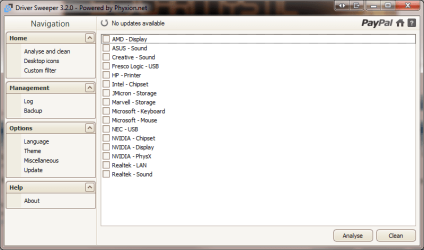
I used Driver Sweeper, and as you've correctly guessed it was used on the ATI drivers.

I'm not sure (as it was a few weeks ago now) but I think I just went to device manager and unistalled the previous card that way.
 

My Computer

OS
Windows 7 32 bit
I've 3 NVIDIA entries still present, could that be causing this issue?
 

Attachments

  • drive sweeper.png
    drive sweeper.png
    21.1 KB · Views: 36

My Computer

OS
Windows 7 32 bit
Yes.. okay now that you're back we can resume the troubleshooting.

I strongly suspect that is it those NVIDIA entries which are remnants from an incomplete driver uninstallation are causing the issue... most probably because you didn't uninstall the previous drivers properly using the Control Panel.

I need you to do a few things:-


(We're basically going to
purge the system of every previous graphics card driver installation plus the rogue entries from the pnputil list)


PRELIMINARY CHECKS:


Before you start this to-do list, i assume you still have the latest Driver Sweeper installed (version 3.20)? If you do, good, if you don't please download and install it as we will be using it in this procedure. Having the driver file I told you to download and install from AMD earlier on from their website is important too

Also, check the Programs and Features list of installed programs for any NVIDIA entries that may still be there (except for PhysX of course, which is required for your games and is Vendor agnostic), and uninstall them.. and reboot again before proceeding.


PROCEDURE:-

(read first till the end, reply if you understood everything, and then start the process)

Firstly, I want you to look for the AMD Catalyst Install Manager entry in your Programs and Features part of your Control Panel, click change, and completely remove ALL the AMD components on your system, including the Catalyst Install Manager itself.


DO NOT REBOOT YET, no matter what the uninstaller says.
(If your screen suddenly outputs at a horrible resolution and looks like the 90s VGA monitor, skip the next bit, but to sure...follow the next step...)


Next, check Device Manager, and under the Display Adapters list make sure you're getting the Standard VGA Graphics Adapter entry there.


If you're not, (and Windows instead rolls back to some other AMD driver stored in it's repository), then install it yourself manually.

Head to the properties box of the AMD entry|Driver tab|Update driver|Browse my computer for driver software|Let me pick from a list of device drivers on my computer|Tick the Show compatible hardware box|select the Standard VGA Graphics Adapter entry.|Click Next and wait for the driver to install.

Your Desktop will look like the 90s but it's a temporary price to pay until we resolve your issue.

NOW, when you're asked to reboot, reboot, but to safe mode.

In safe mode, start up Driver Sweeper, and tick the checkboxes for NVIDIA - Display and AMD - Display (2 birds, 1 stone).. Analyse, then, Clean...

If asked to reboot, reboot, but this time back to normal mode...(reboot anyway if not asked)

All clear so far? Respond once before you start if you understood all i've just typed up..

When you're done with the above.... Respond again.. and we'll continue!

The next part will come after you've done all of the above..
 
Last edited:

My Computer

Computer Manufacturer/Model Number
DELL SXPS 1640
OS
Windows 7 x64 Professional SP1
CPU
Intel C2D T9550 2.66 GHz @ 2.793 GHz (Thanks ThrottleStop!!)
Motherboard
Intel PM45
Memory
8 GB DDR3
Graphics Card(s)
ATI MOBILITY RADEON 4670
Sound Card
CREATIVE XFI AUDIO NOTEBOOK
Monitor(s) Displays
16.1 WLED
Screen Resolution
1920x1080
Hard Drives
Seagate ST9500420AS 500GB (465GiBi) 7200 RPM Drive

External Drives:-
2 TB WD Essentials x 3
1 TB WD Mybook Gen 1
1 TB WD Mybook Gen 2
1 TB Seagate
1 TB Seagate
320 GB WD Scorpio Black (enclosed)
PSU
90W Dell Power Brick
Case
Dell Chassis
Cooling
Coolermaster Cooling Pad
Keyboard
Built-in backlighted Keyboard
Mouse
Logitech Wireless Mini Mouse
Internet Speed
4/0.5
Are you still around?
 

My Computer

Computer Manufacturer/Model Number
DELL SXPS 1640
OS
Windows 7 x64 Professional SP1
CPU
Intel C2D T9550 2.66 GHz @ 2.793 GHz (Thanks ThrottleStop!!)
Motherboard
Intel PM45
Memory
8 GB DDR3
Graphics Card(s)
ATI MOBILITY RADEON 4670
Sound Card
CREATIVE XFI AUDIO NOTEBOOK
Monitor(s) Displays
16.1 WLED
Screen Resolution
1920x1080
Hard Drives
Seagate ST9500420AS 500GB (465GiBi) 7200 RPM Drive

External Drives:-
2 TB WD Essentials x 3
1 TB WD Mybook Gen 1
1 TB WD Mybook Gen 2
1 TB Seagate
1 TB Seagate
320 GB WD Scorpio Black (enclosed)
PSU
90W Dell Power Brick
Case
Dell Chassis
Cooling
Coolermaster Cooling Pad
Keyboard
Built-in backlighted Keyboard
Mouse
Logitech Wireless Mini Mouse
Internet Speed
4/0.5
Yes still around, sorry for such a delayed reply but my internet conked out on me. 4th time this year!

Now I'm back on I'll begin your procedure and will report back shortly.
 

My Computer

OS
Windows 7 32 bit
OK read the above, all clear so far.
 

My Computer

OS
Windows 7 32 bit
Proceed with the first part of the plan.
 

My Computer

Computer Manufacturer/Model Number
DELL SXPS 1640
OS
Windows 7 x64 Professional SP1
CPU
Intel C2D T9550 2.66 GHz @ 2.793 GHz (Thanks ThrottleStop!!)
Motherboard
Intel PM45
Memory
8 GB DDR3
Graphics Card(s)
ATI MOBILITY RADEON 4670
Sound Card
CREATIVE XFI AUDIO NOTEBOOK
Monitor(s) Displays
16.1 WLED
Screen Resolution
1920x1080
Hard Drives
Seagate ST9500420AS 500GB (465GiBi) 7200 RPM Drive

External Drives:-
2 TB WD Essentials x 3
1 TB WD Mybook Gen 1
1 TB WD Mybook Gen 2
1 TB Seagate
1 TB Seagate
320 GB WD Scorpio Black (enclosed)
PSU
90W Dell Power Brick
Case
Dell Chassis
Cooling
Coolermaster Cooling Pad
Keyboard
Built-in backlighted Keyboard
Mouse
Logitech Wireless Mini Mouse
Internet Speed
4/0.5
OK, done!

It did roll back to an earlier version, but followed the instructions and am ready for part 2.
 

My Computer

OS
Windows 7 32 bit
Alrighty then, for our next part.. again, ensure that you have the crappy looking desktop displayed on your monitor with that vintage 90s look (a sure sign that it's the Standard VGA adapter that is active)


Now comes the interesting bit... do you remember the list of entries earlier on?

Code:
Published name :            oem13.inf
Driver package provider :   NVIDIA
Class :                     Display adapters
Driver date and version :   09/27/2009 8.16.11.9107
Signer name :               Microsoft Windows Hardware Compatibility Publisher

Published name :            oem24.inf
Driver package provider :   NVIDIA
Class :                     Display adapters
Driver date and version :   07/09/2010 8.17.12.5896
Signer name :               Microsoft Windows Hardware Compatibility Publisher

Published name :            oem40.inf
Driver package provider :   Advanced Micro Devices
Class :                     Sound, video and game controllers
Driver date and version :   02/23/2012 7.12.0.7706
Signer name :               Microsoft Windows Hardware Compatibility Publisher

Published name :            oem41.inf
Driver package provider :   ATI Technologies Inc.
Class :                     Display adapters
Driver date and version :   04/19/2011 8.850.0.0000
Signer name :               Microsoft Windows Hardware Compatibility Publisher
Go to yet another elevated command prompt, and type in pnputil -e>pnp.txt again like in the post that detailed how to do it..

Upload the newly created pnp.txt file, and in the next post I'll type out the final (hopefully) bit we'll have to do.
 

My Computer

Computer Manufacturer/Model Number
DELL SXPS 1640
OS
Windows 7 x64 Professional SP1
CPU
Intel C2D T9550 2.66 GHz @ 2.793 GHz (Thanks ThrottleStop!!)
Motherboard
Intel PM45
Memory
8 GB DDR3
Graphics Card(s)
ATI MOBILITY RADEON 4670
Sound Card
CREATIVE XFI AUDIO NOTEBOOK
Monitor(s) Displays
16.1 WLED
Screen Resolution
1920x1080
Hard Drives
Seagate ST9500420AS 500GB (465GiBi) 7200 RPM Drive

External Drives:-
2 TB WD Essentials x 3
1 TB WD Mybook Gen 1
1 TB WD Mybook Gen 2
1 TB Seagate
1 TB Seagate
320 GB WD Scorpio Black (enclosed)
PSU
90W Dell Power Brick
Case
Dell Chassis
Cooling
Coolermaster Cooling Pad
Keyboard
Built-in backlighted Keyboard
Mouse
Logitech Wireless Mini Mouse
Internet Speed
4/0.5
Back
Top