Catalyst Control Center missing/Wont install

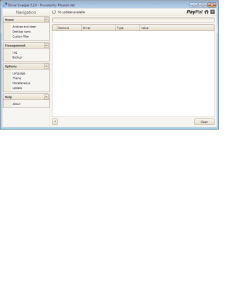
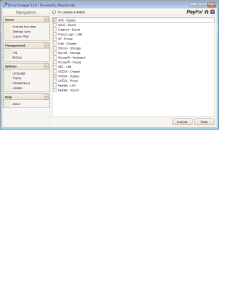
I've taken a look in the file and it still appears to list AMD and NVIDIA drivers, is that normal? Just run Drivers S. again and its not showing that there is anything left to remove.
 

Attachments

  • dsweep 1.png
    dsweep 1.png
    14.4 KB · Views: 22
  • dsweep 2.png
    dsweep 2.png
    12.2 KB · Views: 8

My Computer

OS
Windows 7 32 bit
And now for the penultimate step (sorry but we might need another one after this)

It's time to purge the system of these pesky pnputil entries to allow the Catalyst Install Manager to detect your card properly.


Code:
Published name :            oem13.inf
Driver package provider :   NVIDIA
Class :                     Display adapters
Driver date and version :   09/27/2009 8.16.11.9107
Signer name :               Microsoft Windows Hardware Compatibility Publisher

Published name :            oem24.inf
Driver package provider :   NVIDIA
Class :                     Display adapters
Driver date and version :   07/09/2010 8.17.12.5896
Signer name :               Microsoft Windows Hardware Compatibility Publisher

Published name :            oem40.inf
Driver package provider :   ATI Technologies Inc.
Class :                     Display adapters
Driver date and version :   04/19/2011 8.850.0.0000
Signer name :               Microsoft Windows Hardware Compatibility Publisher
Follow these steps VERY closely as one misstyped character can cause other plug and play devices in your system to fail or stop functioning.


1. Open yet another elevated command prompt


2. Type in these commands as displayed in the CODE box, one at a time, and press Enter for each command

Code:
pnputil -f -d oem13.inf
pnputil -f -d oem24.inf
pnputil -f -d oem40.inf

3. Reboot your computer again afterwards.

Respond when you've done the above steps.
 

My Computer

Computer Manufacturer/Model Number
DELL SXPS 1640
OS
Windows 7 x64 Professional SP1
CPU
Intel C2D T9550 2.66 GHz @ 2.793 GHz (Thanks ThrottleStop!!)
Motherboard
Intel PM45
Memory
8 GB DDR3
Graphics Card(s)
ATI MOBILITY RADEON 4670
Sound Card
CREATIVE XFI AUDIO NOTEBOOK
Monitor(s) Displays
16.1 WLED
Screen Resolution
1920x1080
Hard Drives
Seagate ST9500420AS 500GB (465GiBi) 7200 RPM Drive

External Drives:-
2 TB WD Essentials x 3
1 TB WD Mybook Gen 1
1 TB WD Mybook Gen 2
1 TB Seagate
1 TB Seagate
320 GB WD Scorpio Black (enclosed)
PSU
90W Dell Power Brick
Case
Dell Chassis
Cooling
Coolermaster Cooling Pad
Keyboard
Built-in backlighted Keyboard
Mouse
Logitech Wireless Mini Mouse
Internet Speed
4/0.5
I've taken a look in the file and it still appears to list AMD and NVIDIA drivers, is that normal? Just run Drivers S. again and its not showing that there is anything left to remove.

That's not a listing of what you have on your system, my good man, that the list of options you can select to make it scan for those particular drivers :)

Anyway, respond again once you've done the steps in my previous post, CAREFULLY... don't rush it.
 

My Computer

Computer Manufacturer/Model Number
DELL SXPS 1640
OS
Windows 7 x64 Professional SP1
CPU
Intel C2D T9550 2.66 GHz @ 2.793 GHz (Thanks ThrottleStop!!)
Motherboard
Intel PM45
Memory
8 GB DDR3
Graphics Card(s)
ATI MOBILITY RADEON 4670
Sound Card
CREATIVE XFI AUDIO NOTEBOOK
Monitor(s) Displays
16.1 WLED
Screen Resolution
1920x1080
Hard Drives
Seagate ST9500420AS 500GB (465GiBi) 7200 RPM Drive

External Drives:-
2 TB WD Essentials x 3
1 TB WD Mybook Gen 1
1 TB WD Mybook Gen 2
1 TB Seagate
1 TB Seagate
320 GB WD Scorpio Black (enclosed)
PSU
90W Dell Power Brick
Case
Dell Chassis
Cooling
Coolermaster Cooling Pad
Keyboard
Built-in backlighted Keyboard
Mouse
Logitech Wireless Mini Mouse
Internet Speed
4/0.5
Ahh I see.

Driver S. is new to me, hadn't used it before this problem.

Have carried out above steps and am rebooting now.
 

My Computer

OS
Windows 7 32 bit
EDIT:- Oh my lord, I failed to realise one very important thing... You're running Windows 7 32 bit!!!!

The drivers i made you download were of the 64 bit version!!! You would've never been able to get that setup to detect your card in a million years!

Here's the proper link to the AMD 32bit drivers for your system:-

http://www2.ati.com/drivers/12-6_vista_win7_32_dd_ccc.exe
 
Last edited:

My Computer

Computer Manufacturer/Model Number
DELL SXPS 1640
OS
Windows 7 x64 Professional SP1
CPU
Intel C2D T9550 2.66 GHz @ 2.793 GHz (Thanks ThrottleStop!!)
Motherboard
Intel PM45
Memory
8 GB DDR3
Graphics Card(s)
ATI MOBILITY RADEON 4670
Sound Card
CREATIVE XFI AUDIO NOTEBOOK
Monitor(s) Displays
16.1 WLED
Screen Resolution
1920x1080
Hard Drives
Seagate ST9500420AS 500GB (465GiBi) 7200 RPM Drive

External Drives:-
2 TB WD Essentials x 3
1 TB WD Mybook Gen 1
1 TB WD Mybook Gen 2
1 TB Seagate
1 TB Seagate
320 GB WD Scorpio Black (enclosed)
PSU
90W Dell Power Brick
Case
Dell Chassis
Cooling
Coolermaster Cooling Pad
Keyboard
Built-in backlighted Keyboard
Mouse
Logitech Wireless Mini Mouse
Internet Speed
4/0.5
I see....

...Oh how annoying.

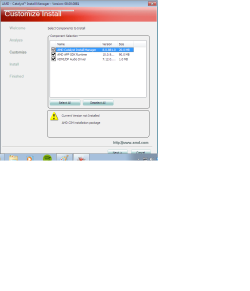
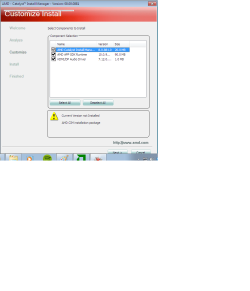
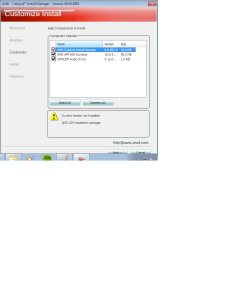
Same list of 3 things as before :confused:
 

Attachments

  • oh no.png
    oh no.png
    20.9 KB · Views: 21

My Computer

OS
Windows 7 32 bit
I see....

...Oh how annoying.

Same list of 3 things as before :confused:

Refer to my previous edited post... I just had a revelation of sorts :p

I've been so used to Windows 7 64bit that I assume all PCs with high end gaming hardware would have it installed.. Please accept my humblest apologies....

Please download that driver I linked to in my edited post... the 32 bit one and run the installer... hopefully all goes well this time, and select customized install again.
 

My Computer

Computer Manufacturer/Model Number
DELL SXPS 1640
OS
Windows 7 x64 Professional SP1
CPU
Intel C2D T9550 2.66 GHz @ 2.793 GHz (Thanks ThrottleStop!!)
Motherboard
Intel PM45
Memory
8 GB DDR3
Graphics Card(s)
ATI MOBILITY RADEON 4670
Sound Card
CREATIVE XFI AUDIO NOTEBOOK
Monitor(s) Displays
16.1 WLED
Screen Resolution
1920x1080
Hard Drives
Seagate ST9500420AS 500GB (465GiBi) 7200 RPM Drive

External Drives:-
2 TB WD Essentials x 3
1 TB WD Mybook Gen 1
1 TB WD Mybook Gen 2
1 TB Seagate
1 TB Seagate
320 GB WD Scorpio Black (enclosed)
PSU
90W Dell Power Brick
Case
Dell Chassis
Cooling
Coolermaster Cooling Pad
Keyboard
Built-in backlighted Keyboard
Mouse
Logitech Wireless Mini Mouse
Internet Speed
4/0.5
No problem, easy mistake to make. I've actually been out of the PC gaming world for ages, but with the release of the new Sins of a Solar Empire I decided it was time to revisit the PC and perform some upgrades. Next on the list is a new mobo and processor, followed by bigger hard disk! At that point I should make the switch to 64 bit Win7, but 32 bit serves me well enough for now.
 

My Computer

OS
Windows 7 32 bit
Have you got that last bit sorted out? What does the customized install window say when you run installer this time?
 

My Computer

Computer Manufacturer/Model Number
DELL SXPS 1640
OS
Windows 7 x64 Professional SP1
CPU
Intel C2D T9550 2.66 GHz @ 2.793 GHz (Thanks ThrottleStop!!)
Motherboard
Intel PM45
Memory
8 GB DDR3
Graphics Card(s)
ATI MOBILITY RADEON 4670
Sound Card
CREATIVE XFI AUDIO NOTEBOOK
Monitor(s) Displays
16.1 WLED
Screen Resolution
1920x1080
Hard Drives
Seagate ST9500420AS 500GB (465GiBi) 7200 RPM Drive

External Drives:-
2 TB WD Essentials x 3
1 TB WD Mybook Gen 1
1 TB WD Mybook Gen 2
1 TB Seagate
1 TB Seagate
320 GB WD Scorpio Black (enclosed)
PSU
90W Dell Power Brick
Case
Dell Chassis
Cooling
Coolermaster Cooling Pad
Keyboard
Built-in backlighted Keyboard
Mouse
Logitech Wireless Mini Mouse
Internet Speed
4/0.5
Oh bum, still no joy.
 

Attachments

  • still no joy.png
    still no joy.png
    22.1 KB · Views: 20

My Computer

OS
Windows 7 32 bit
Errr... (we're not giving up yet)

Try the driver from this link instead. These are newer and they're also 32 bit.

http://www2.ati.com/drivers/hotfix/catalyst_12.7_hotfixes/catalyst_12-7_beta_windows7_20120629.exe

Also do the whole pnputil.exe -e >pnp.txt upload bit again with the command prompt.. i need to see whether those entries are really gone from your system...

You are sure you're running on the Standard VGA Adapter now right? Check Device manager again to be sure... and please post another screenshot from that window and also GPUz again
 

My Computer

Computer Manufacturer/Model Number
DELL SXPS 1640
OS
Windows 7 x64 Professional SP1
CPU
Intel C2D T9550 2.66 GHz @ 2.793 GHz (Thanks ThrottleStop!!)
Motherboard
Intel PM45
Memory
8 GB DDR3
Graphics Card(s)
ATI MOBILITY RADEON 4670
Sound Card
CREATIVE XFI AUDIO NOTEBOOK
Monitor(s) Displays
16.1 WLED
Screen Resolution
1920x1080
Hard Drives
Seagate ST9500420AS 500GB (465GiBi) 7200 RPM Drive

External Drives:-
2 TB WD Essentials x 3
1 TB WD Mybook Gen 1
1 TB WD Mybook Gen 2
1 TB Seagate
1 TB Seagate
320 GB WD Scorpio Black (enclosed)
PSU
90W Dell Power Brick
Case
Dell Chassis
Cooling
Coolermaster Cooling Pad
Keyboard
Built-in backlighted Keyboard
Mouse
Logitech Wireless Mini Mouse
Internet Speed
4/0.5
Afraid still no luck, just the same 3 things as before.
 

Attachments

  • nope.png
    nope.png
    21.7 KB · Views: 9

My Computer

OS
Windows 7 32 bit
Afraid I need to call it a night now. If you've any other suggestions let me know and if I've time I'll try them out in the morning before work. Many thanks for all the help so far.
 

My Computer

OS
Windows 7 32 bit
Alrighty then... have a good night and thanks for being patient..
 

My Computer

Computer Manufacturer/Model Number
DELL SXPS 1640
OS
Windows 7 x64 Professional SP1
CPU
Intel C2D T9550 2.66 GHz @ 2.793 GHz (Thanks ThrottleStop!!)
Motherboard
Intel PM45
Memory
8 GB DDR3
Graphics Card(s)
ATI MOBILITY RADEON 4670
Sound Card
CREATIVE XFI AUDIO NOTEBOOK
Monitor(s) Displays
16.1 WLED
Screen Resolution
1920x1080
Hard Drives
Seagate ST9500420AS 500GB (465GiBi) 7200 RPM Drive

External Drives:-
2 TB WD Essentials x 3
1 TB WD Mybook Gen 1
1 TB WD Mybook Gen 2
1 TB Seagate
1 TB Seagate
320 GB WD Scorpio Black (enclosed)
PSU
90W Dell Power Brick
Case
Dell Chassis
Cooling
Coolermaster Cooling Pad
Keyboard
Built-in backlighted Keyboard
Mouse
Logitech Wireless Mini Mouse
Internet Speed
4/0.5
As for any additonal suggestions, well, you did mention that the card came with drivers from a CD.. i guess you have the option of sticking with them... after all they were the only ones that could detect your card...

I tried looking through some additional documentation, including an .inf file manual update method, but it seems like your card's already in the inf files...

EDIT: If you would like an alternative to CCC, I'd recommend this software... I use it myself for my own AMD graphics card, and does well for my purposes...

http://downloads.guru3d.com/download.php?det=733
 

My Computer

Computer Manufacturer/Model Number
DELL SXPS 1640
OS
Windows 7 x64 Professional SP1
CPU
Intel C2D T9550 2.66 GHz @ 2.793 GHz (Thanks ThrottleStop!!)
Motherboard
Intel PM45
Memory
8 GB DDR3
Graphics Card(s)
ATI MOBILITY RADEON 4670
Sound Card
CREATIVE XFI AUDIO NOTEBOOK
Monitor(s) Displays
16.1 WLED
Screen Resolution
1920x1080
Hard Drives
Seagate ST9500420AS 500GB (465GiBi) 7200 RPM Drive

External Drives:-
2 TB WD Essentials x 3
1 TB WD Mybook Gen 1
1 TB WD Mybook Gen 2
1 TB Seagate
1 TB Seagate
320 GB WD Scorpio Black (enclosed)
PSU
90W Dell Power Brick
Case
Dell Chassis
Cooling
Coolermaster Cooling Pad
Keyboard
Built-in backlighted Keyboard
Mouse
Logitech Wireless Mini Mouse
Internet Speed
4/0.5
All drivers I've tried have come up with the same available options to install. There's nothing during the installation process that suggests the card hasn't been correctly detected, and after installation the card operates fine.

I wouldn't have noticed the issue had I not tried to set up eyefinity, do you know if your suggested replacement supports it? I had a quick look but it's not explicitly stated.

I'm potentially doing further upgrades so will add installing a new version of windows to the list to hope that resolves this.
 

My Computer

OS
Windows 7 32 bit
A cursory glance and read up suggests that ATI Tray Tools does not specifically offer the same customizibility that CCC offers with regards to Eyefinity..

If you're planning to upgrade to new hardware and adding new windows, a fresh new installation of the 64bit version of your Windows would be best, it would offer you a clean slate, and have a higher probability that these issues will not arise..

Being a card carrying ATI/AMD user for quite the past 8 years or so, I've dealt with many issues related to ATI/AMD graphics cards and their drivers/driver support for games in the past; one of which had the exact same symptoms like your problem, which is why we did the whole song and dance with those utilities yesterday.

As a heads up, you can use the key that came with your 32bit version of Windows 7 for the 64bit version as well if it is a retail version; just deactivate your 32bit version prior to the upgrade via Microsoft Support and activate your 64 bit version of 7 afterwards..

Thanks for being patient and cooperating with me yesterday...
 

My Computer

Computer Manufacturer/Model Number
DELL SXPS 1640
OS
Windows 7 x64 Professional SP1
CPU
Intel C2D T9550 2.66 GHz @ 2.793 GHz (Thanks ThrottleStop!!)
Motherboard
Intel PM45
Memory
8 GB DDR3
Graphics Card(s)
ATI MOBILITY RADEON 4670
Sound Card
CREATIVE XFI AUDIO NOTEBOOK
Monitor(s) Displays
16.1 WLED
Screen Resolution
1920x1080
Hard Drives
Seagate ST9500420AS 500GB (465GiBi) 7200 RPM Drive

External Drives:-
2 TB WD Essentials x 3
1 TB WD Mybook Gen 1
1 TB WD Mybook Gen 2
1 TB Seagate
1 TB Seagate
320 GB WD Scorpio Black (enclosed)
PSU
90W Dell Power Brick
Case
Dell Chassis
Cooling
Coolermaster Cooling Pad
Keyboard
Built-in backlighted Keyboard
Mouse
Logitech Wireless Mini Mouse
Internet Speed
4/0.5
No problem, thanks for taking the time to offer up suggestions. At least it wasn't something so simple I look like an idiot! :-D
 

My Computer

OS
Windows 7 32 bit
Back
Top