CCleaner behaviour

OnTheRopes

New member
Member
Local time
12:16 PM
Messages
95
I have been using Ccleaner for some years, however more recently I find it increasingly intrusive. It now has a regular pop up telling my, today for instance that I can save 96 Gb of space. Yet when I run the analysis it is 98Mb?
Why would this be?
 

My Computer

Computer type
PC/Desktop
Computer Manufacturer/Model Number
Self Build
OS
Windows Prox64
CPU
i5 760 2.8Ghz
Motherboard
Asus P7P55D-E
Memory
Corsair XTS 2x4 Gb
Graphics Card(s)
Asus GTX 460 1024Mb
Monitor(s) Displays
HP LP2475w
Hard Drives
Samsung HD103SJ Spinpoint F3 1TB
PSU
Corsair 600CX
Case
Corsair Graphite 600T
Antivirus
Kaspersky IS
Browser
Chrome
I do not know why there is a difference in the numbers.

You do not have to leave CCleaner running. Just start it when you need it. See Options > Settings.
 

My Computer

Computer type
Laptop
Computer Manufacturer/Model Number
Employer provided Dell Latitude
OS
W7 Pro SP1 64bit
CPU
i7
Memory
8GB
Graphics Card(s)
Intel HD Graphics
Hard Drives
crappy SSD
Antivirus
Employer mandated Symantec Endpoint Protection
Browser
Pale Moon 64bit, IE11 64bit & Chrome 64bit
Cheers, thanks for the help
 

My Computer

Computer type
PC/Desktop
Computer Manufacturer/Model Number
Self Build
OS
Windows Prox64
CPU
i5 760 2.8Ghz
Motherboard
Asus P7P55D-E
Memory
Corsair XTS 2x4 Gb
Graphics Card(s)
Asus GTX 460 1024Mb
Monitor(s) Displays
HP LP2475w
Hard Drives
Samsung HD103SJ Spinpoint F3 1TB
PSU
Corsair 600CX
Case
Corsair Graphite 600T
Antivirus
Kaspersky IS
Browser
Chrome
Hi,

In addition to UNI's excellent suggestion, you might want to check your settings.
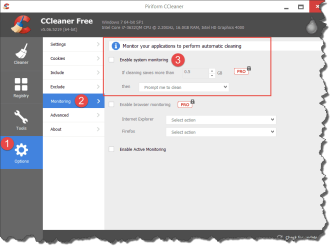
Starting a while back (perhaps version 5.0x), they added features for "system monitoring".
That dialog you report suggests that "system monitoring" is enabled.
You can disable it, if it's too intrusive and/or clashes with your real-time anti-virus/anti-malware applications.
Some of them are available in both the Free and paid, Pro version.
See screenshot below.

Hope this helps,
 

Attachments

  • 2015-06-05_7-01-12.png
    2015-06-05_7-01-12.png
    26.2 KB · Views: 1

My Computer

Computer type
PC/Desktop
Computer Manufacturer/Model Number
Dell Studio XPS 8500
OS
OEM Windows 7 Ult (x64) SP1
CPU
Intel Core-i7 3770 @ 3.4 GHz
Motherboard
"Dell" branded
Memory
16 GB DDR3 SDRAM @ 1333 MHz
Graphics Card(s)
NVidia GeForce GT620 1 GB
Sound Card
THX TruStudio PC
Monitor(s) Displays
Dell U2410 Full HD
Hard Drives
2.0 TB SATA2 @ 7200 RPM
PSU
350W
Keyboard
MS 4000 Ergon - Wired
Mouse
Logitech Anywhere MX
Internet Speed
Cable HSI w/Turbo (router)
Antivirus
KIS-MBAM Premium-MBAE Premium
Browser
Fx (current version); IE
Other Info
And a Win7/64 Pro laptop; And a Win10/64 Pro desktop.
Thanks Moxie I shall give that a try
 

My Computer

Computer type
PC/Desktop
Computer Manufacturer/Model Number
Self Build
OS
Windows Prox64
CPU
i5 760 2.8Ghz
Motherboard
Asus P7P55D-E
Memory
Corsair XTS 2x4 Gb
Graphics Card(s)
Asus GTX 460 1024Mb
Monitor(s) Displays
HP LP2475w
Hard Drives
Samsung HD103SJ Spinpoint F3 1TB
PSU
Corsair 600CX
Case
Corsair Graphite 600T
Antivirus
Kaspersky IS
Browser
Chrome
Back
Top