CCleaner Fail?

gregrocker

New member
Guru
Local time
7:15 AM
Messages
50,634
After fifteen years it looks like I may have finally double-confirmed a case of CCleaner messing up a program. So after insisting that others provide documentation for years here about claims that CCleaner can mess up your System, I am providing it myself:

My sister uses a program called Bayscribe to transcribe medical notes for hospitals from home. She has had an issue where it's audio component fails to start on two occasions after running CCleaner. Apparently it depends upon a temporary file to run which CCleaner empties. The result is it generates a message saying that a [temporary] file is no longer available to start the audio service. I saw this error message.

This is not the Registry cleaner component of CCleaner, but the Disk Cleaner. In order to miss the file one would have to deselect Temporary Files which is often the bulk of what it finds. I believe it found 4gb when when it last cleaned up her machine, just before this error occurred.

Apparently the issue has occurred twice, the second time after CCleaner was reinstalled due to forgetting about the issue. It is noteworthy to me because it represents the first time I've seen first hand a confirmed case of CCleaner removing a file that causes a program not to be able to run.

Her company tech support told her this is a known issue with CCleaner and to remove it.
 
Last edited:
One failure only? But how many millions of good fixes on thousands upon thousands of applications Greg. Thats not a bad track record :D
 

My Computer

Computer type
PC/Desktop
Computer Manufacturer/Model Number
Golden Mk. I.4
OS
Windows 10 Pro x64 ; Xubuntu x64
CPU
Intel i7 860 @ 2.80 GHz O/C'ed to 4.0GHz
Motherboard
Gigabyte P55A-UD3R Rev.1. Award BIOS F13
Memory
16GB Corsair Vengance DDR3 @ 661 MHz Dual Channel (9-9-9-24)
Graphics Card(s)
EVGA NVidia GTX 560 1024MB
Sound Card
Realtek Integrated
Monitor(s) Displays
Dual Samsung SyncMaster 2494HS
Screen Resolution
1920*1080 and 1920*1080
Hard Drives
1*Samsung 840 EVO 120GB SSD;
1*OCZ Vertex 2 60GB SSD;
2*Samsung F3 SpinPoint 1TB in RAID0;
1*Samsung F1 SpinPoint 1TB;
2*Western Digital 1TB External USB 3.0
1*Western Digital 500GB External USB 3.0
1*Seagate 500GB External USB 2.0
PSU
Thermaltake ToughPower QFan 750W
Case
Thermaltake Element S VK60001W2Z
Cooling
Corsair H60 Water Cooling, 2*230mm and 2*80mm case fans
Keyboard
Logitech G110
Mouse
Logitech MX518
That's pretty sad that you had to discover it 1st hand, and for it to happen on a mission-critical (work related) system is even worse..

Isn't there a temporary workaround you can do to alleviate this problem until the maker of CCleaner fixes the issue?

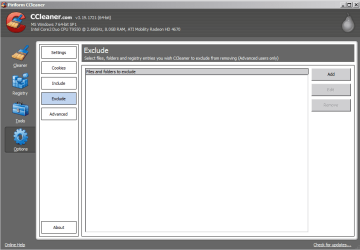
Capture.PNG

Will identifying the files and sub folders required by the application in the temp folder and adding them to the Exclude section of the Options Tab on the sidebar resolve the issue?
 

My Computer

Computer Manufacturer/Model Number
DELL SXPS 1640
OS
Windows 7 x64 Professional SP1
CPU
Intel C2D T9550 2.66 GHz @ 2.793 GHz (Thanks ThrottleStop!!)
Motherboard
Intel PM45
Memory
8 GB DDR3
Graphics Card(s)
ATI MOBILITY RADEON 4670
Sound Card
CREATIVE XFI AUDIO NOTEBOOK
Monitor(s) Displays
16.1 WLED
Screen Resolution
1920x1080
Hard Drives
Seagate ST9500420AS 500GB (465GiBi) 7200 RPM Drive

External Drives:-
2 TB WD Essentials x 3
1 TB WD Mybook Gen 1
1 TB WD Mybook Gen 2
1 TB Seagate
1 TB Seagate
320 GB WD Scorpio Black (enclosed)
PSU
90W Dell Power Brick
Case
Dell Chassis
Cooling
Coolermaster Cooling Pad
Keyboard
Built-in backlighted Keyboard
Mouse
Logitech Wireless Mini Mouse
Internet Speed
4/0.5
Golden - I agree and often defend CCleaner by stating I've put it on installs representing countless thousands of uses without fail. And we have helped popularize it here exponentially. My own defenses against "hearsay" problems have been passionate - maybe too much so. This issue wasn't even with the Reg cleaner which is most at issue.

Surely this is a poorly written program that depends on a temporary file to run each time. Aren't temporary files meant to be cleaned out periodically without discernment?

Solar - Her tech support insists she uninstall CCleaner and don't seem to care what the file is/was. If this is their standard advice I wonder why CCleaner hasn't come across the issue yet for a major medical transcription program. Their previous thoroughness may be slipping, or they may depend more on us to report these things, as I've done.
 

Attachments

  • Capture.JPG
    Capture.JPG
    32.4 KB · Views: 16

My Computer

Computer type
PC/Desktop
Computer Manufacturer/Model Number
Golden Mk. I.4
OS
Windows 10 Pro x64 ; Xubuntu x64
CPU
Intel i7 860 @ 2.80 GHz O/C'ed to 4.0GHz
Motherboard
Gigabyte P55A-UD3R Rev.1. Award BIOS F13
Memory
16GB Corsair Vengance DDR3 @ 661 MHz Dual Channel (9-9-9-24)
Graphics Card(s)
EVGA NVidia GTX 560 1024MB
Sound Card
Realtek Integrated
Monitor(s) Displays
Dual Samsung SyncMaster 2494HS
Screen Resolution
1920*1080 and 1920*1080
Hard Drives
1*Samsung 840 EVO 120GB SSD;
1*OCZ Vertex 2 60GB SSD;
2*Samsung F3 SpinPoint 1TB in RAID0;
1*Samsung F1 SpinPoint 1TB;
2*Western Digital 1TB External USB 3.0
1*Western Digital 500GB External USB 3.0
1*Seagate 500GB External USB 2.0
PSU
Thermaltake ToughPower QFan 750W
Case
Thermaltake Element S VK60001W2Z
Cooling
Corsair H60 Water Cooling, 2*230mm and 2*80mm case fans
Keyboard
Logitech G110
Mouse
Logitech MX518
Greg we may think it otherwise that it is the issue of the program that it needs a temporary file to start the service ?

The inbuilt disk cleanup also wipes the temp out. What happens there if the cleaning is done by using the disk cleanup but not ccleaner ? If the program still fails to run ?
 

My Computer

Computer type
PC/Desktop
Computer Manufacturer/Model Number
Self Assembled
OS
Microsoft Windows 10 Pro Insider Preview 64-bit
CPU
Intel(R) Core(TM) i3-4130 CPU @ 3.40GHz
Motherboard
Gigabyte Technology Co., Ltd. B85M-D3H
Memory
Corsair Vengence 4GB x2 (8.00GB Dual-Channel DDR3 @ 798MHz)
Graphics Card(s)
2047MB GeForce GTS 450 (ZOTAC International)
Sound Card
Onboard (Realtek High Definition Audio)
Monitor(s) Displays
LG Flatron E2040T
Screen Resolution
1600x900
Hard Drives
Western Digital 1 TB
Seagate 500 GB
PSU
Corsair VS550
Case
Cooler Master K380
Cooling
Cooler Master Seidon 120V Plus
Keyboard
Logitech MK260r
Mouse
Logitech MK260r
Internet Speed
PMPL Broadband
Antivirus
Windows Defender + MBAM
Browser
Firefox
Other Info
Dell Studio 15" Laptop
You of course checked to see if your audio service is on automatic?
 

My Computer

Computer Manufacturer/Model Number
HB
OS
W7x64 Ult.
CPU
i7 975
Motherboard
P6T7 SC
Memory
12GB Corsair Dom
Graphics Card(s)
Evga GTX285
Sound Card
OB
Monitor(s) Displays
HP LP2475
Screen Resolution
1920x1200
Hard Drives
Velociraptors Raid0 BU
Crucial M4 OS
WD RE4 Data
PSU
PC Power & Cooling 950
Case
Chieftec Bravo
Cooling
Air 6 GentleTyphoon
Keyboard
Logitech Illuminated
Mouse
Logitech MX518
It is an audio component of the Bayscribe program, what she runs to hear the notes she is transcribing.
 
I think Arc is on to something. Temp files can be cleaned out without any type of third-party app at all, so this sounds to me like BayScribe is just one very poorly written piece of software.
 

My Computer

OS
Windows 7 Ultimate x64 SP1
CPU
Intel Core i7-2600
Motherboard
Gigabyte GA-P67A-UD3P-B3
Memory
12 GB Patriot Extreme DDR3-1333
Graphics Card(s)
Nvidia GTX 470
Monitor(s) Displays
Dell UltraSharp 2209WA
Hard Drives
OCZ Agility3 240 GB, WD5001AALS, WD7501AALS
PSU
OCZ ModStream 700W
Case
CoolerMaster HAF 912 Advanced
Cooling
CoolerMaster Hyper 212 Plus

My Computer

Computer type
PC/Desktop
Computer Manufacturer/Model Number
Golden Mk. I.4
OS
Windows 10 Pro x64 ; Xubuntu x64
CPU
Intel i7 860 @ 2.80 GHz O/C'ed to 4.0GHz
Motherboard
Gigabyte P55A-UD3R Rev.1. Award BIOS F13
Memory
16GB Corsair Vengance DDR3 @ 661 MHz Dual Channel (9-9-9-24)
Graphics Card(s)
EVGA NVidia GTX 560 1024MB
Sound Card
Realtek Integrated
Monitor(s) Displays
Dual Samsung SyncMaster 2494HS
Screen Resolution
1920*1080 and 1920*1080
Hard Drives
1*Samsung 840 EVO 120GB SSD;
1*OCZ Vertex 2 60GB SSD;
2*Samsung F3 SpinPoint 1TB in RAID0;
1*Samsung F1 SpinPoint 1TB;
2*Western Digital 1TB External USB 3.0
1*Western Digital 500GB External USB 3.0
1*Seagate 500GB External USB 2.0
PSU
Thermaltake ToughPower QFan 750W
Case
Thermaltake Element S VK60001W2Z
Cooling
Corsair H60 Water Cooling, 2*230mm and 2*80mm case fans
Keyboard
Logitech G110
Mouse
Logitech MX518
There is a risk you take with every program or application you use, especially these days it would seem. I once had CCleaner delete EVERY picture off of my system, including the entire "My Pictures" folder off of my Win XP machine back in the mid 2000's. But I still use CCleaner. This is why you simply MUST keep periodic backups of files (personal and program, doesn't matter - just do it), no if's and's or but's about it! And when messing with either function of CCleaner, you should be double checking what it's targeting for deletion otherwise you only have yourself to blame after hitting that "Run Cleaner/Fix Selected Issues..." button (and I'm not specifically talking here about anyone in particular, just at-large).

Too bad we did not have external hard drives then, we lost two years of memories that day (I tried every program known of to dig into the hard drive to find them and attempt to pull them back up - but they were totally GONE, a true and proper, permanent delete). This is the reason why I spent just over $200 on getting some of those externals in the first place.

But anyway, perhaps it is that other program which needs a overhaul - not CCleaner. I've never had another problem with CCleaner (though, I am now fastidiously double-checking everything it's slating for deletion or "fixing", and saving the Registry entries just in case also).

twocents.gif
for whatever they're worth to ya'.


OP, good catch.
 

My Computer

Computer type
PC/Desktop
Computer Manufacturer/Model Number
Custom [03/21/2014]
OS
7 Ultimate SP1 x64
CPU
AMD FX-8350 4.0GHz
Motherboard
Asus M5A99FX Pro R2.0
Memory
8GB Corsair Vengeance LP DDR3 1600
Graphics Card(s)
EVGA GTX760 SC 2GB GDDR5
Sound Card
Realtek ALC892
Monitor(s) Displays
23" Syncmaster P2370HD
Screen Resolution
1920 x 1080
Hard Drives
Scorpio Black WD1003FZEX 1TB
PSU
Corsair RM 750W
Case
Gigabyte Sumo Omega
Cooling
Noctua NH-D14 | 6 120mm case.
Keyboard
Tt eSPORTS Poesidon Z - Blue Switch
Mouse
Logitech M510
Internet Speed
FiOS 100/100
Antivirus
MBAM
Browser
WaterFox & Chrome
Other Info
NETWORKING:
FiOS G1100 (v1.03)
Netgear WNDR37AV
Actiontec MI424WR (Rev. I)
PRINTER:
Canon MX340
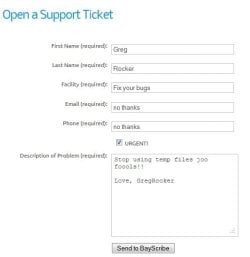
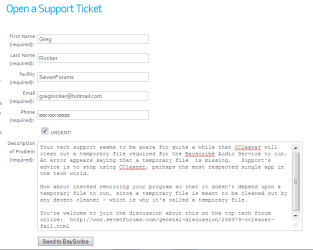
Done. Bugs filed with both programs now.

Capture.PNGclick to enlarge

I blacked out the phone number of the toll sex line. ;)
 
Last edited by a moderator:
Thanks for the support request Greg. I am the developer of the BayScribe Transcription Productivity Tools and have not heard of anybody having problems using CCleaner on systems the Prod Tools are installed on. Checking with some of our support techs, I have confirmed that they can run CCleaner on Win7, Vista, and XP systems, in disk clean mode, and all is well. It is ridiculous beyond belief that someone would write an application that placed key components into a temp folder. Certainly I don't do that.

As I wrote in the email to you, if you or your sister run into problems please send us a support request and if you have information on exactly what file the Prod Tools is complaining about, that would be really helpful. We can remote in to the affected system and gather more information too.

Typically, if a program component is deleted, running a "Repair Install" from the Control Panel Applications "Transcription Productivity Tools" will correct the issue post haste.
 

My Computer

OS
XP 32bit, Win7 Ultimate 64
You certainly have to give the dev and company credit for responding so quickly!
 

My Computer

OS
Windows 7 Ultimate x64 SP1
CPU
Intel Core i7-2600
Motherboard
Gigabyte GA-P67A-UD3P-B3
Memory
12 GB Patriot Extreme DDR3-1333
Graphics Card(s)
Nvidia GTX 470
Monitor(s) Displays
Dell UltraSharp 2209WA
Hard Drives
OCZ Agility3 240 GB, WD5001AALS, WD7501AALS
PSU
OCZ ModStream 700W
Case
CoolerMaster HAF 912 Advanced
Cooling
CoolerMaster Hyper 212 Plus
You certainly have to give the dev and company credit for responding so quickly!

Thanks and we do try to respond to these sorts of things quickly and fix them or provide easy work-arounds. Unfortunately I can't recreate the problem here, and have not heard of this issue until today. When Greg's sister had somebody in her IT department fix the problem in the past, it wasn't reported to me. That's not unusual because a hospital IT department, or her company's IT department if she works for a transcription service, would probably just run the Windows repair install and call it good.

I just wish I knew what "temporary" file the Prod Tools were complaining about when this happened. I don't doubt that it did happen, but I need more information.

Oh, and Greg, do you know what operating system your sister is using?
 

My Computer

OS
XP 32bit, Win7 Ultimate 64
Thanks for the support request Greg. I am the developer of the BayScribe Transcription Productivity Tools and have not heard of anybody having problems using CCleaner on systems the Prod Tools are installed on. Checking with some of our support techs, I have confirmed that they can run CCleaner on Win7, Vista, and XP systems, in disk clean mode, and all is well. It is ridiculous beyond belief that someone would write an application that placed key components into a temp folder. Certainly I don't do that.

As I wrote in the email to you, if you or your sister run into problems please send us a support request and if you have information on exactly what file the Prod Tools is complaining about, that would be really helpful. We can remote in to the affected system and gather more information too.

Typically, if a program component is deleted, running a "Repair Install" from the Control Panel Applications "Transcription Productivity Tools" will correct the issue post haste.

Thanks for the quick reply and reassurance.

Is this Ron from CyberCowboy? I just spoke with my sis Cheryl and she says she knows the program developer although she hasn't discussed this issue.

However she also confirmed it is her company IT that has been telling her that CCleaner messes up Bayscribe due to the temporary file deletion. They actually uninstalled it for her twice while repairing the program. I also saw the error via remote when she tried to open the audio component which said a temporary file was missing.
 
Thanks for the support request Greg. I am the developer of the BayScribe Transcription Productivity Tools and have not heard of anybody having problems using CCleaner on systems the Prod Tools are installed on. Checking with some of our support techs, I have confirmed that they can run CCleaner on Win7, Vista, and XP systems, in disk clean mode, and all is well. It is ridiculous beyond belief that someone would write an application that placed key components into a temp folder. Certainly I don't do that.

As I wrote in the email to you, if you or your sister run into problems please send us a support request and if you have information on exactly what file the Prod Tools is complaining about, that would be really helpful. We can remote in to the affected system and gather more information too.

Typically, if a program component is deleted, running a "Repair Install" from the Control Panel Applications "Transcription Productivity Tools" will correct the issue post haste.

Thanks for the quick reply and reassurance.

Is this Ron from CyberCowboy? I just spoke with my sis Cheryl and she says she knows the program developer although she hasn't discussed this issue.

However she also confirmed it is her company IT that has been telling her that CCleaner messes up Bayscribe due to the temporary file deletion. They actually uninstalled it for her twice while repairing the program. I also saw the error via remote when she tried to open the audio component which said a temporary file was missing.

No, this is not Ron, this is Brent. Ron isn't the actual developer, I am. Ron does handle problems often so your sister thinks of him as the developer possibly.

I just searched through all my code and nowhere do I display a message that a temporary file is missing. It's possible that a component that I link with, like the Windows Quartz audio component, is displaying such a message, but it isn't any code I wrote.
 

My Computer

OS
XP 32bit, Win7 Ultimate 64
I replied to your email with my sisters contact info.

She can connect you with her company IT are so they can explain better why they say this is a known issue with CCleaner and have uninstalled it now twice while reinstalling the program.
 
My take on this is that it is not CCleaner that is the problem. Temporary files are just that. No program should rely on them being there except transiently.
 

My Computer

Computer type
Laptop
Computer Manufacturer/Model Number
Hewlett-Packard/G62-107SA Notebook
OS
Microsoft Windows 7 Home Premium 64-bit Service Pack 1
CPU
Intel(R) Core(TM) i3 CPU M 330 @ 2.13GHz
Motherboard
Hewlett-Packard 1425
Memory
8 GB DDR3
Graphics Card(s)
Intel(R) HD Graphics
Sound Card
Realtek High Definition Audio
Monitor(s) Displays
Builtin
Screen Resolution
1366 x 768 x 32 bits (4294967296 colors) @ 60 Hz
Hard Drives
250 GB SATA Hard Disk Drive 7200 rpm
2TB Seagate GoFlex USB 2 Drive
1TB Iomega Prestige USB 2 Drive
1.5TB Iomega Prestige USB 2 Drive (Samsung)
2TB WD MyBook Live NAS.
Mouse
Logitech Anywhere MX
Internet Speed
152 Mbs download 10 Mbs upload
Antivirus
Norton 360
Browser
Chrome
Back
Top