- Local time
- 8:24 PM
- Messages
- 81
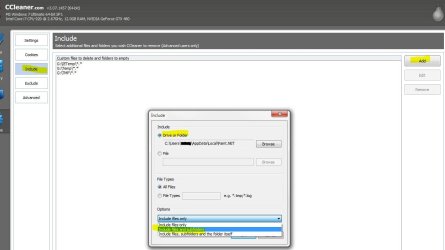
In the Include tab I added folder
C:\Users\RJS\AppData\Local\IsolatedStorage\*.*
IsolatedStorage also has folders in it. When ran CCleaner will remove any files in IsolatedStorage, but it will not remove any folders.
Is there a way to get CCleaner to remove folders in IsolatedStorage, understanding that the folder names will change after you remove them because Win7 keeps adding them back in.
IsolatedStorage has nothing to do with a virus, it has to do with Win7 and apps storing temperary data. Everytime I go look all folders in IsolatedStorage are empty.
C:\Users\RJS\AppData\Local\IsolatedStorage\*.*
IsolatedStorage also has folders in it. When ran CCleaner will remove any files in IsolatedStorage, but it will not remove any folders.
Is there a way to get CCleaner to remove folders in IsolatedStorage, understanding that the folder names will change after you remove them because Win7 keeps adding them back in.
IsolatedStorage has nothing to do with a virus, it has to do with Win7 and apps storing temperary data. Everytime I go look all folders in IsolatedStorage are empty.
My Computer
- OS
- Win7 Ult 64b
- CPU
- i7 950
- Motherboard
- P6T Deluxe v2
- Memory
- Mushkin Redline #998691 DDR3 1600MHz @ 6-7-6-18
- Graphics Card(s)
- BFG GTX 285OCFU
- Monitor(s) Displays
- Asus VW266H
- Hard Drives
- Seagate 7,200 RPM 750GB
WD VR 10,000 RPM 300GB
WD VR 10,000 PPM 600GB
- PSU
- Corsair 850TX
- Case
- HAF-932
- Cooling
- TRUE Rev C w/ Delta FFB1212EH-PWM Fan