CCleaner help.

JigsawPMB

New member
Local time
10:00 PM
Messages
31
I was pointed in the direction in another thread on a different topic to ccleaner. I have since downloaded it and have played with it a bit. I do not know exactly how to use it. I did a scan on the registry and have a huge page full of listings. Is there a way to copy that and post it here? I am scared to have it "clean" the registy files before I know what they are.
 

My Computer

Computer type
Laptop
Computer Manufacturer/Model Number
HP G72
OS
Windows 7 Home Premium x64, Windows Vista Home Premium x??
CPU
Pentium dual core t4500 @2.3 gigs
Motherboard
?
Memory
3.0 gb
Monitor(s) Displays
17" hdwidescreen
Hard Drives
320gb
Internet Speed
high speed frontier communications, close to 6mbps down.
Most here will probably tell you not to clean the registry, even with CCleaner, which is held in high regard generally. The chances of it having a measurable effect are minimal and you are taking some risk. But some people have a compulsion to clean stuff.

I've occasionally used the registry cleaner portion and have never had any trouble. But I've never noticed any performance improvement.

If you just can't help yourself and have to use it, do a backup when it offers you the chance.

A guru I know of says he has used it for a decade on the registry with no issues, but he leaves the "unused file extensions" checkbox unchecked.

Suit yourself. I don't think the comments on this forum about not using it persuades many people.

By all accounts, the other part of it--the regular cleaner---is nearly foolproof and many here use it enthusiastically. I am one of those people. I don't notice any performance improvement, but it does save space over time.
 

My Computer

Computer type
PC/Desktop
Computer Manufacturer/Model Number
Ignatz Special; 4 speed manual gearbox; factory air conditioning; one of one
OS
Windows 7 Home Premium SP1, 64-bit
CPU
Intel Skylake i5-6600K, not overclocked
Motherboard
AsRock Z170M Extreme 4, micro ATX
Memory
8 GB HyperX DDR4-2666 (2 x 4 GB)
Graphics Card(s)
none; graphics are integrated on CPU
Sound Card
onboard: Realtek ALC1150; external: USB Behringer UF0-202
Monitor(s) Displays
Dell S2340M 23 inch IPS
Screen Resolution
1600 x 900
Hard Drives
System: Crucial MX100 series SSD, 128 GB;
Data: Samsung Spinpoint 103SJ, 1 TB;
Backup: WD Caviar Green WD30EZRX-00D8PB0, 3 TB
PSU
Rosewill SilentNight 500 watt fanless, semi-modular
Case
Antec Solo II
Cooling
Noctua NH-U12S; Noctua F12 intake, Noctua S12A exhaust
Keyboard
Microsoft 200 6JH-00001 USB
Mouse
Dell or Microsoft optical wired; USB
Antivirus
Microsoft Security Essentials and Malwarebytes Premium
Browser
Pale Moon
Other Info
All fans PWM; speeds at idle: CPU circa 500 rpm; intake circa 600 rpm; exhaust circa 600 rpm; CPU temps 27 idle and 47 C load in a warm room (27 C/81 F) when running Intel Extreme Tuning Utility stress test.
I have use Ccleaner for years on all my computers.
My recommendation when it comes to the Registry Cleaner section is if you use it always use the backup it requests.
I personally never let it remove anything that I don't understand or have knowledge of.
You can have many unneeded things in the registry and it won't hurt anything. Removing one thing that is needed can cause all kinds of problems.

***A basic rule of the thumb when it comes to Windows registry is simple.
Unless you have the proper knowledge leave the registry alone.
 

My Computer

Computer type
PC/Desktop
Computer Manufacturer/Model Number
Home made Desktop
OS
Windows 10 Pro. 64/ version 1709 Windows 7 Pro/64
CPU
Intel i7-6800K @ 4.3
Motherboard
ASUS X-99 Deluxe II
Memory
Corsair Platinum 16 gig @2400
Graphics Card(s)
EVGA GTX 1070 OC
Monitor(s) Displays
Asus 27" LED LCD/VE278Q
Screen Resolution
1920-1080 or 1280-720 HDMI
Hard Drives
INTEL SSD 730-240 Gb Sata 3.0/
PSU
EVGA Platium 1200W
Case
Phanteks Luxe Tempered Glass 8 fans/ one radiator
Cooling
XSPC/ Water Cooled CPU
Keyboard
Das 4 Professional
Mouse
Logitech M705/MX Anywhere 2-S
Internet Speed
100 mbits
Antivirus
Microsoft Security Essentials/ Malwarebytes Premium 3.0/ SAS
Browser
I.E. 11 default/Firefox/ ISP Time Warner Cable/Spectrum
Other Info
LG BluRay Burner/
Sound system-KLipsch-THX/
Icy Dock ssd Hot Swap bays.
From personal experience, I have a different opinion of Registry Cleaners, so while I use CCleaner to clean temp files, etc., I do not use it to clean a Registry, and believe Registry Cleaning is not routinely needed. My problem arose in an astronomical software program (+$500 program), as described below:

The Path value in the App Paths key of the Windows Registry is used by the operating system to determine the location of shared files for a particular executable. In my case (along with others), CCleaner read the Path value as an error, causing the deletion of this Value (pointer), causing a dll file (APOGEE32-dll) not to load, and you guessed it, the program not to launch. The required dll (APOGEE32-dll) was available, but the registry Path had been deleted, making it inaccessible to the program. CCleaner was not alone in doing this -- turns out that Norton Win Doctor (among others) also read the Path as an error, and deleted the value (pointer). The fix for most people was to re-install the software, to get the right Registry key re-installed.

In spite of this, I would continue to use CCleaner Registry Cleaner, but unchecked the box to "fix" this specific Path. But not always being as attentive as I should be, I'd just click "Fix Issues"... and then it would be another re-install. Finally I woke up, re-installed the software, then located the Registry Key, exported it to the desktop, so the next time I got careless I could just put the deleted key back into the registry.

I am NOT faulting CCleaner (nor the software program). I am just pointing out that no Registry Cleaner is absolutely safe. The makers of CCleaner know this, and responsibly give the user a chance to save (export) the Registry before doing any Fixes. They do this because they know that cleaning the registry is not always safe. So if there is a problem after running the Fixes, you can always go back and re-install the registry. This works great, IF you discover the problem in a short period of time. But in my case, along with other astrophotographers, cloudy weather meant I did not discover the problem until weeks later (and several Registry Key additions later)... So re-installing the pre-fix Registry was of no use...

With modern OS, a registry cleaner is not needed as a regular maintenance tool, and potentially can cause problems not immediately discoverable...

Jim

 

My Computer

Computer type
PC/Desktop
OS
Windows 7 Professional
Like LayBack Bear, I have used CCleaner for many years. I have never had a problem with using it, have recommended it to many forum members, and have never heard of a user with any negative feedback of the program. I, also, agree that when it asks if you want to create a backup, you response with in the affirmative.

Wanting to understand each of the items in your listing is admirable, but not very practical, especially as you say the list is long. I, also, agree that most registry cleaners should never even be installed on a PC. CCleaner is the only exception I would make. I wish you well in your endeavor.
 

My Computer

Computer type
PC/Desktop
Computer Manufacturer/Model Number
Custome Built
OS
Microsoft Windows 7 Ultimate 64-bit 7601 Multiprocessor Free Service Pack 1
CPU
Intel(R) Core(TM) i7 CPU 950 @ 3.07GHz
Motherboard
ASUSTeK Computer INC. SABERTOOTH X58 (LGA1366)
Memory
16.0GB Dual-Channel DDR3 @ 534MHz (8-8-8-20)
Graphics Card(s)
1023MB NVIDIA GeForce GTX 650 (EVGA)
Sound Card
(1) NVIDIA High Definition Audio (2) High Definition Audio
Monitor(s) Displays
HP W2072a LED Backlit
Screen Resolution
1920x1080@60Hz
Hard Drives
(1) SAMSUNG MMCRE28G5MXP-0VB SCSI Disk Device
(2) ST1000DM 003-1CH162 SCSI Disk Device
(3) WDC WD10EURX-73FH1Y0 SCSI Disk Device
PSU
XION XON-1000P14F
Cooling
Fans
Antivirus
Windows Security Essentials
Browser
Mozilla Firefox
Other Info
BIOS Version/Date
American Megatrends Inc. 1402, 8/9/2012
SMBIOS Version 2.5
I use Ccleaner every time I`m done with the pc, and I use the registry cleaner daily, never ever had an issue with it. :)
 

My Computer

Computer type
PC/Desktop
Computer Manufacturer/Model Number
Skylake Special #666
OS
Windows 10 Pro x64
CPU
Intel Core i7 6700K
Motherboard
Asus Sabertooth Z170 Mark 1
Memory
GSkill TridentZ RGB 16GB 3600 16-16-16-36
Graphics Card(s)
EVGA GTX 980 Ti SC x2
Sound Card
Realtek High Definition
Monitor(s) Displays
AOC G2460PG
Screen Resolution
1920 x 1080 144Hz
Hard Drives
Samsung 860 Pro 256GB, Seagate Barracuda 4TB x2
PSU
EVGA 1000 P2, EVGA White Custom Braided Cables
Case
Corsair Vengeance C70 Gunmetal Black
Cooling
Corsair H100i v2, Corsair ML120 x2, Thermal Grizzly Kryonaut
Keyboard
Logitech G910 Orion Spectrum
Mouse
Logitech G700s
Internet Speed
Verizon Fios Quantum Gateway 75/75
Antivirus
Windows Defender, Malwarebytes Free 3.8.3
Browser
Chrome
Other Info
Corsair SP120 x4, LG Blu-ray Drive, Durabrand HT-395 100 Watt Dolby Digital Amp, Corsair H2100 Wireless 7.1 Headset
I don't usually recommend registry cleaners/repairers. However, I used to run CCleaner and didn't have any problems. But, I've had service calls on client PC's that were not running properly after they had used some registry program.

My newest PC (will be two years old in August) has both Win 7 and Win 8 dual boot (with separate drives) and I've never run a registry cleaner and both work without problems. My Win 7 system is also my recording studio system and recording studio software can be very system intensive and it too runs perfectly (I use Sonar X3 64 bit Producer version).
 

My Computer

Computer type
PC/Desktop
Computer Manufacturer/Model Number
My Own Build
OS
Windows 10 64 bit
CPU
Intel i7 6700K
Motherboard
ASUS ROG Maximus VIII Hero
Memory
16GB Corsair Dominator
Graphics Card(s)
Intel CPU Graphics
Sound Card
RealTek
Monitor(s) Displays
27" Dell S2719dgf
Screen Resolution
2560X1440
Hard Drives
1 TB Samsung 850 EVO SSD for Win 10 Pro
500GB Samsung 850 EVO SSD for Win 10 Insider
2 TB drive for backup
PSU
EVGA Supernova 750G2
Case
BeQuiet Silent Base 600
Cooling
Deepcool Captain 120EX
Keyboard
Microsoft Wireless 2000
Mouse
Microsoft wireless
Internet Speed
100 MB/sec (Cable)
Antivirus
Microsoft Defender and Malwarebytes
Browser
Edge/Firefox
Other Info
Cakewalk (Sonar) by BandLab and Studio One 4.1 Pro recording studio software. MOTU 896Mk3 Hybrid recording interface, Frontier Tranzport wireless control unit, Behringer X-Touch Control Surface.
Five USB connected optical drives for CD Audio production using Nero BurningROM
I would not use any registry cleaner. The Windows 7 registry does not need cleaning.

Just my opinion.
 

My Computer

Computer type
PC/Desktop
Computer Manufacturer/Model Number
Custom Built
OS
Windows 10 Pro x64, Windows 8.1 Pro x64, Windows 7 Ultimate x64 SP1,
CPU
INTEL i9-7920X LGA 2066
Motherboard
Gigabyte X299-WU8 F3
Memory
64 GB (4 X 16 GB) G-Skill V Series DDR4 3200 Quad Channel
Graphics Card(s)
EVGA GTX 1060 SC 3 GB
Sound Card
Realtek Onboard ALC1220
Monitor(s) Displays
2 x Samsung S27E310
Screen Resolution
1920x1080
Hard Drives
Samsung 2 x 970 EVO Plus 500 GB NVMe
1 x 6TB WD 6003FZBX SATA
1 x 6TB WD 60EFRX SATA
12 x 3TB WD 30EFRX SATA
PSU
Seasonic X-1050
Case
Thermaltake Armor+
Cooling
Corsair H80i V2 Liquid AOI Cooler
Keyboard
Logitech G510s
Mouse
Logitech MX Master 2S
Internet Speed
200 Mb/s
Antivirus
ESET NOD32 13.1
Browser
EDGE (Dev, Canary, Beta), Chrome
Other Info
ASUS RT-AC68U router
Malwarebytes 4.0.4
I understand and agree with the opinion of windows 7 not needing any register cleaners. However let me add this varible to the issue. I purchased this laptop used only cause I got a deal unpassable on it. That being said I haven't been the sole owner, installer, account holder etc...since day one so through past expierence I know that some people will click and install any old thing and mess with any old file without a ounce of knowledge in thier head as to what they are about to do. Me...I could care less about playing games online with this laptop, I basically want to keep it fast (which it is struggling to do as time goes on, after the initial windows logo upon booting, I log on and get a black screen with a movable cursor and it seems as though the time for it to go away get's long each day.) so if anyone would be willing to tell me what all this is if they recognize something that shouldn't be there please point it out. And if you know of the reason for the black screen I would love to be filled in on it. I am attaching a copy of what ccleaner found earlier today. Both the registry and start up programs. Thank you!

P.S. I could care less about any cd burning cyber anything programs...haha
 

Attachments

My Computer

Computer type
Laptop
Computer Manufacturer/Model Number
HP G72
OS
Windows 7 Home Premium x64, Windows Vista Home Premium x??
CPU
Pentium dual core t4500 @2.3 gigs
Motherboard
?
Memory
3.0 gb
Monitor(s) Displays
17" hdwidescreen
Hard Drives
320gb
Internet Speed
high speed frontier communications, close to 6mbps down.
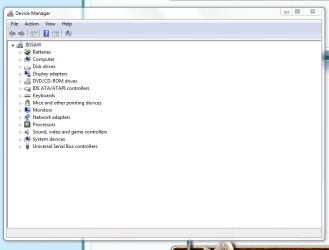
Can you post an image of the Device Manager, please.
 

My Computer

Computer type
PC/Desktop
Computer Manufacturer/Model Number
Custome Built
OS
Microsoft Windows 7 Ultimate 64-bit 7601 Multiprocessor Free Service Pack 1
CPU
Intel(R) Core(TM) i7 CPU 950 @ 3.07GHz
Motherboard
ASUSTeK Computer INC. SABERTOOTH X58 (LGA1366)
Memory
16.0GB Dual-Channel DDR3 @ 534MHz (8-8-8-20)
Graphics Card(s)
1023MB NVIDIA GeForce GTX 650 (EVGA)
Sound Card
(1) NVIDIA High Definition Audio (2) High Definition Audio
Monitor(s) Displays
HP W2072a LED Backlit
Screen Resolution
1920x1080@60Hz
Hard Drives
(1) SAMSUNG MMCRE28G5MXP-0VB SCSI Disk Device
(2) ST1000DM 003-1CH162 SCSI Disk Device
(3) WDC WD10EURX-73FH1Y0 SCSI Disk Device
PSU
XION XON-1000P14F
Cooling
Fans
Antivirus
Windows Security Essentials
Browser
Mozilla Firefox
Other Info
BIOS Version/Date
American Megatrends Inc. 1402, 8/9/2012
SMBIOS Version 2.5
here it is i didn't know exactly what you wanted to see within it
 

Attachments

  • Capture.PNG
    Capture.PNG
    17.7 KB · Views: 1

My Computer

Computer type
Laptop
Computer Manufacturer/Model Number
HP G72
OS
Windows 7 Home Premium x64, Windows Vista Home Premium x??
CPU
Pentium dual core t4500 @2.3 gigs
Motherboard
?
Memory
3.0 gb
Monitor(s) Displays
17" hdwidescreen
Hard Drives
320gb
Internet Speed
high speed frontier communications, close to 6mbps down.
here it is i didn't know exactly what you wanted to see within it
The point is, it eliminates one possible cause for problems. All of your devices/drivers look good.
 

My Computer

Computer type
PC/Desktop
Computer Manufacturer/Model Number
Custome Built
OS
Microsoft Windows 7 Ultimate 64-bit 7601 Multiprocessor Free Service Pack 1
CPU
Intel(R) Core(TM) i7 CPU 950 @ 3.07GHz
Motherboard
ASUSTeK Computer INC. SABERTOOTH X58 (LGA1366)
Memory
16.0GB Dual-Channel DDR3 @ 534MHz (8-8-8-20)
Graphics Card(s)
1023MB NVIDIA GeForce GTX 650 (EVGA)
Sound Card
(1) NVIDIA High Definition Audio (2) High Definition Audio
Monitor(s) Displays
HP W2072a LED Backlit
Screen Resolution
1920x1080@60Hz
Hard Drives
(1) SAMSUNG MMCRE28G5MXP-0VB SCSI Disk Device
(2) ST1000DM 003-1CH162 SCSI Disk Device
(3) WDC WD10EURX-73FH1Y0 SCSI Disk Device
PSU
XION XON-1000P14F
Cooling
Fans
Antivirus
Windows Security Essentials
Browser
Mozilla Firefox
Other Info
BIOS Version/Date
American Megatrends Inc. 1402, 8/9/2012
SMBIOS Version 2.5
I assume you think maybe CCleaner can eliminate whatever problems you have with the laptop.

I have no idea at all if that is true, but you can certainly run the registry cleaner and see if it helps--make sure you make a registry backup when CCleaner mentions it. If the removal of those registry items causes new problems or doesn't get rid of your existing problems, you could restore the registry (undo the changes made by CCleaner).

I'd have my doubts it would help.

You can also uncheck that stuff in startup and see if it helps. Windows should run with it unchecked, although I'd leave anti-virus checked.

Are you averse to a clean install?
 

My Computer

Computer type
PC/Desktop
Computer Manufacturer/Model Number
Ignatz Special; 4 speed manual gearbox; factory air conditioning; one of one
OS
Windows 7 Home Premium SP1, 64-bit
CPU
Intel Skylake i5-6600K, not overclocked
Motherboard
AsRock Z170M Extreme 4, micro ATX
Memory
8 GB HyperX DDR4-2666 (2 x 4 GB)
Graphics Card(s)
none; graphics are integrated on CPU
Sound Card
onboard: Realtek ALC1150; external: USB Behringer UF0-202
Monitor(s) Displays
Dell S2340M 23 inch IPS
Screen Resolution
1600 x 900
Hard Drives
System: Crucial MX100 series SSD, 128 GB;
Data: Samsung Spinpoint 103SJ, 1 TB;
Backup: WD Caviar Green WD30EZRX-00D8PB0, 3 TB
PSU
Rosewill SilentNight 500 watt fanless, semi-modular
Case
Antec Solo II
Cooling
Noctua NH-U12S; Noctua F12 intake, Noctua S12A exhaust
Keyboard
Microsoft 200 6JH-00001 USB
Mouse
Dell or Microsoft optical wired; USB
Antivirus
Microsoft Security Essentials and Malwarebytes Premium
Browser
Pale Moon
Other Info
All fans PWM; speeds at idle: CPU circa 500 rpm; intake circa 600 rpm; exhaust circa 600 rpm; CPU temps 27 idle and 47 C load in a warm room (27 C/81 F) when running Intel Extreme Tuning Utility stress test.
yeah the device manager is one of the things I checked in my routine if you will. I have a microcomputer tech degree from years back. When vista hit the market from the first time I booted it I hated it and that has never changed to this day, along with hating it I fell away from keeping my education level to the new OS's when they came out. So in the meantime I'm asking questions again. haha.
 

My Computer

Computer type
Laptop
Computer Manufacturer/Model Number
HP G72
OS
Windows 7 Home Premium x64, Windows Vista Home Premium x??
CPU
Pentium dual core t4500 @2.3 gigs
Motherboard
?
Memory
3.0 gb
Monitor(s) Displays
17" hdwidescreen
Hard Drives
320gb
Internet Speed
high speed frontier communications, close to 6mbps down.
adverse? Not really. Thing is though as of right now this laptop had a owner before me, and if i had to guess which isn't hard to do with the bloatware that is on this thing, what is on it now came preinstalled for the previous owner. And in my case for sure was preloaded when I bought it. What complicated the whole thing is...I have every OS and every edition of said OS"s right up to vista. Vista came, and I went! So right now a clean install wont happen as I dont have a copy of windows 7 just yet, and when I do have a copy of it, it won't be this bottom feeder home edition crap. FRUSTRATES ME!
 

My Computer

Computer type
Laptop
Computer Manufacturer/Model Number
HP G72
OS
Windows 7 Home Premium x64, Windows Vista Home Premium x??
CPU
Pentium dual core t4500 @2.3 gigs
Motherboard
?
Memory
3.0 gb
Monitor(s) Displays
17" hdwidescreen
Hard Drives
320gb
Internet Speed
high speed frontier communications, close to 6mbps down.
Back
Top