
CD/DVD-ROM makes weird noises when opening certain programmes.

My guess is that it is normal for the disk defragmentation tool to ask the operating system for a list of drives. The exe named svchost is probably a part of the operating system (if it is not part of an infection). If we don't find find an app that is spinning up the drive, then the next step is to uninstall Avast (just as a test). Install MSE instead.
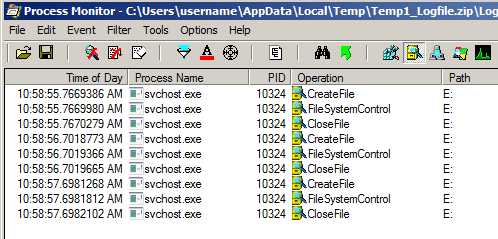
svchost.png
 

My Computer My Computer

Computer type
Laptop
Computer Manufacturer/Model Number
Employer provided Dell Latitude
OS
W7 Pro SP1 64bit
CPU
i7
Memory
8GB
Graphics Card(s)
Intel HD Graphics
Hard Drives
crappy SSD
Antivirus
Employer mandated Symantec Endpoint Protection
Browser
Pale Moon 64bit, IE11 64bit & Chrome 64bit
Just finished doing the process monitor with Counter-Strike. Turns out is not exactly the game that activates the drive, it's when I run Steam specifically.

Also, I'm uploading as well an asus programme called "AI Recovery" that also makes the drive being activated when I run it (it is the programme that pops-out when you first log into your laptop to ensure you make the system security recovery DVD's).

I am not being able to upload the zip files in here so you can get it from my Skydrive page .
 

My Computer My Computer

OS
windows 7 home premium 64bit
The "AI Recovery" program should be something that you can turn off - either by doing the steps that it asks you to do or via some settings window within the app. The WMIPrvSE app is going to be harder to track down because it is a part of the Windows OS. Some other app is asking it to query the DVD drive.

If you don't mind, let's take AVAST out of the equation - replace it with MSE - and see if the issue goes away.

If you don't want to do that, or if the DVD drive is still being accessed with MSE installed, then we have a few other options:

1) Process Explorer should let you see what app called WMIPrvSE but there can be more than one instance of WMIPrvSE running and you would need to use the PID info from Process Monitor to determine which instance of WMIPrvSE to look at within Process Explorer.

2) or you can enable the WMI trace log and use the PID info from Process Monitor to see what called WMIPrvSE.
(Is WMIprvse a real villain? - Windows Management Infrastructure Blog - Site Home - MSDN Blogs)
Read thru the comments in the blog linked to above.

3) or you can try the clean boot method of finding the offend app or apps
http://www.sevenforums.com/tutorial...ation-conflicts-performing-clean-startup.html
 

My Computer My Computer

Computer type
Laptop
Computer Manufacturer/Model Number
Employer provided Dell Latitude
OS
W7 Pro SP1 64bit
CPU
i7
Memory
8GB
Graphics Card(s)
Intel HD Graphics
Hard Drives
crappy SSD
Antivirus
Employer mandated Symantec Endpoint Protection
Browser
Pale Moon 64bit, IE11 64bit & Chrome 64bit
Back
Top