
Hi,
Hope someone here can help with this annoying issue I've been facing for the last few months.
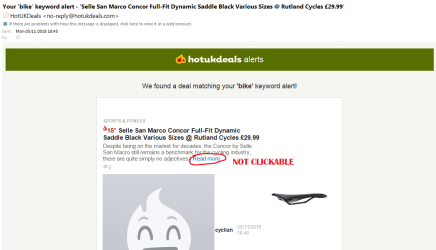
When some, but very few emails, I can never click on the 'read more' text which should take me to the relevant page in Chrome. I do, however, get a link to view in the browser at the top:
"If there are problems with how this message is displayed, click here to view it in a browser" at the top which I can click on. If my default browser is set to chrome, I get a page of text code when I click there. I do, however, get the correct page if I set default browser to IE which isn't ideal for me.
If I use my browser to view these particular emails, The links there work perfectly so I'm a bit confused as to why they're not active links in Outlook.
The vast majority of my emails work fine but each and every one from this sender has this issue. I very occasionally see it with other senders' emails.
I'm using Outlook 2010. I've tried reinstalling it and also tried 2010 and 2016 on my laptop where I experience the same issue.
Hope someone here can help with this annoying issue I've been facing for the last few months.
When some, but very few emails, I can never click on the 'read more' text which should take me to the relevant page in Chrome. I do, however, get a link to view in the browser at the top:
"If there are problems with how this message is displayed, click here to view it in a browser" at the top which I can click on. If my default browser is set to chrome, I get a page of text code when I click there. I do, however, get the correct page if I set default browser to IE which isn't ideal for me.
If I use my browser to view these particular emails, The links there work perfectly so I'm a bit confused as to why they're not active links in Outlook.
The vast majority of my emails work fine but each and every one from this sender has this issue. I very occasionally see it with other senders' emails.
I'm using Outlook 2010. I've tried reinstalling it and also tried 2010 and 2016 on my laptop where I experience the same issue.
Attachments
My Computer
- Computer type
- PC/Desktop
- Computer Manufacturer/Model Number
- Custom build
- OS
- Windows 7 Pro 64 bit
- CPU
- i7 2600k
- Motherboard
- Asrock Z68 Extreme 7 Gen 3
- Memory
- 16GB Teamgroup RAM
- Graphics Card(s)
- GTX460
- Hard Drives
- Samsung 512GB 850 Pro SSD
- Antivirus
- MSE
- Browser
- Chrome


